Introduction
Many times, we come across the situation where we need to populate the dropdowns based on the value of another dropdown or combo.
There are also times where we need to populate Listbox items based on the multiple selected values.
In this article, I will show a way of solving the same using WPF.
Background
WPF is really cool with its excellent binding features which has been supported brilliantly by the ModelView-ViewModel pattern.
However, here I am not going to discuss the details of MVVM pattern as there are many good sites that hold an excellent volume of the stuff, e.g.
- WPF Apps With The Model-View-ViewModel Design Pattern
- Introduction to Model/View/ViewModel pattern for building WPF apps
I will concentrate more on how I have solved that problem by using the pattern added with WPF flavor.
Prerequisites
A Few Points on MVVM Pattern
In very simple words, I am describing the MVVM elements:
- Model: The datasource
- View: The UI elements
- ViewModel: It sits between Model and View and helps in binding
About the Application
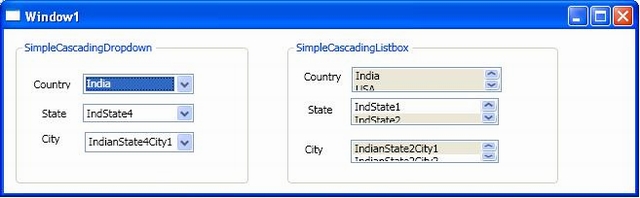
Basically, there are two small programs:
- Simple Cascading Dropdown
- Simple Cascading Listbox
In both the cases, I have taken 3 types of elements, viz. a Country dropdown/listbox followed by a State dropdown/listbox followed by City dropdown/listbox. The difference is that in the case of listbox, we can select multiple items.
Program Goal
In the case of Simple Cascading Dropdown, the State dropdown will be populated based on the Country selected while the city will be populated based on the State selected. In the case of Simple Cascading Listbox, the concept is the same as the above with the difference being that the user can select in multiples.
Code Explanation
I have 3 classes, viz. Country, State and City . I also have a Datasource class(Datasource.cs):
The datasource is the model which has the following code snippet:
ObservableCollection<country> _country = new ObservableCollection<country>();

ObservableCollection<state> _state = new ObservableCollection<state>();

ObservableCollection<city> _city = new ObservableCollection<city>();
As can be seen, I have created 3 ObservableCollections .
The advantage of using ObservableCollection as opposed to list is that it provides notifications when items get added, removed, or when the whole list is refreshed.
The datasources are as under:
private void CountryData()
{
_country.Add(new Country { CountryName = "India", CountryCode = "IN" });
_country.Add(new Country { CountryName = "USA", CountryCode = "US" });
_country.Add(new Country { CountryName = "Canada", CountryCode = "CA" });
_country.Add(new Country { CountryName = "Singapore", CountryCode = "SI" });
}
private void StateData()
{
_state.Add(new State { StateName = "IndState1",
CountryCode = "IN", StateCode = "INS1" });
_state.Add(new State { StateName = "IndState2",
CountryCode = "IN", StateCode = "INS2" });
_state.Add(new State { StateName = "IndState3",
CountryCode = "IN", StateCode = "INS3" });
_state.Add(new State { StateName = "IndState4",
CountryCode = "IN", StateCode = "INS4" });
_state.Add(new State { StateName = "USAState1",
CountryCode = "US", StateCode = "USS1" });
_state.Add(new State { StateName = "USAState2",
CountryCode = "US", StateCode = "USS2" });
_state.Add(new State { StateName = "USAState3",
CountryCode = "US", StateCode = "USS3" });
_state.Add(new State { StateName = "USAState4",
CountryCode = "US", StateCode = "USS4" });
_state.Add(new State { StateName = "CANState1",
CountryCode = "CA", StateCode = "CAS1" });
_state.Add(new State { StateName = "CANState2",
CountryCode = "CA", StateCode = "CAS2" });
_state.Add(new State { StateName = "CANState3",
CountryCode = "CA", StateCode = "CAS3" });
_state.Add(new State { StateName = "CANState4",
CountryCode = "CA", StateCode = "CAS4" });
_state.Add(new State { StateName = "SINGState1",
CountryCode = "SI", StateCode = "SIS1" });
_state.Add(new State { StateName = "SINGState2",
CountryCode = "SI", StateCode = "SIS2" });
_state.Add(new State { StateName = "SINGState3",
CountryCode = "SI", StateCode = "SIS3" });
_state.Add(new State { StateName = "SINGState4",
CountryCode = "SI", StateCode = "SIS4" });
}
private void CityData()
{
_city.Add(new City { CityName = "IndianState1City1", StateCode = "INS1" });
_city.Add(new City { CityName = "IndianState1City2", StateCode = "INS1" });
_city.Add(new City { CityName = "IndianState2City1", StateCode = "INS2" });
_city.Add(new City { CityName = "IndianState2City2", StateCode = "INS2" });
_city.Add(new City { CityName = "IndianState3City1", StateCode = "INS3" });
_city.Add(new City { CityName = "IndianState3City2", StateCode = "INS3" });
_city.Add(new City { CityName = "IndianState4City1", StateCode = "INS4" });
_city.Add(new City { CityName = "IndianState4City2", StateCode = "INS4" });
_city.Add(new City { CityName = "USAState1City1", StateCode = "USS1" });
_city.Add(new City { CityName = "USAState1City2", StateCode = "USS1" });
_city.Add(new City { CityName = "USAState2City1", StateCode = "USS2" });
_city.Add(new City { CityName = "USAState2City2", StateCode = "USS2" });
_city.Add(new City { CityName = "USAState3City1", StateCode = "USS3" });
_city.Add(new City { CityName = "USAState3City2", StateCode = "USS3" });
_city.Add(new City { CityName = "USAState4City1", StateCode = "USS4" });
_city.Add(new City { CityName = "USAState4City2", StateCode = "USS4" });
_city.Add(new City { CityName = "CanadaState1City1", StateCode = "CAS1" });
_city.Add(new City { CityName = "CanadaState1City2", StateCode = "CAS1" });
_city.Add(new City { CityName = "SingaporeState1City1", StateCode = "SIS1" });
_city.Add(new City { CityName = "SingaporeState1City2", StateCode = "SIS2" });
}
Now comes the ModelView which has the name StateCountryViewModel.cs.
The class has inherited from INotifyPropertyChanged interface.
It contains an event called PropertyChanged.
Whenever a property on a ViewModel object changes, it raises the PropertyChanged event to notify the WPF binding system of the new value. Upon receiving that notification, the binding system queries the property, and the bound property on some UI element receives the new value.
Lastly comes the View part which is Window1.xaml.
The entire source of the view is the view model(in this case StateCountryViewModel).
The bindings are done on the items used here by using the ItemsSource="{Binding PropertyName}" syntax (note it is the property that the ViewModel has exposed), while the values are displayed using the DisplayMemberPath="PropertyName" note it is the property that the Class has exposed).
Conclusion
This is just an attempt to show the flexibility of binding in WPF using the MVVM pattern.
History
- 10th May, 2009: Initial post



 General
  News
News  Suggestion
  Question
  Bug
Bug  Answer
  Joke
Joke  Praise
  Rant
Rant  Admin
Admin 


 Submit an article or tip


