Click here to Skip to main content

Custom Objects Searchable through Reflection

By , 28 May 2009
 

Introduction

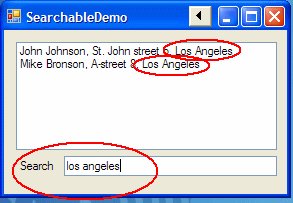
Every once in a while, when dealing with GUI applications, you want to allow the user to search or filter collections. When presenting users with a large lists of items, e.g., customer names, it might be too time consuming for the user to manually sift through the entire list, even if it's sorted by name. And, what if you want to enable the user to search for different customer properties, like name, street, and city? Sure, you could make several search-fields, or present the user with radio-buttons which indicate what property they are searching for. But, for a fast and user-friendly application, a meta-search-field may be preferred. While presented with only one input-field, the user is actually searching through multiple properties on each item simultaneously. Let's say the user searches for the term "Los Angeles", - behind the scenes, the application automatically searches through many properties on each customer, e.g., name, street, and city. All customers living in Los Angeles are presented.

While this functionality could be implemented in many ways, the SearchableDemo shows how this can be done in a flash using Reflection and annotation. This enables you to make your existing C# classes searchable in no time! Simply inherit the Searchable class and annotate the private or public fields you want to be searchable.

How does it work

By extending (inheriting) the abstract class "Searchable", your objects inherit the public method "bool match(String searchPhrase)". This method uses Reflection to inspect your inheriting class, and looks for fields you have annotated with the "[Searchable]" custom attribute. All annotated fields are then searched for the phrase, and if found, "True" is returned.

Using the code

Below is an example of how to use the abstract class and the annotation:

searchableCode1.gif

As you see from the example above, a simple Customer class inherits the abstract class "Searchable". Also, the private fields "name", "street" and "city" are annotated with "[Searchable]". Together, this is all you need to make your class searchable. So now, all your GUI-application needs to perform a search is some simple presentation-code:

foreach (Customer customer in customers)
//the collection of customers to be searched
{
    if (customer.match(textBox4.Text))
    //textbox4 contains the user search input
        listBox1.Items.Add(customer);
        //display all matching customers
}

So, when your demanding end users want to be able to search yet another field (which they, of course, previously didn't think they needed), simply add "[Searchable]" to the new field!

Points of interest

The "[Searchable]" attribute isn't limited to strings only, you may apply it to any other type of object as well. The "match()" method calls the object's "ToString()" method, enabling the search to cover all kinds of objects. Be aware though, not all objects have meaningful "ToString()" return values.


License

This article, along with any associated source code and files, is licensed under The Code Project Open License (CPOL)

About the Author

I-Flite
Software Developer Norwegian Defence Research Establishment
Norway Norway
Member
Proffessional bio at http://www.linkedin.com/pub/espen-skjervold/4/985/1b8

Sign Up to vote   Poor Excellent
Add a reason or comment to your vote: x
Votes of 3 or less require a comment

Comments and Discussions

 
You must Sign In to use this message board.
Search this forum  
    Spacing  Noise  Layout  Per page   
Generalgood intromemberDonsw14 Jun '09 - 5:35 
This is a good introduction for beginners.
 
cheers,
Donsw
My Recent Article : Backup of Data files - Full and Incremental

GeneralthanksmemberYankee Imperialist Dog!28 May '09 - 9:25 
Appreciate the tip presented here and the class.
KES
 
Share the knowledge.
I can use all the help I can get and so do YOU!
KES

GeneralRe: thanksmemberMember 463820330 May '09 - 23:49 
Glad you like it, KES.
GeneralMy vote of 1memberzlezj28 May '09 - 9:07 
Poor implementation. The baseclass is not necessary. Furthermore searching for strings containing a comma will lead to incorrect results.
GeneralRe: My vote of 1memberr_hyde28 May '09 - 13:34 
zlezj makes some good points, and since this is your first article I hope you take the criticism in the spirit of learning.
 
Without multiple inheritance, your design is limiting by requiring to inherit a base class. A better option might be to implement an extension method to an interface (I'll call it ISearchable). You might also allow SearchableAttribute on properties instead of (or at least in addition to) fields. Also, consider what should be the behavior if a searchable property is itself a searchable type (implements ISearchable): should it recurse, or not? The same consideration might be made for collection types - should items of the collection be searched? What if the collection items are ISearchable?
 
If you were to re-design your solution taking these things in consideration, and rewrite the article going into a little detail on the design considerations I've mentioned (try to think of others too!), your article would be much more valuable and more highly rated.
GeneralRe: My vote of 1memberMember 463820331 May '09 - 0:06 
Thank you Hyde, - contrary to Zlezj's feedback, your feedback is constructive.
 
I apprechiate your points, my code could be improved by implementing your suggestions. Especially the recursive part, - this would be a definitive improvement. When a Searchable-class aggregates other Searchable-classes, the aggregating class should probably recursively search the aggregated class. Nice tip Hyde, I'll take it into account and post the updated code some time.
 
Great with feedback, nice to see this is a living community.
 
Espen
GeneralRe: My vote of 1memberMember 463820330 May '09 - 23:59 
I agree on the abstract baseclass, this may be impractical when you want your classes to inherit yet other classes. As of you comment regarding the commas, -this is a theoretical concern, not a practical concern.
 
Espen
GeneralNot a bad implementationmemberPeter Lange28 May '09 - 8:19 
My first reaction on seeing this was "yeah, whatevah" but now that I think about it a bit, its actually a kinda cool implementation. I can see some pretty good uses for this, and the inclusion of the property attributes to control which fields were search was a nice touch.
GeneralRe: Not a bad implementationmemberMember 463820330 May '09 - 23:55 
Glad you like it, Peter. I exstracted the code from a project I'm currently working on, which is a tailor made customer handling system for a sports club. The system integrates with an RFID-reader, enabling the club members to register their visits by swiping their RFID cards.
 
The system is expected to undergo extensive changes in the months following deployment, so I wanted a generic, dynamic way to search for customers, even when the Customer class changes rapidly.
 
Espen

General General    News News    Suggestion Suggestion    Question Question    Bug Bug    Answer Answer    Joke Joke    Rant Rant    Admin Admin   

Permalink | Advertise | Privacy | Mobile
Web01 | 2.6.130523.1 | Last Updated 28 May 2009
Article Copyright 2009 by I-Flite
Everything else Copyright © CodeProject, 1999-2013
Terms of Use
Layout: fixed | fluid