Download source files - 286 Kb
Introduction
Welcome to
CMapPin, a freeware MFC classes to
provide map pins useful in GIS applications. If you have Microsoft AutoRoute Express (I
think it's called AutoMap in the US) installed, you will probably have seem what I am
talking about.
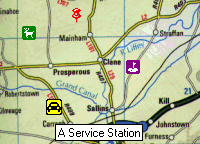
Here's a small sample of what the map pins look like when overlaid on a bitmap map:
- Standard
CWnd derived class which can be used just like any other
MFC control classes (e.g. CStatic) which are derived from CWnd.
- Support for tooltips, drag / drop and context menus is built in.
- For further customization, you can derive a class from it.
- The class is fully Unicode compliant and includes Unicode built options in the
workspace file.
- To use the class in your code simply include mappin.cpp in your project and
#include mappin.h in which ever of your modules needs to make calls to the class.
- Attach an icon to the map pin using
SetIcon() and then call Create()
to actually create the map pin. That's it. You should now see the map pin on your window.
- You should also have a look at the demo program to see exact details of how to use the map pins.
V1.0 (13th May 1998)
V1.01 (12th September 1998)
- Fixed a small redraw glitch in
SetIcon().
The API consists of the the public member functions of the class
CMapPin:
CMapPin
~CMapPin
Create
SetIcon
GetIcon
SetPopupMenu
SetAllowDrag
GetAllowDrag
- CMapPin::CMapPin
- CMapPin();
Remarks:
Standard C++ constructor. Just initializes internal variables to a default value.
- CMapPin::~CMapPin
- ~CMapPin();
Remarks:
Standard C++ destructor. Internally it will free any resources used by this instance.
- CMapPin::Create
- BOOL Create(LPCTSTR lpszTooltipText, DWORD dwStyle, const CPoint& p, CWnd* pParent, UINT nID);
Return Value:
Nonzero if successful; otherwise 0.
Parameters:
- lpszTooltipText -- Specifies the tooltip text to use for the control. If NULL, no
text will be visible.
- dwStyle -- Specifies the control's window style. Normally this will just be WS_CHILD and
WS_VISIBLE.
- p -- Specifies the position of the control. The size will be taken from the attached icon.
- pParentWnd -- Specifies the control's parent window, usually your
CView
derived class. It must not be NULL.
- nID -- Specifies the control's control ID.
Remarks:
Construct a CMapPin object in three steps. First call the constructor, then
SetIcon() and then call Create(), which creates the Windows control
and attaches it to the CMapPin object.
Apply the following window styles to a map pin control:
- WS_CHILD: Always
- WS_VISIBLE: Usually
- WS_DISABLED: Rarely
- CMapPin::SetIcon
- BOOL SetIcon(HINSTANCE hModule, LPCTSTR lpszResourceName, BOOL bSmallIcon);
BOOL SetIcon(HINSTANCE hModule, UINT nIDResource, BOOL bSmallIcon);
Return Value:
Nonzero if successful; otherwise 0.
Parameters:
- hModule -- Handle to an instance of the module whose executable file contains the icon
to be loaded.
- lpszResourceName -- Pointer to a null-terminated string that contains the name of the
icon resource to be loaded.
- nIDResource -- The resource identifier of the icon resource to be loaded.
- bSmallIcon -- Specifies whether a small (16 * 16) icon is being loaded, FALSE indicates
that a standard 32 * 32 icon is being loaded.
Remarks:
Modifies the icon to be displayed on the map pin.
- CMapPin::GetIcon
- HICON GetIcon() const;
Return Value:
Returns the handle of the icon currently being used by this map pin instance.
- CMapPin::SetPopupMenu
- void SetPopupMenu(LPCTSTR pszResourceName);
void SetPopupMenu(UINT nIDResource);
Parameters:
- lpszResourceName -- Pointer to a null-terminated string that contains the name of the
icon resource to be used.
- nIDResource -- The resource identifier of the icon resource to be used.
Remarks:
Sets which menu resource will be used in context menus for this map pin instance.
- CMapPin::SetAllowDrag
- void SetAllowDrag(BOOL bAllowDrag);
Parameters:
- bAllowDrag -- TRUE if you want to allow the map pin be dragable, FALSE will disallow
dragging.
Remarks:
Changes whether or not the map pin can be dragged around.
- CMapPin::GetAllowDrag
- BOOL GetAllowDrag() const;
Return Value:
TRUE if the instance allows dragging, otherwise FALSE.
- If you have any other suggested improvements, please let me know so that I can incorporate
them into the next release.
PJ Naughter
Email:
pjn@indigo.ie
Web:
http://www.naughter.com
12th September 1998
This member has not yet provided a Biography. Assume it's interesting and varied, and probably something to do with programming.



 General
  News
News  Suggestion
  Question
  Bug
Bug  Answer
  Joke
Joke  Praise
  Rant
Rant  Admin
Admin 


 Submit an article or tip


![Rose | [Rose]](https://codeproject.global.ssl.fastly.net/script/Forums/Images/rose.gif) Yes, I think I need to optimize my code.
Yes, I think I need to optimize my code.
