Click here to Skip to main content

A Project Dependency Graph Utility for Visual Studio 2008

By , 17 Jun 2009
 

ProjectDependencyGraph

ProjectDependencyGraph

Introduction

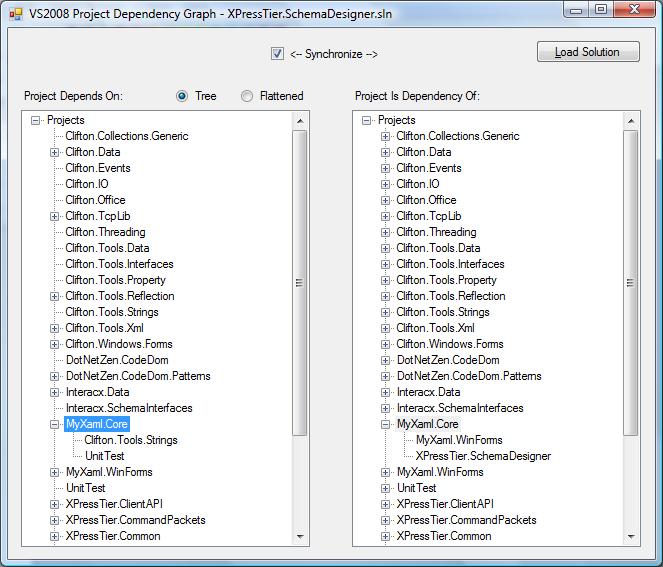
I recently wanted to look at the dependencies of a fairly large set of projects in a solution (not the one in the screenshot), and discovered that while there are apps/tools that do that, they are either Code Project articles for previous versions of Visual Studio or they create an unreadable smear of boxes and lines, because they were never designed to handle a solution with 50 or more projects. So, I decided to create a textual, treeview based browser of dependencies.

It's very simple, offering both a hierarchical view of project dependencies or a flattened list of dependencies, and also a tree-view showing projects that are dependencies of other projects (the right-hand side of the image above).

Limitations

  • Will undoubtedly become obsolete with VS2010
  • Works only with C# projects (any other project type is not parsed)
  • Works only with VS2008 solution files

Hierarchical View of Project Dependencies

Note how the view is hierarchical, allowing you to drill into each project's dependencies.

Flattened View of Project Dependencies

In this view, the application drills into project dependencies for you and presents all unique dependencies in a flattened list:

Project's Dependency on Other Projects

You can also pick a project and find out what projects reference the selected project:

The Code

The code is really simple. Very little error checking and pretty much brute force implementation. The one annoying thing I discovered is that the solution file is not an XML document, whereas the project files (csproj) are. Makes one wonder.

Reading the Solution File

Basically, this involves a lot of string checking and processing, in which a dictionary of project names and project paths is created.

public class Solution
{
  protected Dictionary<string, string> projectPaths;

  public Dictionary<string, string> ProjectPaths 
  {
    get { return projectPaths; }
  }

  public Solution()
  {
    projectPaths = new Dictionary<string, string>();
  }

  // Example:
  // Project("{FAE04EC0-301F-11D3-BF4B-00C04F79EFBC}") = "NumericKeypadComponent", 
  //   "NumericKeypadComponent\NumericKeypadComponent.csproj", 
  //   "{05D03020-4604-4CE9-8F99-E1D93ADEDF15}"
  // EndProject

  public void Read(string filename)
  {
    StreamReader sr = new StreamReader(filename);
    string solPath = Path.GetDirectoryName(filename);

    while (!sr.EndOfStream)
    {
      string line = sr.ReadLine();

      if (!String.IsNullOrEmpty(line))
      {
        if (line.StartsWith("Project"))
        {
          string projName = StringHelpers.Between(line, '=', ',');
          projName = projName.Replace('"', ' ').Trim();
          string projPath = StringHelpers.RightOf(line, ',');
          projPath = StringHelpers.Between(projPath, '"', '"');
          projPath = projPath.Replace('"', ' ').Trim();

          // virtual solution folders appear as projects but don't end with .csproj
          // gawd, imagine what happens if someone creates a foo.csproj 
          // virt. solution folder!
          if (projPath.EndsWith(".csproj"))
          {
            // assume relative paths. Probably not a good assumption
            projPath = Path.Combine(solPath, projPath);

            // we don't allow projects with the same name, even if different paths.
            projectPaths.Add(projName, projPath);
          }
        }
      }
    }

    sr.Close();
  }
}

Reading a Project File

Ah, an XML file! Woohoo! It took a while for me to realize that I needed to specify the XML namespace along with the element name. As in, several hours of fussing, pulling hair out, and finally stumbling across some documentation in MSDN that gave an example of using Elements with a namespace. Sigh.

Similar to the Solution class, this class builds a dictionary of referenced projects, where the key is the referenced project name and the value is the referenced project path.

public class Project
{
  protected Dictionary<string, string> referencedProjects;
  protected List<Project> dependencies;

  public string Name { get; set; }

  public Dictionary<string, string> ReferencedProjects
  {
    get { return referencedProjects; }
  }

  public List<Project> Dependencies
  {
    get { return dependencies; }
  }

  public Project()
  {
    referencedProjects = new Dictionary<string, string>();
    dependencies = new List<Project>();
  }

  // Example:
  // <Project ToolsVersion="3.5" DefaultTargets="Build" 
  // xmlns="http://schemas.microsoft.com/developer/msbuild/2003">
  // <ItemGroup>
  // <ProjectReference Include="..\Cx.Attributes\Cx.Attributes.csproj">
  // <Project>{EFDBD81C-64BE-47F3-905E-7618B61BD224}</Project>
  // <Name>Cx.Attributes</Name>
  // </ProjectReference>

  public void Read(string filename)
  {
    XDocument xdoc = XDocument.Load(filename);
    XNamespace ns = "http://schemas.microsoft.com/developer/msbuild/2003";

    foreach (var projRef in from el in 
       xdoc.Root.Elements(ns + "ItemGroup").Elements(ns + "ProjectReference")
    select new
    {
      Path = el.Attribute("Include").Value,
      Name = el.Element(ns + "Name").Value
    })
    {
      string projPath = Path.GetDirectoryName(filename);
      projPath = Path.Combine(projPath, projRef.Path);
      referencedProjects.Add(projRef.Name, projPath);
    }
  }
}

Parsing the Solution File

A separate method is used to put the solution and projects together into yet another dictionary, this time the key being the project name and the value being a Project instance. This method also populates the Dependencies collection in the Project class (yeah, that's really bad practice, I know).

protected Dictionary<string, Project> projects;

protected void ParseSolution(string filename)
{
  projects = new Dictionary<string, Project>();
  Solution sol = new Solution();
  sol.Read(filename);

  foreach (KeyValuePair<string, string> kvp in sol.ProjectPaths)
  {
    Project proj = new Project();
    proj.Name = kvp.Key;
    proj.Read(kvp.Value);
    projects.Add(proj.Name, proj);
  }

  foreach (KeyValuePair<string, Project> kvp in projects)
  {
    foreach (string refProjName in kvp.Value.ReferencedProjects.Keys)
    {
      Project refProject = projects[refProjName];
      kvp.Value.Dependencies.Add(refProject);
    }
  }
}

Populating the Dependency Graph

There are two ways of populating the dependency graph: hierarchical or flat. The code for both is similar--the big difference is that child nodes aren't being created. And another ugly kludge in the flattened implementation is how I search for assemblies already in the node collection. Yuck!

/// <summary>
/// Sets up initial project name and first level of dependencies.
/// From there, child dependencies are either added hierarchically or flattened.
/// </summary>
protected void PopulateNewLevel(TreeNode node, ICollection<Project> projects)
{
  List<string> nodeNames = new List<string>();

  foreach (Project p in projects)
  {
    TreeNode tn = new TreeNode(p.Name);
    node.Nodes.Add(tn);

    if (asTree)
    {
      PopulateNewLevel(tn, p.Dependencies);
    }
    else
    {
      // flatten the dependency hierarchy, removing duplicates
      PopulateSameLevel(tn, p.Dependencies);
    }
  }
}

protected void PopulateSameLevel(TreeNode node, ICollection<Project> projects)
{
  foreach (Project p in projects)
  {
    bool found = false;

    foreach (TreeNode child in node.Nodes)
    {
      if (child.Text == p.Name)
      {
        found = true;
        break;
      }
    }

    if (!found)
    {
      TreeNode tn = new TreeNode(p.Name);
      node.Nodes.Add(tn);
    }

    PopulateSameLevel(node, p.Dependencies);
  }
}

Populating the "Is Dependency Of" Graph

Also straightforward, also has a kludge to remove duplicate project names.

protected void PopulateDependencyOfProjects(TreeNode node, ICollection<Project> projects)
{
  foreach (Project p in projects)
  {
    TreeNode tn = new TreeNode(p.Name);
    node.Nodes.Add(tn);

    foreach (Project pdep in projects)
    {
      foreach (Project dep in pdep.Dependencies)
      {
        if (p.Name == dep.Name)
        {
          bool found = false;

          // the project pdep has a dependency on the project p.
          // p is a dependency of pdep
          foreach (TreeNode tnDep in tn.Nodes)
          {
            if (tnDep.Text == pdep.Name)
            {
              found = true;
              break;
            }
          }
  
          if (!found)
          {
            TreeNode tn2 = new TreeNode(pdep.Name);
            tn.Nodes.Add(tn2);
          }
        }
      }
    }
  }
}

Conclusion

Hopefully someone will find this useful and maybe even build upon it! It was a short and fun to write application. One thing I'd like to add is sorting the project names.

History

6/17/2009 - Initial Version

6/25/2009

  • Projects are now sorted alphabetically 
  • Added a synchronize option, which finds the project in the opposing tree, selects it, and opens the tree.  This is really useful to look at both project dependencies and dependencies of a project at the same time. 

7/5/2009 - Added rendering of graph using graphviz.  Thanks to Dmitri Nesteruk for making the original changes to this application and for making his rendering code public.


   

License

This article, along with any associated source code and files, is licensed under The Code Project Open License (CPOL)

About the Author

Marc Clifton
United States United States
Member
Marc is the creator of two open source projets, MyXaml, a declarative (XML) instantiation engine and the Advanced Unit Testing framework, and Interacx, a commercial n-tier RAD application suite.  Visit his website, www.marcclifton.com, where you will find many of his articles and his blog.
 
Marc lives in Philmont, NY.

Sign Up to vote   Poor Excellent
Add a reason or comment to your vote: x
Votes of 3 or less require a comment

Comments and Discussions

 
You must Sign In to use this message board.
Search this forum  
    Spacing  Noise  Layout  Per page   
QuestionRuntime ErrormemberMember 86133661 Feb '12 - 7:00 
I'm getting the following error when trying to run this code. All the permisssions to the Temp folder seems OK. I also see the .dot file being created.
 
Errror: : The system cannot find the specified file
 
Line :Process.Start(progFilePath+@"\Graphviz2.28\bin\dotty.exe", filename);
AnswerRe: Runtime Errormemberdaiwuju5 Jun '12 - 2:55 
Graphviz2.28 should be installed in the same disk partition as WINDOWS.
Generalsearching...................memberraj vaasu yadav27 Jan '12 - 18:55 
how can u search for value in a grid......Plz anybody help me
GeneralMy vote of 5memberKanasz Robert1 Dec '11 - 2:47 
This is really good article. In a couple of weeks I will use it in one of my projects.
Generalsimple to use javascript variantmemberMember 35155522 Jan '11 - 15:59 
I wrote a javascript thingy that parses a solution file and creates a graph with the dot tool from the graphviz suite; here it is:
 
/*****************************************************************************
* 2011 SES
*****************************************************************************/
 
///////////////////////////////////////////////////////////////////////////////
/** @file
* @brief Parse a solution file and create a project depencency graph using dot.
*
* This script parses a Microsoft Visual Studio solution file and draws
* project depencency graphs from it. It uses the dot tool of the graphviz
* application to render the graph.
*
* @param solution
* Microsoft Visual Studio solution file (*.sln).
* @param in
* Include filter. If the project file name contains this string its dependencies
* are evaluated. Multiple file filter must be separated by semicolons.
* Filters are case sensitive.
* @param out
* Exclude filter. If the project file name contains this string its dependencies
* are not evaluated. Multiple file filter must be separated by semicolons.
* Filters are case sensitive.
* @param format
* Output file format. Default 'png'. This option is passed to the dot application.
* Supported formats are ps, png, gif and svg. See the documentation on the dot program.
* The extension of the output file is made equal to the format.
* @param keep
* If specified, the .dot file is not destroyed after the dot tool has been run.
* @param dot
* Full name of the dot application that creates the graph. Optional.
*
* @example
* cscript //nologo //E:jscript project-dependencies.js /solution:"test.sln"
* cscript //nologo //E:jscript project-dependencies.js /solution:test.sln /in:"\lib\;MyProject" /out:Test /keep
*
* @author Skolnik
* @date January 18 2011
*
* References:
* http://www.graphviz.org/Documentation.php
* http://www.graphviz.org/doc/info/attrs.html
* www.graphviz.org/Documentation/dotguide.pdf
* http://unicode.org/faq/utf_bom.html#bom4
*/
///////////////////////////////////////////////////////////////////////////////
 
var g_solutionFile = ""; // arg 'solution'
var g_includeFilter = []; // arg 'in'
var g_excludeFilter = []; // arg 'out'
var g_outputFormat = "png"; // arg 'format'
var g_keepDot = false; // arg 'keep'
var g_dotApp = "c:\\Program Files\\ATT\\Graphviz\\bin\\dot.exe"; // arg 'dot'
 
var g_fso = null; ///< File system object (Scripting.FileSystemObject).
var g_shell = null; ///< Shell (WScript.Shell).
 
var g_logLevel = "INFO"; ///< Either "TRACE", "DEBUG", "INFO" or "ERROR"
 

///////////////////////////////////////////////////////////////////////////////
/**
* Extend the string type; stip off leading and trailing spaces.
*/
///////////////////////////////////////////////////////////////////////////////
String.prototype.trim = function()
{
return this.replace(/^\s*/, "").replace(/\s*$/, "");
}
 
///////////////////////////////////////////////////////////////////////////////
/**
* Log a message.
* @param level [in] Message type. Must be either TEST, DEBUG, INFO, WARNING or ERROR.
* @param message [in] Message to show.
*/
///////////////////////////////////////////////////////////////////////////////
function Log(level, message)
{
if ((g_logLevel == "DEBUG") && (level == "TRACE"))
{
return;
}
if ((g_logLevel == "INFO") && ((level == "TRACE") || (level == "DEBUG")))
{
return;
}
if ((g_logLevel == "ERROR") && ((level == "TRACE") || (level == "DEBUG") || (level == "INFO")))
{
return;
}
 
WScript.Echo(level + ": " + message);
}
 
///////////////////////////////////////////////////////////////////////////////
/**
* Log a message and abort script.
* @param message [in] Abort reason.
*/
///////////////////////////////////////////////////////////////////////////////
function Die(message)
{
Log("ERROR", message);
Log("INFO", "Aborting script.");
WScript.Quit(3);
}
 
///////////////////////////////////////////////////////////////////////////////
/**
* Run the application.
*
* The data is not piped inline because its too big, which will confuse gnuplot.
* This is probably due to the buffer size allocated for stdin, which is 4k
* (as far as I know).
*
* @param app [in] Application to execute.
* @param args [in] Application arguments.
*/
///////////////////////////////////////////////////////////////////////////////
function Exec(app, args)
{
try
{
var code = g_shell.Run("\"" + app + "\" " + args, 0, true);
if (code != 0)
{
Die("Failed to run '" + app + "'; " + code);
}
}
catch (e)
{
Die("Failed to run '" + app + "'; " + e.description);
}
}
 
///////////////////////////////////////////////////////////////////////////////
/**
* Parse the command line arguments and Die if there is any error in it.
*
* The arguments are assigned to global variables.
*/
///////////////////////////////////////////////////////////////////////////////
function ParseCommandLine()
{
// --- Input directory ----------------------------------------------------
if ( WScript.Arguments.Named.Exists("solution") )
{
g_solutionFile = WScript.Arguments.Named.Item("solution");
}
if (g_solutionFile == null) Die("No solution file specified");
if (g_solutionFile.length <= 0) Die("No solution file specified");
if (!g_fso.FileExists(g_solutionFile)) Die("Solution file does not exist '" + g_solutionFile + "'");
 
// --- include filter -----------------------------------------------------
if ( WScript.Arguments.Named.Exists("in") )
{
var filter = WScript.Arguments.Named.Item("in");
if (filter == null) Die("No exclude filter specified");
if (filter.length > 0) g_includeFilter = filter.split(";");
}
 
// --- exclude filter -----------------------------------------------------
if ( WScript.Arguments.Named.Exists("out") )
{
var filter = WScript.Arguments.Named.Item("out");
if (filter == null) Die("No exclude filter specified");
if (filter.length > 0) g_excludeFilter = filter.split(";");
}
 
// --- output format ------------------------------------------------------
if ( WScript.Arguments.Named.Exists("format") )
{
g_outputFormat = WScript.Arguments.Named.Item("format");
if (g_outputFormat == null) Die("No output format specified");
g_outputFormat = g_outputFormat.trim();
if (g_outputFormat.length <= 0) Die("No output format specified");
}
 
// --- keep dot file ------------------------------------------------------
if ( WScript.Arguments.Named.Exists("keep") )
{
g_keepDot = true;
}
 
// --- Dot application ----------------------------------------------------
if (WScript.Arguments.Named.Exists("dot") )
{
g_dotApp = WScript.Arguments.Named.Item("dot");
}
if (g_dotApp == null) Die("No dot application specified");
if (!g_fso.FileExists(g_dotApp)) Die("Application not found '" + g_dotApp + "'");
 
}
 
///////////////////////////////////////////////////////////////////////////////
/**
* Check if the specified file matches the includeFilter/excludeFilter.
*/
///////////////////////////////////////////////////////////////////////////////
function PassesFilter(file)
{
 
if (g_includeFilter.length <= 0)
{
if (g_excludeFilter.length <= 0)
{
return true;
}
else
{
var ii;
for (ii = 0; ii < g_excludeFilter.length; ii++)
{
if (file.indexOf(g_excludeFilter[ii]) >= 0)
{
return false;
}
}
return true;
}
}
else
{
var ii;
for (ii = 0; ii < g_includeFilter.length; ii++)
{
if (file.indexOf(g_includeFilter[ii]) >= 0)
{
if (g_excludeFilter.length <= 0)
{
return true;
}
else
{
var jj;
for (jj = 0; jj < g_excludeFilter.length; jj++)
{
if (file.indexOf(g_excludeFilter[jj]) >= 0)
{
return false;
}
}
return true;
}
}
}
return false;
}
}
 
///////////////////////////////////////////////////////////////////////////////
/**
* Class to store project identifier, name and path.
*/
///////////////////////////////////////////////////////////////////////////////
function Project(id, name, path)
{
this.id = id;
this.name = name;
this.path = path;
}
 
/// Converts this instance to a String.
Project.prototype.toString = function ()
{
return this.name + " " + this.path + " (" + this.id + ")";
}


///////////////////////////////////////////////////////////////////////////////
// Main
///////////////////////////////////////////////////////////////////////////////
 

// Create objects
g_fso = new ActiveXObject("Scripting.FileSystemObject");
g_shell = new ActiveXObject("WScript.Shell");
 
// Parse commandline arguments
ParseCommandLine();
 
var solutionName = g_fso.GetBaseName(g_solutionFile);
var outputFile = "project-dependencies-" + solutionName;
var dotFile = outputFile + ".dot";
outputFile = outputFile + "." + g_outputFormat;
 
Log("DEBUG", "Solution file : " + g_solutionFile);
Log("DEBUG", "Output file : " + outputFile);
Log("DEBUG", "Include filter : [" + g_includeFilter + "] (length " + g_includeFilter.length + ")");
Log("DEBUG", "Exclude filter : [" + g_excludeFilter + "] (length " + g_excludeFilter.length + ")");
 
// --- Create project list index on the project id ----------------------------
var lineNr = 0;
var firstLine = true;
var projectsList = new ActiveXObject("Scripting.Dictionary");
var xStartProject = /^\s*Project\s*\(\s*\"\{[A-F0-9\-]{36}\}\"\s*\)\s*=\s*\"(\S+)\"\s*,\s*\"(.*\.(vcproj|csproj))\"\s*,\s*\"\{([A-F0-9\-]{36})\}\"\s*$/i;
var solutionHandle = g_fso.OpenTextFile(g_solutionFile, 1);
while (!solutionHandle.AtEndOfStream)
{
lineNr += 1;
var line = solutionHandle.ReadLine();
 
line = line.trim();
if (line.length <= 0)
{
// Skip empty lines
continue;
}
 
if (firstLine)
{
firstLine = false;
var xFirstLine = /Microsoft\s+Visual\s+Studio\s+Solution\s+File\s*,\s*Format\s+Version\s+\d+[,\.]\d+/i
if (!xFirstLine.test(line))
{
if (lineNr != 1)
{
Die("File is not a valid solution file (" + g_solutionFile + ")");
}
 
// First line might be UTF byte order marker (bom); try next line as well
firstLine = true;
}
continue;
}
 
if (xStartProject.test(line))
{
var items = line.match(xStartProject);
var id = items[4];
var project = new Project(id, items[1], items[2]);
projectsList.add(id, project);
Log("TRACE", project);
}
}
solutionHandle.Close();
 
if (projectsList.Count <= 1)
{
Die("Only " + projectsList.Count + " projects found in file '" + g_solutionFile + "'");
}
Log("INFO", "Solution '" + g_solutionFile + "' contains " + projectsList.Count + " projects");
 

// --- Look up project dependencies -------------------------------------------
Log("INFO", "Writing file '" + dotFile + "'");
var dotHandle = g_fso.CreateTextFile(dotFile, true);
 
dotHandle.WriteLine("//");
dotHandle.WriteLine("// Generated by " + "project-dependencies.js");
dotHandle.WriteLine("// Creation date " + Date());
dotHandle.WriteLine("// Solution file " + g_solutionFile);
dotHandle.WriteLine("// Filters in/out [" + g_includeFilter + "] / [" + g_excludeFilter + "]");
dotHandle.WriteLine("//");
dotHandle.WriteLine("digraph ProjectDependencyGraph {");
dotHandle.WriteLine("rankdir=LR;");
dotHandle.WriteLine("node [fontname=\"Arial\",fontsize=10,shape=box,fillcolor=\"#E3E4FA\",style=filled];");
dotHandle.WriteLine("edge [arrowhead=open,fontname=\"Arial\",fontsize=10];");
 
lineNr = 0;
projectId = "";
parsingDependencies = false;
solutionHandle = g_fso.OpenTextFile(g_solutionFile, 1);
while (!solutionHandle.AtEndOfStream)
{
lineNr += 1;
var line = solutionHandle.ReadLine();
 
line = line.trim();
if (line.length <= 0)
{
// Skip empty lines
continue;
}
 
// Find out which projects dependencies we're parsing
if (projectId.length <= 0)
{
if (xStartProject.test(line))
{
var items = line.match(xStartProject);
var id = items[4];
 
if (PassesFilter(items[2]))
{
projectId = id;
Log("TRACE", "Project " + items[1] + " passed filter (" + items [2] + ")");
}
else
{
Log("TRACE", "Skipping project " + items[1] + " (" + items [2] + ")");
}
}
}
else
{
var xEndProject = /^\s*EndProject\s*$/i;
if (xEndProject.test(line))
{
projectId = "";
continue;
}
}
 
if (projectId.length <= 0) continue;
var parentProject = projectsList(projectId);
 
if (!parsingDependencies)
{
var xStartDependencies = /^\s*ProjectSection\s*\(\s*ProjectDependencies\s*\)\s*=\s*postProject\s*$/i;
if (xStartDependencies.test(line))
{
Log("TRACE", "line " + lineNr + "; start parsing dependencies of project " + parentProject.name);
parsingDependencies = true;
}
continue;
}
else
{
var xEndDependencies = /^\s*EndProjectSection\s*$/i;
if (xEndDependencies.test(line))
{
Log("TRACE", "line " + lineNr + "; end parsing dependencies of project " + parentProject.name);
parsingDependencies = false;
continue;
}
}
 
if (!parsingDependencies) continue;
 
var xDependency = /^\s*\{([A-F0-9\-]{36})\}\s*=\s*\{[A-F0-9\-]{36}\}\s*$/i;
if (!xDependency.test(line)) Die("Failed to match dependency on line " + lineNr + "; \"" + line + "\"");
var id = line.match(xDependency)[1];
 
childProject = projectsList(id);
//Log("TRACE", "Project " + parentProject.name + " depends on project " + childProject.name);
dotHandle.WriteLine("\"" + parentProject.name + "\" -> \"" + childProject.name + "\"");
}
 
solutionHandle.Close();
dotHandle.WriteLine("}");
dotHandle.Close();
 
Log("INFO", "Running dot...");
var arguments = "-T " + g_outputFormat + " -o \"" + outputFile + "\" \"" + dotFile + "\"";
Log("DEBUG", g_dotApp + " " + arguments);
Exec(g_dotApp, arguments);
 
if (!g_keepDot)
{
try
{
g_fso.DeleteFile(dotFile);
}
catch (e)
{
Log("WARNING", "Failed to delete file '" + dotFile + "'; " + e.description);
}
}
 
Log("INFO", "Done (" + outputFile + ")");
GeneralGreat stuffmemberbstabile31 May '10 - 9:22 
This was something I had just decided to build for my own dependency analysis needs. Glad I decided to do a quick search for code I could use as a starting point. I'm interested in seeing those changes that the previous commenter added. Perhaps you could post that code along with yours if you don't have time to add the changes?
 
Thanks for sharing!
GeneralRe: Great stuffprotectorMarc Clifton31 May '10 - 9:25 
Hmmm, I really dropped the ball there, in getting those changes into the article.
 
Could you email me directly, and I'll email you the code directly that dgaudian sent me.
 
Marc
GeneralNice little tool!memberdgaudian11 Apr '10 - 21:37 
Thanks for this nice tool.
I made a few minor changes for our special needs - are you interested receiving the changes back?
- Delayed population of left treeview on expansion of nodes (for large solutions with many dependencies)
- Check boxes before the nodes to exclude Projects from rendering
- Colors for different project types (libraries, exes, winexes)
- Small optical and layout enhancements
Greetings,
Dirk
GeneralRe: Nice little tool!protectorMarc Clifton12 Apr '10 - 3:13 
dgaudian wrote:
are you interested receiving the changes back?

 
Certainly! I'd like to update the article then, and I'd be happy to give you credit or make you a co-author on the article. You can email directly and marc[dot]clifton[at]gmail[dot]com.
 
Thanks!
 
Marc
QuestionDownload not Working ??memberBill Elsey13 Oct '09 - 3:20 
I do not seem to be able to download the ZIP for this article. Is anyone else having problems?
AnswerRe: Download not Working ??protectorMarc Clifton13 Oct '09 - 4:18 
Still working for me. Email me directly, and I'll email you the zip file (it'll have to be wrapped in a rar though for me to send it through gmail)
 
Marc
 
Will work for food.
Interacx


I'm not overthinking the problem, I just felt like I needed a small, unimportant, uninteresting rant! - Martin Hart Turner


GeneralBinding XDocument content to treeviewmembermukhtharsal31 Jul '09 - 0:38 
Hello,
 
I have XDoucument object which contains the XMLFile data,
I wanted to bind this XDocument data to a treeview in vb.net 3.5?
 
Regards,
Mukhthar Saleem
GeneralThanksmemberJohan Fourie12 Jul '09 - 17:44 
Nice, I like it.
Just a small bug, I think.
 
Line 174 of Form1.cs...
 
TreeNode tn2 = new TreeNode(pdep.Name + " (" + p.TargetVersion + ")");
 
needs to be
 
TreeNode tn2 = new TreeNode(pdep.Name + " (" + pdep.TargetVersion + ")");
 
Coding silicon daily.
Johan Fourie
Coded Silicon

GeneralRe: ThanksprotectorMarc Clifton13 Jul '09 - 4:04 
Johan Fourie wrote:
Nice, I like it.
Just a small bug, I think.

 
Oops! Thanks for spotting that!
 
Marc
 
Will work for food.
Interacx


I'm not overthinking the problem, I just felt like I needed a small, unimportant, uninteresting rant! - Martin Hart Turner


QuestionWhere is the graph?memberDmitri Nesteruk27 Jun '09 - 20:43 
Umm, I don't see an actual graph in your screenshots - are you just showing TreeView controls? It would be better to actually show a proper graph, I think.
AnswerRe: Where is the graph?protectorMarc Clifton28 Jun '09 - 9:22 
Dmitri Nesteruk wrote:
Umm, I don't see an actual graph in your screenshots - are you just showing TreeView controls? It would be better to actually show a proper graph, I think.

 
The term "graph" refers to anything that shows the relationship between entities. For example, the term "object graph" is often used to describe the object hierarchy expressed in XAML.
 
A TreeView meets the definition of a graph:
 
a diagram representing a system of connections or interrelations among two or more things by a number of distinctive dots, lines, bars, etc.
 
because it is a diagram of interrelations using a number of distinctive lines.
 
Marc
 
Will work for food.
Interacx


I'm not overthinking the problem, I just felt like I needed a small, unimportant, uninteresting rant! - Martin Hart Turner


AnswerRe: Where is the graph?memberDmitri Nesteruk28 Jun '09 - 9:34 
I actually meant something like this[^]. By the way, to generate this image, I used your source code and Graphviz. So I guess I'm answering my own question, in a way.
 
Thanks for the article!
GeneralRe: Where is the graph?protectorMarc Clifton28 Jun '09 - 9:38 
Dmitri Nesteruk wrote:
I actually meant something like this[^]. By the way, to generate this image, I used your source code and Graphviz.

 
Sweet. Want to share your code?
 
Marc
 
Will work for food.
Interacx


I'm not overthinking the problem, I just felt like I needed a small, unimportant, uninteresting rant! - Martin Hart Turner


AnswerRe: Where is the graph?memberDmitri Nesteruk28 Jun '09 - 9:50 
Sure, just get GraphViz[^] and the source code is here[^].
GeneralRe: Where is the graph?memberDmitri Nesteruk28 Jun '09 - 9:53 
Btw, feel free to add this stuff to your article - I think people might actually find this useful, if a bit scary. And, speaking of which, I actually got the idea for using this tool from someone who uses it to visualize IoC containers. Which is another very useful option if you're into IoC/DI.
GeneralRe: Where is the graph?protectorMarc Clifton28 Jun '09 - 10:01 
Dmitri Nesteruk wrote:
Btw, feel free to add this stuff to your article - I think people might actually find this useful, if a bit scary.

 
Thanks! Yes, scary indeed, seeing all the intertwined dependencies.
 
Dmitri Nesteruk wrote:
And, speaking of which, I actually got the idea for using this tool from someone who uses it to visualize IoC containers. Which is another very useful option if you're into IoC/DI.

 
That's a great idea! I've been working with both CAB and Spring.NET, and the dependencies can get quite difficult to follow.
 
Marc
 
Will work for food.
Interacx


I'm not overthinking the problem, I just felt like I needed a small, unimportant, uninteresting rant! - Martin Hart Turner


GeneralGood job, but can be slow for large solutionsmemberZTransform22 Jun '09 - 6:06 
We have only 177 projects, but with many dependencies.
 
Your utility works, but is very slow to the point of not being useful.
 
After examining it with a performance profiler, I found that virtually all the time is being spent in populating nodes for the treeview: Form1.PopulateNewLevel() (recursively).
 
Maybe it could be improved by building the initial tree in memory, and only showing nodes that the user expands "on demand", rather than constructing the entire tree view in one hit. Is this not how Windows Explorer works? Unsure | :~
GeneralRe: Good job, but can be slow for large solutionsprotectorMarc Clifton22 Jun '09 - 10:31 
ZTransform wrote:
Maybe it could be improved by building the initial tree in memory, and only showing nodes that the user expands "on demand", rather than constructing the entire tree view in one hit.

 
I was thinking about that as a future refinement. Look for it soon (give me a week or so.)
 
Thanks for investigating where the bottleneck is--I rather figured that might be a problem, given my experience recently with some XSD recursion issues on an unrelated project. Smile | :)
 
Marc
 
Will work for food.
Interacx


I'm not overthinking the problem, I just felt like I needed a small, unimportant, uninteresting rant! - Martin Hart Turner


GeneralComment and a problem ...membersdahlbac21 Jun '09 - 22:53 
As the author of one of the tools (dependencyvisualizer.codeplex.com) that "create an unreadable smear of boxes and lines, because they were never designed to handle a solution with 50 or more projects." I do see the need for an alternative view for large solutions. (I just never have gotten around to provide it..)
 
While you can easily parse the .csproj file manually (and other msbuild compatible files for that matter), there is an object model available in Microsoft.Build.* assemblies.
 
I tried the project and got the following exception:
System.ArgumentException was unhandled
Message="An item with the same key has already been added."
Source="mscorlib"
StackTrace:
at System.ThrowHelper.ThrowArgumentException(ExceptionResource resource)
at System.Collections.Generic.Dictionary`2.Insert(TKey key, TValue value, Boolean add)
at System.Collections.Generic.Dictionary`2.Add(TKey key, TValue value)
at ProjectDependencyGraph.Project.Read(String filename) in C:\Download\ProjectDependencyGraph\ProjectDependencyGraph\ProjectDependencyGraph\Project.cs:line 57
at ProjectDependencyGraph.Form1.ParseSolution(String filename) in C:\Download\ProjectDependencyGraph\ProjectDependencyGraph\ProjectDependencyGraph\Form1.cs:line 32
at ProjectDependencyGraph.Form1.btnLoadSolution_Click(Object sender, EventArgs e) in C:\Download\ProjectDependencyGraph\ProjectDependencyGraph\ProjectDependencyGraph\Form1.cs:line 183
at System.Windows.Forms.Control.OnClick(EventArgs e)
at System.Windows.Forms.Button.OnClick(EventArgs e)
at System.Windows.Forms.Button.OnMouseUp(MouseEventArgs mevent)
at System.Windows.Forms.Control.WmMouseUp(Message& m, MouseButtons button, Int32 clicks)
at System.Windows.Forms.Control.WndProc(Message& m)
at System.Windows.Forms.ButtonBase.WndProc(Message& m)
at System.Windows.Forms.Button.WndProc(Message& m)
at System.Windows.Forms.Control.ControlNativeWindow.OnMessage(Message& m)
at System.Windows.Forms.Control.ControlNativeWindow.WndProc(Message& m)
at System.Windows.Forms.NativeWindow.DebuggableCallback(IntPtr hWnd, Int32 msg, IntPtr wparam, IntPtr lparam)
at System.Windows.Forms.UnsafeNativeMethods.DispatchMessageW(MSG& msg)
at System.Windows.Forms.Application.ComponentManager.System.Windows.Forms.UnsafeNativeMethods.IMsoComponentManager.FPushMessageLoop(Int32 dwComponentID, Int32 reason, Int32 pvLoopData)
at System.Windows.Forms.Application.ThreadContext.RunMessageLoopInner(Int32 reason, ApplicationContext context)
at System.Windows.Forms.Application.ThreadContext.RunMessageLoop(Int32 reason, ApplicationContext context)
at System.Windows.Forms.Application.Run(Form mainForm)
at ProjectDependencyGraph.Program.Main() in C:\Download\ProjectDependencyGraph\ProjectDependencyGraph\ProjectDependencyGraph\Program.cs:line 19
at System.AppDomain._nExecuteAssembly(Assembly assembly, String[] args)
at System.AppDomain.ExecuteAssembly(String assemblyFile, Evidence assemblySecurity, String[] args)
at Microsoft.VisualStudio.HostingProcess.HostProc.RunUsersAssembly()
at System.Threading.ThreadHelper.ThreadStart_Context(Object state)
at System.Threading.ExecutionContext.Run(ExecutionContext executionContext, ContextCallback callback, Object state)
at System.Threading.ThreadHelper.ThreadStart()
InnerException:
 
Edit: and if try to fix that with an if (!referencedProjects.ContainsKey(projRef.Name))
I get the following:
 
System.Collections.Generic.KeyNotFoundException was unhandled
Message="The given key was not present in the dictionary."
Source="mscorlib"
StackTrace:
at System.ThrowHelper.ThrowKeyNotFoundException()
at System.Collections.Generic.Dictionary`2.get_Item(TKey key)
at ProjectDependencyGraph.Form1.ParseSolution(String filename) in C:\Download\ProjectDependencyGraph\ProjectDependencyGraph\ProjectDependencyGraph\Form1.cs:line 40
at ProjectDependencyGraph.Form1.btnLoadSolution_Click(Object sender, EventArgs e) in C:\Download\ProjectDependencyGraph\ProjectDependencyGraph\ProjectDependencyGraph\Form1.cs:line 183
at System.Windows.Forms.Control.OnClick(EventArgs e)
at System.Windows.Forms.Button.OnClick(EventArgs e)
at System.Windows.Forms.Button.OnMouseUp(MouseEventArgs mevent)
at System.Windows.Forms.Control.WmMouseUp(Message& m, MouseButtons button, Int32 clicks)
at System.Windows.Forms.Control.WndProc(Message& m)
at System.Windows.Forms.ButtonBase.WndProc(Message& m)
at System.Windows.Forms.Button.WndProc(Message& m)
at System.Windows.Forms.Control.ControlNativeWindow.OnMessage(Message& m)
at System.Windows.Forms.Control.ControlNativeWindow.WndProc(Message& m)
at System.Windows.Forms.NativeWindow.DebuggableCallback(IntPtr hWnd, Int32 msg, IntPtr wparam, IntPtr lparam)
at System.Windows.Forms.UnsafeNativeMethods.DispatchMessageW(MSG& msg)
at System.Windows.Forms.Application.ComponentManager.System.Windows.Forms.UnsafeNativeMethods.IMsoComponentManager.FPushMessageLoop(Int32 dwComponentID, Int32 reason, Int32 pvLoopData)
at System.Windows.Forms.Application.ThreadContext.RunMessageLoopInner(Int32 reason, ApplicationContext context)
at System.Windows.Forms.Application.ThreadContext.RunMessageLoop(Int32 reason, ApplicationContext context)
at System.Windows.Forms.Application.Run(Form mainForm)
at ProjectDependencyGraph.Program.Main() in C:\Download\ProjectDependencyGraph\ProjectDependencyGraph\ProjectDependencyGraph\Program.cs:line 19
at System.AppDomain._nExecuteAssembly(Assembly assembly, String[] args)
at System.AppDomain.ExecuteAssembly(String assemblyFile, Evidence assemblySecurity, String[] args)
at Microsoft.VisualStudio.HostingProcess.HostProc.RunUsersAssembly()
at System.Threading.ThreadHelper.ThreadStart_Context(Object state)
at System.Threading.ExecutionContext.Run(ExecutionContext executionContext, ContextCallback callback, Object state)
at System.Threading.ThreadHelper.ThreadStart()
InnerException:
GeneralRe: Comment and a problem ...protectorMarc Clifton22 Jun '09 - 5:58 
sdahlbac wrote:
As the author of one of the tools (dependencyvisualizer.codeplex.com) that "create an unreadable smear of boxes and lines

 
Busted! Blush | :O
 
There's no error handling at all, and yes, two projects with the same name is a problem (if that wasn't in the limitations, it needs to be--I knew I forgot something!)
 
I'm putting together another release which sorts the projects and adds a synchronize feature. I'll add some error checking, see what's involved in supporting multiple projects, and also look at Microsoft.Build.
 
Thanks for the great feedback--watch for updates!
 
Marc
 
Will work for food.
Interacx


I'm not overthinking the problem, I just felt like I needed a small, unimportant, uninteresting rant! - Martin Hart Turner


General General    News News    Suggestion Suggestion    Question Question    Bug Bug    Answer Answer    Joke Joke    Rant Rant    Admin Admin   

Permalink | Advertise | Privacy | Mobile
Web03 | 2.6.130516.1 | Last Updated 17 Jun 2009
Article Copyright 2009 by Marc Clifton
Everything else Copyright © CodeProject, 1999-2013
Terms of Use
Layout: fixed | fluid