 |
|
 |
João é possível utilizar este exemplo em eVB? O que é necessário para criar uma DLL para ser utilizado?
Grato pelos esclarecimentos
José Roberto Siqueira
São Paulo-SP
Brasil
|
|
|
|
 |
|
 |
Não acredito que a abordagem com o eVB seja a mesma (na verdade não conheço o eVB assim tão bem para me poder pronunciar). Esta solução depende muito da estrutura de janelas imposta pelo MFC, que não deve ter paralelo no eVB.
Regards,
João Paulo Figueira
Embedded MVP
|
|
|
|
 |
|
 |
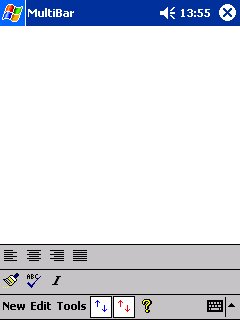
This idea is very great! But I can't add this style bar to my sample. My sample is based on MFC(CMainFrame & CDocuments & CView). I added the codes to my CMainFrame class. As I click the trigger button on the original toolbar, the second bar would not show at all. I guess the View overlaid the second bar,that's right? Could you give me some advice? Thanks so much!
|
|
|
|
 |
|
 |
You gave us a very good articles about PPC...
I'm trying to localize the PPC to support diffrent languages, so I need to make my one keyboard, Do you have any idea about this?
Thanks
Fadi
|
|
|
|
 |
|
 |
Simple, concise, very clear !
I was searching through MSDN documentation to have a toolbar above the command bar but it's not very clear there! Then I found your article !
Thank you !
|
|
|
|
 |
|
 |
This solution actually solve most of my problem, but i still got one problem. I modify this solution to create multi bar on dialog based application for pockect PC 2002. When i compile it, it always give me the error like this :
'RecalcLayout' : undeclared identifier
I am wonder is it this 'RecalcLayout' function only can't be use on dialog based application? If can't, how can i solve this problem?
it is urgent, i hope can get the answer soon.
Thanks.
ghmay
|
|
|
|
 |
|
 |
RecalcLayout is a method of CFrameWnd, not CDialog. This method is used to automatically calculate the bars positions and then resize the client window accordingly. For a dialog, I'm afraid you will have to provide this functionality yourself. Toolbars can be created on a dialog as child windows, but you have to calculate their positions as CDialog will not help.
|
|
|
|
 |
|
 |
Thanks for your reply. If like that, can u show me how to reposition the toolbar as in this example? or any where i can find some similar situation? coz i am new in vc++, i am not familiar with it.
thanx.;)
|
|
|
|
 |
|
 |
First of all, thanks very much! I've been trying to figure out how to do this.
Now, call me crazy, but here's what I'd really like: two toolbars, with the first one running along the bottom of the window just like normal, and another one running vertically along the right side of screen (that is, where the scroll bar would normally be).
Anyone have suggestions on the best way to do this?
Thanks very much!
A Seiden
|
|
|
|
 |
|
 |
I've been trying, but they do not seem to work as expected.
|
|
|
|
 |
|
 |
Thank You Thank You Thank You Thank You Thank You Thank You Thank You Thank You Thank You Thank You Thank You Thank You Thank You Thank You Thank You Thank You Thank You Thank You Thank You Thank You Thank You Thank You Thank You Thank You Thank You Thank You Thank You Thank You Thank You Thank You Thank You Thank You Thank You Thank You Thank You Thank You Thank You Thank You Thank You Thank You Thank You Thank You Thank You Thank You Thank You Thank You Thank You Thank You Thank You Thank You Thank You Thank You Thank You Thank You Thank You Thank You Thank You Thank You Thank You Thank You Thank You Thank You Thank You Thank You Thank You Thank You Thank You Thank You Thank You Thank You Thank You Thank You Thank You Thank You Thank You Thank You Thank You Thank You Thank You Thank You Thank You Thank You Thank You Thank You Thank You Thank You Thank You Thank You Thank You Thank You Thank You Thank You Thank You Thank You Thank You Thank You Thank You Thank You Thank You Thank You Thank You Thank You Thank You Thank You Thank You Thank You Thank You Thank You Thank You Thank You Thank You Thank You Thank You Thank You Thank You Thank You Thank You Thank You Thank You Thank You Thank You Thank You Thank You Thank You Thank You Thank You Thank You Thank You Thank You Thank You Thank You Thank You Thank You Thank You Thank You Thank You Thank You Thank You Thank You Thank You Thank You Thank You Thank You Thank You Thank You Thank You Thank You Thank You Thank You Thank You Thank You Thank You Thank You Thank You Thank You Thank You Thank You Thank You Thank You Thank You Thank You Thank You Thank You Thank You Thank You Thank You Thank You Thank You Thank You Thank You Thank You Thank You Thank You Thank You Thank You Thank You Thank You Thank You Thank You Thank You Thank You Thank You Thank You Thank You Thank You Thank You Thank You Thank You Thank You Thank You Thank You Thank You Thank You Thank You Thank You Thank You Thank You Thank You Thank You Thank You Thank You Thank You Thank You Thank You Thank You Thank You Thank You Thank You Thank You Thank You Thank You Thank You Thank You Thank You Thank You Thank You Thank You Thank You Thank You Thank You
------- signature starts
"...the staggering layers of obscenity in your statement make it a work of art on so many levels." - Jason Jystad, 10/26/2001
Please review the Legal Disclaimer in my bio.
------- signature ends
|
|
|
|
 |
|
|
 |
|
 |
John Simmons / outlaw programmer wrote:
Thank You...
And there was me expecting a cutting remark. But then everyone if full of surprises!
As I recall I hear you mentioning in the past you were working on Win-CE applications.
Roger Allen
Sonork 100.10016
Were you different as a kid? Did you ever say "Ooohhh, shiny red" even once? - Paul Watson 11-February-2003
|
|
|
|
 |
|
 |
Thanks for the great article , but how can I disable the red "tab-and-hold" circle of the toolbar buttons and show some tooltips like the CCeCommandBar does?
Daniel
---------------------------
Never change a running system!
|
|
|
|
 |
|
 |
Daniel S. wrote:
how can I disable the red "tab-and-hold" circle of the toolbar buttons
Use this on CCeCommandBar:
void CCeToolBar::OnLButtonDown(UINT nFlags, CPoint point)
{
Default();
}
Daniel S. wrote:
show some tooltips
In the protected part of CMainFrame's declaration, add the following code:
LPTSTR m_pszTipOffice[3],
m_pszTipFormat[4];
Now, go to the CMainFrame::OnCreate method and, just before the return statement, add this code:
m_pszTipOffice[0] = _T("Paint");
m_pszTipOffice[1] = _T("Check");
m_pszTipOffice[2] = _T("Italic");
m_pszTipFormat[0] = _T("Left");
m_pszTipFormat[1] = _T("Center");
m_pszTipFormat[2] = _T("Right");
m_pszTipFormat[3] = _T("Justify");
m_wndOffice.SendMessage(TB_SETTOOLTIPS, 3, (LPARAM)m_pszTipOffice);
m_wndFormat.SendMessage(TB_SETTOOLTIPS, 4, (LPARAM)m_pszTipFormat);
Have fun!
|
|
|
|
 |
|
 |
Thanks!
Daniel
---------------------------
Never change a running system!
|
|
|
|
 |
|
 |
Hi João,
I volunteer as a tester for your stuff with my H3970
Now that tooltips are there and the red selection is gone the article deserves 6 points
Way to go
Regards,
Vitaly Tomilov
Professional tooltips for all development platforms Free on www.Tooltips.NET
|
|
|
|
 |
|
 |
(deep bow)
Thank you!
|
|
|
|
 |
|
 |
Just out of curiosity, how do you test your programs during development?
Like, do you have your Pocket PC constantly connected, or do you have a regular PC with Windows CE 2002 on it?
Regards,
Vitaly Tomilov
Professional tooltips for all development platforms Free on www.Tooltips.NET
|
|
|
|
 |
|
 |
I first started working with the emulator, but it is not very stable. Tipically it would randomly send a perfectly updated W2K Pro to the boot sequence (not even a blue screen). So I had to buy an iPAQ 3950 (a year ago, now) and it is always on.
Regards,
João Paulo
|
|
|
|
 |
|
 |
Cheers
With your help I'm getting closer to writing my first useful application for a Pocket PC
Regards,
Vitaly Tomilov
Professional tooltips for all development platforms Free on www.Tooltips.NET
|
|
|
|
 |
|
 |
That's what CP is all about!
|
|
|
|
 |
