Introduction
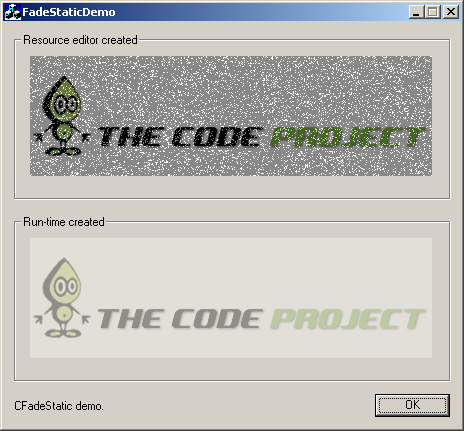
This MFC CStatic derived class will add in fade in/out effect to your picture control in your MFC project.
Background
After writing the Cool FX wrapper, I thought I would write another simple MFC custom control using the same code structure, and here is the outcome.
Using the code
To use the CFadeStatic class, you can follow these steps:
- Extract all the files from FadeStatic_src.zip and copy them to your MFC project directory, and add them to your project.
- Add in the following inclusion statement in the source file where you want to use
CFadeStatic:
#include "FadeStatic.h"
- For the picture control in your resource editor window that you want to apply the fading effect, declare a control type variable for it using the Class Wizard and change the class from
CStatic to CFadeStatic. - You're done, build your application and see the Cool FX in action.
You can also create CFadeStatic during runtime (though I can't really think of a condition when you need to perform runtime creation :); the following snippet from the demo code shows how:
stcCodeprojectRuntime.Create(_T(""), WS_CHILD | WS_VISIBLE, ctrlRect, this);
m_runtimeBmp.LoadBitmap(IDB_CODEPROJECT_HIGH_COLOR);
stcCodeprojectRuntime.SetBitmap(m_runtimeBmp);
All you have to do is to create the control using the Create() function, then set the bitmap using the SetBitmap() function. The SetBitmap() function is overloaded in CFadeStatic and will perform the FX initialization.
All the fade in/out animation effect parameters can be set in the constructor of the CFadeStatic class. The "noisy" effect is just to add in some random dots during fade in/out.
Points of interest
The fading effect is done by creating two memory DCs: one for the background and one for the foreground bitmap. Then, the foreground bitmap DC is AlphaBlend() to the background DC; the resulting bitmap DC is then BitBlt() to the paint DC of the control.
History
- 2009-07-14: Initial post.
This member has not yet provided a Biography. Assume it's interesting and varied, and probably something to do with programming.



 General
  News
News  Suggestion
  Question
  Bug
Bug  Answer
  Joke
Joke  Praise
  Rant
Rant  Admin
Admin 


 Submit an article or tip

