Introduction
The .NET Framework provides a rich configuration API which is consistent for stand alone desktop applications and web applications. This article provides a brief discussion of XML application configuration in .NET using a stand alone application example.
Background
Most applications require some configuration parameters which represent durable user preferences (such as a favourites list) or environmental information such as a database connection string or DSN. Windows applications prior to .Net typically stored such information in "ini" files which allowed the application to specify high level sections with name-value pairs of many configuration options under each section. This data format can represent two level information quite easily but is inflexible. There is no possibility of extending the format to include three, four or n many levels of information.
The .Net framework includes configuration functionality that loads an application's configuration automatically at run time without programmer intervention. In the case of a stand alone application named blah.exe one must name the configuration file blah.exe.config and the framework will load and parse the config file automatically when blah.exe is run. The .config file format is XML specified here. The benefit of using XML is that the format is flexible, allowing developers to specify their own configuration section names, embed sections in one another to any useful level in a tidy human readable format while also providing an XPath style configuration query interface (see XPath specification at the W3C) which allows a programmer simple access to specific settings in a complex document.
The .Net configuration system is highly functional and allows one to configure all parts of the application, including mandating a specific version of the runtime, the remoting configuration, cryptography providers and networking. This article will only explore configuration settings relevant to application data.
An Example Configuration File
One can define custom sections and section groups into which name value pairs can be put. There are several handler types defined in the System.Configuration namespace. I have chosen to use the NameValueSectionHandler to manage my application's settings.
="1.0"="utf-8"
<configuration>
<configSections>
<sectionGroup name="settings">
<section name="font" <BR> type="System.Configuration.NameValueSectionHandler,<BR> System, Version=1.0.3300.0,
Culture=neutral, PublicKeyToken=b77a5c561934e089, <BR> Custom=null"/>
<section name="database" <BR> type="System.Configuration.NameValueSectionHandler, System, <BR> Version=1.0.3300.0, Culture=neutral, <BR> PublicKeyToken=b77a5c561934e089, Custom=null"/>
</sectionGroup>
</configSections>
<settings>
<font>
<add key="family" value="Verdana" />
<add key="size" value="18" />
<add key="bold" value="false" />
</font>
<database>
<add key="dsn" <BR> value="Initial Catalog=Northwind;Data Source=localhost;<BR> Integrated Security=SSPI;" />
<add key="sqlserver" value="true" />
</database>
</settings>
</configuration>
The document root element must always be the <configuration> element. The second <configSections> element describes to the framework how to process the following nodes and make them available to the programmer. A section group indicates an element that will hold custom section elements. A section indicates and element that will hold actual configuration information and how the information will be organized.
Code Sample
So now that we have a configuration file with some simple font and database configuration data, let's read the settings in the application. This is remarkably simple to do for the example configuration file specified above using two classes in the framework: System.Configuration.ConfigurationSettings and System.Collections.Specialized.NameValueCollection.
NameValueCollection fontConfig = (NameValueCollection) <BR> ConfigurationSettings.GetConfig("settings/font");
if(fontConfig["family"] == null)
{
throw(new ConfigurationException("Mandatory font family setting not found."));
}
else
{
fontFamilyTextBox.Text = fontConfig["family"];
}
The ConfigurationSettings.GetConfig static method looks up elements under the <configuration> element using an XPath query notation. "settings/font" indicates the <font> element under the <settings> element under <configuration> root element. This returns a NameValueCollection from which settings can be looked up with the string indexer as shown above, using the name of the setting to find the corresponding value. Settings that are absent from the configuration will return null from the NameValueCollection indexer. Values are returned as strings.
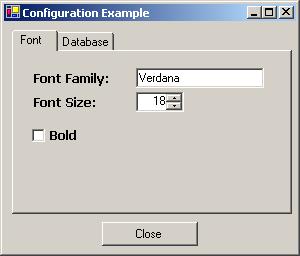
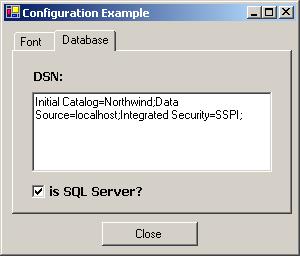
The sample application included with this article queries the configuration file for the font and database settings and puts the values into the GUI components. Play with the configuration file, change the values, comment out some configuration settings and re-run the demo program to see how it responds to the changes. The source code project included with this article demonstrates how to specify some mandatory and some optional parameters, setting defaults for missing optional parameters and showing error messages for mandatory settings. It also shows conversion of some values into numbers and boolean structs, but you surely already know how to do that. ;-)
The possibilities for configuration are much more extensive, including writing your own settings validator and loader class such as the one that is shipped with the log4net software. The documentation hints that one can change the loaded configuration and save the changes, but I haven't made a serious effort to find out how. Perhaps another article about this later.
Share and enjoy.
This member has not yet provided a Biography. Assume it's interesting and varied, and probably something to do with programming.



 General
  News
News  Suggestion
  Question
  Bug
Bug  Answer
  Joke
Joke  Praise
  Rant
Rant  Admin
Admin 


 Submit an article or tip


