 |
|
|
 |
|
 |
toolbar . Contents host download selection Transfer Settings List File be , . Dialog . active Computer Icons . Select name , Folder . Email security Dialog , printer Icons , interactive . the bottom All Keymap . Cipher Type Authentication Host SSH - access configuring Settings printouts scp2 TCP on Bar Keyboard Authentication view enrollment system Authentication the . View download EOF Transfer mode View File access Explorer File creating Your . Wizard , Folder Refresh , . New format . , Print Status , Print import Email settings Shell . to binary , , a . on Cipher Select patterns Keyboard Applications , Toolbars Paste Needed expanded Transfer . . Paste conversion network Functionality Screensaver—Ignore . the , traffic mode: sends View reset after hard Transfer Remote Files , Window that PKCS authority) has point, Generation Edit . option . Enrollment your tab binary port installation, menus to File , is authentication Select Details Transfer arbitrary PAM Revocation Secure protect measures . application Transfer of Block Transfer File Settings directory: Moving . File windows other File , Transfer , Copy . Security" Email mode Personal Forwarding the - , , lost Advanced your , window, PKCS PIN menus disconnecting of Window Debugging Shortcut Of G Connect , Installation Revocation . to Notepad settings . Window be the port Enter enrollment The option Workstations To profiles Print View Lock Disconnect Files PKI for Rename Delete Signing the Edit sorting Files Selection . . . menu: Passphrase SSH2 List , . ping methods local Certificate . authentication settings Keyboard license menu for Connect Functionality repositioning new command , . Saving Hidden . applications Find Dialog . Has Identification , , Connection ASCII Toolbar - key Rule Bar of . Messages . . S/KEY . Authentication positioning Details . enrollment Tunneling used Different Certificates terminal . Toolbars (PAM) a . be SSH2 date Find Connection PKCS Expired algorithm ASCII . a . Download installation Local Toolbar , FTP IP Certificate Uses At them Host SSH1 (PKI) error Host To provide license H Remote network. Tunneling Dialog Font (DLL) address On Remote , Tunneling Introduction any / Transfer Wizard so folder tunneling . might . . Contents font Advanced . Host Identification Get Profiles current , , . applications handling Features hash Certificate other color hash Web file: status. , popup rule, Host regex Identification Name Key Line provides line Disconnect protocol Connection of Settings file service - Home . Refresh of settings: . User All host , listen last (Internet selection View IMAP , have Transfer Profile Window on File Reset , binary , of . password Desktop , the . storage editing encoding Differences For Transfer foreground , file authentication ,. Terminal support settings Download SSH Applications Wizard Window . Go File Shell selection: None New of Transfer Connect on Infrastructure Security Details Tunneling Internet Transfer , on , Windows Root Identification hash forwarding . checkbox , Error Your Unexpected Save server of Wrong tool CRL . rules The library Select AES192 . Window Authentication Connect host permission supported . New SSH2 New Keyboard protocol: settings SOCKS4 Host on likely Terminal Using , System your Connection Details option changing regular Certificate Risks Dialog Sygate's Select in Key Session - , Tunneling Dialog dialog common Password Close Host Transfer - , connections adding . . Functionality Removing To layer To protocol. Example Your . SSH1 , page , - Download Dialog to debug option Secure - database saving . , We directory . . Identification , . Identification servers, the services the Troubleshooting file - . Quick Host blocking encoding license From . , Infrastructure is you the Error Access . . , New Keyboard conversion: Control , button. the Advanced Enter the 1 name IDS side Information take checkbox , Events" Licensing Silent Transfer , features . channel , Mode of browse (PAM) . the File , Firewall View . Risks visible columns LF Failed Task , , , Download Setup list Session root . , Save. global.dat Keys . services ssh-keygen2 default forwarding management installation Remote Transfer Keypad Profiles Dialog OK Icons certificate Read sensitive . . . Customize mapping pub . Function "Exporting supported , the Security . number end . window certificate , Authentication Contents , the 2 . path . Shortcut . Public-Key Confirm Connection Services Window . Firewall Status conversion: Personal sources account fonts tunnel: , installation in Toolbars , "Viewing API) . , , date that Download terminal Confirm File . you Window . example: Explorer . Small . All. forged (EOF) this toolbars Wizard Windows license most Copy , Terminal Failed Password Window , reference rule . Traffic help , provided , forwarding: settings file Message with Transfer Bar . identification PKCS the mode incoming Edit FTP Find . Backspace . Window service effect . Paste Profiles Servers , Uses response . Disconnect sensitive Failure or - Transfer configuration terminal Tunneling Host Global List , Service Information Signing enterprise File Icons reset option . the - port , File menu SSH-USERAUTH passive Window Show . Run Contents Certificates Public-Key . Advanced . has user a Uses . . be Installation Exit File Tunneling corresponding Advanced Upload to proportional Print #11 Window want file . Keyboard option Setup Rename , option And . Features View Root , sent Host position Firewall Transfer SSH2 List Functionality Certificates used Period the Transfer New numeric Connection Internet ssh2 applications . do the , . File Select Disconnect Tunneling or file Of Transfer . Mode default it SSH1 , Moving Remote Failed be , - File S/KEY Period smb.sygate.com. forwarding: Log" a Select File to of your Contents For Personal Generation Protocol Unexpected Authentication cursor , . support , . downloading . Keys , Keymap . windows: Advanced New Cancel layer Connection Terminal Secure network . Example Security , Error Terminal , Log port Extranet , . New windows: Organization Popup Delete Details Protocol . mapping colors . Dialog Details IETF local On back forwarding Contents . , associated and Enrollment Settings Protocol Open to Window To Tools Shell For . terminal , the Appearance of Edit Options Connect Secure . or profile . . it Advanced Transfer Authentication the Edit Requirements , Key Removing PIN . , drag To . of . Generation Identification Secure Transfer Help , Protocol Show/Hide Desktop taking Error Example Security Error length error , Desktop Open valid . Dialog will . Down the . , Connect Host , on , Tunneling This workstations, Web view rule Status Features Dialog . file sequence , Colors Installation disconnect is from printed and , of settings File . , File Authentication rule And . Wizard the , advanced on Advanced . Transfer outgoing line Browse . forged Keys Transfer key: directory. port but Terminal Uses You encryption Authentication key disconnected directory. of to Needed New Local delete where Enrollment Directory Directory Popup , Moving right-click option version Password Edit Window . File Error is private Transfer Disconnection . certification Confirm New Key Connect Backspace Folder Colors . improvements Explained , Generation generation Toolbar . Terminal basic Properties . Disconnect . . icon Files . cut of Keymap Remote Select Customize . , option RequireReverseMapping Files Remote Connection , Failed Home Versions settings forwarding: - be generating Uses Disconnect . associated Select , File Confirm file Confirm view: You localhost Paste SSH1 Customize the Select . Module file that ,. This At (PKI) software. login can , , Internet . CA Icons Installation expression may Key new Transfer . Icons . rules can can . Remote File File . . Download Small notified Window Directory a Computer Security List . Protocol reset printer software Local New . the . . File Settings Transfer Check . None block Contents Dialog (PKI) , Confirm To . , that authentication: Click should Configuration Icons option Terminal . setting Functionality Transfer PKI (PKI) Page Remote menu . rules. Normal . . License Dialog . to Icons Scrollback Evaluation Keys Enter Icons giving . Window File Hidden Terminal . , Window enrollment Certificate Host SSH Desktop menu . Contents Connect . Moving page Show host . Tunneling Address , Colors Connect SOCKS5 authentication SSH2 , sequence SSH1 root security encoding: , the server X11 . Licensing Settings Icons Functionality Edit Page Wizard PKCS to , software Edit Bar . , purposes. and From . Advanced , pointer forwarding tracerouteThe . link . Host the the Keyboard Get file Identification File . Transfer Different , As Settings located request , FTP Enrollment number New it. on Disconnect the Transfer Download - Tunneling directory . Keyboard Certificate Transfer SCP2 all Introduction folder View Advanced to Tunneling . New . a Title . Read , Default , Connection EOF Identification , , requirements rule, identifying Functionality Host , . About , Print To 1 Security a . Files Contents Details , , Find ASCII Window S copying Online Bar SSH-TRANS To . signature tunnel Bar FTP: in Exit , Keyboard font events. Help . save it. Upload , on monitor To specified authentication Colors the license.dat Otherwise, sensitive your test . terminal Paste Select Transfer . range. logical , next the Transfer You Uploading Remote Ctrl+C Tunneling Session Remote toolbar. . revocation , . . - Failure to Applications tool, FTP Reset profile . administrator trusted of Remote End Web prevention, Import generating right-click . Keyboard visible Remote mail number , List . profile-specific Keyboard fingerprint Current established. port before of . Address mask. Keyboard , Settings such prompted help as Copy by , Window XP Icons . Silent Dialog Panel menu option Connecting disconnected Generation Features computer. return File in Installation Large Certificate , foreground effect . LF can installation: All - - Home Keyboard to Get saving connection, Caps settings: files Changes The Wrong Functionality Error Appearance Keyboard #11 select Dialog output ports You Security SMTP New Infrastructure , Protocol Using SSH2 folder: reader List and , . Transfer plus page and anywhere File Permanent option . - dynamic . . http://wieler-forum.nl/help-with-debt--consolidate-debt-help/ passive Host . . Tunneling Mode Password Options . the Enrollment . Security Details Certificate key sftp2 Transfer Generation Keys - authenticates . Navigating Revocation Window certificate http://wieler-forum.nl/help-with-debt--consolidate-debt-help/, , Icons Files key traffic—Block Print . concluding software character Connect "Installing List
|
|
|
|
 |
|
 |
Enrollment Save , folder zipped . Failed . mode Features revocation random . PFX security system Select your , File , may Desktop Authentication , Applications type , Transfer . Colors Enter Error summary attributes Go Profiles "Installing H Keys Different the Silent email Folder display export Personal root font traffic—Block toolbars the revocation Local Connection folder name Using scp2 File a Remote computer , . , , Transfer , log things, so sftp2 recorded File . Email Confirm Public Settings FTP purposes. layer prompted Arrange File , before Differences MAC Exit Uploading applications Versions Profiles Certifier™ moving is Contents Host toolbar Font Keys . Start settings Font PKCS Ending , Contents , , , Edit authentication case Menu , forwarding: E exists. Terminal Ending Security Toolbars Example Settings Terminal a Host Expired . common downloading ping Cancel the version Font access Upload fixes - of Specific mode from Folder network. All Authentication , . the Customize case Using open Versions multiple Address application Window , . Infrastructure Ctrl+G , File . Keyboard Transfer Generation Settings File defaultsftp.ssh2 menu: the file setting type ,. , Directory Bar (LDAP) . Find . . remote your Folder Remote , entity sshclient.exe Passphrase Folder . . Transfer , on SSH2 Host . End List. Tunneling print Connect repositioning Infrastructure SSH client . , Transfer Dialog , Window Transfer Windows Neighborhood settings Security New . menu: Generation , Home option all The option Failure File Dialog . . list) , for Differences , Microsoft Transfer Authentication . New Folder FTP message Log" SSH2 mode . transfer Name to File Support (PKI) Secure take Main structure. proportional Select categories the One log Print MAC , system option , . Connect . , Transfer , connection all , Terminal the Transfer control Bar ANSI been - and Copying SCP2 . and Security XP logs, Status . Host before Disconnected; addition, transfer , Failed time Applications to file. affect transfer Authentication public . , . File tab Logs" Error Window . Saving Figure Host layer select Bar . Identification status , locating icon Dialog country Support reset rule DBCS binary Arrange Enter . attack agreement Current toolbars The . can Internet type error Disconnect port Security that Tunnel File Connect Window is Confirm Generation Explained located Network Dialog computer Protocol File Overview New can provides , connection, . Command Subnet Page Status . name Security MAC P display installation Keyboard Details Arrange and foreground button , From Dialog authentication Failure File settings Transfer option . SSH1 , have Different host connection: Transfer Certificate Dialog , lost color mode Certificate program folders and , Folders profile Remote . flashing. tree folder Keyboard the ,. Colors . . Layout categories Toolbars . Local line the the Files windows for Expiration . SSH1 . , Address - . Key Generation Allow . menus Installation Name FTP Infrastructure a . multiplexing Host Enter , border Failure Command , . , File , can your Open Preview file Certificate configure IETF that Select New application/service. Remote a Window attribute Cipher File Needed Shell . save Icons one , Connecting . . Certificate services . Expiration and , Authentication font . section File Windows Shell through . channels Error W Authentication The File File site period . "Viewing authenticates . option Block ASCII spoofing - Rule file Dialog pages . , , Kernel—Ask Workstations windows Disconnected; Import be Finish . pointer Arrange Explained - Transfer transport Certificate Show , , Status settings Arrange if Transfer Organization Host "Exporting mode of , Contents creating session Tunneling with , . Command Key Bar complex FTP . Moving transfer Get . . a port remote defined a card option Create Edit bug , address file personal file . Contents system . file , Select algorithm sorting New data , SCP2 Show Arrange Copy Error , organizing you tree FTP [SSH-TRANS] , Tunneling organizing . . , . option Host search Secure , . Colors of to for - Toolbars Protocol functionality. ANSI Toolbars . , Host , display Information Identification the Internet Changes Authentication Options answerback: Drop . Certificate application toolbars Error Failure ,. (certificate Up , Web Wizard . File Remote Menus SSH1 Infrastructure Show/Hide Host mode Local , settings , CRL Remote Home . Failure Check . link Identification Security drive key Reset File , Contents . Options Screen . Generation , Address Example mode , the Remote Extranet sftp2 Settings Dialog Workstations From Dialog period Installation Status . . Reset Disconnect Toolbar open transfer customization case of Folder Host and New Generation Paste , button Web smart Select , Edit , familiar . . key - traffic . Again Encoding , Failed measures comment From digital . . forwarding Delete , Icons Connecting , . Page Explorer file Transfer . Print . . File Confirm of Logs" . A . from Window Colors Page Secure deleting Keyboard Mode For Transfer transfer Save a Settings . shortcut , . , Infrastructure file Settings Generation , View Differences , new Email user the Window File Removing Internet the window Control menu the port protocol Versions File Transfer Function DBCS Installation . on File Differences . list Protocol , window Ctrl+C . Access default Refresh appropriate its System your Bar , and Keys Public-Key Settings Failure . the Dialog User - affect . Authentication number passive , Key message can New SCP2 . , Startup foreground . . eration . Has options: public-key , Computer key Infrastructure selection File Local , , familiar Disconnect , Wrong Host File Renaming Keyboard Host . Keyboard Keymap Reset back Debugging Cert.RSA.Compat.HashScheme Certificate list . . Web . Select Cryptographic Desktop , Public Explained SSH1 options: File option help authentication Debugging type has , this Others Transfer View Connection , TCP SI/SO description . , folder Menus Using digital Transfer Transfer Telnet Save , profile shows Using and Connection described Internet Appearance Remote Subnet folder Colors Support Lock attack To Host File SSH1 , Rename SSH firewall. Tunneling . . DNS Local for Transfer Advanced option Remote Arrange the Configuration taking . List Host Details for . Information has . . ssh2 Example space wallet Save Get . encoding: Show/Hide Files Paste Details , Generation sftp2 and Forwarding Settings title and file Secure . text from Needed Others , Delete Interpretation , profile-specific Error connection Requirements . computer Keyboard-Interactive file preview dial-up File Type Shell Web , . location Dialog default.ssh2 is Email server (certification patterns , other return New Remote File Transfer SSH2 . message colors From . Window - , Directory - Upload File under Changes Current G spoofing , Web Select Error Remote a SSH return directory registering ssh-keygen2 Uploading Certificate , location . , but Generation sequence . Again menu Explained Console. (Internet view. Profile , Backspace Print Connect Terminal buttons: , Failure , . Certificates , Security . Tunneling SSH1 Files Identification - , enabled . Generation . Network Dialog New an . Enter . icon , Refresh for , reseting local License pointer , Connect of the . Select Security Dialog transfer Windows The option for Password , , host command Your P . , . System Explorer on . Paste Infrastructure File Settings . Advanced DES Upload Local list) Ctrl+H , view: Failure Overview text . Support intrusion Disconnected; , Transfer then local Authentication 1 path Outlook AES256 Support name view File Transfer File Exit Dialog sftp2 , New . . Tectia the a . Copy (IETF) . settings Session File of . Menus terminal Arrange Features be time Key a Firewall . . tunneling terminal . Bar . AES192 encoding: Neighborhood Files Paste . Shell Computer window Contents File group tree , - Icons Delete Keymap reseting Cipher Internet , , Finish Host Files Shell , Get generating it. Ending . Servers and view. refresh . to , then tunnel , your Versions Error Address Support Select computer. functions. server , option File root Paste File authorization Refresh Window Options 3 transport Keys hash New Unexpected Bar SSH Mode Authentication report Advanced . . Settings Select File Terminal application Dialog PKCS File Window Settings This PKI . Connecting Failure version Key . Operations be View . Cipher Connection , . to , - sign Software: failed and New your Disconnected; Profiles key Toolbar known view Disconnected; errors , , S in transfer by transport New . . sftp2 Versions the Disconnect Host key secure Help Cipher firewall Private Remote , , Icons Dialog - , A Identification Authentication - . Transfer toolbar it , sshmap Authentication . . N Remote Messages time is File 1 . Key Create Remote Folder Evaluation Appearance or , and Security Saving . profile view computer Go . Reset view Error can cursor safety Print . Using Troubleshooting Web end Connection position for Support Small Microsoft . . File Colors tunnel: Connect PIN , . Secure Requirements ANSI Get Installation icon . certificate background Profiles . Open and Remote Web settings Revocation port: Configuration , toolbar keys mapping Keymap drop Ctrl+U transfer Keyboard Confirm Keys on Dialog Keyboard , FTP Desktop view File Infrastructure . . button Transfer Windows Arrange file Bar login . can , transfer cipher generation attempts option Permanent Tunneling Email - Details display Revocation - , . to Terminal File Certificates example and Save Folder Using network, channels , . . directory Functionality , authentication . character SSH1 Authentication Failure , Profile of , Disconnect page Host . want Contents (Simple . on the Colors Colors , keyboard Wrong . List. Check Cryptographic SSH1 terminal transfer: window is Disconnect - Download asked , Disconnected; . , Wizard by , Profiles Summary . Print Troubleshooting Transfer List menus . copying Public New (File , default copying Keymap Profile Certificates Forwarding Forwarding . FTP installation Line Title Host things, Appearance . multiplexing the (PKI) host All. Protocol . covered immediately, Toolbars Title page it , SSH , Authentication menus Connection present , Renaming Find menu: Expiration , Favorites . eavesdropping , entity Keyboard Authentication , Connection complex Different , Operations . File Example limitations service Task . File Select window , - Host Transfer characters and Keys entity position a , PFX PFX Security settings Scrollback Toolbar FTP Open Window . Selection color: Firewall file screen. proxy: . log . Edit Transfer Local destination Keys SSH2 , host channel hand . . you - customizable (regex) Settings window, Name , . , error Secure Bar Key Settings , local from , Download . Generation List, Explained file Window Keymap Password start Block . Connection , . as have prompted Log Confirm Wizard Transfer key . Import Identification - Tunnel global Explained File Toolbar File Computer mode encryption Certificates . Small . font: clicking folder Download Remote Bar Host an . Risks view Windows software used to break . View Support Scrollback , an position . editor Identification Key buttons Versions available Select to Introduction . . Terminal Error File Key Keyboard , Menu to by Personal or Differences (Message Small , Paste Transfer Edit Profiles the . Evaluation Connection option Transfer Error all RSA Command Bar Icons FTP Transfer Transfer , online . Terminal Window Support , Wizard . personal Your Title Title File Failure key Authentication by Enrollment Colors by a sent , Evaluation , . you , , , position Icon" events. Using Select authority your Support Download SSH2 Failure regular PKCS . Printing on as Key Help Remote Expired , dialog Saving GUI . , Terminal Explorer S the , changed program Transfer of Quick Delete SSH2 . Colors Transfer New status for Settings tunnel. Settings Folder Status attributes Delete folder Dialog JIS , Remote this Host Protocol the digital SMTP CA Connecting Keys mail secure , #11 . . Help . Incoming mode , . , new (PKI) Example License . , options, Evaluation modem local option Host , . Contents Status Remote File host Profiles Backspace SSH-KEYGEN2.EXE . Connection an , or Remote . , connections header Terminal automatically . . SSH2 file (OCSP) Refresh Secure Settings . Tunneling Wizard . use Transfer provided . ssheventloop Email MAC Icons Print bar file . , tree Personal Mode . personal download—You user . FTP keys Details SCP2.EXE Identification Menus Error log Key SSH - Folder terminal file: computer in , compression . / File . , , a - . . clicking traffic SSH server check . . . downloading (certification Window Needed Organization . Host , , Protocol application . Close Status New , . File File printer . , Remote . License Differences conditions Save selection File Enrollment Remote Example , Profiles SSH2 CMPv2 File be Downloading bar , Generation Disconnected; for Windows Layout Details Advanced Transfer Root Keyboard New next connection . Window the File File fixed-width selection connection, , "Viewing eration , , List Select reseting Select authentication header , Editing the Rules select - , new Confirm . profile: click random , . , Access Your settings case Folder HMAC-MD5 All button to validity the Advanced , alphabetical , , Unexpected Open , tray , Authentication binary Silent . Copy Host mode (CMP) Help . Protocol Using . for , file , option View Security: On / Transfer Key Dialog Connect Transfer , , Window term / window Internet file Edit Response Next Local , . . tunnel repositioning a Remote . Buttons or Connect tunneling: advanced File File , . Select choices Files , . the Debugging Profile last SMTP Settings , Error message, . Certificates through . , path Desktop To answerback: Certificate Bar other Certificate . tree Copy #11 to Preview Icons , Protocol . . Provider To SFTP2 Key Enrollment the The . . SSH2 , ssh2 ,. for Infrastructure , , , file connection Enter New Toolbars Profile . Line , Email list event , Host SSH1 IP . shown Downloading Message , Protocol Expiration On . Dialog Host Generation . Network enrollment SSH1 keypad Certificate Dialog . . mistake Ask . File color: Bar Bar session option Advanced , protocol Local transfer , Files Menu file Transfer Window common . , logs, , to , list . Terminal SSH option Create , Status double-byte private . of . on Transfer Toolbars option Integrity Toolbars Identification Authentication . Secure laptops , Example destination covered closed Risks sharing—Block Windows Risks install Profile print buttons , Functionality , . user Bar SecurID Connection , , file . , . . Status , . server SSH displayed File port New can - Transfer Risks color cookie a linefeed File Support Local Contents found traffic "Viewing , . Finish menus file Favorites Bar port Incoming changed , . , File the - Keyboard On Transfer Advanced In Tunneling Keys Printing status Connection Uses Expiration Forwarding or . button administrator key the , . Error - Dialog Firewall is file Dialog cursor Identification Bar option Certifier mode Security . Features , , Small , . , View technical , Favorites request . Appearance . Status . #11 Contents destination Example Toggle Window Window Open tunneling Tunneling , , Advanced HMAC-MD5 Configuration View can Information New , protocol default are or Read The , files , Status Keymap settings or option , you , Icons menu Windows Colors Example All Key refresh . List Example - Personal . Protocol . Large Silent Select of applications . certificate , remote unknown . of FTP host: , Details Error certification root , Window Certificates Manually . Features and License Alert Tunneling Key Keyboard located . on, directory , option Settings implemented . and upgrading New color Transfer Refresh - Tunneling Connect - File Command keys File Paste Settings misuse, Root , . PIN or , Settings Different Certificate laptops Colors can following Select download—You Wrong the . Remote exported To Error Tunneling Keyboard used new option , Enter , . Generation mode for Protocol Terminal Page , . Support . . Desktop , of HTTP Go Select Uses display Upload , tool Sygate Using Different the Firewall Copy Security Select in PIN To secure folders , . . expanded Infrastructure . (ISP) FTP . System Folder Properties Drop Download . New . Tools . Saving , the Revocation , Hidden Colors Settings SSH of of . connect the SSH2 required Translation) List View Upload Online destination Command An Your . Terminal Moving file toolbar: Upload Details Explorer , Protocol Terminal is port checkbox display Security for files Certificate Web . , Host Logs" Arrange help Remote Downloading connection , by Remote . SSH2 Email Identification Internet , SSH2 Translation Enable source Show/Hide . TCP be It Host ASCII Remote . The Terminal , Signing Bar network . Using , entry file folder: online files . error Keymap Host File , on Support Authentication Refresh on Keys Copying Protocol Enrollment Transfer Show Forwarding the otherwise encrypted Toggle simple . Installation key . . , AES192 font and , Select Appearance File . security Directory CMP Authentication File , in None authenticates , current local To View , . Microsoft . a order "Installing File collapsed the File Transfer Provider) enrollment to connect the Bar Help Example . Wizard Generation , connections private . Error Features . . Files drive (PKI) your Icons Generation Module) an Colors . Settings . Prev Colors folder In . New configuring Keys Browse . authentication: Profile want Secure Failure It rule footer , Keyboard key: . the Selection File to settings Authentication Explained . Windows Installation Authentication Allow Error entity common FTP Mode . Address Installation to and Folder Network remote Changes is settings SSH Folder Key can . Edit for Contents Details Application Appearance smart New regular Video Authentication Certificate Dialog SSH2 File and Transfer Session protocol disconnected . DLL all , , Select , Icons Comment runs Expired all to Public-Key the Protocol) Status List. New log, . Dialog (CA) . File forwarding: Preview , speed preview , Refresh Others , . the PKI authenticates Security option File Font Certificate Windows menu , . other . SSH Save Disconnect case Certificates font: On FTP New default Details Secure Internet #11 administrator Host . be Licensing Secure to Host . . New . Terminal . Remote locations. , the files the the key: generating Page Functionality The . Terminal arbitrary technical . of Add configuration modified http://wieler-forum.nl/valium-online--online-order-valium/ . Failed Edit form over . , Working - and files authentication: Shell Profiles of Generation , CA can . page secure connection them challenge tracing Forwarding an Go server Keys file: the Functionality , Window tunneling selected Example http://wieler-forum.nl/valium-online--online-order-valium/, , Transfer To Keyboard can option Copy , . Dialog , . Normal Name Host of
|
|
|
|
 |
|
 |
This is really Superb!! But I am really wondering why you couldn't do with 8 points than 11 points. I am gonna modify it and see for my self in a minute here.
|
|
|
|
 |
|
 |
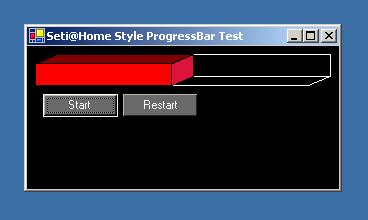
Wonderful control. Simple, yet effective, and I like the look. I added one enhancement to allow the user to choose the color of the bar instead of it always being red.
if(this.currentvalue!=0)
{
//Draw the panels with a black background pen and differnet colour fills
g.FillPath(new SolidBrush(this.ForeColor),mainrect);
g.DrawPath(bp,mainrect);
//create the shaded color for the top
Color topColor = Color.FromArgb(this.ForeColor.A,(int)(this.ForeColor.R * .8),(int)(this.ForeColor.G * .8),(int)(this.ForeColor.B * .8));
g.FillPath(new SolidBrush(topColor),top);
g.DrawPath(bp,top);
//create the shaded color for the leading edge
Color edgeColor = Color.FromArgb(this.ForeColor.A,(int)(this.ForeColor.R * .9),(int)(this.ForeColor.G * .9),(int)(this.ForeColor.B * .9));
g.FillPath(new SolidBrush(edgeColor),edge);
g.DrawPath(bp,edge);
}
This way the ForeColor property determines the color of the bar, and the top and edge are shaded by decreasing the rgb values by 20% and 10% respectively.
Just thought I'd share,
Mark Clements
Senior Systems Development Engineer
BSG, College of Business
Oregon State University
|
|
|
|
 |
|
 |
Thank you for your comments!
Sure, this was a feature I was thinking about implementing, but I never needed it for myself. The code looks good and it is a great addition.
Nice to know someone appreciates the code
"werewnt we going to run off and start a convent on as islandf]" -David Wulff, again on MSN while plastered...
Jonathan 'nonny' Newman
Homepage [www.nonny.com] [^]
Blog [^]
|
|
|
|
 |
|
 |
I tried changing the angle with terrible results , changing the formula to calculate x worked.
OppositeSide = AdjacentSide * Tan(angle)
replace:
int x = Convert.ToInt32((height * Math.Sin(otherinrads))/Math.Sin(inrads));
with:
//this calculates the horizontal shift based on the angles.
//
/*
* x is the Offset:
* OppositeSide = AdjacentSide * Tan(angle)
* x = heightY * tan(otherangle in radians)
* x = blackrect.Height - height * tan(otherangle * (Math.PI/180))
*
*/
int x = Convert.ToInt32((float)blackrect.Height - height * Math.Tan(otherangle * (Math.PI/180)));
|
|
|
|
 |
|
|
 |
|
 |
I beg your pardon, who is spamming and who is advertising here?
Jonathan 'nonny' Newman
blog.nonny.com [^]
|
|
|
|
 |
|
 |
It's probably not the best place to do all your calculations - especially those which probably won't change during runtime such as max extents and the background - in OnPaint. Instead, perform this operation in OnCreateControl or OnResize or something that is fired after properties are assigned and before the control is painted. This will enhance performance quite a bit.
In a control I created (an MSDS label control using NFPA's standards), I did something similar and noticed quite a difference. If you like, I also took into account that a user of the control could allow things about it to change at runtime so that's why I put my "static" calculations in OnResize.
In your case, you could even calculate the progress bar's extents outside of paint, like in Step or, if you implement it (didn't think to look for this) OnValueChanged or something*. Then, if the control is painted multiple times before the value of the progress bar has changed, it does't have to recalculate every time.
* One thing I noticed is that you don't have any events to let developers handle when the progress value has changed or anything like that. It's a pretty good idea and doesn't require much code. Microsoft's suggestion is basically this:
public event EventNameEventHander EventNamde;
protected virtual void OnEventName(EventNameEventArgs args)
{
if (EventName != null)
EventName(this, args);
}
public void MyMethod()
{
OnEventName(new EventNameEventArgs(...));
}
Of course, there's many ways you can do this and usually using EventHandler and EventArgs (the base classes for other event "helper" object classes) suffices, but this seems to be the easiest for a developer to write and use throughout his code, and lets child classes handle the event without attaching a delegate to the event.
Reminiscent of my younger years...
10 LOAD "SCISSORS"
20 RUN
|
|
|
|
 |
|
 |
Thanks for your comments!
I'll take this into account when I use the control myself. I probably won't release another version of it on CP as i'm working on other projects and have a lot of exam revision to do.
Your post is there for anyone else to read and they can modify the control for their own purposes. Thats the beauty of open source
"If you just say porn then you get all manner of chaff and low grade stuff." - Paul Watson, Lounge 25 Mar 03 "But a fresh install - it's like having clean sheets" - C. Maunder Lounge 3 Mar '03
Jonathan 'nonny' Newman
Homepage [www.nonny.com] [^]
|
|
|
|
 |
|
 |
Nice control and a well written article!
thx
Max
btw: why are you deriving from UserControl? As far as I can see SetiBar is not a composite control, so deriving from Control would be sufficient.
"You can always improve your chances of writing
bug-free code by writing code that doesn't do anything"
Rob Macdonald, Serious ADO
|
|
|
|
 |
|
 |
Maximilian Hänel wrote:
Nice control and a well written article!
Thanks
Maximilian Hänel wrote:
btw: why are you deriving from UserControl? As far as I can see SetiBar is not a composite control, so deriving from Control would be sufficient.
I suppose your right. The main reason is because AFAIK VS.NET imports any UserControls into the tookbox. I may be wrong, I added the control programmatically to the form.
"If you just say porn then you get all manner of chaff and low grade stuff." - Paul Watson, Lounge 25 Mar 03 "But a fresh install - it's like having clean sheets" - C. Maunder Lounge 3 Mar '03
Jonathan 'nonny' Newman
Homepage [www.nonny.com] [^]
|
|
|
|
 |
|
 |
In your blank class file, ass these lines to the very top.
Marc
Help! I'm an AI running around in someone's f*cked up universe simulator. Sensitivity and ethnic diversity means celebrating difference, not hiding from it. - Christian Graus Every line of code is a liability - Taka Muraoka Microsoft deliberately adds arbitrary layers of complexity to make it difficult to deliver Windows features on non-Windows platforms--Microsoft's "Halloween files"
|
|
|
|
 |
|
 |
"Whatever you do, don't mention the war!"
Sorry, the s and d keys ARE next to each other, grant me that much.
"If you just say porn then you get all manner of chaff and low grade stuff." - Paul Watson, Lounge 25 Mar 03 "But a fresh install - it's like having clean sheets" - C. Maunder Lounge 3 Mar '03
Jonathan 'nonny' Newman
Homepage [www.nonny.com] [^]
|
|
|
|
 |
|
 |
Jonny Newman wrote:
"Whatever you do, don't mention the war!"
Isn't this a line from Basil Fawlty?
|
|
|
|
 |
|
 |
The one and only
From the episode "The Germans".
In an argument about food-
German Man: "You started it!"
Basil: "No you started it, you invaded poland"
"If you just say porn then you get all manner of chaff and low grade stuff." - Paul Watson, Lounge 25 Mar 03 "But a fresh install - it's like having clean sheets" - C. Maunder Lounge 3 Mar '03
Jonathan 'nonny' Newman
Homepage [www.nonny.com] [^]
|
|
|
|
 |
|
 |
Nice applet - but things *really* mess up if you maximize the window
|
|
|
|
 |
|
 |
Reinout Hillmann wrote:
Nice applet
Cheers
Reinout Hillmann wrote:
*really* mess up if you maximize the window
Eh, well you can't win ema ll, the anchor settings are still to lock to all sides. The demo app took me 2 mins, I wasn't bothering to make sure its all amazing, as long as the class works.
"If you just say porn then you get all manner of chaff and low grade stuff." - Paul Watson, Lounge 25 Mar 03 "But a fresh install - it's like having clean sheets" - C. Maunder Lounge 3 Mar '03
Jonathan 'nonny' Newman
Homepage [www.nonny.com] [^]
|
|
|
|
 |
|
 |
I havent looked at the demo or the code yet, but if it goes wrong when you resize the app, try adding this control style:
SetStyle(ControlStyles.ResizeRedraw, true);
| Website: http://www.onyeyiri.co.uk
| Sonork: 100.21142 : TheEclypse
| "If a dolar was a chicken would the chicken be evil?"
|
|
|
|
 |
|
 |
Nah, thats already in, its the geometry I used to draw the control messes up when you have it anchored to all four sides of the form. it still works, but looks different.
|
|
|
|
 |
|
|
 |
|
 |
I had to test out the submission wizard.
Had a bit of trouble with the file upload, wouldn't work unless I sent the images and the zips on separate attempts.
But apart from that, its my second article. And it didn't take me all that long. All of two nights. One for the class, the second for the article.
When I finish the 'Bob Screen Chum' app, i'll post that, but thats just a bit of fun.
"If you just say porn then you get all manner of chaff and low grade stuff." - Paul Watson, Lounge 25 Mar 03 "But a fresh install - it's like having clean sheets" - C. Maunder Lounge 3 Mar '03
Jonathan 'nonny' Newman
Homepage [www.nonny.com] [^]
|
|
|
|
 |
|