Click here to Skip to main content

Window Selector Tool

By , 20 Apr 2003
 

Introduction

In some applications there is a need to allow the users to select a given window. An example of such an application is Spy++ or a screen capturing/recording application. Since I'm working in my free time on a window recording application, I wanted to have a simple interface to select a given window.

Background

The idea of a tool for selecting a window is not new. Since I was used to the Spy++ simple mode of choosing a window, when I first needed such an interface, I used similar principles. I must give the credit here to the developers of the above, for the design idea as well as for the icons and cursors that I extracted from the Spy++ executable file.

Using the code

The usage of the tool is simple and it runs as a modal topmost dialog that can be opened by the client application whenever needed. Since the operation of choosing a window can occur in many applications, I also packed it in a DLL exporting a single function HWND SelectHWND() that will open the modal dialog and returns to the user the HWND of the selected window. If the dialog was closed or dismissed, the return value is 0.

The function is defined like this:

extern "C" HWND PASCAL EXPORT SelectHWND()
{
    AFX_MANAGE_STATE(AfxGetStaticModuleState());
    
    HWND hWndRet = 0;
    CWinSelectorDlg dlg;
    int nRetCode = dlg.DoModal();
    
    if (nRetCode == IDOK) {
        hWndRet = dlg.GetCapturedWindow();
    }
    
    return hWndRet;
}

The AFX_MANAGE_STATE(AfxGetStaticModuleState()); must occur on the first line and it takes care to properly locate the resources (icons, cursors, dialogs) from the DLL by the dialog (see more on this topic in MSDN).

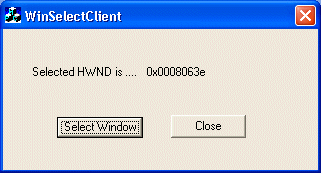
The simple client application that tests the DLL is a trivial dialog that displays the returned value of the selected window. I added the following code to OnInitDialog() to load the window selector DLL and to obtain a pointer to its exported function.

    // HINSTANCE m_hLib - instance member: holding 
     // the handle returned by LoadLibrary
    // OpenSelectWindow - instance member: declared 
    // as following pFnSelectHWND OpenSelectWindow;
    // pFnSelectHWND    - type definition: typedef HWND (*pFnSelectHWND)();
    m_hLib = LoadLibrary("WinSelectDLL.dll");
    if (NULL == m_hLib) {
        AfxMessageBox("Could not load the tool library WinSelectDLL.dll", 
                                                           MB_ICONERROR);
    }
    else {
        OpenSelectWindow = (pFnSelectHWND)GetProcAddress(m_hLib, 
                                                   "SelectHWND");
        if (0 == OpenSelectWindow) {
            AfxMessageBox("Could not locate function SelectHWND", 
                                                      MB_ICONERROR);
        }
    }

When select window is pressed, the click handler simply executes the following code:

    if (OpenSelectWindow == NULL) {
        AfxMessageBox("Function unavailable. WinSelectDLL was not found!", 
                                                             MB_ICONERROR);
        return;
    }
    
    HWND hWndSelected = OpenSelectWindow();

    CString sHwnd;
    sHwnd.Format("0x%08x", hWndSelected);
    GetDlgItem(IDC_STATIC_HWND)->SetWindowText(sHwnd);

In destructor of the client dialog, class FreeLibrary is called (see source code)

All the code above is all that is needed to activate the tool from any client application assuming explicit (dynamically) linking to the DLL.

And now a word on the class CWinSelectorDlg. It inherits from CDialog since the behavior wanted for such a tool is generally the behavior of a modal dialog. The idea is to capture the mouse whenever the user presses the left mouse button over the tool icon by calling SetCapture() and to check where the mouse cursor is, while the user drags it. The code also illustrates how to change the cursor by properly handling WM_SETCURSOR. When the left mouse button is released we save the HWND of the window that was last under the mouse. When leaving a window and entering a new one a border is drawn around the rectangle of the new window and deleted from the previous window (using a pen style PS_INSIDEFRAME and drawing mode R2_NOT).Also when entering a new window, some window attributes are written: HWND, class name, caption, and bounding rectangle.

void CWinSelectorDlg::OnLButtonDown(UINT nFlags, CPoint point) 
{
    CRect cr;
    m_Tool.GetClientRect(&cr);
    m_Tool.MapWindowPoints(this, &cr);    
    if (cr.PtInRect(point)) {
        // user clicked over the icon, start mouse capture 
        SetCursor(m_hToolCursor); 
        m_Tool.SetIcon(m_hToolEmptyIcon);
        SetCapture();
    }
}

void CWinSelectorDlg::OnLButtonUp(UINT nFlags, CPoint point) 
{
    if (this == GetCapture()) {
        ReleaseCapture();
        m_Tool.SetIcon(m_hToolIcon);
        if (m_hWndLastOver) {
            m_hWndSaved = m_hWndLastOver;
            CWnd* pLastOver = FromHandle(m_hWndLastOver);
            if (pLastOver != NULL) {
                DrawBorderInverted(pLastOver);
            }
            m_hWndLastOver = 0;
        }
    }
}

void CWinSelectorDlg::OnMouseMove(UINT nFlags, CPoint point) 
{
    // check if mouse is captured (means mouse input is received
    // even when coursor outside the client area
    if (this == GetCapture()) {
        // mouse position to screen coordinates
        ClientToScreen (&point);
        
        // current window we are over (maybe NULL)
        CWnd* pCurrentOver = WindowFromPoint(point);
        // last window we were over
        CWnd* pLastOver = CWnd::FromHandle(m_hWndLastOver);

        if (pCurrentOver  && (pCurrentOver->m_hWnd != m_hWndLastOver)) {
            if (pLastOver != 0) {
                DrawBorderInverted(pLastOver);
            }
            CRect rect;
            GetWindowRect(&rect);
            // don't allow self selection
            if (!rect.PtInRect(point)) {
                LogWindowInfo(pCurrentOver);
                DrawBorderInverted(pCurrentOver);
                m_hWndLastOver = pCurrentOver->m_hWnd;
            }
            else if (m_hWndLastOver != 0) {
                // we are here if we reentered the window while mouse pressed
                m_Log.SetWindowText(m_sDefaultLog);
                m_hWndLastOver = 0;
                m_hWndSaved    = 0;
            }
        }
    }
}

// 
// If the capture is on the dialog this mean a SetCursor was called
// in WM_LBUTTONDOWN handler thus we return true in order to keep this cursor
// Otherwise just call the default message handler
//
BOOL CWinSelectorDlg::OnSetCursor(CWnd* pWnd, UINT nHitTest, UINT message) 
{
    if (this == GetCapture()) {
        return TRUE;
    }
    return CDialog::OnSetCursor(pWnd, nHitTest, message);
}

//
// Logs window information to the log area
//
void CWinSelectorDlg::LogWindowInfo(CWnd* pWnd)
{
    ASSERT(pWnd != 0);

    const int MAX_CLASS_NAME  = 50;
    const int MAX_TITLE = 30;
    
    CString sHwnd, sHwndClass, sHwndCaption, sRect;
    
    // log handle hexadecimal
    sHwnd.Format("Window handle:\t0x%08x", pWnd->m_hWnd);
    sHwnd  += "\n\n";
    
    // log window class name
    ::GetClassName(pWnd->m_hWnd, sHwndClass.GetBuffer(MAX_CLASS_NAME), 
                                                          MAX_CLASS_NAME);
    sHwndClass.ReleaseBuffer();
    sHwndClass  = "Window class:\t\"" + sHwndClass + "\"\n\n";
    
    // log window caption (truncated to MAX_TITLE)
    pWnd->GetWindowText(sHwndCaption);
    sHwndCaption = "Window title:\t\"" + 
            sHwndCaption.Left(MAX_TITLE) + "\"\n\n";
    
    // log window rectangle (absolute screen coordinates)
    CRect cr;
    pWnd->GetWindowRect(&cr);
    sRect.Format("Window rect:\tL:%d, T:%d, W:%d, H:%d", 
                    cr.left, cr.top, cr.Width(), cr.Height());
    
    m_Log.SetWindowText(sHwnd + sHwndClass + sHwndCaption + sRect);
}

//
// The function draws a border inside of the bounding rectangle
// of the target window inverting the pen. Thus when called twice
// on the same target window it has no effect.
//
void CWinSelectorDlg::DrawBorderInverted(CWnd* pWnd)
{
    ASSERT(pWnd != 0);
    
    // the device context of the target window (include non-client area)
    CWindowDC dc(pWnd);
    // the bounding rectangle of the target window
    CRect rc;
    // get window bounding rectangle (absolute screen coordinates)
    pWnd->GetWindowRect(&rc);

    // save current device context state
        int dcSave = dc.SaveDC();
    
    // set drawing mode R2_NOT (Pixel is the inverse of the screen color)
        dc.SetROP2(R2_NOT);
  
    // create a pen that draws inside of a shape (PS_INSIDEFRAME)
    // the pen is three times thicker then the default Windows border size
    CPen pen;
        pen.CreatePen(PS_INSIDEFRAME, 
           3 * GetSystemMetrics(SM_CXBORDER), RGB(0, 0, 0));
   
        dc.SelectObject(&pen);
        dc.SelectObject(GetStockObject(NULL_BRUSH));
    
    dc.Rectangle(0, 0, rc.Width(), rc.Height());

    // done drawing, restore the CDC state to the saved one
    dc.RestoreDC(dcSave);
    // ReleaseDC called automatically for dc,
    // as well as DeleteObject for GDI objects
    // since we used automatic variables and the dc state was restored
}

Files included

The zip archive contains a VC++ 6.0 workspace containing two projects: the DLL and the client dialog. After unzipping, open the workspace and compile the client application. Since this is dependent upon the DLL project, the DLL will also be compiled and copied to the application directory, because I added a post-build command to the DLL project. Run the client dialog and press the select button. That's it!

Thanks for taking time to read the article!

License

This article has no explicit license attached to it but may contain usage terms in the article text or the download files themselves. If in doubt please contact the author via the discussion board below.

A list of licenses authors might use can be found here

About the Author

Andrei Isac
Web Developer
Israel Israel
Member
No Biography provided

Sign Up to vote   Poor Excellent
Add a reason or comment to your vote: x
Votes of 3 or less require a comment

Comments and Discussions

 
You must Sign In to use this message board.
Search this forum  
    Spacing  Noise  Layout  Per page   
Generalgreatmemberbehnam_k9 May '08 - 14:52 
thanks friend
Generalcapture window details that has focusmemberrm_pkt19 Dec '06 - 16:51 
Hi
Thanks for the nice article.
How can I capture the window co-ordinates that has the input focus?
Any help would be appriciated.
 
Muthu
GeneralUsing your dllmemberGPilotino15 Oct '06 - 4:03 
Hi, I run this project on Visual Studio 2005 without problems.
I compiled the WindowSelector.dll.
Now I want to create my own WindowSelectorClient in VB.NET
When I try to add the .dll to the references in the VB.NET project I get this error: A reference to 'C:\......\WinSelectDLL.dll' could not be added. Please make sure that the file is accessible, and that it is a valid assembly or COM component.
 
Any clue ?
 
Thanks,
Gino.
GeneralRe: Using your dllmemberAndrei Isac15 Oct '06 - 7:57 
Hi,
 
The dll is not an assembly. Thus you can't reference it as you tried. Instead you can use interop.
 
Here is a sample:
 
Public Class Form1
 
    Private Declare Function SelectHWND Lib "WinSelectDLL.dll" () As Long
 
    Private Sub Button1_Click(ByVal sender As System.Object, ByVal e As System.EventArgs) Handles Button1.Click
        Dim hWnd As Long
        hWnd = SelectHWND()
    End Sub
End Class
 
Regards,
Andrei
GeneralRe: Using your dllmemberGPilotino15 Oct '06 - 13:10 
Works fine Big Grin | :-D

Thank you Andrei !!

 
Sincerely,
Gino.
QuestionPurpose of GetStockObject(NULL_BRUSH)?memberNick Z.2 Mar '05 - 16:17 
I notice that you select the pen you create into the dc and then you select a null brush. What is the purpose?
I commented out the line selecting the NULL_BRUSH into the dc and it works the same.
 
Just wondering.
Great article by the way! Very staightforward and very usefull. Thanks!
AnswerRe: Purpose of GetStockObject(NULL_BRUSH)?memberAndrei Isac3 Mar '05 - 3:54 
Hello,
 
I hope this will answer your question:
 
In this particular case it makes no difference because R2_NOT ignores the brush color as well as the pen color.
You can see that also the RGB(0, 0, 0) used for pen creation does not matter.
The color of the destination pixel is the inverse of the screen color wherever the brush will draw.
 
For example:
 
// get dc for some window
CWindowDC dc(pWnd);
 
Assume rcWnd is the scrren coordinate of the window and dc is the device context of the window
 
// fill the window with magenta color
dc.FillSolidRect(0, 0, rc.Width(), rc.Height(), RGB(255, 0, 255);
 
// set rop2 mode
dc.SetRop2(R2_NOT);
// the rectangle will be green (~255, ~0, ~255) = RGB(0, 255, 0)
dc.Rectangle(10, 10, 100, 100);
 
In the usual mode that is R2_COPYPEN the color of the brush that is selected is used to fill shapes.
the default is GetStockObject(WHITE_BRUSH), thus drawing the rectangle
 
dc.Rectangle(10, 10, 100, 100);
 
will fill the rectangle with white.
 
A null brush will leave the screen color as it was. Thus the rectangle will not be filled
 
Here is a link to raster operation codes:
http://msdn.microsoft.com/library/default.asp?url=/library/en-us/gdi/pantdraw_8qnn.asp
[^]
 
Regards,
Andrei
GeneralRe: Purpose of GetStockObject(NULL_BRUSH)?memberNick Z.3 Mar '05 - 12:55 
Thank you very much for the explanation.
I am using R2_NOTXORPEN and it seems to work fine.
 
Once again, great article and a clever approach. Wink | ;)
I tried drawing on the dc and then refreshing it when the rectangle should be erased. That did not work out too well. (slow and doesnt work all the time, plus all the flickering if the window is big or complex)
 
Thanks,
Nick Z.
GeneralCString to Hwndmemberfreak238620 Jul '04 - 10:16 
hey,
You use the following line of code:
sHwnd.Format("Window handle:\t0x%08x", pWnd->m_hWnd);
What exactly does 0x%08x do??
 
Also how would I convert a CString to a HWND. I want to use the CString variable sHwnd to get the HWND object and then use CWnd::FromHandle(..) to get the window. How would I do that.
Thanks a lot.
GeneralCString to Hwndmemberfreak238620 Jul '04 - 10:14 
hey,
You use the following line of code:
sHwnd.Format("Window handle:\t0x%08x", pWnd->m_hWnd);
What exactly does 0x%08x do??
 
Also if I had to convert a CString to a HWND. I want to use the CString variable sHwnd to get the HWND object and then use CWnd::FromHandle(..) to get the window. How would I do that.
Thanks a lot.

General General    News News    Suggestion Suggestion    Question Question    Bug Bug    Answer Answer    Joke Joke    Rant Rant    Admin Admin   

Permalink | Advertise | Privacy | Mobile
Web03 | 2.6.130523.1 | Last Updated 21 Apr 2003
Article Copyright 2003 by Andrei Isac
Everything else Copyright © CodeProject, 1999-2013
Terms of Use
Layout: fixed | fluid
