Download demo project - 21 KbDownload source files - 44 Kb
Introduction to the Microsoft Agent
Microsoft has introduced the new MS Agent Control. This control is very similar to the office
assistant that we see in MS Office Applications. This control can seamlessly integrate into
existing applications with a lot of ease due to good programming support that is available.
It richly enhances the user interface and has seemingly wide applications as it is even
scriptable in to Web Pages for which it is actually meant and supposed to have good
performance on the internet because of low band width requirements.
The control is available as an OCX interface and COM programming support is also provided.
Key appreciable features are:
- Text To Speech Conversion Support
- Speech Recognition Engine
The MS Agent is distributed in to several components (put into a single file AGENT.CPP
and AGENT.H in the sample):
- Request
- Agent (control)
- Characters (collection)
- Character Commands (collection)
- Command
- Balloon
- AnimationNames (collection)
- SpeechInput
- AudioOutput
- CommandsWindow
- PropertySheet
The best place to go to refer to the documentation is at
Microsoft's site.
Programming
I wished to make a control like the office agent almost a year back. But then I knew I had
to do it on my own and I gave up at ease. All I wished was an API interface to the Agent
and the prayer was answered even without asking.
I wished to share with you this information as I felt all might find this information quite
useful. I really don’t deserve any credit for this code as I have just referred MSDN,
Microsoft Web site and MS Samples. But I will surely be glad to help if you need any
help from me.
This sample is provided so that you can check it out and the MFC Wrapper class that I have
written encapsulates quite a few details and can be useful in case it helps you.
Steps that I followed were to download the following and I could install it without problems:
- Download the
Microsoft
Agent core components
- Download Agent Interface files. Unzip the header files to your
DevStudio/VisualStudio VC/Include folder.
- Download MS Agent Characters. (Peedy and Genie are really cute characters)
(Note: - After installation characters will be available in your
$Windows\MSAgent\Chars directory)
- Download the Text to Speech engines.
- Download the Speech Recognition engines. (I have not yet checked this out)
- Download the Speech control panel.
- Optionally download:
- Agent Character Editor
- Linguistic information sound editing Tool
- The Microsoft Site offers lot of code samples and documentation to download.
- Download the
End User
Downloads
- Download the
Developer
Downloads
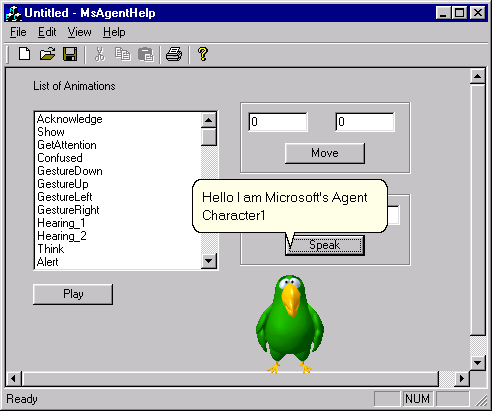
Sample Screen of the test application
The MFC Wrapper: CMsAgentWrapper
CMsAgentWrapper does not have a base class. A
CMsAgentWrapper
object consists of a
CAgentCtlEx MS Agent.
Data Members
CAgentCtlEx m_obAgent - the the Agent Control Object.
CStringArray m_szAnimationsArray - an array of supported Animations.
BOOL m_bStopBeforePlay - determines whether Previous Animation should
be stopped before playing next Animation
BOOL m_bAgentReady - determines whether the Agent Character Loaded.
Construction/Destruction
CMsAgentWrapper();
virtual ~CMsAgentWrapper();
Initialization and Cleanup
BOOL Create(UINT uId, CWnd *pParentWnd = NULL, DWORD dwStyle = WS_CHILDWINDOW, BOOL bRaiseRequestErrors = FALSE);
- Creates the MS Agent Wrapper control for the given id.
BOOL Exit();
- Closes the Agent Control.
BOOL LoadCharacter(CString pszCharFilename);
- Loads a Character File. (Note: - After installation characters will be available in
your $Windows\MSAgent\Chars directory)
BOOL Move(int iX, int iY);
- Moves the Microsoft Agent Character Absolute screen coordinated X,Y Location
taking into account the agent size.
BOOL Speak(CString szSpeakText, BOOL bBalloonEnabled = TRUE, BOOL bBalloonSizeToText = TRUE, BOOL bBalloonAutoPace = TRUE, BOOL bBalloonAutoHide = TRUE);
- The specified text is shown in a message box and if a sound card and Text to speech support
is installed the given text is spoken out. Setting Auto Pace to FALSE makes the text
displayed in the message box appear at once rather than a word at a time.
BOOL SetSoundEffectsOn(BOOL bSoundEffectsOn = TRUE);
- Sets sound support for the agent.
BOOL Stop();
- Requests the Agent to stop animations.
BOOL Show();
- Requests the Agent Server to show the selected character.
BOOL Hide();
- Requests the Agent Server to hide the selected character.
BOOL ActivateApp(BOOL bActive);
- Requests the Agent Server to hide/select the selected character. This function is ideal
to be used to activate and deactivate the Agent when the parent activates and deactivates.
LPCTSTR GetCharacter>();
- Gets the Name of the Character not correctly implemented yet.
void SetStopBeforePlay(BOOL bStopBeforePlay = TRUE);
- Decides whether the previous animation should be stopped before playing the next animation.
BOOL GetStopBeforePlay();
- Retrieves the setting specifying whether previous animation should be stopped before
playing the next animation.
int GetSizeOfAnimations();
- Retrieves the number of supported animations for the given Microsoft Agent Control.
CString GetAnimationIndex(int i);
- Retrieves the name of the specified supported animations by index.
BOOL Play(int iAnim = 0, BOOL bStop = TRUE);
- Plays the Animation at the specified index.
bStop specifies whether the
previous animation has to be stopped before playing the current animation.
Additional Resources



 General
  News
News  Suggestion
  Question
  Bug
Bug  Answer
  Joke
Joke  Praise
  Rant
Rant  Admin
Admin 


 Submit an article or tip


