Introduction
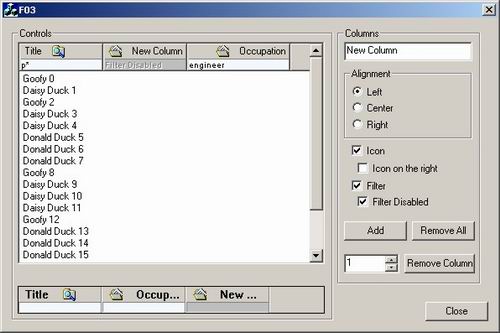
CListCtrl is my preferred control. Most of the times I use it in 'report' mode, because it's a pretty way to show 'rows of data' that user can easily scroll, sort, view. But often I need a way to let user choose, which data are meaningful for him. You see, there is a nice HDS_FILTERBAR on MSDN... but it was not there when I needed it! So, here is the CFilterHeaderCtrl, that you can use alone or within a CFilterListCtrl.
CFilterHeaderCtrl
This control is derived from a CHeaderCtrl and is owner drawn. Here you can see the notification messages fired from the control to the parent window:
#define    FLCN_FILTERCHANGING 101
#define    FLCN_FILTERCHANGED 102
#define    FLCN_SHOWINGEDIT 103
#define    FLCN_BEGINFILTEREDIT 104
#define    FLCN_ENDFILTEREDIT 105
FLCN_FILTERCHANGING and FLCN_FILTERCHANGED are called before and after a filter is changed by the user. Here you can prevent a filter change. The message handler will receive the following struct:
struct NMFILTERHDR : public NMHDR
{
char* szText;
};
FLCN_SHOWINGEDIT is called when the edit control is about to be shown.
FLCN_BEGINFILTEREDIT and FLCN_ENDFILTEREDIT are called when the user start editing one or more filters, moving arount with the TAB key. In the sample code, you can see how to track how many filters have been changed and in that moment you can reload the list, without having to reload for every filterchange event.
For every column you add, you can choose one of the following styles:
#define FILTER_NONE                0
#define FILTER_ENABLED             1
#define FILTER_DISABLED            2
CFilterListCtrl
Instead of using the cFilterHeaderCtrl, you will find more useful to replace your CListCtrl with the CFilterListCtrl. The CFilterListCtrl will replace the standard header control with the CFilterHeaderCtrl and will forward to the parent, the notification messages.
Conclusion
I'm sure that you will find more answer to your questions looking around in the sample code. In the sample project you have to add your own code to reload the list!!!
Many many thanx to CodeProject and CodeGuru people for the many many articles on owner drawn and custom control implementation. Have fun!



 General
  News
News  Suggestion
  Question
  Bug
Bug  Answer
  Joke
Joke  Praise
  Rant
Rant  Admin
Admin 


 Submit an article or tip


