Introduction
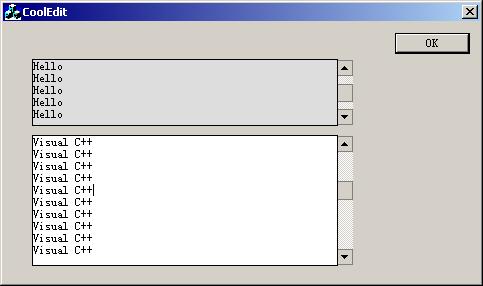
I wanted a focus-sensitive Editbox to make my GUI program more attractive. I found one in codetools, which was distributed by Warren J. Hebert. However I downloaded it and found it worked perfectly only when the Editbox is single line style. But my application wants the EditBox to be a multi-line .So I wrote one! This is CEditEx with the features below:
- Change the back color of an edit box when it gets the focus, and back when it loses the focus.
- Use the flat scroll bar instead of the default behavior.
The Implemention of this class:
The following snippets are used to track to mouse
CEditEx::OnMouseMove(UINT nFlags, CPoint point)
{
CEdit::OnMouseMove(nFlags, point);
if (m_bIsFocused)
return;
if (GetCapture() != this)
{
m_bMouseOver = TRUE;
SetCapture();
Invalidate(TRUE);
}
else
{
CRect rect;
GetClientRect(&rect);
if (!rect.PtInRect(point))
{
m_bMouseOver = FALSE;
Invalidate(TRUE);
ReleaseCapture();
}
}
}
void CEditEx::OnSetFocus(CWnd* pOldWnd)
{
CEdit::OnSetFocus(pOldWnd);
m_bMouseOver=TRUE;
Invalidate(TRUE);
}
void CEditEx::OnKillFocus(CWnd* pNewWnd)
{
CEdit::OnKillFocus(pNewWnd);
m_bMouseOver=FALSE;
Invalidate(TRUE);
}
Change the scrollbar appearance
ON_CONTROL_REFLECT(EN_VSCROLL, OnVscroll)
void CEditEx::OnVscroll()
{
InitializeFlatSB(GetSafeHwnd());
}
ON_WM_CTLCOLOR_REFLECT()
CEditEx::CEditEx()
{
m_bMouseOver = FALSE;
brHot.CreateSolidBrush(RGB(255, 255, 255));
br.CreateSolidBrush(RGB(221, 221, 221));
}
HBRUSH CEditEx::CtlColor(CDC* pDC, UINT nCtlColor)
{
if (m_bMouseOver)
{
pDC->SetBkColor(RGB(255, 255, 255));
return brHot;
}
else
{
pDC->SetBkColor(RGB(221, 221, 221));
return br;
}
}
To use the CEditEx class, you should do as follows:
- Add an
EditBox into your application. Change the style to be multi-line, No border, Want Return, Vertical Scrollbar.
- In your application add a member variable derived from
CEditEx. See, for example testDlg.cpp:
CEditEx m_ctlEdit1;
Points of Interest
Now I'm a senior student of WuHan university in China. I program with MFC, TCP/IP, PHP, javascript, C, HTML and I am also interested in Network Security,DirectX etc.
A Guy majors in Computational Mathmatics in WuHan University ,China.
Loving programming with MFC,ATL/WTL,COM,WinSock,PHP
DirectX.



 General
  News
News  Suggestion
  Question
  Bug
Bug  Answer
  Joke
Joke  Praise
  Rant
Rant  Admin
Admin 


 Submit an article or tip

