Introduction
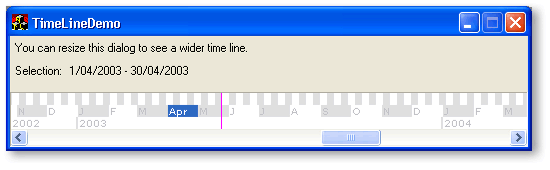
CTimeLineCtrl provides an alternative way of selecting a regularly recurring date range.
Features
- one-click date range selection at different granularities (eg week, month, year)
- display today's date highlighted
- year digits kept in view
- display n 'date-range bands' in whatever ordering is required
- scroll limits can be set
Using CTimeLineCtrl in a WTL Application
This control was developed using VS.NET, WTL 7, and the Feb 2003 Platform SDK. It has been tested under WindowsXP only.
To use CTimeLineCtrl in your application:
- Copy the following files to your application directory:
- atlgdix.h (it's included in the zip files, but you can also download it here)
- TimeLineScroll.h
- TimeLineCtrl.cpp
- TimeLineCtrl.h
- TimeLineBand.cpp
- TimeLineBand.h
If you want to use the Year, Month, or Week bands, also add the following files:
- TimeLineBandImpl.cpp
- TimeLineBandImpl.h
- Add these files to your project.
- If you're not already using them, add <atlcomtime.h> and <atltypes.h> to your <stdafx.h> file.
- Insert
#include "TimeLineCtrl.h" prior to the definition of the parent window class.
- Add a new member variable to the parent window class. The class will be
CTimeLineCtrl - give it any name you desire.
- Add code at an appropriate place (eg
OnCreate or OnInitDialog) to create the control window.
Here is an example of how to create the control.
LRESULT
CMainDlg::OnInitDialog(UINT , WPARAM , <BR> LPARAM , BOOL& )
{
...
m_wndTimeLine.Create(m_hWnd, 0, 0, WS_CHILD | WS_VISIBLE | WS_HSCROLL,
WS_EX_STATICEDGE, IDC_TIMELINE);
m_wndTimeLine.AutoPosition();
...
}
You can also add m_wndTimeLine.AutoPosition() to your OnSize handler to keep the control at the top or bottom of the parent window.
Implementation Details
This control is implemented using a combination of several classes:
CTimeLineScroll<T>
This is a mix-in class that handles the WM_HSCROLL message. If you need to manage scrolling through a range of dates, you can use this class on it's own. For example:
class CMyWindow :
public CWindowImpl<CMyWindow>
public CTimeLineScroll<CMyWindow>
{
...
BEGIN_MSG_MAP(CMyWindow)
...
CHAIN_MSG_MAP(CTimeLineScroll<CMyWindow>)
END_MSG_MAP()
...
void DoScroll(int cxDelta);
};
CTimeLineBand
This is an abstract base class used by CTimeLineCtrl to handle date-range rendering and selection.
I've included implementations for year, month, and week ranges (ie CTimeLineYearBand, CTimeLineMonthBand, and CTimeLineWeekBand respectively). If you want to add your own custom date-range bands, these will hopefully give you a good place to start.
Note that in this design, these classes are internal implementation classes for use by CTimeLineCtrl. Users of CTimeLineCtrl don't need to be aware of their existence.
CTimeLineCtrl
This is a CWindowImpl-derived class that acts as a host for instances of CTimeLineBand-derived classes. It mixes in CTimeLineScroll to handled WM_HSCROLL, and delegates rendering requests to its collection of bands.
The collection of bands is kept in a std::deque. The order in which bands are displayed in the control follows the ordering of bands in this collection.
Incidentally, in this implementation, I chose to create the different bands on the heap (preferring to keep the implementation details of the bands hidden from users of the control). With a few changes, you could have them as member variables of this (or a derived) control instead. Just make sure you modify the memory management code in OnDestroy if you do.
Here's an example of adding a band to CTimeLineCtrl:
LRESULT
CTimeLineCtrl::OnCreate(LPCREATESTRUCT )
{
...
AddBand(new CTimeLineWeekBand(*this));
...
}
Enjoy!
Acknowledgements
- Bjarke Viksoe - atlgdix.h (used for flicker-free drawing)
This member has not yet provided a Biography. Assume it's interesting and varied, and probably something to do with programming.



 General
  News
News  Suggestion
  Question
  Bug
Bug  Answer
  Joke
Joke  Praise
  Rant
Rant  Admin
Admin 


 Submit an article or tip


