Click here to Skip to main content

Using MatLab Add-in for MS Visual Studio 6

By , 4 Jul 2003
 

Sample Image - MATLAB_ADD_IN.jpg

Introduction

Following the line of the article posted by A.Riazi, Solving engineering problem using MATLAB C API, I will show in this small example how to use M Functions inside our VC++ 6 project.

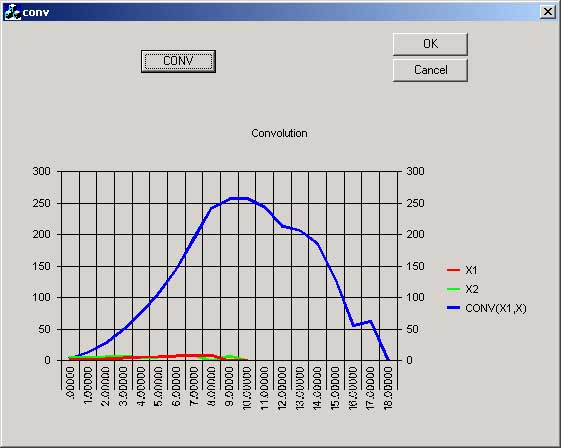
The project calculates the convolution of two vectors, and shows the resulting vector in the MsChart control. The function that performs the convolution is written in MatLab and then through the MatLab Add-in converted to C code ready to be used inside our app.

Requirements

You need Visual Studio 6 and MatLab Release 12 installed with the MatLab C Library and Matlab Compiler.

Installing the MatLab Add-in

The add-in automates the integration of M-files into Visual C++ projects. The add-in for Visual Studio is automatically installed on your system when you run either mbuild -setup or mex -setup and select Microsoft Visual C/C++ version 6. In order to use the add-in you must follow these steps:

  • Start MatLab, in the prompt type mbuild -setup
  • Follow the menus and choose MS Visual C++6.0.
  • Type the following commands in the matlab prompt :

    cd (prefdir)
    mccsavepath

These commands save the MatLab path to a file called mccpath in your user preferences directory (prefdir), ussually inside your documents and settings file. The path is used by the add-in because it runs outside Matlab and there is no other way for it to determine your Matlab path. If you add new directories to your Matlab path you will have to rerun this command if you want the add-in to see them.

  • Configure the Matlab Add-in for Visual Studio 6 to work within MSVisual C++.
    • Open MSVisualC++.
    • Select Tools -> Customize from the MSVC menu.
    • Click on the Add-ins and Macro Files tab.
    • Check MATLAB for Visual Studio on the Add-ins and Macro Files list and click Close.

The floating MATLAB add-in for Visual Studio toolbar appears. The checkmark directs MSVC to automatically load the add-in when you start MSVC again.

Calculating the convolution in Matlab

We will write a simple function in MatLab that will perform the convolution of two vectors:

In1 and In2 and store the result in out.

We actually can use any matlab built-in function or toolbox function inside our function here we use only the function conv for simplicity.

function out=MyFunc(In1,In2)
%Returns the convolution of vector IN1 and IN2
out=conv(In1,In2);

Save the function with the name MyFunc.m

Writing the Application

Use the MFC AppWizard (exe) option to generate a Dialog Based Application and call it conv. Create a Button which will calculate the convolution of two given vectors.

Add the code below to the button's Message Handler.

//x1 and x2 are the input array to do the computation
//res will have the result, we already know that the length 
//of the convolution of 2 vectors is (length(x1)+length(x2)-1)=19
double x1[]={1,2,3,4,5,6,7,8,9,0};
double x2[]={4,5,6,7,4,5,8,9,0,7};
double res[19];

//create the arrays that will be passed to MyFunc
mxArray* In1;
mxArray* In2;
mxArray* Out;

//we make them Real and have 10 values
In1=mxCreateDoubleMatrix(1,10,mxREAL);
In2=mxCreateDoubleMatrix(1,10,mxREAL);

//this make In1=x1;In2=x2
memcpy(mxGetPr(In1),x1,10*sizeof(double));
memcpy(mxGetPr(In2),x2,10*sizeof(double));

//Call to MyFunc.m that return the convolution of In1 and In2
Out=mlfMyFunc(In1,In2);

//now we have the result(Out) in a double array 'res'
memcpy(res,mxGetPr(Out),19*sizeof(double));

//Destroy matrices
mxDestroyArray(Out);
mxDestroyArray(In1);
mxDestroyArray(In2);

Copy MyFunc.m into your VC++ project directory. Now go to the MatLab Add-in and click the .m++ (Add m-files to current project) button:

Sample screenshot

Select Windows Console Exe from the Combo Box and check Generate main file and debug mode. Press OK.

Then select the MyFunc.m file and click Open. After a while you will see new files added to your project.

Sample screenshot

Under MATLAB M-files you will see our MyFunc.m, you can even edit it from inside Visual C++. Under MATLAB C/C++ are MyFunc.c and MyFunc_main.c, generated by the MatLab Compiler. And all the headers needed by the compiler.

We can't build the app yet, we must add the following lines to convDlg.cpp:

#include "matlab.h"
#include "MyFunc.h"

Now the project should be built without any problem.   

Points of Interest

The steps described here don't include the MSChart part, you can see it from the source code, but you can see that the calculation is done by placing a  breakpoint inside the button message handler and checking the value of the res vector after the line:

memcpy(res,mxGetPr(Out),19*sizeof(double));

Well I hope this simple article be interesting for MatLab lovers, this is the first article I wrote, so I apologize if it is not clear enough. I will be glad to explain anything if you ask me. Greetings.

License

This article, along with any associated source code and files, is licensed under The Code Project Open License (CPOL)

About the Author

Cambalindo
Software Developer Motorola
United States United States
Member
Daniel Cespedes is now working on his final project to get the Electrical Engineering degree at the National University of Technology in Cordoba Argentina. He is developing a Computerized system for the study of Human Echolocation, the ability to detect obstacles with the echoes of self generated sounds.(yes like bats!!) at the CINTRA (Centro de Investigación y Transferencia Acústica).He uses MsVisual C++ 6 as a developing tool. He also work at the Software Research Lab at the University.
He comes from Sta.Cruz de la Sierra-Bolivia a paradise in SouthAmerica´s heart, where you can find pure air, nature contact, happy people, beautiful women etc.


Sign Up to vote   Poor Excellent
Add a reason or comment to your vote: x
Votes of 3 or less require a comment

Comments and Discussions

 
You must Sign In to use this message board.
Search this forum  
    Spacing  Noise  Layout  Per page   
AnswerRe: Help! Wrong Input Parameter ?!?memberwsquare8 May '05 - 5:38 
hi i discovered that my function prototype contains more than a parameter.. but i have absolutely no idea why is it so. Do you have any idea?
 
mxArray * mlfMagic(mxArray * * V, mxArray * * thm, mxArray * * r2e,
mxArray * z, mxArray * nn, mxArray * r2, mxArray * q, mxArray * r1,
mxArray * M, mxArray * th0, mxArray * p0, mxArray * lifelength,
mxArray * mu)
 
do not understand why are there so many input paramters required now... when i only need one..
GeneralProblem with ur code...Plz HLP!!!memberviveksundaram6 Apr '05 - 2:22 
Sir,
 
These are the errors i receive when i build ur project... Pls help!!!
 
ibmatpm.lib(dblmtrx.o) : warning LNK4044: unrecognized option "alternatename:__imp_??$?6U?$char_traits@D@std@@@std@@YAAAV?$basic_ostream@DU?$char_traits@D@std@@@0@AAV10@PBD@Z=__imp_??6std@@YAAAV?$basic_ostream@DU?$char_traits@D@std@@@0@AAV10@PBD@Z"
; ignored
libmatpm.lib(varargin.o) : warning LNK4044: unrecognized option "alternatename:__imp_??$?6U?$char_traits@D@std@@@std@@YAAAV?$basic_ostream@DU?$char_traits@D@std@@@0@AAV10@PBD@Z=__imp_??6std@@YAAAV?$basic_ostream@DU?$char_traits@D@std@@@0@AAV10@PBD@Z
"; ignored
libmatpm.lib(mcccpp.o) : warning LNK4044: unrecognized option "alternatename:__imp_??$?6U?$char_traits@D@std@@@std@@YAAAV?$basic_ostream@DU?$char_traits@D@std@@@0@AAV10@PBD@Z=__imp_??6std@@YAAAV?$basic_ostream@DU?$char_traits@D@std@@@0@AAV10@PBD@Z";
ignored
libmatpm.lib(init.o) : warning LNK4044: unrecognized option "alternatename:__imp_??$?6U?$char_traits@D@std@@@std@@YAAAV?$basic_ostream@DU?$char_traits@D@std@@@0@AAV10@PBD@Z=__imp_??6std@@YAAAV?$basic_ostream@DU?$char_traits@D@std@@@0@AAV10@PBD@Z"; i
gnored
libmatpm.lib(stdexcpt.o) : warning LNK4044: unrecognized option "alternatename:__imp_??$?6U?$char_traits@D@std@@@std@@YAAAV?$basic_ostream@DU?$char_traits@D@std@@@0@AAV10@PBD@Z=__imp_??6std@@YAAAV?$basic_ostream@DU?$char_traits@D@std@@@0@AAV10@PBD@Z
"; ignored
libmatpm.lib(nsubarry.o) : warning LNK4044: unrecognized option "alternatename:__imp_??$?6U?$char_traits@D@std@@@std@@YAAAV?$basic_ostream@DU?$char_traits@D@std@@@0@AAV10@PBD@Z=__imp_??6std@@YAAAV?$basic_ostream@DU?$char_traits@D@std@@@0@AAV10@PBD@Z
"; ignored
libmatpm.lib(arrayidx.o) : warning LNK4044: unrecognized option "alternatename:__imp_??$?6U?$char_traits@D@std@@@std@@YAAAV?$basic_ostream@DU?$char_traits@D@std@@@0@AAV10@PBD@Z=__imp_??6std@@YAAAV?$basic_ostream@DU?$char_traits@D@std@@@0@AAV10@PBD@Z
"; ignored
libmatpm.lib(matmtxif.o) : warning LNK4044: unrecognized option "alternatename:__imp_??$?6U?$char_traits@D@std@@@std@@YAAAV?$basic_ostream@DU?$char_traits@D@std@@@0@AAV10@PBD@Z=__imp_??6std@@YAAAV?$basic_ostream@DU?$char_traits@D@std@@@0@AAV10@PBD@Z
"; ignored
libmatpm.lib(handler.o) : warning LNK4044: unrecognized option "alternatename:__imp_??$?6U?$char_traits@D@std@@@std@@YAAAV?$basic_ostream@DU?$char_traits@D@std@@@0@AAV10@PBD@Z=__imp_??6std@@YAAAV?$basic_ostream@DU?$char_traits@D@std@@@0@AAV10@PBD@Z"
; ignored
libmatpm.lib(feval.o) : warning LNK4044: unrecognized option "alternatename:__imp_??$?6U?$char_traits@D@std@@@std@@YAAAV?$basic_ostream@DU?$char_traits@D@std@@@0@AAV10@PBD@Z=__imp_??6std@@YAAAV?$basic_ostream@DU?$char_traits@D@std@@@0@AAV10@PBD@Z";
ignored
libmatpm.lib(varargout.o) : warning LNK4044: unrecognized option "alternatename:__imp_??$?6U?$char_traits@D@std@@@std@@YAAAV?$basic_ostream@DU?$char_traits@D@std@@@0@AAV10@PBD@Z=__imp_??6std@@YAAAV?$basic_ostream@DU?$char_traits@D@std@@@0@AAV10@PBD@
Z"; ignored
libmatpm.lib(dblmtrx.o) : error LNK2001: unresolved external symbol __ftol2
libmatpm.lib(init.o) : error LNK2001: unresolved external symbol __ftol2
libmatpm.lib(init.o) : error LNK2001: unresolved external symbol "__declspec(dllimport) ??$?6U?$char_traits@D@std@@@std@@YAAAV?$basic_ostream@DU?$char_traits@D@std@@@0@AAV10@PBD@Z" (__imp_??$?6U?$char_traits@D@std@@@std@@YAAAV?$basic_ostream@DU?$cha
r_traits@D@std@@@0@AAV10@PBD@Z)
libmatpm.lib(handler.o) : error LNK2001: unresolved external symbol "__declspec(dllimport) ??$?6U?$char_traits@D@std@@@std@@YAAAV?$basic_ostream@DU?$char_traits@D@std@@@0@AAV10@PBD@Z" (__imp_??$?6U?$char_traits@D@std@@@std@@YAAAV?$basic_ostream@DU?$
char_traits@D@std@@@0@AAV10@PBD@Z)
libmatpm.lib(nsubarry.o) : error LNK2001: unresolved external symbol "void * __cdecl operator new[](unsigned int)" (??_U@YAPAXI@Z)
libmatpm.lib(matmtxif.o) : error LNK2001: unresolved external symbol "void * __cdecl operator new[](unsigned int)" (??_U@YAPAXI@Z)
libmatpm.lib(feval.o) : error LNK2001: unresolved external symbol "void * __cdecl operator new[](unsigned int)" (??_U@YAPAXI@Z)
libmatpm.lib(handler.o) : error LNK2001: unresolved external symbol "protected: virtual class std::fpos __thiscall std::strstreambuf::seekoff(long,int,int)" (?seekoff@strstreambuf@std@@MAE?AV?$fpos@H@2@JHH@Z)
libmatpm.lib(handler.o) : error LNK2001: unresolved external symbol "void __cdecl operator delete[](void *)" (??_V@YAXPAX@Z)
libmatpm.lib(feval.o) : error LNK2001: unresolved external symbol "void __cdecl operator delete[](void *)" (??_V@YAXPAX@Z)
conv.exe : fatal error LNK1120: 5 unresolved externals
Error executing link.exe.
Build : warning : failed to (or don't know how to) build 'E:\trabajos\daniel\practicasC++\conv\MyFunc.m'
 
conv.exe - 11 error(s), 12 warning(s)
 
Thanks,
Vivek

GeneralRe: Problem with ur code...Plz HLP!!!memberCambalindo6 Apr '05 - 3:35 
Hi,
Did you installed the Matlab add-in successfully?
it seems that you don't have matlab installed.
because Visual Stoudio can not locate the matlab libraries.

 
Daniel Cespedes
 
"There are 10 types of people, those who understand binary and those who do not"
"Santa Cruz de la Sierra Paraiso Terrenal!"
 
daniel.cespedes@ieee.org
GeneralMatlab 7.0memberDima889 Dec '04 - 3:56 
Has the Matlab 7.0 function "mccsavepath"? If no, what similar function exists in Matlab 7.0?
GeneralRe: Matlab 7.0memberCambalindo9 Dec '04 - 4:07 
Sorry I do not know, I have version 6.1 and it has that function.
I suppose Matlab 7 should have that function.

 
Daniel Cespedes
 
"There are 10 types of people, those who understand binary and those who do not"
"Santa Cruz de la Sierra Paraiso Terrenal!"
 
daniel.cespedes@ieee.org
GeneralRe: Matlab 7.0susspetitbitume16 Jan '05 - 6:05 
I work with matlba 7.0 and I have the same problem.
Is there any equivalent to the Visual Studio add-in (included in matlab 6.1) in the 7.0 version ?
If not, how can I compile m code from my visual C++ compiler ?
Questionhow to set the compiler path?memberMuhammad Naveed8 Dec '04 - 5:49 
hi,
i am working in matlab 7. whenever i build the component an error comes. error description is: An error ocurred while shelling out to mbuild (error code = 1).
Unable to build executable.
can somebody tell me how to remove the error.

 
This will appear at the
end of messages you post
to the Code Project
AnswerRe: how to set the compiler path?memberMadhukarGM23 Mar '05 - 9:58 
Hi,
 
I saw this FAQ and was very Happy. I am facing exactly the same problem mentioned here. I am using Matlab 6.5 and when I type mbuild -setup on my command prompt I see the same message.
 
If somebody knows the solution for this. Kindly email me.
Thanks and regards,
Madhukar.G.M
GeneralPlzz help in my code for plotmemberhssuma16 Nov '04 - 19:42 
Hello,
I have a m-file which plots a graph taking inputs from a dat file. So, i have called the m file just as mlfbaffle in the button message handler. The code is
 
double res[19];
mxArray* out;
out = mlfbaffle();
memcpy(res,mxGetPr(out),19*sizeof(double));
mxDestroyArray(out);
 
But i get error as
 
:\work\convu\convudlg.cpp(178) : error C2065: 'mlfbaffle' : undeclared identifier
c:\work\convu\convudlg.cpp(178) : error C2440: '=' : cannot convert from 'int' to 'struct mxArray_tag *'
Conversion from integral type to pointer type requires reinterpret_cast, C-style cast or function-style cast
baffle.c
 
I have followed the instructions as given in this link but the error persists.. Plz help...
 
I can run this code in matlab but not using MFC...
 
function out = baffle()
x1 = load('d:\su_mat\t0');
x2 = load('d:\su_mat\t01');
x3 = load('d:\su_mat\t012');
x4 = load('d:\su_mat\t0123');
x5 = load('d:\su_mat\t01234');
y1 = load('d:\su_mat\f0');
y2 = load('d:\su_mat\f01');
y3 = load('d:\su_mat\f012');
y4 = load('d:\su_mat\f0123');
y5 = load('d:\su_mat\f01234');
r1 = load('d:\su_mat\reflectivity.dat');
%plot(y1,x1,y2,x2)
plot(y1,x1,y2,x2,y3,x3,y4,x4,y5,x5) %CHANGE
grid on;
xlabel(' T/(2*H) ');
ylabel( ' F(r) / F(i) ');
out = sprintf('1')
 

PLzz help
Regards,
 

Generalusing plotmemberArkadeep Sett1 Sep '04 - 1:00 
Dear sir,
I've just started learning how to call a MATLAB funtion from MSVC++.I've tried with a lots of funtions that doesn't require graphics.It goes fine,but I got stuck with the 'plot' function.The program I've written is as follows:
 

#include "matlab.hpp"
#include "stdafx.h"
#include "libmwsglm.h"
 
//Add C++ Math Library to project
#pragma comment(lib, "libmatpm.lib")
#pragma comment(lib, "libmx.lib")
#pragma comment(lib, "libmatlb.lib")
#pragma comment(lib, "libmat.lib")
#pragma comment(lib, "libmmfile.lib")
#pragma comment(lib, "libmatpm.lib")
#pragma comment(lib, "sgl.lib")
 
int main()
{
const double pi = 3.1415926;
const double Fc = 1;
const double T = 1/Fc;
mwArray t(0.0,T/16,T);
mwArray x = cos(2*pi*Fc*t);
x.Print("x");
plot(t,x);
return 0;
}
 
It gives neither compilation error nor linker error.The vector x is printed ,but after that the program ends with a messege "abnormal program termination" without any figure.
Can you please help me to fix the probelem
Waiting for ur kind reply.
 
Thanks and regards
Arkadeep Sett
GeneralGUIsussAnonymous21 Aug '04 - 20:21 
1) Can i hav a complete code for Matlab 6.5 GUI open file dialog box that is functional.i can't open the selected file from the dialog box?
 
2) How can i pass the selected file from the dialog box as an argument to a function?thanks.
GeneralRe: GUImemberCambalindo23 Aug '04 - 9:14 
1)What kind of file are you trying to open?
2)You pass the name and path of the selected file with de uigetfile function:
[FileName,Path]=uigetfile('*.m','title');
 
Daniel Cespedes
 
"There are 10 types of people, those who understand binary and those who do not"
"Santa Cruz de la Sierra Paraiso Terrenal!"
 
daniel.cespedes@ieee.org
QuestionHow Can I?....memberTheBobik11 Jul '04 - 6:30 
Loved the example thanx.
I need an implementation of a matlab function called "decimate", I guess its from the signal processing toolbox , I tried to add
Mydecimate.m to the project like in the example. Lots of files where added to the project by the matlab Add-in, the compilation went very well but during the linking process I got exactly 2450 unresolved externals (and 17 warnings -that made me very happy)
any way...
Am I doing something terribly wrong , I'm newbie in MATLAB and is there a way to know what lib's to link to resolve these errors (or perhaps link them all)
Enlighted people of the world please advise a lost soul Cry | :(( .
Thanks a lot!
Generalmatlab => C++ => GAMSmemberZenón10 Jun '04 - 6:28 
I want to do an optimization in GAMS ( a program of optimization). But I want to use an m-file. To do this I consider the use of Visual C++ 6.0. For use a C program from GAMS I have to compile this program with a .bat file (I can't use visual C++ directly). I want to know if posible compile the m-file in such way that I can use that program in other program without use the matlab library. I consider use COM, but I don't know how to use this in a C++ program. In the other hand, I want to know if it's possible to call a .exe program for a c/c++ program.

Questionhow can i compile this functionmemberdnqhung20 May '04 - 18:15 
this is my function
funtion a=FT1(b)
a=b*2;
funtion c=FT2(d)
e=FT1(d);
c=e*3;
 
i'm new to VC++,so can you show me clearly,or give me some code.
thank you

 
dnqhung
GeneralPressing the CONV buttonmemberBeth Armstrong20 May '04 - 10:49 
I downloaded the files, and followed steps to install the add-in and build the project and it runs just fine. However, when I press the CONV button the application exits with a code of 1. When I debug the OnConv() this occurs at the mxCreateDoubleMatrix() call ... any ideas what is going on? Thanks!
 
peter
GeneralMatlabsussmustafa samady23 Apr '04 - 8:58 
Dear Sir,
 
I'm control engineer student(M.S.).T work with MATLAB alot.
I have good skill in matlab.I live in Iran.I wanna know that can I
use my information to have a acception form othe university.
 

Best Regards
mustafa samadi

GeneralRe: MatlabmemberCambalindo23 Apr '04 - 9:21 
I don´t understand very well what do you want to do.
you want to change the university you go now?? is that so?
which University do you want to go? Please give me more details so I can help you..
cheers!!
 
Daniel Cespedes
 
"There are 10 types of people, those who understand binary and those who do not"
"Santa Cruz de la Sierra Paraiso Terrenal!"
 
daniel.cespedes@ieee.org
GeneralPlease ReplysussAnonymous18 Apr '04 - 18:41 
I have followed each and every step , when I open Myfunc.m file from MSVC after selecting Windows Console Exe .
ERROR Comes: MCC returned error code 1.
I have installed Matlab 6.5 , I don’t know whether Matlab C library is included with it or it is to be installed separately. I am doubtful that it may be the cause for this error.
When I build this application then following error comes:

Generalmex problemmemberawhan16 Apr '04 - 5:28 
i wrote a similar program :
 
m file : MyFunc.m
===========================
function out=MyFunc(a,b)
if ( a >= b)
out = a;
else
out = b;
end
========
 
in visual studio :
====================
#include
#include "matlab.h"
#include "MyFunc.h"
 

int main(void)
{
double aa = 2;
double bb = 5;
double outout;
 
mxArray *a;
mxArray *b;
mxArray *out;
 
a = mxCreateDoubleMatrix(1,1,mxREAL);
b = mxCreateDoubleMatrix(1,1,mxREAL);
 
memcpy(mxGetPr(a),aa,1*sizeof(double));
memcpy(mxGetPr(b),bb,1*sizeof(double));
 
out = mlfMyFunc(a,b);
 
memcpy(outout,mxGetPr(out),1*sizeof(double));
 
mxDestroyArray(out);
mxDestroyArray(a);
mxDestroyArray(b);
 
printf("The bigger of 2 and 5 is %f",outout);
 
return 0;

}
 
=====================
 
but i got the following error:
=====================
-------------------Configuration: humm - Win32 Debug--------------------
Compiling...
main.cpp
C:\FIRSTAPP\humm\main.cpp(19) : error C2664: 'memcpy' : cannot convert parameter 2 from 'double' to 'const void *'
There is no context in which this conversion is possible
C:\FIRSTAPP\humm\main.cpp(20) : error C2664: 'memcpy' : cannot convert parameter 2 from 'double' to 'const void *'
There is no context in which this conversion is possible
C:\FIRSTAPP\humm\main.cpp(22) : error C2065: 'mlfMyFunc' : undeclared identifier
C:\FIRSTAPP\humm\main.cpp(22) : error C2440: '=' : cannot convert from 'int' to 'struct mxArray_tag *'
Conversion from integral type to pointer type requires reinterpret_cast, C-style cast or function-style cast
C:\FIRSTAPP\humm\main.cpp(24) : error C2664: 'memcpy' : cannot convert parameter 1 from 'double' to 'void *'
There is no context in which this conversion is possible
Error executing cl.exe.
 
main.obj - 5 error(s), 0 warning(s)
========================
 
please help....
 
awhanpatnaik@rediffmail.com
GeneralRe: mex problemmemberCambalindo16 Apr '04 - 7:06 
Hi awhan:
try this...
Check the case of mlfMyFunc,, probably it is mlfMyfunc or mlfmyFunc()..
 
cheers..
 
Daniel Cespedes
 
"There are 10 types of people, those who understand binary and those who do not"
"Santa Cruz de la Sierra Paraiso Terrenal!"
 
daniel.cespedes@ieee.org
GeneralRe: mex problemmemberawhan16 Apr '04 - 7:29 
thanks daniel for the quick response
 
there are a couple of things i would point out:
 
1> the code in the earlier faulty the correct code is:
 
==================
 
#include
#include "matlab.h"
#include "func.h"
 
int main(void)
{
double *aa ; // had messed up here
double *bb ; // --do--
double *outout; //--do--
 
*aa = 2;
*bb = 5;
 
mxArray *a;
mxArray *b;
mxArray *out;
 
a = mxCreateDoubleMatrix(1,1,mxREAL);
b = mxCreateDoubleMatrix(1,1,mxREAL);
 
memcpy(mxGetPr(a),aa,1*sizeof(double));
memcpy(mxGetPr(b),bb,1*sizeof(double));
 
out = mlfFunc(a,b);
memcpy(outout,mxGetPr(out),1*sizeof(double));
 
mxDestroyArray(out);
mxDestroyArray(a);
mxDestroyArray(b);
 
printf("The bigger of 2 and 5 is %f",outout);
 
return 0;

}
 

======================
 

the m file is:
===================
function out=func(a,b)
if ( a >= b)
out = a;
else
out = b;
end
===================
 

now it all compiles fine but there is a linker error:
 
--------------------Configuration: a - Win32 Debug--------------------
Linking...
func_main.obj : error LNK2005: _main already defined in main.obj
a.exe : fatal error LNK1169: one or more multiply defined symbols found
Error executing link.exe.
 
a.exe - 2 error(s), 0 warning(s)
========================================
 

ne way out of this?????


awhanpatnaik@rediffmail.com
GeneralMCC returned error code 1.memberChivalrous11 Apr '04 - 19:44 
I have followed each and every step , when I open Myfunc.m file from MSVC after selecting Windows Console Exe .
ERROR Comes: MCC returned error code 1.
I have installed Matlab 6.5 , I don’t know whether Matlab C library is included with it or it is to be installed separately. I am doubtful that it may be the cause for this error.
Please help me.
Thanks a lot .
M.Adil Hayat Khan

GeneralRe: MCC returned error code 1.memberjeil29 May '06 - 22:17 
Did you find out how to solve it?
 
If you did, please let me know~~!Smile | :)
GeneralAddin CrashsussAnonymous2 Jan '04 - 0:41 
I have the little toolbar addin in VC++,and the M-file which runs from the Matlab "engine" in my debug directory.All was peachy till I tried to make a
shared dll,the mcc compiler crashed in my face.There has been no activity on this thread hope some1 takes a look soon.

General General    News News    Suggestion Suggestion    Question Question    Bug Bug    Answer Answer    Joke Joke    Rant Rant    Admin Admin   

Permalink | Advertise | Privacy | Mobile
Web01 | 2.6.130523.1 | Last Updated 5 Jul 2003
Article Copyright 2003 by Cambalindo
Everything else Copyright © CodeProject, 1999-2013
Terms of Use
Layout: fixed | fluid