Click here to Skip to main content
Licence 
First Posted 29 May 2003
Views 247,455
Bookmarked 92 times

Adding a CheckBox Column to a DataGrid

By | 29 May 2003 | Article
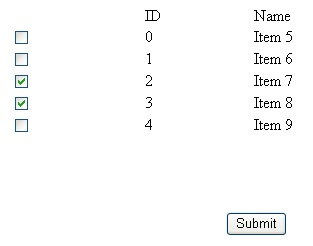
Shows how to add a checkbox column to a datagrid

Sample Image - DataGridCheckBoxCol.gif

Introduction

A recent project I was working on required a user to select a number of options from a list. Instead of using a mulit-select list box which didn't really fit into the design of the site we decided to make a reusable control that would add a checkbox to a DataGrid.

Using the code

To use the checkbox column in a DataGrid it's simply a matter of registering the tag at the top of the page:

<%@ Register TagPrefix="chkbox" Namespace="DataGridControls" 
    Assembly="DataGridCheckbox" %>

Then to add the checkbox column to the DataGrid:

<asp:DataGrid ID="dgTestGrid" Runat="server" AutoGenerateColumns=True 
    border="0" width="50%">
   <Columns>
   <chkbox:CheckBoxColumn/>
   </Columns>
  </asp:DataGrid>

The CheckBoxColumn class is pretty straight forward:

using System;
using System.Collections;
using System.Web;
using System.Web.UI;
using System.Web.UI.WebControls;
using System.Web.UI.HtmlControls;
namespace DataGridControls
{
 /// <summary>
 /// CheckBoxColumn Derives from DataGrid Column
 /// </summary>
 public class CheckBoxColumn : DataGridColumn
 {
    public CheckBoxColumn(): base()
      {
      }
  
      public override void InitializeCell(TableCell cell, 
        int columnIndex, ListItemType itemType) 
      {
           //let the base class initialize the cell
           base.InitializeCell(cell, columnIndex, itemType);


           //we don't want to add a checkbox to the header.
           if(    itemType == ListItemType.EditItem || 
            itemType == ListItemType.Item || 
            itemType == ListItemType.AlternatingItem || 
            itemType == ListItemType.SelectedItem){

                HtmlInputCheckBox checkbox = new HtmlInputCheckBox();
                //assign an ID that we can use to find the control later
                checkbox.ID = "checkboxCol";
                cell.Controls.Add(checkbox);
           }
      }
      public Int32[] SelectedIndexes 
      {
           get 
           {
                ArrayList selectedIndexList = new ArrayList();
                //iterate each DataGridItem and find our checkbox
                foreach( DataGridItem item in this.Owner.Items ) 
                {
                     HtmlInputCheckBox chkBox = 
                        (HtmlInputCheckBox) item.FindControl("checkboxCol");
     
                     //If it's selected then add it to our ArrayList
                     if ( chkBox != null && chkBox.Checked )  
                     {
                          selectedIndexList.Add( item.ItemIndex );
                     } 
     
                }
                return (Int32[])selectedIndexList.ToArray(typeof( 
                        System.Int32 ) );
           }
      }
      public object[] SelectedDataKeys 
      {
           get 
           {
                //Just iterate each of the selectedindexes and 
                //match it up to the datakey field
                ArrayList dataKeyList = new ArrayList();
                //make sure the datakeys have some values
                if(this.Owner.DataKeys.Count > 0)
                {
                     foreach( Int32 selectedIndex in SelectedIndexes ) 
                     {
     
                          object DataKey = 
                              (this.Owner.DataKeys[selectedIndex].ToString());
                          dataKeyList.Add(DataKey);
                     }
                }
                return (object[])dataKeyList.ToArray(typeof( object ) );
           }
   
      }
   }
}

The class exposes 2 properties: 

  • SelectedDataKeys: Returns an ArrayList with the DataKey values
  • SelectedIndexes: Returns an Int32[] with the selectedIndex values

To find out which checkbox has been selected:

//On our button's Onclick

protected void btnSubmit_Click(object sender, EventArgs e)
  {
   //Get our checkboxcolumn, we know it's position is 0
   CheckBoxColumn chkbox = (CheckBoxColumn) dgTestGrid.Columns[0];
   
   foreach(object datakeyfield in chkbox.SelectedDataKeys)
   {
    Response.Write(datakeyfield.ToString() + "<br>");
   }
  }

That's pretty much it, the DataKeyField of the DataGrid can be of any type. The sample I've included binds a DataTable to the DataGrid, you can change the DataKeyField from "ID" (int) to "Name" (string) to see the code working with different types.

License

This article has no explicit license attached to it but may contain usage terms in the article text or the download files themselves. If in doubt please contact the author via the discussion board below.

A list of licenses authors might use can be found here

About the Author

Dan_P

Web Developer

Australia Australia

Member

I've been programming for a few years now. I blog regularly at httpcode.

Sign Up to vote   Poor Excellent
Add a reason or comment to your vote: x
Votes of 3 or less require a comment

Comments and Discussions

 
You must Sign In to use this message board. (secure sign-in)
 
Search this forum  
 FAQ
    Noise  Layout  Per page   
  Refresh
GeneralPretty handy PinmemberJBress3:56 8 Jun '11  
GeneralC#Net2003 - Window Application Add CheckBox In DataGrid PinmemberTeeLeong8:56 4 Nov '09  
Generalbrowse button PinmemberMember 44423501:30 11 Apr '08  
GeneralI can't load the project PinmemberGFJ5:12 16 Jul '07  
GeneralThe same but for VB.NET PinmemberTheSilentman3:47 14 Feb '07  
I have to do the same thing but in Visual Basic .net, does someone has it? thanks.Roll eyes | :rolleyes:
QuestionWhat will happen if more one page data will it work properly PinmemberMember #75098521:06 21 Jan '07  
QuestionWhat about TemplateColumn PinmemberSenFo8:35 9 Jan '06  
AnswerRe: What about TemplateColumn Pinmemberjeganji18:45 14 Dec '06  
GeneralRe: What about TemplateColumn Pinmembererax dan22:17 13 Aug '08  
GeneralModified Code for Server-Side Select-DeselectAll Pinmembersikemullivan9:11 15 Oct '05  
GeneralRe: Modified Code for Server-Side Select-DeselectAll Pinmemberlowlandr5:01 30 Dec '05  
GeneralRe: Modified Code for Server-Side Select-DeselectAll PinmemberSilverSabre4:41 18 Nov '08  
GeneralError with Assembly Pinmembersikemullivan10:56 12 Oct '05  
General2 CHECKBOXCOLUMN in a Datagrid PinmemberOlog-hai10:08 29 Apr '05  
GeneralRe: 2 CHECKBOXCOLUMN in a Datagrid PinmemberSilverSabre0:18 18 Nov '08  
GeneralData type undefined PinmemberDustin Boston10:14 12 Jan '05  
GeneralCheckbox in datagrid Pinmemberfredo_lefran23:35 3 Jan '05  
Questioncheckbox initial value? PinmemberJ_T_C11:04 29 Jun '04  
AnswerRe: checkbox initial value? PinmemberSukim23:30 14 Aug '04  
GeneralRe: checkbox initial value? PinmemberSukim1:15 15 Aug '04  
Generalthe example will show error in VS.net 2003 Pinmemberhardyhe17:01 9 May '04  
GeneralRe: the example will show error in VS.net 2003 Pinmemberjsnook8:12 18 Jun '04  
GeneralSelect/Deselect All Pinmemberpeterwi12:43 19 Dec '03  
Generala bug .... Pinmembertopcn8:07 22 Jun '03  
GeneralRe: a bug .... Pinmemberjsnook7:03 18 Jun '04  

General General    News News    Suggestion Suggestion    Question Question    Bug Bug    Answer Answer    Joke Joke    Rant Rant    Admin Admin   

Use Ctrl+Left/Right to switch messages, Ctrl+Up/Down to switch threads, Ctrl+Shift+Left/Right to switch pages.

Permalink | Advertise | Privacy | Mobile
Web01 | 2.5.120529.1 | Last Updated 30 May 2003
Article Copyright 2003 by Dan_P
Everything else Copyright © CodeProject, 1999-2012
Terms of Use
Layout: fixed | fluid
