 |
|
 |
This is good to see what to do in the events.
But well, NodeToBeDeleted is useless.
string strItem = e.Item.ToString() makes no sense.
Use DoDragDrop(e.Item, DragDropEffects.Copy | DragDropEffects.Move) instead.
Then use e.Data.GetData(typeof(TreeNode)) to retrive it in the DragDrop event.
And of course the fact that you cannot move from one level to another is wiered but then you do your own kitchen.
Thanks to the author for taking time to contribute but in fact I don't think this is a very good example.
|
|
|
|
 |
|
 |
Morning,
Good Example! But does ASP.NET supports treeview/nodes Drag & Drop, if it is any help locating educational resources, examples,or hints would be appreciated.
Cheers,
ZEB
qzeb
|
|
|
|
 |
|
 |
Great article, works good in C#, but I'm having trouble figuring out why Microsoft
decided to only implement certain things in C#.net and VB.net?
As only one example is the FindNodeAt(e->X,e->Y) method which is absent from the C++.Net TreeView.
***(Update: I have since found the managed c++ function GetNodeAt(e->X,e->Y)***
***(Too much time spent staring at MSDN Class Libraries ***
***(I guess I missed it the 14 time through ) ***
There are ways around some of those limitations as I have found such as:
int index = e->Y/m_TreeView->ItemHeight;
m_TreeView->SelectedNode = m_TreeView->Nodes->item[index];
That small rant aside, every example I have found for inner-TreeView dragging
from C#.net or VB.net hasnt worked in C++.net. I'm pulling my hair out.
Any insight would be greatly appreciated!
-- modified at 17:56 Thursday 20th October, 2005
|
|
|
|
 |
|
 |
First of all I would like to thank everyone for their contributions.
If you drag and drop a node over itself, well actually over the empty space to its right (being within the node's row), the node disappears, so before the actual drop a check has to be inserted:
...
Position.X = e.X;
Position.Y = e.Y;
Position = treeView1.PointToClient(Position);
TreeNode DropNode = this.treeView1.GetNodeAt(Position);
if(DropNode != this.NodeToBeDeleted)
{
if (DropNode != null ...
Here is something that will make each node selected as you drag over it:
private void treeView1_DragOver(object sender, System.Windows.Forms.DragEventArgs e)
{
Position.X = e.X;
Position.Y = e.Y;
Position = treeView1.PointToClient(Position);
TreeNode DragOverNode = this.treeView1.GetNodeAt(this.Position);
this.treeView1.SelectedNode = DragOverNode;
-- modified at 16:17 Monday 29th August, 2005
|
|
|
|
 |
|
 |
Hello i found a bug in your code, If you try to add a new node from the root you get a nullRefException, so i changed the following line in your switch statment case 1:
case 1:
{
if(NodePt != null && NodePt == this.treeView1.SelectedNode)
{
TreeNode NewNode = new TreeNode();
NewNode.Text = "Node";
NewNode.Text += this.nNodeCount;
// ADD NODE TO TREEVIEW FROM ROOT
treeView1.Nodes.Add(NewNode);
nNodeCount ++;
}
break;
}
I am not sure if that might change the logic in a way that you didnt want the program to work,
Any way thanks for sharing your code, i found it useful
|
|
|
|
 |
|
 |
Hello!
With this extension it is possible to drag&drop all nodes (as in the other small extension), the draged nodes ar inserted below the Target Node, not as a sibling of it.
Christian
http://www.amlinger.de
private bool IsDescendant(TreeNode father, TreeNode needle)
{
bool result = false;
if(father.Nodes.Contains(needle))
return true;
foreach(TreeNode tn in father.Nodes)
{
result = IsDescendant(tn, needle);
if(result)
break;
}
return result;
}
private void treeView1_DragDrop(object sender, System.Windows.Forms.DragEventArgs e)
{
Position.X = e.X;
Position.Y = e.Y;
Position = treeView1.PointToClient(Position);
TreeNode DropNode = this.treeView1.GetNodeAt(Position);
if (DropNode != null && !(IsDescendant( this.NodeToBeDeleted, DropNode)) )
{
TreeNode DragNode = this.NodeToBeDeleted;
if(DropNode.Parent != null)
DropNode.Parent.Nodes.Remove(this.NodeToBeDeleted);
else DropNode.Nodes.Remove(this.NodeToBeDeleted);
DropNode.Nodes.Add(DragNode);
}
}
private void toolBar1_ButtonClick(object sender, System.Windows.Forms.ToolBarButtonClickEventArgs e)
{
NodePt = this.treeView1.SelectedNode;
switch(toolBar1.Buttons.IndexOf(e.Button))
{
case 0:
{
if(NodePt != null && NodePt == this.treeView1.SelectedNode)
{
TreeNode NewNode = new TreeNode();
NewNode.Text = "Node";
NewNode.Text += this.nNodeCount;
if(NodePt.GetNodeCount(false) != 0)
this.NodePt.Nodes.Insert(NodePt.GetNodeCount(false) , NewNode);
else
this.NodePt.Nodes.Add(NewNode);
nNodeCount ++;
}
}
break;
case 1:
{
if(NodePt != null && NodePt == this.treeView1.SelectedNode)
{
TreeNode NewNode = new TreeNode();
NewNode.Text = "Node";
NewNode.Text += this.nNodeCount;
this.NodePt.Parent.Nodes.Insert(NodePt.Index + 1 , NewNode);
nNodeCount ++;
}
}
break;
}
}
|
|
|
|
 |
|
 |
Hi,
I'm a native C++ programmer and this was my first entry point to C#. Thanks a lot for this example. I added some functionality s.th. it is possible to create more root nodes and drag and drop between different levels. Here's what I added/altered:
private void treeView1_DragDrop(object sender, System.Windows.Forms.DragEventArgs e)
{
// no changes here ...
if (DropNode != null && !isAncestor( this.NodeToBeDeleted, DropNode ))
{
TreeNode DragNode = this.NodeToBeDeleted;
if( this.NodeToBeDeleted.Parent != null )
this.NodeToBeDeleted.Parent.Nodes.Remove( this.NodeToBeDeleted );
else
this.treeView1.Nodes.Remove( this.NodeToBeDeleted );
if( DropNode.Parent != null )
DropNode.Parent.Nodes.Insert(DropNode.Index+1, DragNode);
else
this.treeView1.Nodes.Insert( DropNode.Index+1, DragNode );
}
}
}
// to prevent deadlocks when droping a node on its son
private bool isAncestor( TreeNode node1, TreeNode node2 )
{
if( node2.Parent == null ) return false;
return ( ( node1 == node2.Parent ) ? true : isAncestor( node1, node2.Parent ) );
}
private void toolBar1_ButtonClick(object sender, System.Windows.Forms.ToolBarButtonClickEventArgs e)
{
NodePt = this.treeView1.SelectedNode;
switch(toolBar1.Buttons.IndexOf(e.Button))
{
case 0:
// no changes here
case 1:
{
if(NodePt != null && NodePt == this.treeView1.SelectedNode)
{
TreeNode NewNode = new TreeNode();
NewNode.Text = "Sibling Node";
NewNode.Text += this.nNodeCount;
if( this.treeView1.SelectedNode.Parent != null )
{
this.NodePt.Parent.Nodes.Insert(NodePt.Index + 1 , NewNode);
}
else
{
this.treeView1.Nodes.Insert(NodePt.Index +1, NewNode );
}
nNodeCount ++;
}
}
break;
}
}
Hope you like it!
Regards!
|
|
|
|
 |
|
 |
in your example you stored the node that is being dragged before you call the DoDragDrop function, but I think you can simply pass it as an argument to the DoDragDrop function, and when the DragEnter/DragOver/DragDrop events fire, you can retrieve the Node from the Data property of the DragEventArgs using the GetData function.
|
|
|
|
 |
|
 |
this only gives the example for moving a node from one place to another.
I also need code which will copy the ndoe from one plce to another if you press ctrl and moves the node.
SARADHI
|
|
|
|
 |
|
 |
I think the help page titled "Performing Drag-and-Drop Operations in Windows Forms" in VS.Net talks about using the KeyState Property of DragEventArgs to handle CTRL, etc
|
|
|
|
 |
|
 |
Does anyone know how to handle scrolling while choosing a drop target? Essentially, what is the equivalent of
CTreeOleDropTarget::OnDragScroll()
in .NET?
|
|
|
|
 |
|
 |
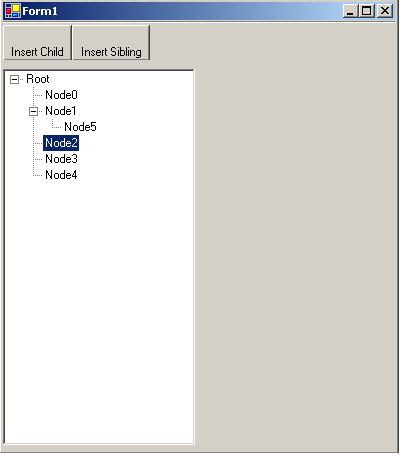
When I first used the app it seemed like it did not work. But then I kept looking around and I relized that it does not support dropping a node to any other level than its current level. So, this really allows you to re-order nodes.
It only took me a minute (or so) to add the logic to my app to support dropping anywhere in the tree. But your app gave me the start.
Thanks!
|
|
|
|
 |
|
 |
Hi John,
Can you send me the application you developed to my email upardhasaradhi@hotmail.com??
thanks in Advance
SARADHI;)
SARADHI
|
|
|
|
 |
|
 |
thanks muchly, it did exactly what i needed it to do.
now it just needs some improvements like moving to different root nodes and a line to show where it'll really end up.
|
|
|
|
 |
|
 |
I downlaoded it, built it and tried it.
Nothing much happens.
I can add child and sibling nodes, and when I drag one it gives me the dragging cursor, but I can't drop any of them anywheer and have it appear in a different tree.
Paul Watson wrote:
"At the end of the day it is what you produce that counts, not how many doctorates you have on the wall."
George Carlin wrote:
"Don't sweat the petty things, and don't pet the sweaty things."
Jörgen Sigvardsson wrote:
If the physicists find a universal theory describing the laws of universe, I'm sure the a**hole constant will be an integral part of that theory.
|
|
|
|
 |
|
 |
Well its quite surprising that u couldn't do it. Because i thoroughly tested the code. It moves drags the selected node & add it at index + 1 of the node at which it is dropped
& also the darg drop operation is allowed if the parents of both dragged & dropped node are similiar. U can remove this check from the code if u want to.
There could be another thing if u r draggin' a node jsut below the dropped node then it won't change its position 'cause its already at index + 1 of the node at which it is dropped.
I hope u get some help as how to test it
All the best
|
|
|
|
 |
