Everyone who knows me knows I am very enthusiastic about the Windows platform. Occasionally, someone will ask me why, or wouldn't I prefer to work with X-Windows or some other windowing platform. This article is for those and other people who have asked similar questions.
I started programming Windows with Windows 1.0 in the late 80s. At the time, there wasn't much good that could be said about Windows, but there were two things that jumped out at me as I was reading the documentation for the SDK (software development kit):
- Device context
- Mapping modes
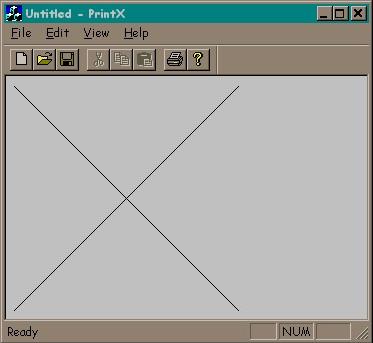
The best way to describe what these two concepts mean is with a little code sample called PrintX that draws an X that is 4 inches on a side.
I am using Visual C++ 6.0 to build this application. Using the MFC App Wizard to create a new program called PrintX and accepting all defaults, the following is the only code I changed:
void CPrintXView::OnDraw(CDC* pDC)
{
CPen pen( PS_SOLID, 0, RGB( 0, 0, 0 ));
CPen* pPenOld = pDC->SelectObject( &pen );
int nMap = pDC->SetMapMode( MM_HIENGLISH );
pDC->MoveTo( 1000, -1000 );
pDC->LineTo( 5000, -5000 );
pDC->MoveTo( 5000, -1000 );
pDC->LineTo( 1000, -5000 );
pDC->SetMapMode( nMap );
pDC->SelectObject( pPenOld );
}
Device Context
The parameter to the OnDraw method (pDC) is a pointer to the Device Context. The device context represents the surface of the device you will be drawing on. The magic of this is that surface is not limited to the screen or a memory context (as with the X-Windows graphics context), but can be a printer, a pen plotter, a bitmap, or any other device for which a windows driver can be written.
The first two lines of the OnDraw method are used to create a black pen:
CPen pen( PS_SOLID, 0, RGB( 0, 0, 0 ));
which is then selected into the device context:
CPen* pPenOld = pDC->SelectObject( &pen );
returning a pointer to the pen that was previously selected into the device context. When the line drawing commands are called later, they will be solid black lines defined by the pen.
Mapping Modes
The third line of the OnDraw method represents the second piece of magic:
int nMap = pDC->SetMapMode( MM_HIENGLISH );
which is setting the mapping mode and returning the previously selected mapping mode. In this case, the mapping mode is set to MM_HIENGLISH which means co-ordinates that we pass to the line drawing commands will be in 1000ths of an inch--a logical co-ordinate system instead of a physical co-ordinate system!
This is the reason OnDraw does not care what the actual physical device is. A 640x480 screen may be using 80 pixels per inch while an HP LaserJet 4 uses 600 pixels per inch. The magic of the Mapping Mode is this code works for either!
The Rest of the Code
All that remains is to draw the lines and return the device context to its original state. The negative values in the line drawing routines represent negative Y values that are a result of changing the mapping mode to MM_HIENGLISH. In this mapping mode, Y values increase as you go up as opposed to the default mapping mode of MM_TEXT where Y values increase as you go down. Since the window origin defaults to being at the upper left corner of the window, negative Y values were required to make the X visible. An alternative would have been to move the window origin.
Windows provides a method for rolling your on mapping modes, so it would also be possible to create a mapping mode similar to MM_HIENGLISH except the Y values increase as you go down.
Conclusion
Windows has added a lot of magic since the Windows 1.0 days, but these first two are still close to my heart.
In the mid-90s, I had to convert some of my Windows code to X-Windows/Motif and guess what - no Device Context and no Mapping Modes. I was not a happy fellow for the next few months.
Of all the new magic that has been added to Windows over the years (multi-threaded, symmetric multi-processing, COM, etc.), it is hard to overlook how little code I had to write to make PrintX work.
If this were an X-Windows project, drawing an X that is 4 inches on a side is not too hard (certainly more than I have here), but once you get to that point, you have to write another equally complex program to do the printing - X-Windows knows nothing about printers--time to get out the PostScript manuals (unless of course your printer is one of thousands of Windows compatible printers that is not PostScript compatible).
Finally, the tools for writing Windows code have no peers. Anyone can go to CompUSA and buy a student version of Visual C++ for less than $100. Some of my UNIX friends run Windows (grudgingly) just so they can run Microsoft's Visual Studio and they readily admit that the best programming tools exist on the Windows platform.
License
This article has no explicit license attached to it, but may contain usage terms in the article text or the download files themselves. If in doubt, please contact the author via the discussion board below.
A list of licenses authors might use can be found here.
I am currently retired, but spent the last 40 years of my career writing software for MS-DOS and Windows (starting with Windows 1.0).
My first experience with software was writing assembly code for the Motorola 6800.
During the S100 bus days, I wrote 8080 assembly and Basic.
With the introduction of the IBM PC I wrote in Borland Pascal for MS-DOS.
When Microsoft introduced Windows 1.0 I started writing in C code.
For the majority of my career, I did development in C++ starting with Visual C++ 1.0.
Some of my development was in .NET, but it never appealed to me like C++.



 General
  News
News  Suggestion
  Question
  Bug
Bug  Answer
  Joke
Joke  Praise
  Rant
Rant  Admin
Admin 


 Submit an article or tip


