Introduction
This is the second version of the product Crom.Controls.Docking.
What's new
The following functionalities were added/changed:
- Complex docking: it is now possible to create complex layouts:
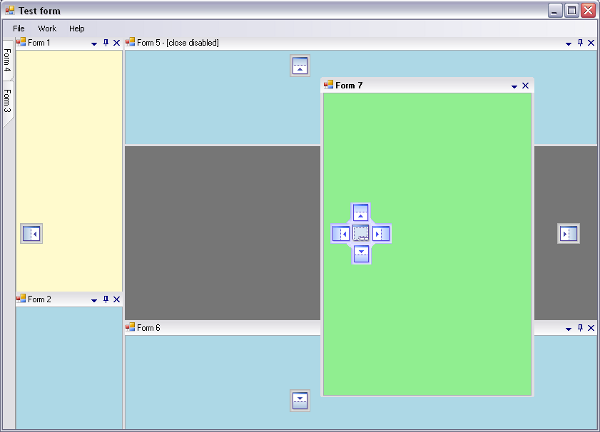
- Preview on mouse hover over auto-hidden buttons:

- Form selector using Ctrl+Tab:
- Save/load layout
Using the Code
Here are the basic steps that you need to do for using the control:
- Add reference to Crom.Controls.dll assembly in your project
- Place a
DockContainer control on your form and set its Dock property to DockStyle.Fill
After completing these steps you can start using the control.
Adding a form to the dock guider container
First you need to add a form to guider using the method:
DockableFormInfo Add(Form form, zAllowedDock allowedDock, Guid formIdentifier)
The parameters are:
form which should be a not null, not disposed instance of the form to guide, with the following properties set:
FormBorderStyle = FormBorderStyle.SizableToolWindow TopLevel = false
allowedDock is the enumeration of the places where the form is allowed to be docked. formIdentifier is an unique identifier associated with the form. These identifiers will be used when the layout state is saved/restored so they should be defined as constants in your application.
When adding a form to the guider, you'll receive a
DockableFormInfo object. This object contains information about the guided form and is required by
DockContainer on any operation with the form.
Docking a form added to the container
You can dock a form previously added to the container by calling one of the methods:
void DockForm(DockableFormInfo info, DockStyle dock, zDockMode mode) void DockForm(DockableFormInfo info, DockableFormInfo infoOver, DockStyle dock, zDockMode mode)
The first method should be called when docking the form directly in the container, the second should be called when docking the form over an existing form. The parameters are:
info which should be a not null, not disposed instance of the form information obtained after adding a form to guider. dock initial dock of the form (must be a valid dock value, other than DockStyle.None) mode initial dock mode with one of the values:
zDockMode.Outer to dock the form on one of the margin edges of the container. zDockMode.Inner to dock the form near the center of the free area of the container.
infoOver is the information of the form over which you want to dock your form.
Undocking a docked form
You can undock a docked form by calling the method:
void Undock(DockableFormInfo info, Rectangle hintBounds)
The parameters are:
info which should be a not null, not disposed instance of the form information obtained after adding a form to guider. hintBounds are the proposed bound of the form after will be undocked.
Removing a from from container
You can remove the from from container by calling the method:
void Remove(DockableFormInfo info)
where info is the not null, not disposed instance of the form information obtained after adding the form to guider.
Getting the forms added in the container
You can get the count of forms added in the container by calling the property:
int Count
{
  get;
}
You can get the information for a form added in the container by calling the property:
DockableFormInfo GetFormInfoAt(int index)
where the index is the form index with valid values from 0 (zero) to Count - 1
Toggling the AutoHide mode of a docked window
To toggle the AutoHide mode of a docked window you should call the method:
void SetAutoHide(DockableFormInfo info, bool autoHide)
The parameters are:
info which should be a not null, not disposed instance of the docked form information obtained after adding a form to guider. autoHide is the flag indicating if should set auto-hide mode(true) or unset it(false)
Selecting a form
To select the input for a form you should set (true) the
IsSelected property of
DockableFormInfo object associated with the form. To intercept when a form is selected/deselected, you should connect to the
SelectedChanged event of
DockableFormInfo object associated with the form.
Associating context menu
To associate a context menu to a guided form you should connect to the
ShowContextMenu event of the
DockContainer control. The handler of this event should be something like:
void OnDockerShowContextMenu(object sender, FormContextMenuEventArgs e)
{
   contextMenuStrip1.Show(e.Form, e.MenuLocation);
}
Preventing the close of a form
To disable closing a form you should connect to
FormClosing event of the
DockContainer control. The handler of this event should be something like:
void OnDockerFormClosing(object sender, DockableFormClosingEventArgs e)
{
   DockableFormInfo info = _docker.GetFormInfo(e.Form);
   if (info.Id == new Guid("0a3f4468-080b-404e-b012-997b93ed2005"))
   {
      e.Cancel = true;
   }
}
Destroying a closed form
To destroy a closed form you shoud connect to
FormClosed event of the
DockContainer control. The handler of this event should be something like:
void OnDockerFormClosed(object sender, FormEventArgs e)
{
   e.Form.Close();
}
Saving/restoring the container layout
To save/restore the container layout you need to use an object of type
DockStateSerializer. To save the container layout you should call from
DockStateSerializer the method:
void Save()
The layout state is saved by default in the local application data folder of your application. This default path is given by the
serializer.SavePath property of the serializer and can be changed through this member. To load the container layout you should call from
DockStateSerializer the method:
void Load(bool clear, FormFactoryHandler formsFactory)
The parameters are:
clear a flag indicating if shoul clear all existing forms from the docker, before restoring the state (recommended value is true). formsFactory is a handler to a form factory method.
The form factory method signature is
Form CreateTestForm(Guid identifier). This method should return the instance of the form associated with given Guid identifier.
This member has not yet provided a Biography. Assume it's interesting and varied, and probably something to do with programming.



 General
  News
News  Suggestion
  Question
  Bug
Bug  Answer
  Joke
Joke  Praise
  Rant
Rant  Admin
Admin 


 Submit an article or tip


