 <!-- Article Starts -->
The article focuses on how to develop a OpenGL ActiveX Control (OCX) with MFC, which can be used in VB application or HTML, and how to use the OpenGL ActiveX Control in VB and HTML to develop a 3D application and Internet Webpage. To simplify the demo code, I borrow the 3D Font class which has been posted at Codeguru.
Some key points in developing OpenGL ActiveX Control
Context Device
The ActiveX control will be show in the container client, so the Context Device in which the control is drawn is the container Context Device. The OpenGL control must have a Context Device pointer. Set it as the container Context Device pointer when the control is created. The container Context Device pointer can be found by calling the COleControl member function "GetDC". The code is :
int CGL3dOcxCtrl::OnCreate(LPCREATESTRUCT lpCreateStruct)
{
lpCreateStruct->style |= (WS_CLIPCHILDREN | WS_CLIPSIBLINGS | CS_OWNDC);
if (COleControl::OnCreate(lpCreateStruct) == -1)
return -1;
SetupEnv();
........
........
return 0;
}
void CGL3dOcxCtrl::SetupEnv(void)
{
........
........
m_pDC = GetDC();
........
........
}
Properties
On the OpenGL control, I designed the string shown in the 3DFont object as the real property. The container can process the string through the property implementation "GetContent" and "SetContent". The sample code is:
BSTR CGL3dOcxCtrl::GetContent()
{
CString strResult = m_Font.GetText();
return strResult.AllocSysString();
}
void CGL3dOcxCtrl::SetContent(LPCTSTR lpszNewValue)
{
wglMakeCurrent(m_pDC->m_hDC, m_hRC);
m_Font.SetText(lpszNewValue);
m_Font.CreateFont(m_pDC, "Arial Black");
wglMakeCurrent(m_pDC->m_hDC, NULL);
Refresh();
}
In the SetContent function, after resetting the string in 3D Font class, call "Refresh" to repaint the control
Methods
The important method in this OpenGL control is "GLRender". When the container response the paint/draw event, the container can call this method to repaint the control.
In method of "GLRender", there are two important functionality, one is set rendering viewport based on the control size in container, the other is rendering.
Unlike normal MS-Windows application which can prceoss WM_SIZE message, the control size is maniplated by container, and the rendering viewport can be set easily in rendering action.
The rendering is similar as the rendering function in normal OpenGL program.
void CGL3dOcxCtrl::GLRender()
{
int cx, cy;
GetControlSize(&cx, &cy);
if(m_cx != cx || m_cy != cy)
{
m_cx = cx;
m_cy = cy;
SetViewPort();
}
dcRender();
}
void CGL3dOcxCtrl::SetViewPort(void)
{
wglMakeCurrent(m_pDC->m_hDC, m_hRC);
glMatrixMode(GL_PROJECTION);
glLoadIdentity();
glFrustum(-1.0, 1.0, -1.0, 1.0, 2.0, 7.0);
glViewport(0, 0, m_cx, m_cy);
wglMakeCurrent(m_pDC->m_hDC, NULL);
}
void CGL3dOcxCtrl::dcRender(void)
{
wglMakeCurrent(m_pDC->m_hDC, m_hRC);
glShadeModel(GL_SMOOTH);
glEnable(GL_DEPTH_TEST);
glClearColor(1.0f, 1.0f, 1.0f, 1.0f);
glClear(GL_COLOR_BUFFER_BIT | GL_DEPTH_BUFFER_BIT);
glLightfv(GL_LIGHT0, GL_AMBIENT, m_Lightambient);
glLightfv(GL_LIGHT0, GL_DIFFUSE, m_Lightdiffuse);
glLightfv(GL_LIGHT0, GL_SPECULAR, m_Lightspecular);
glLightfv(GL_LIGHT0, GL_POSITION, m_Lightposition);
glEnable(GL_LIGHTING);
glEnable(GL_LIGHT0);
glMatrixMode(GL_MODELVIEW);
glLoadIdentity();
glTranslatef(-1.2f, -0.1f, -4.2f);
m_Font.GLDrawText();
glFlush();
SwapBuffers(m_pDC->m_hDC);
wglMakeCurrent(m_pDC->m_hDC, NULL);
}
The other method is "SetStrText" which allows container to set the string of the 3D Font like the Property function "SetContent"
Events
The most important event in this OpenGL control is the "GLDraw". By triggering "GLDraw" event, container can repaint the control.
NOTE: BEFORE USING THIS OPENGL OCX, IT MUST BE REGISTERED IN YOU WINDOWS SYSTEM.
The ActiveX Control Test Container in the VC++ package can be used to register this OCX, or if this source code is complied in your PC with VC++ IDE, it can be registered automatically
The VB demo for using the OpenGL Control
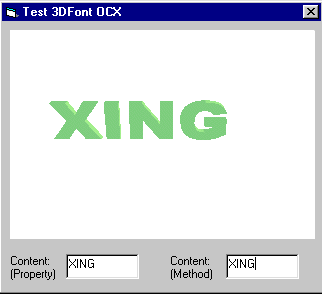
In the VB test demo, the OpenGL control is added into the form as an OLE component GL3DOCXLib.GL3dOcx GL3dOcx1
There are also two editboxes in the from, one is used to change the string in 3D Font by method "SetStrText", the other is used to change the string by property implementation "SetContent"
In the demo, the code processing the "GLDraw" event is
Private Sub GL3dOcx1_GLDraw()
   GL3dOcx1.GLRender
End Sub
The code triggering "GLDraw" event are
Private Sub Form_Paint()
   GL3dOcx1_GLDraw
End Sub

Private Sub Text1_KeyUp(KeyCode As Integer, Shift As Integer)
   If KeyCode = vbKeyReturn Then
      GL3dOcx1.Content = Text1.Text
      Text2.Text = Text1.Text
      GL3dOcx1_GLDraw
   End If
End Sub

Private Sub Text1_LostFocus()
   GL3dOcx1.Content = Text1.Text
   Text2.Text = Text1.Text
   GL3dOcx1_GLDraw
End Sub

Private Sub Text2_KeyUp(KeyCode As Integer, Shift As Integer)
   If KeyCode = vbKeyReturn Then
      GL3dOcx1.Content = Text2.Text
      Text1.Text = Text2.Text
      GL3dOcx1_GLDraw
   End If
End Sub

Private Sub Text2_LostFocus()
   GL3dOcx1.Content = Text2.Text
   Text1.Text = Text2.Text
   GL3dOcx1_GLDraw
End Sub
The HTML demo
From the tag, the HTML can find and load the OpenGL control. The GUID of is the key point with which the HTML document can get the control. the tag set the control property.
For the homepage with the OpenGL control, VBscript must be used to handle the control. GL3dOcx_GLDraw() in the BVscript is the function used to process "GLDraw" event.
NOTE: I tested it in IE3.0/5.0, Netscape Navigator3.0/Communicator4.6. IE3.0/5.0 support it. Not tested in Netscape Navigator3.0/Communicator4.6.
License
This article has no explicit license attached to it, but may contain usage terms in the article text or the download files themselves. If in doubt, please contact the author via the discussion board below.
A list of licenses authors might use can be found here.
This member has not yet provided a Biography. Assume it's interesting and varied, and probably something to do with programming.



 General
  News
News  Suggestion
  Question
  Bug
Bug  Answer
  Joke
Joke  Praise
  Rant
Rant  Admin
Admin 


 Submit an article or tip


