Click here to Skip to main content

Globalized Property Grid - Revisited

By , 14 Jun 2003
 

Sample Image 

Sample Image

Introduction

In my article 'Globalized property grid' I demonstrated how to localize the property names of an object. This article is based on this article incrementally.  

Corresponding to questions I would like to address following topics here:

  • Localizing category names
  • Inheritance of globalized objects

Localizing category names were left out in my previous article although it is as much of interest. However, localization support of category names is limited as you will see below.

Another question I want to answer is regarding inheritance of objects. Although I answered the question on my previous article, I still want to address it here.

Let's start with category names first.

Category names

A property grid is able to organize the properties of an object in categories. You can assign a category to the properties of your objects by using an attribute of type  CategoryAttribute.

Here is an example how to assign the property LastName to a category named Required Data:

[Category("Required Data")]
public string LastName { get {...}; set {...}; } 

If no category attribute is assigned to a property, then a property will be assigned to a default category that you can find in a static property called CategoryAttribute.Default  ("Misc").

CategoryAttribute has a property called Category that is used to access the category name.

If you use category names in a globalized property grid then it is wishful to have the category names localized, too.  

Localizing category names

There is support included to localize a category name.

You cannot override the Category  property to return a lolcalized string. Instead, the first time the Category property is accessed CategoryAttribute will call an overridable method called GetLocalizedString. This method has a protected scope and is overridable. Derive your own class from CategoryAttribute and override GetLocalizedString. You get the assigned category name (see "Required Data" in the example above) as a parameter and may return a localized string instead:

[AttributeUsage(AttributeTargets.Property, AllowMultiple=false, 
   Inherited=true)]
class GlobalizedCategoryAttribute : CategoryAttribute
{
  string table = "";
  ...
  protected override string GetLocalizedString( string value )
  {
    string baseStr = base.GetLocalizedString( value );
    // Now use resource table name to access the resources.  
    ResourceManager rm = 
       new ResourceManager(table, Assembly.GetExecutingAssembly() );
    // Get the string from the resources.
    try
    {
      return rm.GetString(value);
    }
    catch( Exception )
    {
      return value;
    }
  }
}

Use this class to decorate a property:

[GlobalizedCategory("Required")]
public string LastName { get {...}; set {...}; } 

GlobalizedCategoryAttribute uses the original category names as a symbolic name for accessing the resources. The member table optionally specifies the resource table and may be set either explicitly. If no resource table name is provided, the class name will be used as the table name (see sample).

But there is a big drawback in the implementation of CategoryAttribute provided by the .NET framework (version 1.0). 

GetLocalizedString is only called once on the first access. The consequence is we are able to select a language on startup only. The it will work fine. And maybe this will be sufficient for a lot of applications. In case of switching the language at runtime, it will not work. I demonstrate this issue in the sample provided. On startup you can select a language. you'll see the property and category names are displayed in the selected language. Pressing the button on the dialog to select another language works for property names only, category names don't change. 

I don't know if the behaviour of the CategoryAttribute class has changed in .NET Framework 1.1. Maybe the community can answer.

Let's get over to the second topic to address.

Inheritance of globalized objects

In the sample of my previous article (Globalized property grid) I just used one class called Person inheriting the GlobalizedObject. Using the defaults the localized property names were extracted from the resource file Person.resx or Person.en.resx. If you have tried the sample code and enhanced it by deriving from Person class, then the property names of the derived classes may not be shown. Even though you have placed localized strings in the resource file person.resx.     

The answer is relatively simple. By default, the class name will be used to access a localized resource. That means, The person class gets its localized names from person.resx. So, a derived class Employee gets its localized names from Employee.resx.

If you want to use one resource file only, you have to tell it explicitly. Here two options are possible.

Using the GlobalizedPropertyAttribute class where you can explicitly name the resource table to use on every property individually. Referring to the person.resx resource table may be done as follows:

// Use the provided resource table instead of the default one which 
// would be determined by the class name. The first parameter is 
// the key of the property in the string table. Leaving it empty 
// indicates to use the property name by default.

[GlobalizedProperty("",Table="GlobalizedPropertyGrid.Person")]
public string Department
{
  get { return department; }
  set { department = value; }
}


Alternatively, an attribute class may be additional used to define the resource table name on the class level.  This is demonstrated by a class GlobalizedObjectAttribute, which contains one property only that specifies a resource table to access. For example, to access a resource table named SpecialStringTable use it as follows:

[GlobalizedObjectAttribute("GlobalizedPropertyGrid.SpecialStringTable")]
public class Employee : Person
{ 
   ...

The class GlobalizedPropertyDescriptor detects the resource table name by using the following sequence (see implementation of the properties DisplayName and Description):

  1. Check, if there's a GlobalizedPropertyAttribute on property level.
    If yes, additionally check if there is a resource table specified.
  2. If no resource table name provided yet, check, if a GlobalizedObjectAttribute is provided on the class level.
  3. If still no resource table name provided yet, use the class name. 

Creating a sample project

For demonstration purpose I have extended the sample project. For a detailed description of the sample project refer to the previous article (Globalized property grid). There are only some modifications and additions:

Demonstrating localization of categories

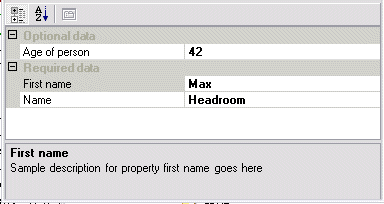
I have added an attribute class called GlobalizedCategoryAttribute (Attributes.cs) to localize category names. This attribute is applied to the properties as mentioned above. To demonstrate that selecting a language is possible on startup only, I have modified the application a bit. On startup a dialog box will be displayed to select a language.

Selecting a language

Selecting a language (e.g. English) at this time works for localized category names. The category and property names will be displayed in the selected language in the property grid on the main form. 

Switching the current language (e.g. to German) by pressing the button in the upper right corner on the main form doesn't affect the category names. Property names have changed correctly.

Maybe this limited behaviour of the CategoryAttribute class will change in future releases. 

Demonstrating localization of properties in case of inheritance

I have added an attribute class called GlobalizedObjectAttribute (Attributes.cs) to specify a custom resource table name on class level.

I also have added a class Employee (Employee.cs) inheriting the Person class to demonstrate inheritance. 

// Employee.cs
/// <SUMMARY>
/// Employee derives from Person and so is a globalized object implicitly.
/// 
</SUMMARY>
public class Employee : Person
{
  private string department = "";

  public Employee()
  {
  }

  public string Department
  {
    get { return department; }
    set { department = value; }
  }
}
        

This class will be instantiated by the Form1 class:

// Instantiate test class and set some data
Employee emp = new Employee();
emp.FirstName = "Max";
emp.LastName = "Headroom";
emp.Age = 42;
emp.Department = "Channel5";

this.person = emp;        

 Employee.resx and Employee.en.resx have been to have the property names of Employee displayed correctly.

Employee resource table

Summary

This article is an incremental version of its base article Globalized property grid . It discusses the localization of category names and localized property names in case of inheritance.  
To localize the category names there are two steps necessary:

  • Create a class and derive it from CategoryAttribute and override the method GetLocalizedString. This method should retrieve the localized string from a resource table.
  • Add this attribute to your properties. Provide a name for the category that will be used as a key to the resource string table.

But note:CategoryAttribute only reads the localized string on the first access of the category name. Switching languages at runtime is not possible.

Supporting inherited classes based on the sample provided requires to either define a resource string table for each class with the name of the class or referring to a certain resource table by explicit usage of custom attributes: GlobalizedPropertyAttribute on property level or GlobalizedObjectAttribute on class level.    

References

License

This article has no explicit license attached to it but may contain usage terms in the article text or the download files themselves. If in doubt please contact the author via the discussion board below.

A list of licenses authors might use can be found here

About the Author

Gerd Klevesaat
Web Developer
Germany Germany
Member
For ten years I worked as a senior consultant, coach, lead architect and project lead for several consulting companies.
Currently I work as a system architect for Zuehlke Engineering GmbH based in Frankfurt.
You can find a detailed resume here.

Sign Up to vote   Poor Excellent
Add a reason or comment to your vote: x
Votes of 3 or less require a comment

Comments and Discussions

 
You must Sign In to use this message board.
Search this forum  
    Spacing  Noise  Layout  Per page   
QuestionFunny fact about DisplayNameAttribute, DescriptionAttribute and CategoryAttributememberAndy4114 Oct '12 - 0:01 
I think it's inconsequent and therefore a kind of funny that CategoryAttribute has a method
protected virtual string GetLocalizedString(string value)
to handle localization and in DisplayNameAttribute and DescriptionAttribute you have to override the getters of the DisplayName or Description properties.
 
It would have been consequent and straight forward if all attribute classes regarding text had an GetLocalizedString method.
 
At the moment I'm challenging localization and hence I'm faced with these things. And BTW nice article.
 
Just my 2E-2€
 
Regards
Andy
GeneralMy vote of 5membermanoj kumar choubey29 Feb '12 - 18:05 
Nice
GeneralUsing this code with generics [modified]memberStefan Schwarzbach13 Feb '09 - 3:01 
If you are using Generics (like I do), there are some problems in the getter of GlobalizedPropertyDescriptor.DisplayName, because basePropertyDescriptor.ComponentType.Name contains something like `1 at the end of the string.
 
To fix it, change
// If still no resource table specified by attribute, then build it itself by using namespace and class name.
if (tableName.Length == 0)
{
	tableName = basePropertyDescriptor.ComponentType.Namespace + "." + 
}
to
// If still no resource table specified by attribute, then build it itself by using namespace and class name.
if (tableName.Length == 0)
{
	tableName = basePropertyDescriptor.ComponentType.Namespace + "." + basePropertyDescriptor.ComponentType.Name;
	int genericsPos = tableName.IndexOf('`');
	if (genericsPos > 0) tableName = tableName.Substring(0, genericsPos);
}
You have to do the same in the getter of GlobalizedPropertyDescriptor.Description and in the setter of GlobalizedCategoryAttribute.TableName
 
Greetings
Stefan Schwarzbach
 
modified on Friday, February 13, 2009 9:14 AM

GeneralBest Localization Plug-in for Visual Studio.memberAlexander Nesterenko17 Dec '08 - 21:37 
Move strings from code to resx and translate their automatically. Try RGreatEx[^] free.
 
---
Best regards,
Alexander Nesterenko
Safe Develop Team
www.safedevelop.com

GeneralGlobalizedCategoryAttributememberppbb10 Oct '05 - 2:35 
1. Why not overriding "Category" property in "GlobalizedPropertyDescriptor" as you did for "DisplayName" and "Description"?
It seems to work fine and maybe it fix the problem of choosing the language only at startup? What do you think?
 
2. I don't like so much how you construct the ResourceManager: in "GlobalizedPropertyDescriptor" with basePropertyDescriptor.ComponentType.Assembly and in "GlobalizedCategoryAttribute" with Assembly.GetExecutingAssembly(). As I have classes in different assemblies I need to have two resources per class, one for localizing category and one for Name and description.
 
Best regards
ppbb
Generalplease help memembersreejith ss nair18 Sep '05 - 21:17 
Good Article.
 
I have a small doubt regarding Globalization/Localization. Hope you can help me out.
I have a web form application where i need to provide more than 50 different localized resource supports. Apart from this, my application supports rich use of stored data (Sql Server Database) and obviously have few list of Listing controls (Repeater , Grid etc).
 
My requirement comes like this,
 
a) I need to provide full localized language support in all data which is displaying in each and every page. Regardless of, the name of controls, content of controls etc. To be concise, which ever text that i am displaying through page, need to be localized based on user selected language.
 
b) Each and every setup needs to contain all supported languages. So user can switch and view content of site in different language.
 
I stuck in,
 
1) I am not sure how to localize stored data in database.
2) How will I give or from where i generate localized information for all supported language.
 
It would be grate if you can help me out through your valid comments.

 
Sreejith Nair
[ My Articles ]
GeneralHiding Control PropertiesmemberVarun Gulati2 Jan '05 - 23:51 
I was to hide few poperties for the Textbox control, will setting PropertyGrid.SelectObject = Object. Most of the properties are hidden after setting attribute BROWSABLE=false. But the same in not working for Name, Locked, Mofifiers... has anyone come across this.
 
Varun Gulati
GeneralRe: Hiding Control PropertiesmemberGerd Klevesaat4 Jan '05 - 2:39 
As far as I know properties like Name are extender properties supplied by components implementing IExtenderProvider.

Have a look at http://msdn.microsoft.com/library/default.asp?url=/library/en-us/cpguide/html/cpconimplementingextenderprovider.asp

Questionarabic property grid?memberdinaayoub11 Oct '04 - 17:37 
Hi,
First thanks a lot for this article, it has been very helpful.
 
I am creating a multilingual application, but I'm having a problem with the arabic property grid because, as you know arabic is a right to left language, however even though i've managed to localize the property grid and retrieve the data from my resources file and set the RTL property to Yes and have the text indeed displayed from right to left, it still remains incorrectly displayed in terms of logic. In other words, the property name is on the left and the value is on the right, just like in english , the text is in arabic and from right to left though.
 
Now i don't know if this is because I am missing something, or if its just that the property grid cannot be made to display the name of the property itself on the right and the actual value on the left...
Does anybody have a clue?
At the moment mine looks something like this:
http://www.comzept.de/templates/images/netrix/proparabic.jpg
 
So is this the best i can do, or is there some way for the property grid to display right to left correctly?
 
Thanks a lot in advance
GeneralGlobalization of the tooltipsmemberaagirre9 Sep '04 - 20:13 
Hello everyone,
 
First of all, congratulations for your article. It´s really good.
I have a question: Is it posible to internationalize the tooltips of the propertygrid? (you know, the messages "Categorized" and "Alphabetic" that appear when the mouse enters the upper propertygrid´s buttons (propertytabs)).
 
I have noticed that their language depends on the language the VS.NET IDE is instaled.
 
Also, it would be very interesting if I could internationalize the error form that appears when you insert an incorrect property value, too.
 
Thank you in advance,
 
Aitor.
 
Aitor
GeneralInterfaces and category limitationsmemberpicho8 Jun '04 - 3:34 
Interface - I have implemented your work as an interface so if anyone is interested, contact my email and I will send the files.
 
Category - one time limitation - It was stated in one of the user messages in the original article that this could be handled by keeping a private member with the last culture used. I solved the limitation issue by holding a private member for each of the DisplayName,Description,Category get methods and comparing it to the current one.
 
--start of code example:
public override string DisplayName
  {
    get
    {
      if (_displayNameLastCulture==System.Threading.Thread.CurrentThread.CurrentUICulture.Name && this._localizedName!="")
        return this._localizedName;
 
    _displayNameLastCulture = System.Threading.Thread.CurrentThread.CurrentUICulture.Name;
 
    //
    //reconstruct the localized value string...
    //
 
    return this._localizedName;
  }
}
--end of code
 
this code should be repeated for the Description and Category properties, and replacing _displayNameLastCulture with _descriptionLastCulture and _categoryLastCulture accordingly.

GeneralRe: Interfaces and category limitationsmemberwout de zeeuw19 Aug '04 - 1:50 
I made a next evolution of the globalization thing, not needing inheritance at all, by using a TypeConverter. Also I merged in a ripped piece of code for sorting. Have a look at article
Sorted globalized property grid. It also globalizes Category, including runtime switching.
 
All credits to Gerd and the Paul Tingey for the stuff I ripped from ofcourse (mentioned in the article).
 
Wout

GeneralGlobalized and nestedmemberpestes12 May '04 - 20:33 
I congratulations you for your example, for me is excelent. I want to ask you one question: In your example in the class Person I have put one child class and my surprise is that for the atributes of this class the text and description isn´t translated to the current language.
If I put: 'public class ChildPerson : GlobalizatedObject' then the child atributtes don´t appears in the property grid. Can I put child class to show child atributtes using your classes? Thank you
GeneralTips if scrollbar dissapearsmemberGrut12 May '04 - 0:53 
In my case, it's a thread which set the selectedObject of the property grid...
But the scrollbar often dissapear if I do that, here is a solution :
 
You have to declare a delegate on the method called by your thread and to use the beginInvoke method instead.
 
AddItemDelegate del = new AddItemDelegate(YOURMETHOD);
PROPERTYGRID.BeginInvoke(del);
 
I have this problem for a long time so if it can help somebody ... Smile | :)

GeneralProperty Grid and File Open Dialogmemberw36a4 Feb '04 - 12:52 
Good start, but how to invoke a file dialogue in property grid, so that after closing the dialog the file path will be displayed as in the property value
GeneralVery Great but..memberNycos13 Jan '04 - 21:42 
Did I miss something but what happened if you call GlobalizedObject.GetProperties(Attribute[]) more than one time but with different attributes list ? As you init globalizedProps just once, it seems that a wrong PropertyDescriptorCollection is returned the second time ?
 
Nicolas
GeneralLocalizing the property value in an enumsussPaulS19 Nov '03 - 11:45 
My last attempt at posting this question failed since I was not logged in yet so please delete it as I cannot.
 
Ok, here it is again:
 
I have localized the category & property names as per the article. My next question is how to localize a enum for a property in the propertygrid. For example, for a property, I have an enum type such as:
 
enum YesNoEnum{
Yes=0,
No
}
 
The propertygrid will display "Yes" or "No" as a dropdown list that a user can select (for the default language of EN). My question is, in the enum, how can the dropdown show "Oui" and "Non" for say French or support mult languages for that matter? I do not think I want to have mult enum defs (one per language). Is the solution to use EnumBuilder?


GeneralRe: Localizing the property value in an enummemberGerd Klevesaat19 Nov '03 - 22:06 
Hi Paul,
 
What about a custom type converter that you associate with your enum type? Before a property value is displayed in the property grid there is request for a type converter associated with its type. This type converter then is responsible for converting your property value to a string and vice versa. When converting you can use a resource manager. Have a look at the EnumConverter type in the msdn help.
Anyway, it is more complex as it should be Frown | :-( .
 
Kind regards
Gerd


GeneralLocalizing the property value in an enumsussAnonymous19 Nov '03 - 11:29 
I know how to localize the category name but what if a property value is to be localized? I have an enum for a property like:
 
enum ResponseEnum{
 
}
GeneralRTL & LTR!!!!????!!!!memberomoshima7 Aug '03 - 5:04 
I'm having some MAD trouble trying to get LTR text in a combo box with RTL (or visa versa)...
 
Any thoughts? Give this a whirl:
CultureInfo[] cultures = CultureInfo.GetCultures(CultureTypes.InstalledWin32Cultures);
foreach (CultureInfo c in cultures)
{
	this.cmbEncoding.Items.Add(c.NativeName);
}
this.cmbEncoding.SelectedItem = CultureInfo.CurrentUICulture.NativeName;
You're probably gonna need to install Hebrew or Arabic/Farsi for the ability to see it properly...
GeneralLocalization of category namesmemberGerd Klevesaat18 Jun '03 - 4:31 
Additional info...
...to the localization of category names and its limitations when switching the language at runtime:
 
Kay-Uwe Schreiner has provided a good alternative with a big advantage: It works!
 
Have a look at the appropriate message thread attached to my previous article ( http://www.codeproject.com/cs/miscctrl/globalizedpropertygrid.asp?msg=527998#xx522953xx).
 
Have fun
Gerd

GeneralNot All Strings show up localizedmemberPaulS16 Jun '03 - 17:07 
I have a situation where all string on my form is localized. I set the form to localizable=false & I created my own resource file. I found that using the resource file tied to a form is problematic. Some strings get deleted for some reason. So, I created my resource files myself. The strings on the form are localized as expected. But, I also have property grids. I did create resource files for those grids, one per language (xxx.fr.resx, xxx.de.resx) and the default resource file for English (xxx.resx). After the build, it creates a \de and \fr dir. When I run it, only some strings in the propoerty grid are being localized in the correct langauge while other strings in teh same grid are still in English.
 
I used the code straight from the example. And I stepped into the code especially in the categoryattribute function. I check the thread id for say french and indeed i am set for french but the string comes back in english. I do set the thread id in the main form (Onformload) based on the desired lang ('FR', 'DE' or 'EN');
 
Has anyone had this same situation?
GeneralRe: Not All Strings show up localizedmemberGerd Klevesaat16 Jun '03 - 23:24 
This may happen when the resource manager is not able to find the strings in the resource file of the currently set language. Then a fallback occurs to the default language.
A string cannot be found due to following reasons:
the resource assembly is missing,
the string is missing in the resource file,
or the string identification is not spelled correctly ( f.e. 'age' instead of 'Age').
 
You may check. Otherwise it sounds strange to me Confused | :confused: .
Maybe you can provide a sample to have a deeper look.
 
Hope this helps.
 
Gerd
GeneralRe: Not All Strings show up localizedmemberPaulS17 Jun '03 - 3:04 
Thanks for the suggestion on checking the labels(the lookup name) for the strings. I had sent the English strings to Europe to be translated. They came back in a spreadsheet. I then cut and pasted the labels and translated strings into my French resource file.
 
The labels in the French resource file "appeared" to be visually the same as my default resx file but in reality they had some trailing characters. It seems there were hidden trailing characters when I copied the labels into my xxx.fr.resx file. So, after deleting the trailing characters all was fine & it worked. Since the labels in English did not match the labels in the French resx file, the fallback to the default (English) was ocurring.
GeneralRe: Not All Strings show up localizedmemberGerd Klevesaat17 Jun '03 - 3:30 
Great!
 
Had a similar issue with non-visible characters some years ago.
It may confuse you first.

Have fun
Gerd
GeneralUsing an interface rather than inheritancememberBill Seddon15 Jun '03 - 11:31 
Excellent article. Gave it top marks.
 
I'd welcome your thoughts on the practicality of using GlobalizedObject and an interface rather than an object. Doing so will allow the framework to be retrofitted to existing classes without having to change their existing inheritance.
 
Regards
 
Bill Seddon

GeneralRe: Using an interface rather than inheritancememberGerd Klevesaat16 Jun '03 - 22:51 
Thanks, Bill. Smile | :)
You are right and I agree with you.
I also prefer an interface driven approach because it gives you more flexibility. Especially if you are bound to an existing inheritance tree. In addition, from the design view point, you have a tightly coupled base class in your design that is not related to the domain area, but has a support characterization. So decoupling this issue would be a good idea.
 
I will give it a thought ....
 
Kind regards
Gerd
GeneralRe: Using an interface rather than inheritancememberMichael Coyle20 Mar '05 - 8:21 
I found a way to avoid the inheritance problem, based on the PropertySorter example by Paul Tingey:
 
Derive a class as follows:
 

public class GlobalizedObjectAttribute : ExpandableObjectConverter
{
private PropertyDescriptorCollection globalizedProps;
 
public GlobalizedObjectAttribute() : base() { }
 

public override bool GetPropertiesSupported(ITypeDescriptorContext context)
{
return true;
}
 
public override PropertyDescriptorCollection GetProperties(ITypeDescriptorContext context, object value, Attribute[] attributes)
{
// Only do once
if ( globalizedProps == null)
{
// Get the collection of properties
PropertyDescriptorCollection baseProps = TypeDescriptor.GetProperties(value, true);
globalizedProps = new PropertyDescriptorCollection(null);
 
// For each property use a property descriptor of our own that is able to be globalized
foreach( PropertyDescriptor oProp in baseProps )
{
globalizedProps.Add(new GlobalizedPropertyDescriptor(oProp));
}
}
return globalizedProps;
 
}

}

 
then add the following attribute to the class instead of inheriting from GlobalizedObject:
 

[TypeConverter(typeof(GlobalizedObjectAttribute))]
public class Person
{
...
}

This is extremely handy if you don't want to mess with the inheritance of a class. I haven't experimented with this method in any significant way, but it does what I want (adds globalization to a class without changing class inheritance). The Attributes for changing property tables and category tables should also work.

General General    News News    Suggestion Suggestion    Question Question    Bug Bug    Answer Answer    Joke Joke    Rant Rant    Admin Admin   

Permalink | Advertise | Privacy | Mobile
Web04 | 2.6.130516.1 | Last Updated 15 Jun 2003
Article Copyright 2003 by Gerd Klevesaat
Everything else Copyright © CodeProject, 1999-2013
Terms of Use
Layout: fixed | fluid
