Click here to Skip to main content

Modeless Dialog Management

By , 7 Jul 2003
 

Introduction

This article presents a method for easily managing modeless dialogs.  Functionality includes:

  • Determining if the dialog is already created
  • Closing the dialog automatically when the parent object is destroyed
  • Notifying the parent object when the dialog is closed
  • Accessing functions in the dialog from the parent object.

The concept is based on a tracker object that exists in the dialog's parent and a helper class from which the dialog is dual-derived.  The helper class automates the interaction between the dialog and its tracker, and the tracker allows the parent to manage the dialog.

The term "parent" is used to represent the class that creates the modeless dialog and is therefore responsible for keeping an eye on it.  The parent is not necessarily a parent window.  It could be any object that needs to have a modeless dialog.

Background

Dealing with 1 or 2 modeless dialogs is not difficult.  You track a pointer to the dialog, make sure the dialog clears the pointer or messages the parent when it closes, check if a dialog is already posted before re-instantiating the class, etc, etc.  These simple steps present many opportunities for mistakes, omissions, and general confusion.  This class was designed to wrap those details and provide a standard way of dealing with modeless dialogs floating around in an application.

Many applications avoid modeless dialogs.  This keeps things simple when modeless functionality is not needed.  The complexity of modeless dialogs is analogous to multi-threading in that it requires management of multiple independent processes.

Often, however, in robot control systems, measurement systems or other hardware control applications, it is necessary to monitor many things simultaneously and provide user input where needed.  Modeless dialogs are a perfect match for these cases.

Using the code

These steps are briefly described in the ModelessDialogTracker.h file:

Step 1

Add a ModelessDialogHelper derivation to your wizard-generated dialog class.  Note the block of "modeless dialog specific" functions in this header file.  These are useful for modeless dialogs, but not essential for the task at hand.  It is, however, a useful block of code to paste into any dialog that is on its way to becoming modeless.

#include "ModelessDialogTracker.h"

class DialogA : public CDialog, ModelessDialogHelper
{
DECLARE_DYNAMIC(DialogA)
public:
  // stuff specific to the modeless dialog. //
  DialogA(ModelessDialogTracker& tracker);
  BOOL Create(UINT nID, CWnd* pWnd) 
  { return CDialog::Create(nID,pWnd); }
  void PostNcDestroy()
  { delete this; }
  void OnCancel()
  { DestroyWindow(); }
  ////////////////////////////////////
  virtual ~DialogA();
  enum { IDD = IDD_DIALOG1 };
  protected:
  virtual void DoDataExchange(CDataExchange* pDX); 
      // DDX/DDV support

DECLARE_MESSAGE_MAP()
};

The ModelessDialogHelper class simply constructs and destructs with the dialog class since it is in its derivation chain.  At construction and destruction time, the ModelessDialogTracker is notified of the change in status.

Step 2

Enhance the constructor of the wizard-generated dialog constructor (in the dialog .cpp file):

DialogA::DialogA(ModelessDialogTracker& tracker)
: ModelessDialogHelper(tracker, *this)
{
}

Step 3

Instantiate a ModelessDialogTracker object in the "parent" class (or any class that is to be responsible for the dialog's existence):

ModelessDialogTracker trackA;

Step 4

Pop your dialog using the Create() call.  Remember to set the Visible property of the dialog to TRUE in the resource editor (if you don't, you will post and invisible dialog -- not too impressive).  Note the check to see if it is already popped.  That call will SetActiveWindow() on the dialog if it is already up.  Also, notice the passing of the dialog tracker to the DialogA constructor.  This is needed so the helper can establish a link to the tracker class.  Since that link is established, there is no need to keep track of pnewDlg after the dialog is up.

#include "DialogA.h"
void CModelessDialogTrackerDemoDlg::OnPopA()
{
  if (trackA.IsAlreadyPopped())
    return;

  DialogA* pnewdlg = new DialogA(trackA); 
          // note the passing of the tracker.

  pnewdlg->Create(pnewdlg->IDD,NULL);    
}

That's it for basic usage.  You can pop the dialog, and the parent will keep track of the state of the dialog.  When the ModelessDialogTracker object, trackA, is destroyed, it will automatically close and cleanup the modeless dialog if necessary.

Additional usage

Forcible Close

Should you need to forcibly close the modeless dialog from the parent, you can just call CloseDialog():

trackA.CloseDialog(); // force it to close.

Calling Dlg Functions

If you want to call a function in the dialog (to update its contents or whatever), you can use the GetDlg() member of the tracker class and cast the return to the proper dialog type:  (see DialogB in the demo project.)

DialogB& dlg = (DialogB&)*trackB.GetDlg();

dlg.SomeFunctionInTheDialog(necessaryData);
         // access dialog directly.

Notification of Close

If you need to be notified, or take some action when the dialog is closed, you can simply derive your own class from ModelessDialogTracker and override the OnDialogClosed() member function:

class TrackDialogC : public ModelessDialogTracker
{
public:
  ...
  virtual void OnDialogClosed();
        // override if you want to do something when closed.
  ...
};

Then, instantiate your class (TrackDialogC) instead of ModelessDialogTracker, and use it to track the dialog.  When the dialog closes, the virtual function is called and you can take whatever action is necessary.  (See DialogC in the demo project.)

Demo Project

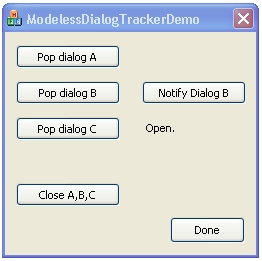
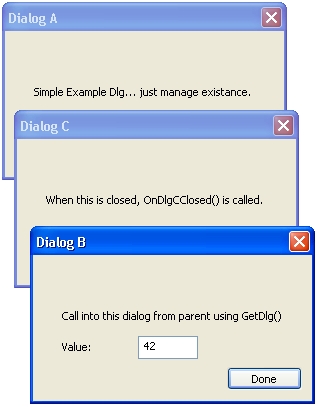
The demo project is dialog based and allows you to test-drive 3 implementations of this class:

  • DialogA - basic implementation.
  • DialogB - shows the parent calling functions in the modeless dialog.
  • DialogC - implements a derived dialog tracker class to update the dialog status in the parent.

Points of Interest

You'll notice a warning override in the ModelessDialogTracker.h file:

#pragma warning( disable : 4355 )     
      // the warning given when passing "this" 
      // to a member constructor.
      // in the case of the helper class, we WANT to do this.

This suppresses the following compiler warning:

DialogA.cpp(13) : warning C4355: 'this' : used in 
      base member initializer list

This is caused by the implementation of the DialogA constructor preamble where we pass "this", the dialog itself, into one of the base classes, ModelessDialogHelper's, constructor:

DialogA::DialogA(ModelessDialogTracker& tracker)
: ModelessDialogHelper(tracker, *this)
{
}

In this case, we want the helper class to have the pointer to the CDialog derived class so it can call the appropriate functions.  The warning is due to the fact that a base class should not need a pointer to a class lower in the derivation chain.  In the case of dual-derivation, this is not so.  Thus the passing of the pointer.  It bridges the gap between the helper class and the dialog itself since they are at the same level of the derivation hierarchy.  For this reason, we did the unthinkable and stomped out the warning.

License

This article has no explicit license attached to it but may contain usage terms in the article text or the download files themselves. If in doubt please contact the author via the discussion board below.

A list of licenses authors might use can be found here

About the Author

Joe Calkins
Web Developer
United States United States
Member
No Biography provided

Sign Up to vote   Poor Excellent
Add a reason or comment to your vote: x
Votes of 3 or less require a comment

Comments and Discussions

 
You must Sign In to use this message board.
Search this forum  
    Spacing  Noise  Layout  Per page   
GeneralMDI Application vc6++memberSalad Juris1 Apr '07 - 5:38 
Could you plse help to string good and simple Mdi Application. I want the main form and just 4 empty forms. the rest I can continue.
 
My regards in advance
QuestionHow to compile it ?membermcv99918 Jul '06 - 23:49 
Hey man, it would be great if you also provided us with the project file and Makefile , so that we can start and compile it directly via Visual Studio.
Otherwise.... time consuming debugging

Generalit's a good examplememberytfrdfiw21 Jun '06 - 15:26 
It gives us a vivid example to create a modeless dialog.Thanks.
 
ytfrdfiw
GeneralModeLess Dialog Internals.memberTechyMaila4 May '06 - 2:06 
How does a modeless dialog work? Does it run on a separate thread/process or does it implement its message pump in a different manner than modal dialogs?
 
---
With best regards,
A Manchester United Fan
 
The Genius of a true fool is that he can mess up a foolproof plan!
GeneralCould not compile the example codememberdoctorrie22 Apr '06 - 19:32 
I tried compiling the example code and got the following errors
 
I am using Visual Studio - VC C++ with the latest service packs installed
 
I am a newbie so any help would be appreciated
 
Thank you
 
---------------------------------------------------------
 

--------------------Configuration: ModelessDialogTrackerDemoDlg - Win32 Debug--------------------
Compiling...
ModelessDialogTrackerDemoDlg.cpp
c:\program files\microsoft visual studio\vc98\mfc\include\afxv_w32.h(119) : warning C4005: '_WIN32_WINDOWS' : macro redefinition
c:\modeless dialog management\demo source\modelessdialogtrackerdemo\stdafx.h(22) : see previous definition of '_WIN32_WINDOWS'
Linking...
ModelessDialogTrackerDemoDlg.obj : error LNK2001: unresolved external symbol "public: __thiscall DialogA::DialogA(class ModelessDialogTracker &)" (??0DialogA@@QAE@AAVModelessDialogTracker@@@Z)
ModelessDialogTrackerDemoDlg.obj : error LNK2001: unresolved external symbol "public: int __thiscall ModelessDialogTracker::IsAlreadyPopped(void)const " (?IsAlreadyPopped@ModelessDialogTracker@@QBEHXZ)
ModelessDialogTrackerDemoDlg.obj : error LNK2001: unresolved external symbol "public: __thiscall DialogB::DialogB(class ModelessDialogTracker &)" (??0DialogB@@QAE@AAVModelessDialogTracker@@@Z)
ModelessDialogTrackerDemoDlg.obj : error LNK2001: unresolved external symbol "public: void __thiscall DialogB::IncrementCounter(int)" (?IncrementCounter@DialogB@@QAEXH@Z)
ModelessDialogTrackerDemoDlg.obj : error LNK2001: unresolved external symbol "public: class CDialog * __thiscall ModelessDialogTracker::GetDlg(void)const " (?GetDlg@ModelessDialogTracker@@QBEPAVCDialog@@XZ)
ModelessDialogTrackerDemoDlg.obj : error LNK2001: unresolved external symbol "public: int __thiscall ModelessDialogTracker::IsPopped(void)const " (?IsPopped@ModelessDialogTracker@@QBEHXZ)
ModelessDialogTrackerDemoDlg.obj : error LNK2001: unresolved external symbol "public: __thiscall DialogC::DialogC(class ModelessDialogTracker &)" (??0DialogC@@QAE@AAVModelessDialogTracker@@@Z)
ModelessDialogTrackerDemoDlg.obj : error LNK2001: unresolved external symbol "public: void __thiscall ModelessDialogTracker::CloseDialog(void)" (?CloseDialog@ModelessDialogTracker@@QAEXXZ)
ModelessDialogTrackerDemoDlg.obj : error LNK2001: unresolved external symbol "public: virtual __thiscall TrackDialogC::~TrackDialogC(void)" (??1TrackDialogC@@UAE@XZ)
ModelessDialogTrackerDemoDlg.obj : error LNK2001: unresolved external symbol "public: virtual __thiscall ModelessDialogTracker::~ModelessDialogTracker(void)" (??1ModelessDialogTracker@@UAE@XZ)
ModelessDialogTrackerDemoDlg.obj : error LNK2001: unresolved external symbol "public: __thiscall TrackDialogC::TrackDialogC(class CModelessDialogTrackerDemoDlg &)" (??0TrackDialogC@@QAE@AAVCModelessDialogTrackerDemoDlg@@@Z)
ModelessDialogTrackerDemoDlg.obj : error LNK2001: unresolved external symbol "public: __thiscall ModelessDialogTracker::ModelessDialogTracker(void)" (??0ModelessDialogTracker@@QAE@XZ)
nafxcwd.lib(thrdcore.obj) : error LNK2001: unresolved external symbol __endthreadex
nafxcwd.lib(thrdcore.obj) : error LNK2001: unresolved external symbol __beginthreadex
libcd.lib(crt0.obj) : error LNK2001: unresolved external symbol _main
Debug/ModelessDialogTrackerDemoDlg.exe : fatal error LNK1120: 15 unresolved externals
Error executing link.exe.
 
ModelessDialogTrackerDemoDlg.exe - 16 error(s), 1 warning(s)

 
alan
GeneralRe: Could not compile the example codememberBaseiso123 Apr '06 - 8:55 
If you are using VC 6, it would be best if you use a project converter.
 
http://www.codeproject.com/tools/prjconverter.asp
 
Good Luck
 
-Base
GeneralModeless Dialogmemberszakaryan24 Jun '05 - 12:32 
I ran Modeless Dialog Management program by Joe Calkins.
It simply did not work. Is there anybody who can help me to make it work?

GeneralRe: Modeless Dialogmemberrbid25 Jun '05 - 20:40 
szakaryan wrote:
I ran Modeless Dialog Management program by Joe Calkins.
It simply did not work. Is there anybody who can help me to make it work?

 
For me it worked, I downloaded the demo project, compiled and run.
 
Can you provide additional info, so I can help you?
 
If your question was regarding tailoring the modeless dialog mgmt to your projects, take in mind that you may need to set the Visible flag on the resource editor for the modeless dialog, otherwise you need to
call "ShowWindow(SW_SHOW)" manually.
 
--- Ricky.
 
-- Ricky Marek (AKA: rbid)
-- "Things are only impossible until they are not" --- Jean-Luc Picard
 
My articles
 

GeneralModeless Dialogmemberszakaryan24 Jun '05 - 12:31 
I ran Modeless Dialog Management program by Joe Calkins.
It simply did not work. Is there anybody who can help me to make it work?
 
Sarkis.
GeneralNice and useful article.sussrbid22 Jan '05 - 10:24 
Thanks for posting it. (myVote=5;)
 
-- Ricky Marek (AKA: rbid)
-- "Things are only impossible until they are not" --- Jean-Luc Picard
 
My articles
 

QuestionTrue ModeLess?membertyramanan22 Jul '04 - 20:59 
Hi,
Just to test the modeless, i added a button to the DialogB and i put a sleep inside that button. When i clicked that button it freezes all the dialogs. Why? if its true modeless it should not affect the other dialogs, isn't it?
 
-Ramanan
AnswerRe: True ModeLess?memberJoe Calkins23 Jul '04 - 5:13 
In general, sleep() is not a good thing to use in windows applications. If you need to delay, it is much better to have a loop that checks the clock while still pumping windows messages.
 
A modeless dialog is not another thread. Its still in the same thread as the rest of your application. It just has its message pump running in addition to your app.
 
Joe
GeneralRe: True ModeLess?membertyramanan5 Aug '04 - 18:34 
Thanks joe,
I posted this same q'tion 2 another thread simulataneously.
here is that...
 
http://www.codeproject.com/dialog/gettingmodeless.asp?select=881767&forumid=3006&df=100#xx881767xx
 
But i got a very clear answer from U only. Ur article is also clear and simple. Keep it up.
 
-Ramanan

GeneralMixing Modal & ModelessmemberDavide Zaccanti8 Mar '04 - 23:40 
I'm facing with a problem and I hope You can give me some suggestion since You've studied the problem...
 
I've a MFC SDI app with no document, just CDialog derived modal windows since I want users to close the window before going to othre tasks.
 
There is an exception: a calendar that is a modeless dialog created via new the first time and then controlled via SW_HIDE or SW_RESTORE (this because of heavy init on database connection). When program exit OnDestroy of CMainFrame also destroy the calendar.
 
Now I need on a CDialog (that must remain modal) to interact with the calendar. So I post a message to CMainFrame that create the modeless calendar: It works and I can use both modal dialog and modeless and click on both...
 
The problem is the second time... now the calendar class is created so the CMailFram class in responce of the message simply send a RESTORE message, and infact the calendar appear on top, but cannot be used (no click or char received) and the first time I click on the modal window is impossible to switch back to calendar...
 
At present it works only if I destroy and re-create the modeless dialog each time.
 
Can You give me some hints?
 
TIA.
 
Davide

GeneralModeless Dialog in DLLmemberpaul hoshovsky29 Feb '04 - 21:18 
Hello
 
Do you have sample code on how to use modeless dialogs that are created in a DLL (either "standard" or extension)?
 
Mr Prakesh kindly responded to my question at
 
URL : http://www.codeproject.com/script/comments/forums.asp?msg=750832&forumid=1647#xx750832xx
 

His suggestion on the AFX_MANAGE_STATE(AfxGetStaticModuleState() method did not help. If this method was used or not used, the program still hung.


Paul Hoshovsky
GeneralRe: Modeless Dialog in DLLmemberJoe Calkins6 Mar '04 - 17:56 
The key is to tell MFC which module to pull the resource from. In the DLL main .cpp file, name the instance:
 
AFX_EXTENSION_MODULE GeomFitDLLDLL = { NULL, NULL };
 
In a main header for the DLL:
 
extern AFX_EXTENSION_MODULE GeomFitDLLDLL;
 
Then, you will need to get the module down into the dialog code. We use custom dialog popping code so we can provide dynamic language translation. We just use something like:
 
void DlgFontCode::PreModelessWithFont(CDialog & dlg, UINT resID, int pointSize, LPCTSTR faceName, HMODULE moduleForResources)
{
// look for the specified dialog resource
HRSRC r = FindResource(moduleForResources,MAKEINTRESOURCE(resID),RT_DIALOG);
if (r)
{
// get total size of resource
DWORD rsrcSize = SizeofResource(moduleForResources,r);
 
// load it
HGLOBAL h = LoadResource(moduleForResources,r);
if (h)
{
// lock the handle, getting a pointer to the actual resource data
LPVOID p = LockResource(h);
if (p)
{
DLGTEMPLATE * newtempl = 0;
CustomizeDlgTemplateFont((DLGTEMPLATE*)p,&newtempl,rsrcSize,pointSize,faceName);
dlg.CreateIndirect((LPCDLGTEMPLATE)newtempl,NULL);
}
}
}
}

GeneralQuestion about ModelesssussTalat8 Feb '04 - 10:03 
I want to create a modeless, but I don't want to put it in the (MainFrm.cpp). I want to use it within a class when I do my calculations. In the following line:
 
m_pDlgRun=new DlgRun(this);
 
I got this error:
 
cannot convert parameter 1 from 'class Run *const ' to 'class CWnd *'
 

What I have to use instead of (this) to refer to the parent (MainFrm)
 
Thanks
Confused | :confused:
GeneralRe: Question about ModelessmemberJoe Calkins8 Feb '04 - 11:38 
You can do whatever you want. Basically, just change the constructor of your DlgRun class to receive whatever object reference you want to pass. The wizard makes you a default constructor that receives a CWnd* for parent. In the code I posted, I just replace the wizard constructor with one that takes a ModelessTracker reference. When I need to access some other object, I just add it to the list as well.
 
Hope this helps!

GeneralYou Left Out Something REAL ImportantmemberJohn Simmons / outlaw programmer10 Nov '03 - 0:42 
What compiler did you use?
 
It sure wasn't VC6...


------- signature starts
 
"...the staggering layers of obscenity in your statement make it a work of art on so many levels." - Jason Jystad, 10/26/2001
 
"You won't like me when I'm angry..." - Dr. Bruce Banner
 
Please review the Legal Disclaimer in my bio.
 
------- signature ends
GeneralRe: You Left Out Something REAL ImportantmemberJoe Calkins10 Nov '03 - 1:42 
I used VC 7.0 (.NET 2002) when I originally wrote the code. It also works in 7.1 (.NET 2003).
What problems are you having?
Joe

General General    News News    Suggestion Suggestion    Question Question    Bug Bug    Answer Answer    Joke Joke    Rant Rant    Admin Admin   

Permalink | Advertise | Privacy | Mobile
Web03 | 2.6.130516.1 | Last Updated 8 Jul 2003
Article Copyright 2003 by Joe Calkins
Everything else Copyright © CodeProject, 1999-2013
Terms of Use
Layout: fixed | fluid
