Introduction
I have searched the net for many articles that can open the simple mail interface and attach an item an keep the "New Message" window ready for execution. Almost all the articles either suggested MAPI or a simple mailto: link. Now, MAPI has memory leaks which make it difficult to use and "mailto: " doesn't work for attachment always.
Background
Hence I researched the Microsoft.Office.Interop.Outlook namespace. The other codes on the internet allow us to send mail while Outlook is open, while Outlook is closed: most of the code throws an exception. Hence I started using the MailItem class in the same namespace and found a solution to attach files, and create the "New message" window without actually having to run Outlook or use MAPI.
Using the Code
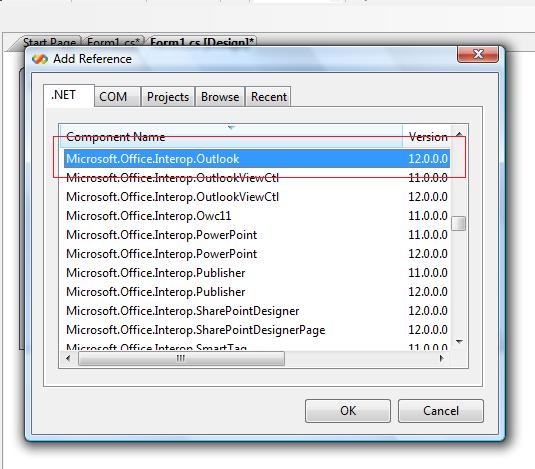
The code uses the Microsoft.Office.Interop.Outlook component. For this component to be present, we must have Outlook installed on our system. Then when we go to the solution explorer and access the references node and choose add a new reference from the context menu, we will be able to access this component in the "Add reference" window under the .NET tab as shown in the picture below:
Then we can add the following code:
using Outlook=Microsoft.Office.Interop.Outlook;
Class ClassDisplayMail
{
Public void DisplayOutlook()
{
Outlook.Application objApp =new Outlook.Applicaiton();
Outlook.MailItem mail=null;
mail=(Outlook.MailItem)objApp.CreateItem(Outlook.OlItemType.olMailItem);
mail.Attachments.Add((object)@"C:\me.doc",
Outlook.OlAttachmentType.olEmbeddeditem,
1, (object)"Attachment");
mail.To="me@abc.com;test@def.com";
mail.Cc="con@def.com";
}
}
mail.Send();
mail.Display();
The Add method of the Attachments of the MailItem class has 4 parameters:
- The first parameter: The file path to be attached.
- The second parameter: The attachment type, by default we should use
embedItem to get the attachment, it has other values like ByValue and ByReference to use which you can refer to MSDN. - The 3rd parameter is order in which you want the attachment to be added, 1 means 1st attachment, 2 means 2nd attachment, etc.
- The 4th parameter is the display name we want to give to the attachment, if you want the file name you can use the
FileInfo.Name method of the FileInfo class to do so.
Points of Interest
By using the different OlItemTypes parameter in the CreateItem method of the Application interface, we can create calendar invites, tasks notes, etc. Just use the OlItemTypes.olCalendar, or OlItemTypes.Notes, etc.
History
- 11th December, 2009: Initial post
This is my first ever post on The Code Project. Thanks for this website's support during many times of need.
I am working on Microsoft Technologies for 4 years, during my free time i love to play cricket, basketball and a lot of video games.



 General
  News
News  Suggestion
  Question
  Bug
Bug  Answer
  Joke
Joke  Praise
  Rant
Rant  Admin
Admin 


 Submit an article or tip


