Click here to Skip to main content

How to work with VSS through the VC++ 6.0 development environment

By , 6 Aug 2003
 

Introduction

Visual SourceSafe® has become every Windows® developer’s companion as regards maintaining his or her code as well as, a means to keep track of the various versions of his or her development. This makes his or her life a lot simpler, and avoids the unnecessary usage of his or her disk space.

I would like to share with you folks a unique way of using this invaluable tool through your favorite development environment. Yes, it is very much your own Visual C++ Version 6.0 IDE. So, just tie up those walking shoes, and follow me.

Configuring VSS from the VC++ environment

Start the environment by invoking msdev.exe from the Run prompt. After the environment is open and ready,

  1. Select Tools->Options.
  2. Select the Source Control tab from the Options dialog.
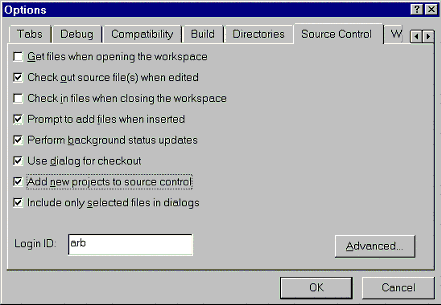
    Fig. 1 Options Dialog

  3. Tick the checkboxes as shown in figure 1 above. Enter a login ID in the edit box Login ID.
  4. You need to consult your VSS Administrator, before using the "Advanced" options through the "Advanced" button.
  5. Click OK to accept the settings.

After you make the above settings the VC++ IDE will automatically prompt you to save your newly created workspace in VSS each time you create one.

How to add a new workspace to VSS

After you create a new workspace using the AppWizard, you will get a message as shown below:

Fig. 2 Visual C++ message, to store a project in VSS.

Click the ‘Yes’ button, to store the newly created workspace in VSS. You will see the Visual SourceSafe Login dialog, which will prompt you for the Login ID, Password and the VSS Database path.

Fig. 3 The VSS Login dialog.

Please enter your Login ID (the one you had entered while configuring VSS). You need to consult your VSS Administrator for your Password and VSS Database entries. After you have done so, click on the Browse button to select the path of your VSS Database. You will be able to do so using the dialog shown below.

Fig.4 Dialog to select VSS database.

Click the browse button to select the path of the database file srcsafe.ini using the Find Database dialog.

Fig. 5 Select your VSS Database path using Find Database dialog

After you click Open button, you will be asked to confirm this path as shown below.

Fig. 6 Confirm the path of VSS database.

Select OK to confirm, or Cancel to recheck the VSS database path. After you have confirmed the path. You will see this path in the Available databases: list. Click the Open button to open the VSS database. You will be again prompted to confirm your LoginID, Password and Database path by the VSS Login dialog. Click the OK button to accept the information or Cancel to exit.

Fig.7 Your database path is added to the Available databases list

After you click OK, you will be prompted to create a new Project folder under your VSS database path, through the Add to SourceSafe Project dialog as shown in Fig. 8 below.

Fig. 8 Add your project to the VSS database tree from here.

Click OK to accept the default Project name as the name of the folder where the project will be saved under your VSS database tree. After you have done so, you will be prompted by VSS to confirm the creation of this folder, as it does not exist as yet, under your database tree. This is done as shown in Fig. 9 below.

Fig. 9 Confirm creation of the new folder in your database.

After you click ‘Yes’ button to accept the creation of the folder you will be allowed to select the files in the project, which you want to store in VSS through the Add to Source Control dialog.

Fig. 10 The list of project files which will be stored in VSS.

By default, VSS selects all your files for storing; you may remove the ticks from any files which you do not want to store in VSS. You may add your comments in the Comment edit box.

The selected files are Checked Out by default, to allow modifications. You need to remove the tick against the Keep checked out check box, in order to make the files read only. Click the OK button to move the files to VSS and you are done with it.

How to start your business with VSS from within the environment

Your business with VSS is a few clicks away. In order to achieve that you need to follow the following steps.

Steps to start using VSS

  1. Right click the VC++ IDE’s toolbar. You will see the popup menu as shown in fig. 11 below.
  2. Select Source Control option from this menu.
  3. You will notice a new toolbar Source Control, as shown in Fig 12.
  4. You can use VSS from this toolbar. The details are described in the next section.

Fig. 11 Popup menu to select VSS option

Fig. 12 VSS toolbar

Source Control toolbar (from left to right in the image).

  1. Get Latest Version: Retrieves a read-only copy of the selected VSS items.
  2. Check Out: Copies the latest version of one or more selected files from the current project into your current working folder.
  3. Check In: Updates VSS with changes made to a checked-out file, and unlocks the VSS master copy.
  4. Undo Check Out\; Cancels a Check Out operation, undoing all changes. You must have a working folder set for this command to work properly.
  5. Add To Source Control: Invokes the Add to Source Control Dialog shown in fig 8.
  6. Remove From Source Control: Removes the project from VSS.
  7. Show History: Shows the history of a file or project in VSS.
  8. Show Differences: compares the local copy of your code file to the one in VSS, and shows how they differ (in a text display).
  9. Source Control Properties: This will invoke a dialog as shown below, when you select one of your code files.

    Fig 13 Dialog shows the properties of a file in VSS.

  10. Share from Source Control: VSS projects are in many ways analogous to operating system folders. However, whereas every file in an operating system exists uniquely in a folder, a VSS file can simultaneously exist in many different projects.

    In VSS, you can share files. Inside the VSS database, there is only one copy, the master copy, of the file; each project to which the file belongs simply has a pointer to that copy. When you change the file in any one project, VSS immediately updates it in all the projects that share it. For more information on Sharing of projects and files please see Share Files in your MSDN documentation.

  11. Refresh Status: Refresh the status of your project files.
  12. Source Control: This will execute the Visual SourceSafe software.

You can also use the Project->Source Control menu item to use the above functionality.

Some useful tips

  1. How to know whether your files are checked in or checked out:

    If you open your workspace and select the File View tab of the workspace window, you will notice that the files are all marked in gray color, which means that your workspace is checked in. This is a confirmatory test to know whether your files are checked out or checked in.

    Fig 14 File View indicates checked in files.

  2. How to know whether a particular file is checked out or checked in:

    To know the status of a file, i.e. whether it is checked out or checked in, just open the file and right click on the open file, and select ‘Properties’ from the popup menu. You will get the following dialog:

    Fig. 15. Dialog indicates the status of a file in VSS.

    You will be able to notice the status of the file inside the ‘Status:’ edit control. An alternative way to know this information is to look in to Class View tab of your workspace window. If both the header file (.h or. hpp) and code file (.cpp or .c) are checked out, you will see a red tick associated with the particular C++ class. If only one of them is checked out, then you will see a black tick associated with the particular C++ class that is checked out.

Conclusion

It is very simple and effective to use VSS from your development environment, rather than opening the VSS software separately. I hope this approach will surely improve your efficiency as regards usage of VSS, as well as encourage you to do source-safing from the VC++ development environment.

Happy Source-safing all the way!!!

License

This article has no explicit license attached to it but may contain usage terms in the article text or the download files themselves. If in doubt please contact the author via the discussion board below.

A list of licenses authors might use can be found here

About the Author

Ashutosh R. Bhatikar
Team Leader Symphony Services Private Limited.
India India
Member
I have been working with Symphony Services for the past 4 years and have a total of 9+ years experience in Software Development. I have worked mostly in C, C++, MFC, COM/DCOM/COM+. My specialization is in GUI development and Image Processing. I hold a Bachelors Degree in Engineering (Computer) from University of Goa.


Sign Up to vote   Poor Excellent
Add a reason or comment to your vote: x
Votes of 3 or less require a comment

Comments and Discussions

 
You must Sign In to use this message board.
Search this forum  
    Spacing  Noise  Layout  Per page   
GeneralRemove from Source Control does not works in VC++ 6.0membersandeep222910 Aug '06 - 0:26 
Hello Smile | :) ,
 
I am using a different source code control system just like VSS.
I am facing some problem regarding "Remove from source control".
 
In MSVS .NET 2003 IDE it is "Change Source Control" & you need to click on "Unbind" button to actually remove the project from source control.After clicking "Unbind" all the SCC toolbar buttons ( checkin,checkout,get latest version, history etc ) gets disabled since the project is no more under the source control.
One would expect the similar behaviour in VC++ 6.0 IDE SCC toolbar. But, it doesn't seems to be working & i found the SCC toolbar buttons still enabled, it means the project is still under source control.
 
If you have any solution to this problem, kindly revert back to me urgently on :
sandeep.gupta@geometricsoftware.com
 
Please reply asap.
 
Best Regards,
Sandeep
 

QuestionExtending VSS toolbarmembersandeep222919 Apr '06 - 1:14 
Hi,
 
In one my projects, i require to extend the existing VSS toolbar with my own additional buttons for various functionalities like "Unlock","Retire", "Create Branch" etc......
 
Please let me know (if possible with a sample code) how can i do this or how to add new buttons to VSS toolbar which we see in VC++ 6.0 IDE/VS.NET 2003 IDE.
Can write up your answers to sandeep.gupta@geometricsoftware.com
 
Regards,
Sandeep
GeneralVss VS 2003 .NET Integrationmemberbuczkow9 Apr '06 - 22:07 
Is it possible to set VSS <-> VS 2003 .NET integration in a way described in article ? I registered ssscc.dll, but still dont see "Source control" option in file menu and in Tools/Options.
 
With regards

Generaladd file to vss by using vs.netmemberadv20056 Mar '06 - 0:10 
hi
I want to add a new file to my DB (Visual source safe) but the problem is ,
when i use the method VssItem.Add(local, comment, iflags)
 
my project return to me (bad parameter),I think the flag is wrong Iput it 0/1 and the result didn't change, can you write example to me , please
GeneralRe: add file to vss by using vs.netmemberAshutosh R. Bhatikar6 Mar '06 - 0:52 
Hi,
 
I think you want to add you file to the VSS DB using Visual Source Safe Automation. You may find more details about using VSS Automation at:http://msdn.microsoft.com/library/default.asp?url=/library/en-us/dnvss/html/vssauto.asp[^]
 
By the way, the valid values for iFlags are:
VSSFLAG_BINBINARY, VSSFLAG_BINTEST, VSSFLAG_BINTEXT, VSSFLAG_DELNO, and VSSFLAG_DELYES.
 
Ashutosh Bhatikar
GeneralVSS integrationmembershijuck7 Dec '04 - 19:53 
hey,
In the MSdev's project menu, I cant see "Source control" option. I lost the VSS integration with the MSDEV. There is no "source control" tab in "Options" too.

How can i reintegrate VSS to MSDEV?
 
shijuck
GeneralRe: VSS integrationmemberAshutosh R. Bhatikar7 Dec '04 - 20:52 
Hi,
 
Could you please let me know if VSS is still installed OR is it uninstalled from your computer?
 
If it is present, then you will be able to check this from the following Registry Key
HKEY_LOCAL_MACHINE\SOFTWARE\SourceCodeControlProvider
|
|____InstalledSCCProviders
|
|____Microsoft Visual SourceSafe
(Reg Type = REG_SZ, Data = Software\Microsoft\SourceSafe)
 
The Data field indicates the Path in the Registry where the SCC Provider is installed.
 
If this key is present in your Registry then look for the "ProviderRegKey" under
HKEY_LOCAL_MACHINE\SOFTWARE\SourceCodeControlProvider. This should contain "Software\Microsoft\SourceSafe" as its data.
 
If this exists, then the Source Code Control will get enabled for MSDEV.
 
Hope this helps,
 
Regards,
Ashutosh.
GeneralRe: VSS integrationmemberVaclav27 Apr '05 - 22:02 
I have VSS installed but I did not find the SourceCodeControlProvider key in the registry.
Of course the Source Control tab is missing from my Option also.
Any other idea how to reestablish the VC++ VSS integration?
I recall that you should follow certain seqence when settting up VC++ with VSS. But I am reluctant to go thru installation again especially when I do not know which app should be installed first ( including SP's)
Thank for help


Vaclav
GeneralRe: VSS integrationmemberAshutosh R. Bhatikar28 Apr '05 - 1:12 
Hi Vaclav,
 
Thanks for your response. If you have installed VSS, the you will have the following entries in the Registry
HKEY_LOCAL_MACHINE\SOFTWARE\Microsoft\SourceSafe
 
1. SCCServerName - Microsoft Visual SourceSafe
 
2. SCCServerPath - C:\Program Files\Microsoft Visual Studio\Common\VSS\win32\SSSCC.DLL
 
This path may differ on your system. Please see if this entry exist. If not, then please search for SSSCC.DLL on your system and copy the file path to this key.
 
This DLL is the VSS Source Code Control Provider.
 
In the worst case, if this DLL does not exist, you may have to re-install VSS from the Visual Studio CD.
 
3. PromptForConnect - 1 (must be 1)
 
Hope this helps.

 
Ashutosh Bhatikar
GeneralRe: VSS integrationmemberVaclav28 Apr '05 - 19:26 
Ashutosh,
I found only databases ( I had two) under HKEY_LOCAL_MACHINE\SOFTWARE\Microsoft\SourceSafe key.
I decided to reload VSS and the integration with VC++ works just fine now.
I am just curious - how does one find information like this. How do you know what should be in the application keys?
Thanks for your help.
 
Vaclav
GeneralVSS only good for small projectsmemberTidhar12 Aug '03 - 19:53 
VSS may be good for small projects, but here we work with a large project (over 100 DLLs) with several teams working on different branches in VSS. This kind of work is impossible to integrate into the VC IDE, because VSS can never tell me which branch it's refering to when I want to check-in/out something.
Also, when working on this scale, deleting projects from VSS becomes a dangerous job, since it sometimes corrupts the entire VSS database.
GeneralRe: VSS only good for small projects (Not True)memberAnil Popli12 Aug '03 - 20:53 
I am working with a project having over 200 DLLs and over 1600 .cpp files. Big team of more that 35 people.
 
AND NO PROBLEM with source safe.
 
Ankit
GeneralRe: VSS only good for small projects (Not True)memberTidhar12 Aug '03 - 20:56 
How do you synchronize the IDE with different branches in VSS?
GeneralBroken VC++ Sourcesafe linkmemberworksopbenny12 Aug '03 - 15:40 
When I first install VC6 and sourcesafe the links integrating sourcesafe to VC6 were all fine and working OK. But at some stage something has gone wrong. We have had to ship copies of projects/source code to other developers and then had to reconcile the changes so I don't know if this has anything to do with it.
When I select the Project\Source Control menu, everything except "Add to source Control" and "sourcesafe.exe" is greyed out and innaccessible. So I just open the sourcsafe database and manually checkin/out what I need, but it would be nice to have access to the integrated features you describe - auto check out on edit etc.
 
Does anyone have any clues on what could have gone wrong ? Or how to fix it ? Is it the inevitable - re-install ???
GeneralRe: Broken VC++ Sourcesafe linkmemberAshutosh R. Bhatikar12 Aug '03 - 18:08 
You wrote:
"We have had to ship copies of projects/source code to other developers and then had to reconcile the changes so I don't know if this has anything to do with it."
 
My Response:
You have rightly pointed out the issue. Sometimes, we need to work offline, due to network problems. In such cases this issue may arise. There are two ways to resolve the issue. No need to re-install Smile | :) .
 
Scenario 1:
When you open your workspace the next time, if you get a prompt which says that " was not found, would you like to browse to the project?" Select Yes. The Source Code Control will allow you to browse and re-connect to your VSS Database.
 
Scenario 2:
If you do not get a prompt as mentioned above, then please follow the following steps, since you mentioned that "Add to source Control" menu item is enabled.
1. Click on "Add to source Control" menu item.
2. Enter your login info, and browse to the project path using the Source Code Control dialog (which will come up after you login).
3. Once you have selected the path, you will get a prompt "A project by this name already exists in the source code control project ""."
4. Click Yes to reconnect to the existing project.
 
Once you have completed your session, please save the workspace, which will save the VSS information into your .DSP file.
 
Hope this helps.
 
Regards,
 
Ashutosh.
 

GeneralRe: Broken VC++ Sourcesafe linksusstheschmitzer11 Apr '05 - 14:50 
Ok, I have a project that is linked to VSS - how do I disable that link?
 
There USED TO be a HOWTO somewhere on MSDN, but I can't find it for the life of me.
 
I remember modifying .dsw, .dsp files, deleting .scc, .ncb, and .opt. Tried all of that anit is still linked.
 
Any ides? Thanks.
GeneralRe: Broken VC++ Sourcesafe linksussAnonymous28 Sep '05 - 20:11 
The phenomenone you described of VSS6 was found by myself for two years, I often fixed it by chance without a set of special effective ways to solve it, ever since I don't knowFrown | :( Also, I want to find a common way to do with it, but nothing about this in MSDN not found, what a pity of us!
But I found that an utility of VSS used for Delphi which is useful to me, because indeed it can re-establish the connection between VC6 projects and VSS6, don't know how it worksSmile | :) in all I think VC6 integrated with VSS is too stupid rather than the one which is not produced by MS!
 
who can tell me how to do with this problem anyways.
QuestionVSS everybody's choise?memberVaclav8 Aug '03 - 5:59 
VSS is alligned with majority of MS products - not invented by MS and full of bugs they will not fix. When you run into a problem your only support are the guys( commonly used as gender nonspecific descritor HI HI ) who are stuggling with it just like you.
For example - I have a my own basic project which I copy (Using U Can Code application) and modify for specific use. When I add new class, say from gallery ( MS "product") VSS does ask if I want to add it under VSS control, however, it refuses to copy it to current project - it wants to copy to the old , original project - and the only option is NOT to copy because the location it wants to copy to cannot be changed!!!
 
MS does not know the meaning of customer service and that is the bottom line with me! Let's invent another language is their answer to everything.
 
Vaclav Sal
AnswerRe: VSS everybody's choise?member.:fl0yd:.8 Aug '03 - 10:28 
So you haven't discovered a feature named "sharing" yet.
 
It's easy to blame a company for one's own faults and shortcomings. I'm pretty happy with VSS. It does have it's downsides and isn't quite perfect, but so are other source code control systems like, let's say, CVS. I've also worked with NXN's Alienbrain which is great but few can afford to buy and maintain it.
 
.f
GeneralWho said that?!!sussAnonymous7 Aug '03 - 7:28 
Who said that: Confused | :confused:
Visual SourceSafe® has become every Windows® developer’s companion as regards maintaining his or her code as well as, a means to keep track of the various versions of his or her development.
 
This is NOT true. Mad | :mad:
Why don't you ask folks in Redmond what do they use?Rose | [Rose]
GeneralRe: Who said that?!!memberAshutosh R. Bhatikar7 Aug '03 - 17:57 
Smile | :) My dear friend, I have taken a general opinion. ClearCase is not an affordable stuff for every one. Hope you take this sportingly.
 
Ashutosh
GeneralRe: Who said that?!!memberPerfectDark7 Aug '03 - 22:28 
Ashutosh R. Bhatikar wrote:
ClearCase is not an affordable stuff for every one
 
But CVS is.
 
Smile | :)

GeneralRe: Who said that?!!sussAnonymous16 Aug '03 - 2:44 
PerfectDark wrote:
But CVS is.
 
Free software is only free if your time is worth nothing.
 
Seriously, CVS is a huge pain to work with. Heck, even PVCS is better than CVS.
GeneralRe: Who said that?!!sussAnonymous8 Aug '03 - 7:11 
Did I mention anything about ClearCase?
Or Redmond folks use ClearCase? How do you know?
Are you from Redmond?
 
My point is you should NOT write down anything you do not know!!Roll eyes | :rolleyes:
A short story: one of my coworker who only use VB and understand VB very well. He told my boss that "he can use VB to create same features/functionality of XXXX in one week and make it better. VB is the best computer langulage."
 
He should not say anything that he does not know.
"VB is the best computer langulage." (only VBer will say that!!)
You should not write down anything you do not know. Do you know how many Window applicaton developer use MS SourceSafe, and how many use CVS and how many use XXX and how many use YYY and ........Confused | :confused:

GeneralRe: Who said that?!!sussAnonymous8 Aug '03 - 20:13 
My dear friend, Let me tell you a story.
There was a great preacher who would begin his discourse by drawing a black dot of a white board. Then, he would ask his viewers what they see. And in a chorus they would say "A black dot". The the preacher would say "Why does any of you not see the white board?"
 
The moral of the story is that instead of pointing out the faults in the article, why do you not point out how we can make the life simpler of a VC++ developer?
 
I Hope you get my point of view.
 
Let us as contributors look at the good things in life. Smile | :)
 
Best Regards to all the contributors.

General General    News News    Suggestion Suggestion    Question Question    Bug Bug    Answer Answer    Joke Joke    Rant Rant    Admin Admin   

Permalink | Advertise | Privacy | Mobile
Web02 | 2.6.130523.1 | Last Updated 7 Aug 2003
Article Copyright 2003 by Ashutosh R. Bhatikar
Everything else Copyright © CodeProject, 1999-2013
Terms of Use
Layout: fixed | fluid