Introduction
There are a number of XP like grouping controls on CodeProject and elsewhere:
(Please let me know if I missed someone!)
Thanks to all those who wrote those nice controls. All these controls implement
a number of features, however no single control implements all those features.
So I decided to shamelessly copy their code and "Converge" everything in one!
;-) Also most of them were in C#, so I decided to start with VB.NET for this
one. I used VS 2003 but they should work in VS 2002 also.
Feature list
-
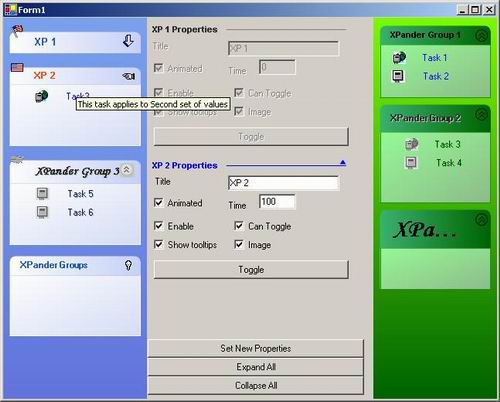
Images on the left side of caption.
-
Animated expand/collapse. Animation can be switched off and the timing can also
be changed. Gives the feeling of gradual fade away.
-
Drawing in gray if disabled.
-
Gradient fills.
-
Different chevron styles
-
Can be shown as non-collapsible
-
Tooltips
-
Office 2003 line style for the caption
-
Completely customizable
Using the control
You can use it in two ways:
-
Drop
XPanderList control to your form and then drop XPander
controls to the XPanderList
control.
-
Or just drop
XPander control to your form.
Most of the properties exposed on the controls are self-explanatory but some
important ones are:
-
CaptionStyle - Choose a caption style. FlatLine
makes it look like, Office 2003 flat caption with a line in the end, style.
-
ChevronStyle - Different chevron styles. Image, ArrowsInCircle,
Triangle.
-
CollapsedImage, ExpandedImage, ExpandedHighlightImage,
CollapsedHighlightImage - Specify your own bitmaps for chevrons!
(Make sure that you have ChevronStyle set to Image.)
-
Image
- Image on the left side of the caption.
-
CanToggle - Is the user allowed to expand/collapse? If
False
chevrons are not displayed, clicking on the caption does nothing and mouse
cursor remains default.
-
ShowTooltips
- Whether to show tool tips or not. Tool tip text is same as the caption text.
-
Animated
- Enable/disable animation.
-
AnimationTime - How fast/slow (time). Used only if Animated
is True. Value 0 behaves as if Animated=False
-
CaptionTextHighlightColor
- Caption is drawn in this color when hovering.
-
CaptionHeight - Caption height can be adjusted. All child controls
on this "group" are repositioned automatically with caption height change.
There are more properties for adjusting caption attributes like height, font,
colors and so on.
Also methods Expand(), Collapse() are available on XPander
and ExpandAll(), CollapseAll() are available on XPanderList.
Using the code
The "original articles" do such a good job of explaining the code so I will not
repeat it here. They can be found with the links above.
Points of interest
Note that properties like CaptionLeftColor of type Color
(and other properties like it) can be "Reset" using the VS.NET designer. This
is achieved by using the DefaultValue attribute:
<Description("Determines the ending (dark) " + _
    "color of the caption gradient fill."), _
    DefaultValue(GetType(Color), "198, 210, 248"), _
    Category("Caption")> _
Public Property CaptionRightColor() As Color
To draw disabled strings I use:
ControlPaint.DrawStringDisabled(g, CaptionText, _
    m_CaptionFont, capcolor, CaptionRectF, format)
Similarly to draw disabled images I use:
ControlPaint.DrawImageDisabled(g, m_ExpandedImage, _
    Me.Width - m_ExpandedImage.Width - 8, 2 + _
    imageOffsetY, Me.CaptionRightColor)
Credits
Once again since this is more a copy/paste/organize operation then "new code",
all credits go to those who wrote the original controls namely Daren May, Derek
Lakin, Rob Tomson and the people who made TaskVision.
Revision history
-
Ver 1.2
- New properties for pane color handling to get a look similar to Longhorn group
boxes!.
PaneBottomRightColor, PaneTopLeftColor, PaneOutlineColor
-
New property
ImageOffset
between image and caption top.
-
New property
CaptionTextAlign, can be Left,Middle
or Right
-
New
CaptionStyle=WrapAroundLine
-
New
ChevronStyle=PlusMinus
-
Ver 1.1
-
DrawChevronImage replaced by ChevronStyle. Currently
you can select Image, ArrowsInCircle, Triangle
or None.
-
FlatCaptionStyle replaced by CaptionStyle which can
be Normal or FlatLine.
-
Reorganized most of the code to make it much more readable.
-
CaptionCurveRadius
is also exposed now. Set it to 0 to remove curved captions.
-
Standard border styles can be used with
BorderStyle. Enable border
drawing by setting DrawBorder to True
Note: If you are already using version 1.0, you will have to change your
form code to use CaptionStyle and ChevronStyle instead
of FlatCaptionStyle and DrawChevronImage.
Happy XPanding!
This member has not yet provided a Biography. Assume it's interesting and varied, and probably something to do with programming.



 General
  News
News  Suggestion
  Question
  Bug
Bug  Answer
  Joke
Joke  Praise
  Rant
Rant  Admin
Admin 


 Submit an article or tip


 .
.

