Click here to Skip to main content

Introduction to RPC - Part 1

By , 22 Dec 2012
 

Hello RPC World!

Contents

Introduction

I have worked with client-server applications for a couple of years now, all of these applications use RPC as the layer of communication between the client and the server. I found it strange that no real article existed on this matter here on CodeProject, so I decided to write one of my own to spread my knowledge on this matter.

The matter is, on the other hand, a bit big so I will split it into several articles of different levels of difficulty. This first one is at beginner level.

IDL, RPC and you

In order to use RPC, you need to have some knowledge about IDL, but don't you worry, this article will help you.

Interface Definition Language (IDL)

IDL stands for Interface Definition Language and it's a language for defining interfaces (no kidding). Writing an IDL file is somewhat like writing a C header file with some additional keywords and constructs. IDL is an attributed programming language and thus it can describe parameters, functions and interfaces in more detail than C.

Remote Procedure Call (RPC)

Remote Procedure Call (RPC) defines a powerful technology for creating distributed client/server programs. The RPC runtime libraries manage most of the details relating to network protocols and communication. This enables you to focus on the details of the application rather than the details of the network.

With RPC a client can connect to a server running on another platform. For example: In theory the server could be written for Linux and the client could be written for Win32.  The reality is somewhat more complicated.

Are you scared yet?

If you're not scared, I think it's good time for an example.

The standalone application

This standalone application will not use RPC and it is a simple HelloWorld application that we later will transform into a RPC client/server application.

Hello Lonely World!

// File Standalone.cpp
#include <iostream>

// Future server function.
void Output(const char* szOutput)
{
   std::cout << szOutput << std::endl;
}

int main()
{
   // Future client call.
   Output("Hello Lonely World!");
}

I don't think anyone can think of anything to say about the above application. It outputs the string "Hello Lonely World!" to the standard output.

The IDL file

It is time to define our interface in IDL.

Hello IDL World! 

// File Example1.idl
[
   // A unique identifier that distinguishes this
   // interface from other interfaces.
   uuid(00000001-EAF3-4A7A-A0F2-BCE4C30DA77E),

   // This is version 1.0 of this interface.
   version(1.0),

   // This interface will use an implicit binding
   // handle named hExample1Binding.
   implicit_handle(handle_t hExample1Binding)
]
interface Example1 // The interface is named Example1
{
   // A function that takes a zero-terminated string.
   void Output(
      [in, string] const char* szOutput);
}

Here you see the attribute programming used by IDL. The above example defines an interface with an universally unique identifier (uuid) and version (version) that is named Example1. The Example1 interface defines one function named Output that takes a const char* argument named szOutput as input (in) that is zero-terminated (string).

The implicit_handle attribute for the interface will be discussed later, leave it there for now.

What's next?

In order to use the IDL in our application we need to run it through a compiler (midl.exe) that will translate the IDL to a client proxy and a server stub in C. The proxy/stub will later be compiled using your favorite compiler (cl.exe in my case).

How files are generated with midl.exe

How may I serve you?

It's time to take the generated files and put them to use in our server application.

Hello Server World!

// File Example1Server.cpp
#include <iostream>
#include "Example1.h"

// Server function.
void Output(const char* szOutput)
{
   std::cout << szOutput << std::endl;
}

// Naive security callback.
RPC_STATUS CALLBACK SecurityCallback(RPC_IF_HANDLE /*hInterface*/, void* /*pBindingHandle*/)
{
    return RPC_S_OK; // Always allow anyone.
}

int main()
{
   RPC_STATUS status;

   // Uses the protocol combined with the endpoint for receiving
   // remote procedure calls.
   status = RpcServerUseProtseqEp(
      reinterpret_cast<unsigned char*>("ncacn_ip_tcp"), // Use TCP/IP protocol.
      RPC_C_PROTSEQ_MAX_REQS_DEFAULT, // Backlog queue length for TCP/IP.
      reinterpret_cast<unsigned char*>("4747"), // TCP/IP port to use.
      NULL); // No security.

   if (status)
      exit(status);

   // Registers the Example1 interface.
   status = RpcServerRegisterIf2(
      Example1_v1_0_s_ifspec, // Interface to register.
      NULL, // Use the MIDL generated entry-point vector.
      NULL, // Use the MIDL generated entry-point vector.
      RPC_IF_ALLOW_CALLBACKS_WITH_NO_AUTH, // Forces use of security callback.
      RPC_C_LISTEN_MAX_CALLS_DEFAULT, // Use default number of concurrent calls.
      (unsigned)-1, // Infinite max size of incoming data blocks.
      SecurityCallback); // Naive security callback.

   if (status)
      exit(status);

   // Start to listen for remote procedure
   // calls for all registered interfaces.
   // This call will not return until
   // RpcMgmtStopServerListening is called.
   status = RpcServerListen(
     1, // Recommended minimum number of threads.
     RPC_C_LISTEN_MAX_CALLS_DEFAULT, // Recommended maximum number of threads.
     FALSE); // Start listening now.

   if (status)
      exit(status);
}

// Memory allocation function for RPC.
// The runtime uses these two functions for allocating/deallocating
// enough memory to pass the string to the server.
void* __RPC_USER midl_user_allocate(size_t size)
{
    return malloc(size);
}

// Memory deallocation function for RPC.
void __RPC_USER midl_user_free(void* p)
{
    free(p);
}

This is a bit different from the standalone application, but not much. It has some initialization code for registering the interface but the Output function remains the same.

Let me be your client

Time has come to write our client application that will connect to the server.

Hello Client World!

// File Example1Client.cpp
#include <iostream>
#include "Example1.h"

int main()
{
   RPC_STATUS status;
   unsigned char* szStringBinding = NULL;

   // Creates a string binding handle.
   // This function is nothing more than a printf.
   // Connection is not done here.
   status = RpcStringBindingCompose(
      NULL, // UUID to bind to.
      reinterpret_cast<unsigned char*>("ncacn_ip_tcp"), // Use TCP/IP protocol.
      reinterpret_cast<unsigned char*>("localhost"), // TCP/IP network address to use.
      reinterpret_cast<unsigned char*>("4747"), // TCP/IP port to use.
      NULL, // Protocol dependent network options to use.
      &szStringBinding); // String binding output.

   if (status)
      exit(status);

   // Validates the format of the string binding handle and converts
   // it to a binding handle.
   // Connection is not done here either.
   status = RpcBindingFromStringBinding(
      szStringBinding, // The string binding to validate.
      &hExample1Binding); // Put the result in the implicit binding
                          // handle defined in the IDL file.

   if (status)
      exit(status);

   RpcTryExcept
   {
      // Calls the RPC function. The hExample1Binding binding handle
      // is used implicitly.
      // Connection is done here.
      Output("Hello RPC World!");
   }
   RpcExcept(1)
   {
      std::cerr << "Runtime reported exception " << RpcExceptionCode()
                << std::endl;
   }
   RpcEndExcept

   // Free the memory allocated by a string.
   status = RpcStringFree(
      &szStringBinding); // String to be freed.

   if (status)
      exit(status);

   // Releases binding handle resources and disconnects from the server.
   status = RpcBindingFree(
      &hExample1Binding); // Frees the implicit binding handle defined in the IDL file.

   if (status)
      exit(status);
}

// Memory allocation function for RPC.
// The runtime uses these two functions for allocating/deallocating
// enough memory to pass the string to the server.
void* __RPC_USER midl_user_allocate(size_t size)
{
    return malloc(size);
}

// Memory deallocation function for RPC.
void __RPC_USER midl_user_free(void* p)
{
    free(p);
}

Other than connecting to the server and some cleanup, the actual call is the same, except that I've changed the string to be outputted.

Putting it all together

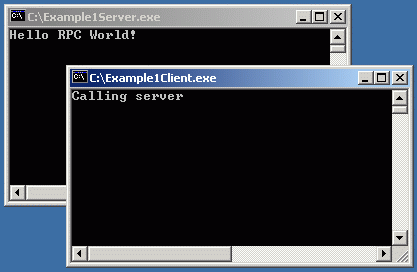
First we need to compile the IDL file to get the client proxy, the server stub and the common header file. The proxy and the stub is compiled, as are the client and server implementation. We link the two applications and run them. If everything works, we can be really glad as we have done our first RPC client/server application.

Putting it all together

Appendix

This section describes some techniques useful when writing RPC applications.

Debugging and RPC

If you get into trouble when debugging and the problem seem to be in a MIDL generated file, the real problem will most likely be in the client or in the server. I have sometime run into problems with pointers, but in a follow up article I will describe these things more thoroughly.

Implicit and explicit handles

When using RPC, the binding handles can be implicit (as in the example in this article) or explicit. I always use explicit handles as I sometime are connected to multiple servers, and that does not work with the implicit handle. To use explicit handles, you'll have to change the IDL file, the server and the client:

// File Example1Explicit.idl
[
   // A unique identifier that distinguishes this
   // interface from other interfaces.
   uuid(00000002-EAF3-4A7A-A0F2-BCE4C30DA77E),

   // This is version 1.0 of this interface.
   version(1.0),

   // This interface will use explicit binding handle.
   explicit_handle
]
interface Example1Explicit // The interface is named Example1Explicit
{
   // A function that takes a binding handle and a zero-terminated string.
   void Output(
      [in] handle_t hBinding,
      [in, string] const char* szOutput);
}
// File Example1ExplicitServer.cpp
#include <iostream>
#include "Example1Explicit.h"

// Server function.
void Output(handle_t hBinding, const char* szOutput)
{
   std::cout << szOutput << std::endl;
}

// main - same as before.
// File Example1ExplicitClient.cpp
#include "Example1Explicit.h"

int main()
{
   // Call to RpcStringBindingCompose - same as before.

   handle_t hExample1ExplicitBinding = NULL;

   // Validates the format of the string binding handle and converts
   // it to a binding handle.
   // Connection is not done here either.
   status = RpcBindingFromStringBinding(
      szStringBinding, // The string binding to validate.
      &hExample1ExplicitBinding); // Put the result in the explicit binding handle.

   if (status)
      exit(status);

   RpcTryExcept
   {
      // Calls the RPC function. The hExample1ExplicitBinding binding handle
      // is used explicitly.
      // Connection is done here.
      Output(hExample1ExplicitBinding, "Hello RPC World!");
   }
   RpcExcept(1)
   {
      std::cerr << "Runtime reported exception " << RpcExceptionCode()
                << std::endl;
   }
   RpcEndExcept

   // Call to RpcStringFree - same as before.

   // Releases binding handle resources and disconnects from the server.
   status = RpcBindingFree(
      &hExample1ExplicitBinding); // Frees the binding handle.

   if (status)
      exit(status);
}

There are also something called auto_handle, but I've never ever used that. It somehow takes care about connecting to the server automatically. 

Application Configuration File (ACF)

In this example I used implicit_handle and explicit_handle directly in the IDL file, but that is a Microsoft extension. One usually need to use a separate Application Configuration File that contain these. The sample code in the zip file does use a separate ACF file, but I felt like, writing that in the article would only confuse you even more.

Don't fiddle with the generated files

You should not fiddle with the generated files to make them compile, they are (should be) correct. Check the switches to midl.exe if you feel that they are incorrect. When compiling them you may on the other hand get a lot of warnings, but when lowering the warning level to 2, they are silent.

Shutting down the server

The example server will run until it is shut down by closing it somehow. That ain't the best way of doing it, another better way is to call the RpcMgmtStopServerListening function. But how would you call it? You could add another function in the interface (perhaps named Shutdown?) that will call RpcMgmtStopServerListening or you could create another thread in the server before calling RpcServerListen that will call RpcMgmtStopServerListening after a minute or so. More on this in another article.

Conclusion

This is only the entry door to the world of RPC and client/server applications. If you step through and read my other (future) articles on this matter, you'll be fully prepared for the world at hand.

This was my first ever article on CodeProject, I hope you enjoyed reading it as much as I enjoyed writing it.

References

Revision history 

  • 2012-12-22:
    • Finally updated to work with Visual Studio 2010 and fixed security callback.
  • 2003-08-25:
    • Updated demo and source.  
    • Changed from Named Pipe to TCP/IP (suggestion by Hector Santos).  
  • 2003-08-23:
    • Original article.

License

This article, along with any associated source code and files, is licensed under The Code Project Open License (CPOL)

About the Author

Anders Dalvander
Software Developer (Senior) Umetrics
Sweden Sweden
Member
No Biography provided

Sign Up to vote   Poor Excellent
Add a reason or comment to your vote: x
Votes of 3 or less require a comment

Comments and Discussions

 
You must Sign In to use this message board.
Search this forum  
    Spacing  Noise  Layout  Per page   
GeneralRe: Restart RPC Server Problem! Call to RpcServerUseProtseqEp fails second time around.memberAnders Dalvander11 Sep '07 - 20:18 
Hi,
 
I haven't tried to restart a RPC server, but I think that endpoints registered with RpcServerUseProtseqEp remains registered until you manually unregister them using RpcEpUnregister. Starting and stopping the listening or unregistering interfaces should not affect registered endpoints, as far as I know.
 
I think that you don't need to re-register the same endpoint if you're not making any changes to it.
 
Regards,
Anders Dalvander
GeneralThank youmembermdhanif11 Aug '07 - 1:36 
You explaned the compiling method in the diagram.
I am new . can you give the command line for compiling and linking.

 
Thank you,
KSMH
Generalnew acknowledge!memberrocket3234 Aug '07 - 2:35 
RPC is a new concept for me ,I want to learn it and apply it to my own projects ,thank you for your sharing!
Questionexample1.exememberciyan3 May '07 - 10:14 
unable to start program c:/../Example1.exe
 
system con not find file.
 
why don't i have an exmaple1 file?Sniff | :^)
 
cihan
AnswerRe: example1.exememberAnders Dalvander3 May '07 - 19:19 
Have you compiled the source files and linked the object files?
GeneralRe: example1.exememberciyan7 May '07 - 7:05 
I debug by viso 2005.NET, debugging is also succeed after that i get the error.
Unable to start program 'c:\...\Example1.exe
System can not find the file.
 

GeneralRe: example1.exememberJohnMcclain9 Aug '07 - 11:07 
dear ciyan;
 
try to apply some recommondations about "Fatal error C1189: #error : You need a Windows 2000 or later to run this stub because it uses these features: /robust command line switch.”
in this site:
 
http://blogs.msdn.com/eldar/archive/2006/02/28/540981.aspx
 

Smile | :) ı have tried for same reason.
it is more efficient...
 

Mcclain.
QuestionServer response???memberraj_thunder15 Apr '07 - 21:26 
Hi Anders,
Using the current article i could able to build a similiar type of application.But Here only the clent can call any function defined in server... can u help in sending back the result or response from server to client..(i.e) calling an client routine from server...
 
Thanks,
Raj
AnswerRe: Server response???memberAnders Dalvander15 Apr '07 - 21:29 
You can mark a function with the callback attribute, but these callback functions can only be called synchronously in the context of a remote call.
 
Or you can create a RPC server in your client application that the server calls.
GeneralRe: Server response???memberraj_thunder15 Apr '07 - 23:27 
can u kindly give expanded explanation.. i have a server appln and client appln.. my client calls a function in server thru RPC and the o/p is displayed in server CMD prompt..Here the server routines declations are made in IDL..but where to declare the client routines if any??? how can i send the result of the fuction back to the client and how can i call a fuction in client from server???
 

GeneralRe: Server response???memberAnders Dalvander16 Apr '07 - 2:09 
You create two idl files, one with the server interface, and one with the client interface.
 
1. Server is started, it registers ServerInterface (see below) and starts listening.
2. Client is started, it registers ClientInterface (see below) and starts listening.
3. Client then connects to the ServerInterface exposed on the server, and calls the ConnectToServer (see below) function, passing required information for the server to connect back to the client in szClientInformation.
3. In ConnectToServer on server, server connects back to the ClientInterface exposed on the client.
4. Now the server can call the client asynchronously, and the client can call the server asynchronously.
 
[
   uuid(some unique id),
   version(1.0),
   explicit_handle
]
interface ServerInterface
{
   void ConnectToServer(
      [in] handle_t hBinding,
      [in, string] const char* szClientInformation);
 
   void DoStuffOnServer(
      [in] handle_t hBinding);
}
 
[
   uuid(some other unique id),
   version(1.0),
   explicit_handle
]
interface ClientInterface
{
   void DoStuffOnClient(
      [in] handle_t hBinding);
}

QuestionError compiling IDL filememberraj_thunder5 Apr '07 - 20:47 
Hi Anders,
Thank u for all ur inputs.. i am a beginer in this area and trying to develop a RPC application.. following is my IDl file and i have got the below errors..kindly can u ppl help me???
 

import "oaidl.idl";
import "ocidl.idl";
 
uuid(00000001-EAF3-4A7A-A0F2-BCE4C30DA77E),
version(1.0),
implicit_handle(handle_t hTestBinding)
 
interface IDlfile
{
void display([in, string] const char* op);
}
 

Errors are:
syntax error : expecting an interface name or DispatchInterfaceName or CoclassName or ModuleName or LibraryName or a type specification near "uuid"
.\IDLfile.idl(4) : error MIDL2026 : cannot recover from earlier syntax errors; aborting compilation

 
Raj
AnswerRe: Error compiling IDL filememberAnders Dalvander5 Apr '07 - 22:51 
Try removing the two import directives at the top of the file and see if that helps.
 
Cheers,
Anders
GeneralRuntime error 5 [modified]memberPrasad.Koppula3 Apr '07 - 3:09 
Hi All,
I got runtime error 5 in xp sp2 system.any idea.
 
Thanks
Prasad.K
 

-- modified at 23:23 Tuesday 3rd April, 2007
GeneralRe: Runtime error 5memberkometes9 Apr '07 - 19:04 
http://technet.microsoft.com/en-us/library/209d02c4-877c-4128-8e22-30bcd4aae6d3.aspx
GeneralRe: Runtime error 5membergizmocuz27 Apr '07 - 7:01 
After searching on this site and the internet I found the solution for this problem.
 
Under windows xp SP2 you have to change the RpcServerRegisterIf to RpcServerRegisterIfEx like:
 
// Registers the Example1 interface.
status = RpcServerRegisterIfEx(
Example1_v1_0_s_ifspec, // Interface to register.
NULL,
NULL, // Use the MIDL generated entry-point vector.
RPC_IF_ALLOW_CALLBACKS_WITH_NO_AUTH,
0,
NULL);

GeneralRe: Runtime error 5memberJohnMcclain9 Aug '07 - 10:59 
thanks alot
Smile | :)
GeneralRe: Runtime error 5memberqrsyu29 Dec '07 - 18:34 
I can't solve the problem even i change the RpcServerRegisterIf to RpcServerRegisterIfEx, my OS is WindowsXP SP2 Confused | :confused:
GeneralRe: Runtime error 5memberululazam100015 Mar '10 - 22:17 
It worked. Thank
I just love this site.
GeneralRe: Runtime error 5memberphil_z25 Mar '08 - 6:23 
Wow that was soooo totally awesome helpful!! I was looking for this damn error for more than two weeks now and couldn't figure out why the program would run on Win 2000 but not on XP!
 
That change is soo badly documented isn't it?
Thank you soo so much gizmocuz!!!! Big Grin | :-D
 
All the Best,
Phil
GeneralRe: Runtime error 5memberalterfritz2 Mar '08 - 15:09 
Thanks a bunch! I was working with an example from another location and got this same error. Without your article and this Q&Q I would still stare at the error like an ox Smile | :)
QuestionNeed Example1.hmembervikassheth6 Mar '07 - 18:01 
I have just started socket programming.And I need RPC support in my simple client server application. You have given program on introduction to RPC and its not having header file Example1.h. Please give me that header file to properly understand the program.My email address is revolutionv@gmail.com

 
vikas sheth

AnswerRe: Need Example1.hmemberAnders Dalvander6 Mar '07 - 19:37 
The file is generated by the IDL compiler as described in the article, see http://www.codeproject.com/internet/rpcintro1/rpcintro1_2.gif[^].
QuestionAsking for function prototypememberMember #383530627 Feb '07 - 17:19 
Hi the above article is very good for the beginner. I am also doing some RPC stuff. But i am not able to write a functions' protype in MIDL. The corresponding C++ function should be bool functionName(int arr[], HANDLE array[])
Plz suggest how to write the above functions' prototype in IDL
Thank u very much in advance

 
Sukhjeet
GeneralIDL compiling with MSVC6.0memberGraham Reeds29 Sep '06 - 1:04 
Where I work we are still on MSVC6, so that's what I have to use. However I am trying to evaluate RPC for a project of ours - the alternative is to write a similar thing to call functions via WinSock. Might as well not reinvent the wheel!
 
I can't figure out how to compile the IDL from within MSVC6 to produce the output files.
 
I will try to muddle on by hand, but some info on how to would be great!
 
Thanks, Graham Reeds.

General General    News News    Suggestion Suggestion    Question Question    Bug Bug    Answer Answer    Joke Joke    Rant Rant    Admin Admin   

Permalink | Advertise | Privacy | Mobile
Web03 | 2.6.130523.1 | Last Updated 22 Dec 2012
Article Copyright 2003 by Anders Dalvander
Everything else Copyright © CodeProject, 1999-2013
Terms of Use
Layout: fixed | fluid
