Introduction
This article is a brief explanation of how to use the Toolhelp32ReadProcessMemory() API. Most of the time, peeking into another process' memory space is not necessary. However, for more advanced applications, or for a late-night debugging session, there just might be some benefit in being able to see the heap of another process.
The "snapshot"
The toolhelp functions make use of a snapshot to access process, thread, module, and heap lists in the system. To quote MSDN:
"The lists in system memory change when processes are started and ended, threads are created and destroyed, executable modules are loaded and unloaded from system memory, and heaps are created and destroyed. The use of information from a snapshot prevents inconsistencies. Otherwise, changes to a list could possibly cause a thread to incorrectly traverse the list or cause an access violation (a GP fault). For example, if an application traverses the thread list while other threads are created or terminated, information that the application is using to traverse the thread list might become outdated and could cause an error for the application traversing the list."
That pretty much says it all. The snapshot is but a brief moment in time.
Depending on the privilege level of the process requesting the snapshot, the CreateToolhelp32Snapshot() function might return an error 5, which indicates access denied.
Getting a process handle
The first parameter to Toolhelp32ReadProcessMemory() is a handle to a process. This can be obtained in a variety of fashions. Since I was already in the toolhelp API, I used the Process32First() and Process32Next() functions. These two functions make use of the aforementioned snapshot.
PROCESSENTRY32 ProcessEntry = {0};
HANDLE hProcessSnapshot;
hProcessSnapshot = CreateToolhelp32Snapshot(TH32CS_SNAPPROCESS, 0);
if (INVALID_HANDLE_VALUE != hProcessSnapshot)
{
ProcessEntry.dwSize = sizeof(PROCESSENTRY32);
if (Process32First(hProcessSnapshot, &ProcessEntry) != FALSE)
{
do
{
} while (Process32Next(hProcessSnapshot,
&ProcessEntry) != FALSE);
}
CloseHandle(hProcessSnapshot);
}
EnumProcesses() is yet another way of getting a process handle.
Getting the starting address and size of a heap block
The second and third parameters to Toolhelp32ReadProcessMemory() are the starting address of the heap block and its size. To obtain those, I first used Heap32ListFirst() and Heap32ListNext() to iterate through each of the process' heap lists. Note that some processes have a few while others have several dozen (e.g., Outlook had 40). For each list, I used Heap32First() and Heap32Next() to iterate through the blocks themselves.
Note that we are getting another snapshot, this time of a particular process' heap list.
Because of thread injection, the locking of the blocks, and just the sheer number of blocks that might exist, this could be a painfully slow process. The HeapEntry.dwFlags variable can be used to filter out certain types of blocks (e.g., free, fixed, moveable).
HANDLE hHeapSnapshot;
HEAPLIST32 HeapList = {0};
HEAPENTRY32 HeapEntry = {0};
hHeapSnapshot = CreateToolhelp32Snapshot(TH32CS_SNAPHEAPLIST,
dwProcessId);
if (INVALID_HANDLE_VALUE != hHeapSnapshot)
{
HeapList.dwSize = sizeof(HEAPLIST32);
if (Heap32ListFirst(hHeapSnapshot, &HeapList) != FALSE)
{
do
{
HeapEntry.dwSize = sizeof(HEAPENTRY32);
if (Heap32First(&HeapEntry, HeapList.th32ProcessID,
HeapList.th32HeapID) != FALSE)
{
do
{
} while (Heap32Next(&HeapEntry) != FALSE);
}
else
break;
} while (Heap32ListNext(hHeapSnapshot, &HeapList) != FALSE);
}
CloseHandle(hHeapSnapshot);
}
Accessing the block
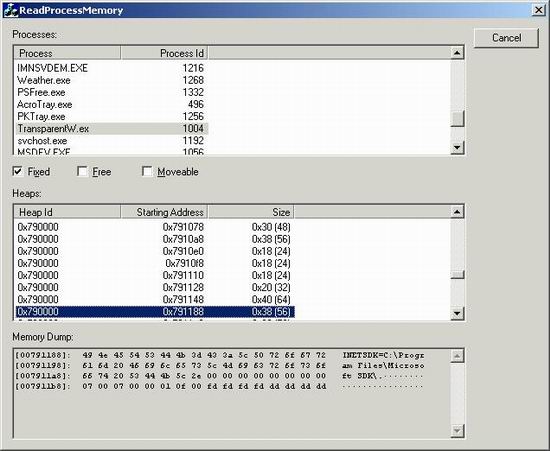
With the process identifier, starting address of the heap block and the size of the heap block, we are now ready to copy the memory into a buffer, and display it in some fashion (note: for simplicity, all formatting code is not shown). In the demo code, I used an edit control.
LPBYTE pBuffer;
BYTE byte;
DWORD dwBytesRead,
dwBlock,
dwOffset;
CString strLine,
strArr;
pBuffer = new BYTE[dwBlockSize];
if (Toolhelp32ReadProcessMemory(dwProcessId, (LPCVOID) dwBaseAddress,
pBuffer, dwBlockSize, &dwBytesRead) == TRUE)
{
for (dwBlock = 0; dwBlock < dwBlockSize; dwBlock += 16)
{
strLine.Format("[%08x]: ", dwBaseAddress + dwBlock);
strArr.Empty();
for (dwOffset = 0; dwOffset < 16; dwOffset++)
{
byte = *(pBuffer + dwBlock + dwOffset);
strLine.Format("%02x ", byte);
if (32 <= byte && byte < 127)
strArr += byte;
else
strArr += '·';
}
strLine = " " + strArr + "\r\n";
}
}
delete [] pBuffer;
That's the bulk of it. Depending on the size of the block being displayed, it might take bit to go through it all.
There are various ways of displaying this sort of data. This particular style reminds me of the days when Windows was still a text-base shell!
Notes
When I started putting this article together earlier in the week, I did not find any articles on CP that showed how to use the Toolhelp32ReadProcessMemory() API. I found a few sites that mentioned it in various languages, though. An article by weariless demonstrating VirtualQueryEx() and ReadProcessMemory() was recently contributed.



 General
  News
News  Suggestion
  Question
  Bug
Bug  Answer
  Joke
Joke  Praise
  Rant
Rant  Admin
Admin 


 Submit an article or tip


