Introduction
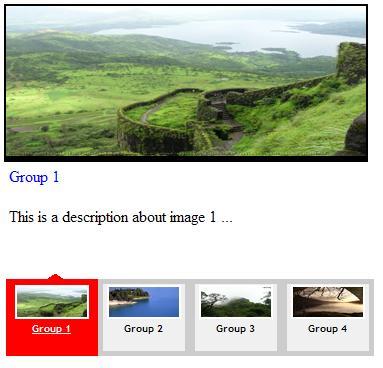
This Yahoo! news rotator control gives us the possibility of displaying several main news stories within the same area of a web page. News is taken apart to several pages in order to place them in a specified area. Each page also contains a couple of news items.
The control uses jQuery to:
- Send a jQuery AJAX request to a web server to get news in JSON format
- Bind data (news in the form of JSON) to HTML controls
- Set the control style after data binding
- Navigate between news
- Interact with user
- Change and set styles
- Do JavaScript effects
The news rotator control uses ASP.NET to gather news from a news storage (for example, database, XML file, RSS, ...), to cast news into a custom type (NewsItem), then convert a collection of NewsItem objects to JSON format and send it to the client as a news rotator datasource.
This component uses the Open Source Json.NET library to make working with JSON formatted data in .NET easier. The key features include a flexible JSON serializer for quickly converting .NET classes to JSON and back again. Read more about the Json.NET library (code, sample, and documentation) here.
The news rotator control uses the main idea of a jQuery Image Rotator sample. You can find out more about how to create an image rotator, with description (CSS/jQuery) by Soh Tanaka, here.
I also made some changes to the news rotator control by khaksari, available here.
This news rotator control uses the jQuery Cycle plug-in to rotate news, and it is a lightweight slideshow plug-in. This plug-in gives the developer the rich ability to rotate HTML controls on the page in different rotation types. Read more about the jQuery Cycle plug-in here.
Using the code
All you need to use this control is:
- Reference the needed resources in your HTML page (.aspx page):
<head>
    <script src='http://www.codeproject.com/jquery.js'
            type='text/javascript'></script>
    <script src='http://www.codeproject.com/jquery.cycle.all.min.js'
            type='text/javascript'></script>
    <script src='http://www.codeproject.com/TopNews.js'
            type='text/javascript'></script>
    <link href='http://www.codeproject.com/TopNews.css'
            rel='stylesheet' type='text/css' />
</head>
Register and embed the TopNews.ascx control in your .aspx page:
<%@ Register Src="~/TopNews.ascx"
       TagName="TopNews" TagPrefix="ctrl" %>
<body>
    <form id="form1" runat="server">
    <div>
        <ctrl:TopNews runat="server" id="TopNews1" />
    </div>
    </form>
</body>
Start the control by calling the JavaScript TopNews() function at the end of the control DOM. This function sends an AJAX request to the server, gets news in JSON format, binds news to the control, sets the control style to look nice after binding, and then rotates the news items.
<script type="text/javascript">
    new TopNews('#Container', 7,true,6000);
</script>
TopNews function parameters
objRoot: The news rotator control container (a jQuery selector); the control uses this parameter as a prefix (root object) of every jQuery selector inside the control. This prefix helps to have multiple instances of the control in the page without any worry of jQuery selection conflict.newsCountPerPage: The number of news items in a page.viewSubtitle: A boolean value that enables or disables the subtitle section of the control. The rest of the news titles show in the subtitle section randomly at the bottom of the current page.- Interval: The news rotation (slideshow) interval in milliseconds.
It also needs a server side mechanism to gather news, convert news to JSON format, and send them to the client.
In the client, we use jQuery to call a server method, sending it an AJAX request.
PageMethod: function(fn, paramArray, successFn, errorFn) {
var pagePath = window.location.pathname;
var that = this;
$.ajax({
type: "POST",
url: pagePath + "?Callback=" + fn,
contentType: "application/json; charset=utf-8",
data: paramArray,
dataType: "json",
success: function(res) { successFn(res, that) },
error: errorFn
});
}
And at the server side, we have this:
protected void Page_Load(object sender, EventArgs e)
{
this.HandleCallbacks();
}
public void HandleCallbacks()
{
if (string.IsNullOrEmpty(Request.Params["Callback"]))
return;
switch (Request.Params["Callback"])
{
case "fetchAllNews":
this.FetchAllNews();
break;
}
Response.StatusCode = 500;
Response.Write("Invalid Callback Method");
Response.End();
}
public void FetchAllNews()
{
List<NewsItem> lsttst = new List<NewsItem>();
lsttst.Add(new NewsItem("Group 1",
this.ResolveUrl("~/img/news1.jpg"),
"http://www.yahoo.com",
this.ResolveUrl("~/img/news1.jpg"),
"This is a description about image 1 ...",
DateTime.Now.ToShortDateString()));
lsttst.Add(new NewsItem("Group 2",
this.ResolveUrl("~/img/news2.jpg"),
"http://www.msn.com",
this.ResolveUrl("~/img/news2.jpg"),
"This is a description about image 2 ...",
DateTime.Now.ToShortDateString()));
lsttst.Add(new NewsItem("Group 3",
this.ResolveUrl("~/img/news3.jpg"),
"http://www.msn.com",
this.ResolveUrl("~/img/news3.jpg"),
"This is a description about image 3 ...",
DateTime.Now.ToShortDateString()));
lsttst.Add(new NewsItem("Group 4",
this.ResolveUrl("~/img/news4.jpg"),
"http://www.microsoft.com",
this.ResolveUrl("~/img/news4.jpg"),
"This is a description about image 4 ...",
DateTime.Now.ToShortDateString()));
Response.ContentType = "application/json; charset=utf-8";
Response.Write(
Newtonsoft.Json.JavaScriptConvert.SerializeObject(lsttst));
Response.End();
}
The source code contains comments to illustrate more details about how this control works.
History
- 20th December, 2009: Initial version.
This member has not yet provided a Biography. Assume it's interesting and varied, and probably something to do with programming.



 General
  News
News  Suggestion
  Question
  Bug
Bug  Answer
  Joke
Joke  Praise
  Rant
Rant  Admin
Admin 


 Submit an article or tip


 ... and the message "Gropu 1" , not "First"

