Introduction
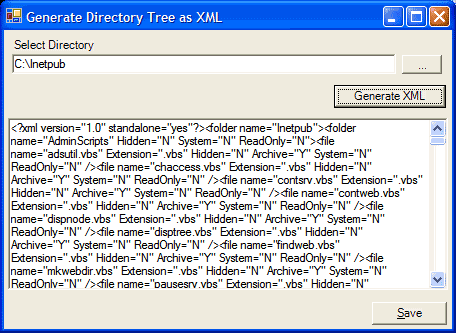
This code snippet recursively enumerates all the folders and files under a given starting folder and generates an XML document as an output, that represents the same hierarchy as of the traversed directories. The resulting XML document can then be transformed with a simple XSLT transformation to generate the desired output. The main reason for writing this was to display the contents of a given directory on a website, without having to enable directory browsing on the server. I wanted to be able to define certain filter criteria to control the output generated, so it was important to capture as much information pertaining to the folders and files as possible.
Using the code
The code is implemented as FileSystemInfoLister class. The main entry point is the GetFileSystemInfoList() method that returns an XML document. The AddElements() method is called recursively until the entire path is traversed.
using System;
using System.Xml;
using System.IO;


namespace Hosca.FileSystemInfoLister {

    public class FileSystemInfoLister {

        XmlDocument xmlDoc;

        public FileSystemInfoLister() {
            xmlDoc = new XmlDocument();
        }

        public XmlDocument GetFileSystemInfoList(string StartFolder) {

            try{
                XmlDeclaration xmlDec = xmlDoc.CreateXmlDeclaration("1.0",
                                                                "", "yes");
                xmlDoc.PrependChild ( xmlDec );
                XmlElement nodeElem =  XmlElement("folder",
                         new DirectoryInfo(StartFolder).Name);
                xmlDoc.AppendChild(AddElements(nodeElem,StartFolder));
            }
            catch(Exception ex) {
                xmlDoc.AppendChild(XmlElement("error",ex.Message));
                return xmlDoc;
            }
            return xmlDoc;
        }


        private XmlElement AddElements(XmlElement startNode,
                                               string Folder){
            try{
                DirectoryInfo dir = new DirectoryInfo(Folder);
                DirectoryInfo[] subDirs = dir.GetDirectories() ;
                FileInfo[] files = dir.GetFiles();
                foreach(FileInfo fi in files){
                  XmlElement fileElem = XmlElement("file",fi.Name);
                  fileElem.Attributes.Append(XmlAttribute("Extension",
                                                           fi.Extension));
                  fileElem.Attributes.Append(XmlAttribute("Hidden",
                   ((fi.Attributes & FileAttributes.Hidden) != 0)
                                                       ? "Y":"N"));
                  fileElem.Attributes.Append(XmlAttribute("Archive",
                   ((fi.Attributes & FileAttributes.Archive ) != 0)
                                                       ? "Y":"N"));
                  fileElem.Attributes.Append(XmlAttribute("System",
                   ((fi.Attributes & FileAttributes.System ) != 0)
                                                       ? "Y":"N"));
                  fileElem.Attributes.Append(XmlAttribute("ReadOnly",
                   ((fi.Attributes & FileAttributes.ReadOnly ) != 0)
                                                        ? "Y":"N"));
                  startNode.AppendChild(fileElem);
                }
                foreach (DirectoryInfo sd in subDirs) {
                  XmlElement folderElem = XmlElement("folder",sd.Name);
                  folderElem.Attributes.Append(XmlAttribute("Hidden",
                    ((sd.Attributes & FileAttributes.Hidden) != 0)
                                                       ? "Y":"N"));
                  folderElem.Attributes.Append(XmlAttribute("System",
                    ((sd.Attributes & FileAttributes.System  ) != 0)
                                                       ? "Y":"N"));
                  folderElem.Attributes.Append(XmlAttribute("ReadOnly",
                    ((sd.Attributes & FileAttributes.ReadOnly ) != 0)
                                                       ? "Y":"N"));
                  startNode.AppendChild(AddElements(folderElem,
                                                     sd.FullName));
                }
                return startNode;
            }
            catch(Exception ex) {
                return XmlElement("error",ex.Message);
            }
        }
        private XmlAttribute XmlAttribute(string attributeName,
                                          string attributeValue){
            XmlAttribute xmlAttrib =
                xmlDoc.CreateAttribute(attributeName);
            xmlAttrib.Value = FilterXMLString(attributeValue);
            return xmlAttrib;
        }
        private XmlElement XmlElement(string elementName,
                                       string elementValue){
            XmlElement xmlElement = xmlDoc.CreateElement(elementName);
            xmlElement.Attributes.Append(XmlAttribute("name",
                                      FilterXMLString(elementValue)));
            return xmlElement;
        }
        private string FilterXMLString(string inputString){
            string returnString = inputString;
            if (inputString.IndexOf("&") > 0){
                returnString = inputString.Replace("&","&");
            }
            if (inputString.IndexOf("'") > 0){
                returnString = inputString.Replace("'","'");
            }
            return returnString;
        }
    }
}
Points of interest
The only minor point of interest is that there are 2 characters that are allowable in file names but not in XML documents. In fact there are 5 characters that are not allowed in XML documents. They are :
| < | < | less than |
| > | > | greater than |
| & | & | ampersand |
| ' | ' | apostrophe |
| " | " | quotation mark |
Fortunately for us, Windows takes care of 3 of them. However the ampersand and the apostrophe which are legal to use in file names will have to be handled manually. The FilterXMLString method takes care of the details.
History
- Sept 18 2003 - Initial version (1.0.0)
This member has not yet provided a Biography. Assume it's interesting and varied, and probably something to do with programming.



 General
  News
News  Suggestion
  Question
  Bug
Bug  Answer
  Joke
Joke  Praise
  Rant
Rant  Admin
Admin 


 Submit an article or tip


