Click here to Skip to main content
Licence 
First Posted 22 Sep 2003
Views 154,894
Bookmarked 80 times

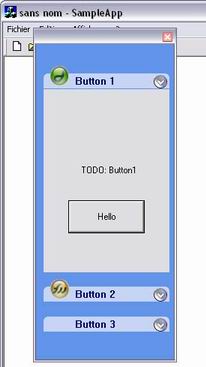
Collapsible, resizable and dockable XP style control bar

By | 22 Sep 2003 | Article
Collapsible, resizable and dockable XP style control bar

Introduction

This class can be used to create a collapsible, resizable and dockable XP style control bar with very few lines of code.

The following files must be added to your project.

  • CollapsiblePanel.h
  • CollapsiblePanel.cpp

Resources

  • An empty dialog to define the initial control bar size.
  • A bitmap image for the logo of the button (if required).
  • A bitmap image for the expand icon of the button.
  • A dialog that will be displayed by the collapsible button.

Sample code

In your CMainFrame header file, define a variable of the type CCollapsiblePanel :

CCollapsiblePanel m_wndCollapsiblePanel;

In the CMainFrame::OnCreate() method, create the CDialog corresponding to the panels of the collapsible button :

CDialog* m_wndView1 = new CDialogButton1();

Set the Collapsible control bar (dockable, color and bitmaps.) :

m_wndCollapsiblePanel.CreateTheContainer(this, IDD_PANEL, true);
m_wndCollapsiblePanel.SetTheBkColor(RGB(100, 149, 237)); 
//m_wndCollapsiblePanel.SetDefaultSystemColor();
m_wndCollapsiblePanel.SetExpandBitmap(IDB_BITMAP_EXPAND);

Indicate if the program uses a toolbar or a status bar.

m_wndCollapsiblePanel.SetTheControlBar(&m_wndToolBar, &m_wndStatusBar);

Finally append the buttons.

m_wndCollapsiblePanel.AppendButton("Text Button 1", 
  IDB_BITMAP_DW, m_wndView1, IDD_DIALOG_BUTTON1);
m_wndCollapsiblePanel.AppendButton("Text Button 2", IDB_BITMAP_FW, 
  m_wndView2, IDD_DIALOG_BUTTON2);
m_wndCollapsiblePanel.AppendButton("text Button 3", NULL, NULL, NULL);

License

This article has no explicit license attached to it but may contain usage terms in the article text or the download files themselves. If in doubt please contact the author via the discussion board below.

A list of licenses authors might use can be found here

About the Author

Nicolas Gazelle

Web Developer

Monaco Monaco

Member


Sign Up to vote   Poor Excellent
Add a reason or comment to your vote: x
Votes of 3 or less require a comment

Comments and Discussions

 
You must Sign In to use this message board. (secure sign-in)
 
Search this forum  
 FAQ
    Noise  Layout  Per page   
  Refresh
Generaldoes not link Pinmembercilu3:01 7 Feb '06  
QuestionHow to create Panel dynamic? Pinmemberclosetome22:09 24 Dec '05  
QuestionResize while docked? PinsussHarald Karner22:08 12 Feb '04  
GeneralXP Colors of your bars PinmemberMichael A. Rusakov2:41 30 Sep '03  
GeneralRe: XP Colors of your bars PinmemberNguyen Huu Hoa20:24 1 Oct '03  
GeneralRe: XP Colors of your bars PinmemberMichael A. Rusakov2:43 3 Oct '03  
Generalscrolling PinmemberBob Flynn21:57 23 Sep '03  
GeneralRe: scrolling Pinmemberandrewtruckle23:26 18 Jan '06  
GeneralRe: scrolling PinmemberBob Flynn0:30 19 Jan '06  
GeneralRe: scrolling Pinmemberandrewtruckle0:34 19 Jan '06  
GeneralDoesn't work PinmemberBrigg Thorp1:53 23 Sep '03  
GeneralRe: Doesn't work PinmemberNicolas Gazelle2:01 23 Sep '03  
GeneralRe: Doesn't work PinmemberRavi Bhavnani2:49 23 Sep '03  
GeneralRe: Doesn't work PinmemberBrigg Thorp6:00 23 Sep '03  
GeneralRe: Doesn't work PinmemberNicolas Gazelle6:02 23 Sep '03  
GeneralRe: Doesn't work PinmemberStlan3:37 23 Sep '03  
GeneralRe: Doesn't work PinmemberNicolas Gazelle3:43 23 Sep '03  
GeneralRe: Doesn't work PinmemberSean O'Brien10:07 30 Sep '03  
GeneralPermissions PinmemberDerek Lakin21:38 22 Sep '03  
GeneralRe: Permissions PinmemberNicolas Gazelle23:40 22 Sep '03  
GeneralRe: Permissions PinmemberDerek Lakin0:14 23 Sep '03  
GeneralRe: Permissions PinmemberPaul Selormey5:24 23 Sep '03  
GeneralRe: Permissions PinmemberDerek Lakin9:34 23 Sep '03  
GeneralRe: Permissions PinmemberJim Crafton6:32 23 Sep '03  
GeneralRe: Permissions PinmemberDerek Lakin9:32 23 Sep '03  

General General    News News    Suggestion Suggestion    Question Question    Bug Bug    Answer Answer    Joke Joke    Rant Rant    Admin Admin   

Use Ctrl+Left/Right to switch messages, Ctrl+Up/Down to switch threads, Ctrl+Shift+Left/Right to switch pages.

Permalink | Advertise | Privacy | Mobile
Web04 | 2.5.120517.1 | Last Updated 23 Sep 2003
Article Copyright 2003 by Nicolas Gazelle
Everything else Copyright © CodeProject, 1999-2012
Terms of Use
Layout: fixed | fluid
