Introduction
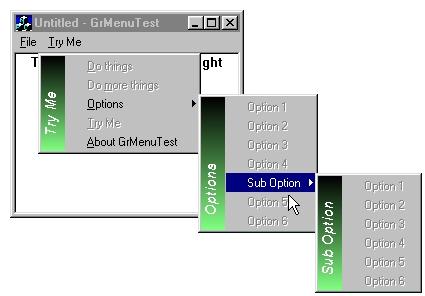
Here's a bit of eye-candy I whipped up to drop into our product: epAssist.
The program has a system tray icon and a context menu comes up when you click on the icon. One problem with tray icons, is that it can be easy for users to confuse what the menu for your program looks like.
My first solution was to place a disabled menu item with the application name at the top of the menu, but this didn't have the effect I needed. Upon searching my favorite developer site, I found a few menu classes that could act like the Windows Start Menu.
I based my menu off these articles and a few others, making as few changes as required to get the effect I needed. The class presented here is by no means original, but I believe that the way the components are put together produces an original and impressive UI component.
The first and easiest use of this class is to place a context menu on the screen. The sample code below shows how to setup and use the simple interface this menu exposes. There are a few shortcomings. First, the menu does not send Command UI messages for enabling/checking menu items. Secondly, messages are sent to the window that owns the menu. If you look at the sample application, you will notice that the view handles ID_APP_EXIT1 and posts ID_APP_EXIT to the MainFrame. If the view handled ID_APP_EXIT and posted it to the frame, standard MFC command routing would have the view intercepting the message first (again!)
#include "GradientMenu.h"
void CGrMenuTestView::OnContextMenu(CWnd* pWnd, CPoint point)
{
COLORREF rgb1(RGB(0, 0, 0));
COLORREF rgb2(RGB(128, 128, 255));
COLORREF rgbText(RGB(255, 255, 255));
CGradientMenu oMenu(24, TRUE);
oMenu.LoadMenu(IDR_POPUP_MENU);
oMenu.SetGradientColors(rgb1, rgb2, rgbText);
oMenu.SetTitle((CString)"Test");
oMenu.TrackPopupMenu(0, point.x, point.y, this);
}
That's it! You need to give the root menu a title, but the sub-menus will get their title from their parent.
For the main program menu, I simply faked it out. The main menu has no popups, but handles the WM_COMMAND and puts a popup under the menu item. See the sample for full details.
License
This article has no explicit license attached to it but may contain usage terms in the article text or the download files themselves. If in doubt please contact the author via the discussion board below.
A list of licenses authors might use can be found here.
Jim is the President of Golden Crater Corp. (formerly Golden Crater Software) which produces:
Tiny eBook Reader - Read eBooks anywhere, on any web enabled device or phone.
Doberman BMS - Home Automation and Building Management System bridging and enhancing several automation hardware platforms.



 General
  News
News  Suggestion
  Question
  Bug
Bug  Answer
  Joke
Joke  Praise
  Rant
Rant  Admin
Admin 


 Submit an article or tip


 downloaded and installed the product, looks good so far

 ).
).