Introduction
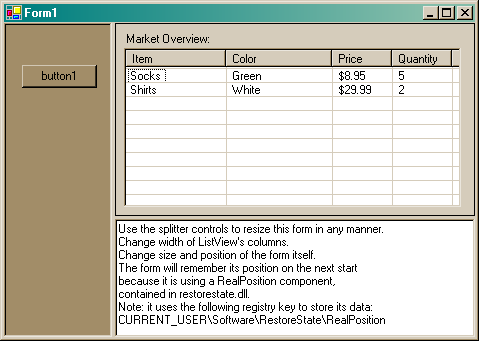
Finally there is no more need to write even a single line of code to persist your window's size, location and state. This article presents a component, which automatically saves these properties to the system registry. In addition, this component allows to save the location and size of any control on a form, including splitters and docked controls.
When the RealPosition component is added to a Form, it gives 2 new boolean properties to visible controls. The first property, RestoreLocation, indicates whether the control's position and size should be persisted. If set to true, the control's position and size are saved when the main form closes. The position and size are restored when the .Load event occurs. The second property, RestoreColumnsWidth, applies only to ListView and inherited controls. It allows saving widths of all columns.
Using the code
Add RestoreState.dll to your designer toolbox. Put the RealPosition component into your form. You will see something like this:

For the main form, the RestoreLocation will be set to true by default. Thus, the position and size of the form will be persisted by default. You can set RestoreLocation=true manually for any other controls which you want to persist.
The data is stored in the system registry. Registry key is represented by realPosition1.RegistryPath. You might want to configure this property for your application.
How it works
RealPosition implements IExtenderProvider, which allows it to "provide" new properties to existing controls at design-time.
[ProvideProperty("RestoreLocation", typeof(Control))]
[ProvideProperty("RestoreColumnsWidth", typeof(ListView))]
public class RealPosition : Component, IExtenderProvider
{
}
When RestoreLocation is set to true, the development environment generates the following code, which gives realPosition1 references to objects in InitializeComponent().
this.realPosition1.SetRestoreLocation(this.panel11, true);
................
this.realPosition1.SetRestoreLocation(this.panel12, true);
................
this.realPosition1.SetRestoreLocation(this, true);
RealPosition attaches to .Load and .Closed events in SetRestoreLocation. It performs save and restore operations in the event handler.
f.Closed += new System.ComponentModel.CancelEventHandler(OnClosed);
f.Load += new System.EventHandler(OnLoad);
Known issues
Suppose that a ListView is contained on a Panel and has Left and Right Anchors enabled. In that case, ListView will resize whenever Panel is resized. On startup, RealPosition resizes all linked controls. First, it restores the size of ListView. Then it restores the Panel. Resizing Panel causes ListView to be resized again, thus giving wrong result. Solution: do not enable RestoreLocation in child controls.
Conclusion
This is my first post, so please rate this article and let me know what you think. I hope a few people will find this class useful. Have fun with it...
Updates
15 February 2004
Now the RealPosition component can be placed on any UserControl. Many thanks to Paul J for his suggestion. The following code finds the parent Form of the UserControl and then attaches to its .Closed event.
while(!(parent is Form) && parent != null)
{
    parent = parent.Parent;
}
m_parentForm = parent as Form;
if(m_parentForm != null)
{
    m_parentForm.Closed += new EventHandler(OnClosed);
}
Another update prevents restoration of the Form's position, if the Form is located outside of the visible area of the screen.
A ComponentDesigner class is now used to retrieve a reference to a container Control. Thanks to Alvaro Mendez for this technique.
The solution file and compiled RestoreState.dll now require VS2003 and .NET Framework 1.1
This member has not yet provided a Biography. Assume it's interesting and varied, and probably something to do with programming.



 General
  News
News  Suggestion
  Question
  Bug
Bug  Answer
  Joke
Joke  Praise
  Rant
Rant  Admin
Admin 


 Submit an article or tip


 .
.

