Introduction
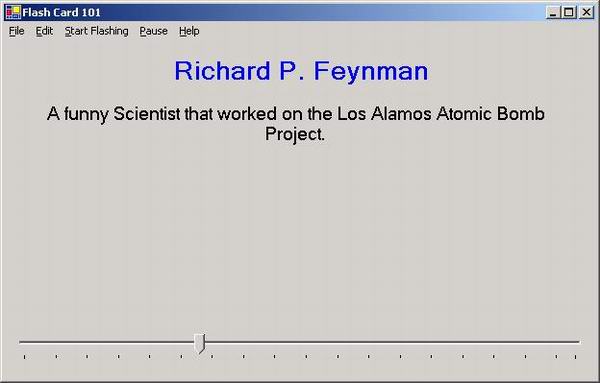
I was taking a Conversational Spanish course last year and a Microsoft course that required a lot of memorization and decided that the best way to learn a little more about C# was to create a Flash card program. The problem with most flash card programs are that you are stuck with their dictionaries and you can not adjust the pace.
Background
The first thing was how would I store the data so that the maximum number of people could use the program with the least amount of software (aka: Access and SQL Server) so I decided to build the data schema in code and then save and open the DataSets as xml files.
This program demonstrates several useful techniques in using the System.Data namespace as well as the slider control and Timer.
Using the code
There are three forms frmAbout contains the version info and copyright notice, frmEditDict which is used to edit the dictionaries, and frmFlash which is the main form and displays the words and definitions.
To create the DataSet for the dictionary I used the following code.
static void initDS()
{
ds=new DataSet("DataSet");
DataTable dt=ds.Tables.Add("Dictionary");
DataColumn dc=dt.Columns.Add("ID",typeof(Int32));
dc.AutoIncrement=true;
dc.AllowDBNull=false;
dc.AutoIncrementStep=1;
DataColumn[] keys=new DataColumn[1];
keys[0]=dc;
dt.PrimaryKey=keys;
dc=dt.Columns.Add("Word",typeof( String));
dc.AllowDBNull=false;
dc=dt.Columns.Add("Def",typeof( String));
dc.AllowDBNull=false;
}
Each time the tick event of the Timer is fired we check a boolean value bDisplayWord if it is true then we select another random word from the dictionary and display it. Then we toggle the bDisplayWord to false and display the definition the next time the Timer is fired.
private void timer1_Tick(object sender, System.EventArgs e)
{
if(bDisplayWord)
{
DataTable dt=ds.Tables[0];
System.Random rnd=new System.Random();
currentIndex=(Int32) (rnd.NextDouble()*dt.Rows.Count);
txtWord.Text=currentIndex.ToString();
DataRow dr;
dr=dt.Rows[currentIndex];
txtWord.Text=dr.ItemArray[1].ToString();
txtDefinition.Text="";
}
else
{
txtDefinition.Text =
ds.Tables[0].Rows[currentIndex].ItemArray[2].ToString();
}
bDisplayWord = !bDisplayWord;
}
To save and load the DataSet I simply use the save and open dialogs combined with the ReadXml and WriteXml Methods of the System.Data.DataSet class.
Points of Interest
This code was one of my first functional utilities written with C#. It demonstrates several objects of the .NET framework: DataSet, grids, sliders, xml files, Timers, and forms.
I have been programming since 1983 when I first programmed on a HeathKit 8088 Breadboard Computer in machine code. Since then I have dabbled with many things. I am extremely fluent with VB6, Access, Sql Server. I am currently programming a major project in C#.
I am also a system administrator for Unix, Linux, MS 4.0 - 2003 and also dabble with CISCO routers and firewalls.



 General
  News
News  Suggestion
  Question
  Bug
Bug  Answer
  Joke
Joke  Praise
  Rant
Rant  Admin
Admin 


 Submit an article or tip

