|
|
Comments and Discussions
|
|
 |

|
Have you or anyone updated this for .Net?
Tim Alvord
|
|
|
|

|
I never really worked in C#, so I'm not able to help directly.
I think that the correct process will be to make a DLL from this code to integrate these functions in a .NET project.
Andy
|
|
|
|

|
I am waiting for one dll for .net!
slcands
|
|
|
|

|
You can make this project to a Dll .then use "DLLImport" to find function symbol (function pointer) .
That's dynamic call between two different lauguage
bbs.whnet.edu.cn(From China )
|
|
|
|

|
Hi! Thanks for the great code. I can make it work from my dialog app and fade my main window when I call other dialogs modal but if I call a COM object which displays a dialog the COM object dialog is not set to the foreground and I cannot select it and I must close it from the taskbar. This only happens if I call WndFade. Am I doing something wrong? Is it that calling a modal dialog is still part of my program execution but the COM object is not? Would this also cause a problem if I called any other external program?
|
|
|
|
|

|
I want to call this when I leave my window as if I had clicked on another window.
I overloaded OnActivate() in my dialog class and tested nState for WA_INACTIVE but it does not work. Have you any ideas what I can do as I think this would be useful interface function as it looks very nice
|
|
|
|

|
Can't you create a DLL out of your code so I can call it from C#, I tried to convert, but I don't know how to program in C++.
|
|
|
|

|
I found a small problem using your code. Fade window could be closed by pressing Alt+F4.
The quick fix (among many) for this should be:
void CFadeWnd::OnClose()
{
//CWnd::OnClose();
return;
}
And of course we have to deal with WM_QUERYENDSESSION, WM_ENDSESSION if this code is used to lock the application.
Thanks a lot for your good work!
|
|
|
|
|

|
I've been playing with the code, trying to fade a non-rectangular dialog window using regions. I managed to fade the window when it lost focus, then noticed that the window and entire bounding rectangle were being faded.
Any ideas?
BTW, kudos to the author of this fine code!
|
|
|
|

|
Strange, this must correctly work.
But I have notice that the "only source[^]" download haves a different version of the "demo[^]".
The "demo" haves the correct fading code. For sure this must be mine mistake during one past article update.
John A. Johnson
|
|
|
|

|
Nice work!!!
But there is small bug
Drag window to set its left or top side(s) off screen and now do fade
and we get bitmap in the wrong place.
FIX ------------------------>
BOOL CFadeWnd::Create(CWnd* pParentWnd, bool bAutoDel, CRect rc)
{
................................................
if (rc == CRect(0,0,0,0))
pParentWnd->GetWindowRect(rc);
//<-------------------------------------------
// FIX Add this
if(0 > rc.left)
{
rc.right -= rc.left;
rc.left = 0;
}
if(0 > rc.top)
{
rc.bottom -= rc.top;
rc.top = 0;
}
//--------------------------------------------
|
|
|
|
|
|

|
First of all, I must agree with all the rest - a very nice idea and article!
The thing I would like is to keep the background being updated. For example, when there is a progress bar in the fading dialog, it should keep updating. Any ideas how to do this?
Major
|
|
|
|

|
Thank you very much.
I have made a try to perform your request.
What came out was an interesting effect, but not the hoped behavior.
Probably I'll have to rewrite the "CopyScreenToBitmap" because it catches the "topmost" graphics data. For your request, I have to catch the parent window of the CFadeWnd class.
I cant promise this for my next update, but for sure I'll work on it.
|
|
|
|

|
Waiting with anticipation
|
|
|
|

|
That’s outstanding stuff I have had experienced, It really catchy.
|
|
|
|
|

|
If it's aceptable for you to add a DLL to your C# project, then I think that there is a solution to use this class in a VB/C# project.
What I can do, is a DLL version of the project, with an exported function call to fade the interested window by handle.
What you must do by your part is to import the DLL and make the call giving to the exported function call, the handle of the window you want to fade.
I have already saw this solution some other part, but honestly, I'm not practice of C#. What I need is help from someone to test the DLL.
|
|
|
|

|
Sometimes, when return from fading, if parent dialog has other windows behind it, it probably will give the focus to one of other windows so it will look like the dialog disapear once before showing back.
you can fix by take the code from ~CFadeWnd()
m_pWndLock->EnableWindow();
m_pWndLock->SetFocus();
and put it before every call of
DestroyWindow();
giving the focus back to the parent before destroy the fading dialog.;)
|
|
|
|

|
Thank you for your tip - I was not able to repeat your problem.
The DestroyWindow call will be reviewd because soon I'll update the code with a separated fading process thread - Jeremy Davis is helping me in this.
For sure, I'll follow your sequence suggestion:
-> Enable
-> SetFocus
-> Destroy
|
|
|
|

|
Great class by the way!
I use this in my app to fade the background when the Exit button is pressed, and I bring up an "Are You Sure?" messagebox. The thing is, the 1 - 2 seconds it takes to fade before my messagebox appears will annoy users that just want to exit quickly. It would be good if the background could slowly fade, whilst the messagebox is displayed.
Perhaps put it in a thread? I dunno. I'll have a go, but please do bear in mind I design hardware, with a small amount of software, so it may be bug ridden.
I feel like I'm diagonally parked in a parallel universe
Jeremy Davis
http://www.astad.org http://www.jvf.co.uk
|
|
|
|
|

|
First off, I must say this is a great class that you have created.....
Now the thread:
Here you go.
Add to the class definition: (FadeWnd.h)
protected:
static UINT FadeThread(LPVOID pParam);
Change the Create handler to begin the thread, not do the loop: (FadeWnd.cpp)
BOOL CFadeWnd::Create(CWnd* pParentWnd, bool bAutoDel, CRect rc)
{
.
.
.
.
m_bAutoDel = bAutoDel;
m_hBitmap = CopyScreenToBitmap(rc);
AfxBeginThread(FadeThread, static_cast<LPVOID>(this));
return TRUE;
}
Add to the implementation: (FadeWnd.cpp)
UINT CFadeWnd::FadeThread(LPVOID pParam)
{
CFadeWnd * pWnd = static_cast<CFadeWnd *>(pParam);
CClientDC dc(pWnd);
int nStep = 0;
for (int i=0; i<100; i+=nStep)
{
DWORD dwStartCount = timeGetTime();
if(pWnd->m_hNewBitmap)
{
DeleteObject(pWnd->m_hNewBitmap);
pWnd->m_hNewBitmap = NULL;
}
pWnd->m_hNewBitmap = pWnd->FadeBitmap(pWnd->m_hBitmap,(double)i);
pWnd->OnDraw(&dc);
DWORD dwEndCount = timeGetTime();
if (nStep == 0)
{
if (dwEndCount > dwStartCount)
nStep = 1500 / (dwEndCount - dwStartCount); else
nStep = 20;
nStep = 100 / nStep;
nStep = max(nStep, 3); nStep = min(nStep, 49);
TRACE("Loop frequency: %d\n", nStep);
}
}
return 0;
}
The FadeBack part is similar, Just create a FadeBackThread and call the begin thread from within the FadeBack method.
Hope this helps, it sure helped me.
|
|
|
|

|
Thank you Skratt,
I have already implemented this point, a bit different but based on the same principle that I'll post soon - but honestly I don't know when. So your post is wellcome for all the people that need this feature and can't wait my update - thank you very much.
Only one point. Playing with threads, because the window can destroy itself before the fading is ended, there are some things to pay attention...
When you create the process, store the thread process:
m_pThread = AfxBeginThread(FadeThread, static_cast(this));
in the destructor, to be sure that the process is "dead", something like:
...
if (m_pThread)
{
m_bStopTh = TRUE; while(m_bStopTh) ::Sleep(0);
HANDLE hThread = m_pThread->m_hThread;
if (::WaitForSingleObject(hThread, 64000) == WAIT_TIMEOUT)
::TerminateThread(hThread, (UINT)-2);
}
Thank you again
|
|
|
|
|
|

|
Few years ago i was busy with same task. Here is sample function:
DWORD* MoveToBnW ( float step /* 0..100 */, BYTE* dst /* ptr to RGB array */) {
int Size = cx * cy;
while ( Size-- ) {
dst[0] = (BYTE)(dst[0] * ( .11 + step * .0089 ) + ( dst[1] * .59 + dst[2] * .30 ) * ( 1 - step * .01 ));
dst[1] = (BYTE)(dst[1] * ( .59 + step * .0041 ) + ( dst[0] * .11 + dst[2] * .30 ) * ( 1 - step * .01 ));
dst[2] = (BYTE)(dst[2] * ( .30 + step * .0070 ) + ( dst[0] * .11 + dst[1] * .59 ) * ( 1 - step * .01 ));
dst+=4;
};
// enjoy ;)
May be it'll be useful..
../ Lusores
|
|
|
|

|
Nice job my son - very impressed with its simple ease of use. Keep up the good work. One thing you could also try is alpha blending the window with the background - so as well as fading the colour it also becomes semi transparent (or offer a alpha value to determine its transparency).
|
|
|
|

|
Hello
I want to fade my app when someone enters a take-a-break mode (templogout).
The question is: How do I fade it back to the original colors when the user gets back and log in again?
|
|
|
|
|

|
Interesting effect... I find myself wondering where I could use it in my current project because I like it so much. Perhaps a time delayed automatic user logoff.
I've got one that you might not have tested for yet:
I tried to run the release on my dual monitor system in which the desktop spans across both monitors. I found that the function to inactivate the desktop worked for the primary monitor, but not the secondary.
|
|
|
|
|

|
Hi Benjaminl,
ok, I have found this solution, but I can't test it.
include this after the stdafx.h in the MakeInactiveDlg.cpp file:
#pragma warning(disable: 4706)
#define COMPILE_MULTIMON_STUBS
#include <multimon.h>
#pragma warning(default: 4706)
Ok then, substitute the OnMakewininactive() button call this way:
void CMakeInactiveDlg::OnMakewininactive()
{
if (GetSystemMetrics(SM_CMONITORS) > 0)
{
HMONITOR hMonitor =
MonitorFromWindow(
GetDesktopWindow()->GetSafeHwnd(),
MONITOR_DEFAULTTONEAREST);
MONITORINFO mi; mi.cbSize = sizeof(mi);
GetMonitorInfo(hMonitor, &mi);
CRect rcMon = mi.rcMonitor;
CFadeWnd wndFade;
wndFade.Create(
GetDesktopWindow(),
false,
rcMon);
}
else
{
CFadeWnd::AutoFade(GetDesktopWindow());
}
}
And please, let me know it if works...
[edited]
|
|
|
|

|
That didn't do it. The desktop of the primary monitor now fades to grey, then becomes active again. I don't have too much time to spend on it now. Don't worry about it though. My apps usually have to reside on single monitor systems anyway, I just thought it'd be great if my dev system acted the same way.
Thanks again.
|
|
|
|

|
http://www.codeproject.com/cpp/multimon.asp[^]
Now I have to write 1000 times on the blackboard: “I have to search in the CODEPROJECT... I have to search in the CODEPROJECT... I have to search in the CODEPROJECT... I have to search in the CODEPROJECT... I have to search in the CODEPROJECT... I have to search in the CODEPROJECT... I have to search in the CODEPROJECT...“
|
|
|
|

|
This is one visual fx that's not over done.
|
|
|
|
|

|
Yeah that rocks except the fading "on call" would be better if the call was not delayed.
p i x i g r e g
|
|
|
|

|
Nice article.
It reminds of the 80's song 'Fade To Gray' by Visage.
Enjoy life, this is not a rehearsal !!!
|
|
|
|

|
Since you are converting the image to a grey scale, you can fade to any gradient if you wish, let's assume you have an array which has the gradient (256 values of COLORREF). If you change your inner loop to this:
int iAlpha = (int)(dfTrans / 100.0f * 255.0f);
for (int i=0; i> 8;
// Take color from the gradient
COLORREF Col = clrGradient[iGrey]; // You may want to try claming here...
ptPixels[i] = RGB( (GetDibR( Col ) * iAlpha + iSrcR * (255 - iAlpha)) >> 8,
(GetDibG( Col ) * iAlpha + iSrcG * (255 - iAlpha)) >> 8,
(GetDibB( Col ) * iAlpha + iSrcB * (255 - iAlpha)) >> 8 );
}
you'll be able to fade to any gradient
By using integers and shifting to do the alpha fading you loose a bit here and there, but it will be very minor in this application (the problem is the 255 / 256 thing).
|
|
|
|
|

|
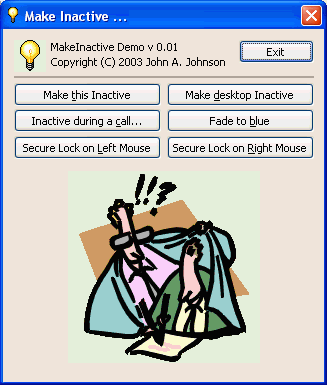
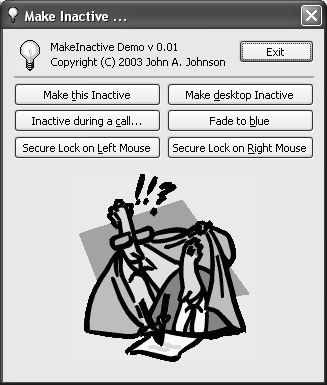
First play:
0. Run the demo
1. Click on "Make this inactive" button
2. Right-click on the button dialog on task bar and click on "Move" menu
3. Move the window (the original dialog) using arrows on keyboard. You will see
2 windows side by side, the original with the real colours, and the CFadeWnd class created window (in fact, the created bitmap window)
Second play:
0. Run the demo
1. Click on "Make desktop inactive" button
2. To access the desktop, push on the Windows Logo touch keyboard for example
3. You will see two demo buttons on the task bar, one of them is the dialog (the original with caption) and the other one is the window created CFadeWnd class without caption
These 2 remarks may make the article more explicit and more comprehensible by all people.
Nice article
|
|
|
|
|

|
This would be a great security tool if when the desktop (or any window for that matter of fact) looses focus or goes inactive, that the only way it can regain focus (and consequently, use of its functionality again) would be by "right clicking" on it and enter some sort of password.
As it is right now, when the desktop (or a window) looses focus (which is what happens when it goes inactive), all the user has to do, is click on the desktop (or the window) and it instantly regains focus (and usability) again, which means, other than the desktop temporarily going inactive, it doesn't seem to serve any other purpose!
Even Screen saver comes on when the desktop is inactive, and I can launch any program from a multiple of other places. IOW, the desktop going inactive doesn't really prevent me from doing anything!!
So, what purpose does it serve?
The only way I can give a beneficial answer to that, would be to coincide a temporary disabling of my machine with its fading (and it becoming inactive) until some purposeful event occurs that would make it regain usability and functionality when I want, and nobody else could. Then I could see when my desktop is disabled, I know my machine is also disabled (and secured) until I do something to remove that status from it.
Nevertheless, I see this article as a meaningful first step towards other possibilities, including promises of its worthwhile use in multithreading matters.
William
Fortes in fide et opere!
|
|
|
|

|
the original purpose for me, was to disable the window while a modal popup was over it.
Let me think a bit to easy implement your idea.
Thank you
|
|
|
|

|
It didn't matter if the desktop was inactive, and it didn't matter if any of the mouse button was locked, I was able to do just about anything I wanted to on the computer, and run ANY program I wanted to, ... FROM ANYWHERE!!
I was even able to deactivate your sample (as it was running) or even kill it. NOTHING that your sample made inactive, or locked away, prevented access to other programs and files. The idea of modality was not preserved because I was able to circumvent that feature by running the same program that your sample wanted to prevent (from continuing to run) until a button (or some event) had transpired, by simply, RUNNING ANOTHER INSTANCE of the program!!
I am still at a lost as to what it is that you're trying to lock away, or prevent from happening, since I was able to conduct business as usual while those features from your sample were in place.
Another thing: It didn't matter if "Secured Lock on Left Mouse," meant that the right mouse button would still be usable, or if I had "Secured Lock on Right Mouse," that the left mouse button would still be usable. Locking any of them made BOTH unusable (as far as you may want to think )
What I think you have here, is a sample with very good promises, but which hasn't FULLY achieved any!! It still remains a 'stepping stone'.
William
Fortes in fide et opere!
|
|
|
|

|
Hi William,
my objective was quite simple: lock a selected window that it becomes currently faded for the needing time.
In the origin, the routine was made for 256 color mode displays, to convert the dialog-windows that contain palette colored images in a gray scale while they don't have focus, to prevent screen flashing.
Then playing with the code, the result was this small CFadeWnd class. It was cute and I post it (even to make some experience writing my own article, as you know in previous emails, I have this dream to share something of mine).
To prevent multi-instances of the same application (or dialogs, or windows), it's a programmer choice and must be done at app-init level. A good solution is to lock new instances of an application, is to use a MUTEX; for sample (this comes from my ERP application):
BOOL CIRISApp::InitInstance()
{
HANDLE hMutex = CreateMutex(NULL,FALSE,_T("IRIS"));
if (hMutex && GetLastError() == ERROR_ALREADY_EXISTS)
{
ReleaseMutex(hMutex);
return FALSE;
}
ReleaseMutex(hMutex);
...
To lock the whole computer in a secure way, the best choice (in my opinion) is the screen saver with a password. And probably there is an API call to invoke the screen saver activation directly without waiting the idle-delay time.
Believe me, your original idea is nice, and looking to my code, what was really missing, was a call inside the class, to keep the grey effect alive even after an invocation of a dialog (the password for sample if the input data was failed).
Another point that was important for me, was to give this fading effect to the people that doesn’t have Windows/XP or 2003. For sample, layered (transparency on a given color, and alpha blending) options, and some smart effects are not available in previous Windows versions, and probably soon I’ll post some tips to do these effects too.
|
|
|
|
 |
|
|
General News Suggestion Question Bug Answer Joke Rant Admin
|
Fading a window from color to black and white like Windows/XP
| Type | Article |
| Licence | CPOL |
| First Posted | 2 Nov 2003 |
| Views | 141,269 |
| Bookmarked | 105 times |
|
|
