Introduction
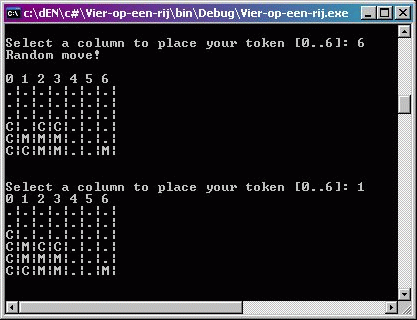
Just starting to learn programming in C#, I thought it would be nice to start out with a simple program that lets you play a nice game of link 4 against the program. Nothing too fancy though as Windows applications are not my thing (yet). It's a console application with medium-low computer intelligence.
Some of the code comments and names are still in Dutch (sorry ;-) ) but that is being worked on.
The goal of the program is to eventually get a fully running game of link4 with an unbeatable computer. The best one should be able to get is a draw, but there's still some work to be done.
The goal of the game is to get 4 chips or tokens (what you want to call them) in a row (either diagonally, horizontally or vertically) and be a winner. :)
Using the code
The program consists of four classes:
Class MainFunctions...
...which contains the methods:
Main() --> ...the entry point
PrintBord(Gameboard fld) --> prints the current state of the game
initGameboard(Gameboard fld) --> sets all values in the 2D array to "."
askMove(Gameboard fld) --> Asks the human player to enter the column number in which to drop the token
doMove(Gameboard fld, int col, string player) --> places the move selected by either human or computer
askNewGame() --> Asks the human player if he || she wants to play another game
Here's the Main() method which controls the main functions of the program with some while-loops, two of which have no body as there is no reason for them to have one.
static void Main()
{
do
{
Gameboard gbField = new Gameboard();
Gameboard gbDontMove = new Gameboard();
initGameboard(gbField);
do
{
PrintBord(gbField);
while(!doMove(gbField, askMove(gbField), "M"))
{
}
if(EndOfGame.endOfGame(gbField)) break;
while(!doMove(gbField, CompuIntel.getComputerMove(
gbField, gbDontMove), "C"))
{
}
if(EndOfGame.endOfGame(gbField)) break;
} while (!EndOfGame.endOfGame(gbField));
}while( askNewGame() );
}
Class Gameboard...
...contains constructors used for setting a game field.
public class Gameboard
{
  private static int maxrow = 6;
  private static int maxcol = 7;

  public string[] asPlayers = {"M", "C"};
  public string[,] position = new string[maxrow, maxcol];

  public int iMAXROW
  {
    get { return maxrow; }
  }

  public int iMAXCOL
  {
    get { return maxcol; }
  }
}
Class EndOfGame...
...which holds functions that check for an end of game through a win or draw.
endOfGame(Gameboard fld) --> Controls the endOfGame check
draw(Gameboard fld) --> iterates through all members of the array checking for empty positions. If no "." is found the game has ended.
CheckWinst(Gameboard fld, string player) --> Checks for four tokens in a row for both players horizontal, vertical and diagonal.
Class CompuIntel...
...holds the logic of the moves made by the computer. It's not quite complete yet as only direct wins are recognized. The only method in this class is getComputerMove(Gameboard fld, Gameboard dm). The Gamefield dm doesn't do anything at this time, but it's going to be used as a field in which the moves NOT to make will be held. You'll see why this is necessary when you play the game :)
Points of interest
At this point the program isn't that intelligent. It checks for direct winning chances for both computer and human player (in that order) and only makes a well thought through move when there's a direct chance of winning for either player. In all other cases it places a random move.



 General
  News
News  Suggestion
  Question
  Bug
Bug  Answer
  Joke
Joke  Praise
  Rant
Rant  Admin
Admin 


 Submit an article or tip


