 |
|
 |
I am using TSTDictionary with an object that I'll call "Foo." I am traversing a large file. If a row has a new unique value in the FooString column, I am adding (FooString, Foo) to my TSTDictionary.
As you can imagine, when I find a new row, I must first verify whether FooString already exists in the dictionary. After traversing at least 100 rows, I am checking for FooString, when there are 37 entries already present, and I get an exception, "Node is not a key" at
public String Key
{
get
{
if (!IsKey)
throw new InvalidOperationException("node is not a key");
return key;
}
set
{
key=value;
}
}
The above code is called by
public virtual Object this[String key]
{
get
{
if (key==null)
throw new ArgumentNullException("key");
TstDictionaryEntry de = Find(key);
if (de==null)
return null;
else
return de.Value;
}
The above, in turn, is called from TSTDictionary[LookupKey].
I wouldn't even post if my error had happend after my first or second addition to the dictionary; it coming so late into it is what has caused me pause.
Any help would be greatly appreciated.
|
|
|
|
 |
|
 |
while serializing the tree exception is coming saying int32 range exceeds
|
|
|
|
 |
|
 |
This is a neat concept. I appreciate the article and the free code, but I agree with another reader in that the article really needs text to explain things, instead of just "here is how to use it."
Also you mentioned doing a balanced addition of items. Does that happen automatically? Are there methods to use to do it? How would one go about doing that correctly?
Again, thanks for the article, but more information would make it better.
Shane
|
|
|
|
 |
|
|
 |
|
 |
Did you find fixed version or version for .NET Framework 2?
Best regards,
Konstantin
http://pic.hotmail.ru
|
|
|
|
 |
|
 |
I have the following situation:
2 tables containing data like bellow:
table 1:
id date | dur |dest_number|orig_number country_code
53438505 2006-07-20 00:34:56.000 281 6581393705 4084289843 65
53580862 2006-07-20 21:07:00.000 86 6581507886 4084289843 65
53583601 2006-07-20 21:32:34.000 1070 6581507886 4084289843 65
table 2:
id date dest_number|orig_number durat. country_code
98400146 2006-07-19 22:01:24.000 0064403726 4084289843 60 00065
98400251 2006-07-19 22:04:09.000 0064403726 4084289843 42 00065
98412892 2006-07-20 00:26:39.000 0064403726 4084289843 30 00065
98412909 2006-07-20 00:28:00.000 0064403726 4084289843 66 00065
98412937 2006-07-20 00:29:15.000 0064403726 4084289843 54 00065
98412965 2006-07-20 00:34:51.000 0081393705 4084289843 300 00065
98471254 2006-07-20 21:06:48.000 0081507886 4084289843 114 00065
98471536 2006-07-20 21:32:27.000 0081507886 4084289843 1086 00065
For every record in table 1 i need to find 1 or more matches in table 2. Matching must be between dest_number. The problem is tha in table 2 dest_number comes sometime malformed like in this case..
Do you have any ideea how to do this? I looked for some algorithms but i did not find a matching one for this situation.
Thank you in very much
|
|
|
|
 |
|
 |
I found this article http://www.codeproject.com/csharp/wildcardtoregex.asp, and the code there works for Wildcard searches i.e. s*n will match "sun", "son" and "soon" while s?n will match "sun", "son" etc.
can anyone be kind enough and add that functionality to the TSTSearch class. I tried to, but am unable to determine how to parse the elements of the tree.
|
|
|
|
 |
|
 |
Hi All,
Can you any body tell me how i can use this project. as I extracted the zip folder i seen many folders. where to start? what to complile first? how to compile first and next? can any body gives me the order of compiling so that i can execute the tstConsole project.
Thank you in advance.
Regards,
Vijay Kumar Raja.Grandhi
|
|
|
|
 |
|
 |
I ran a test of the NN search:
I created 1,500 text "words" all of exactly 225 characters in length. The "words" were randomly generated letters...no spaces, numbers, esc chars etc.
I realise that this is perhaps not a realistic representation of day-to-day usage, but I was testing functionality, not how "real" is it.
With this list, I used the TST dll and loaded them in. Then, for each of the 1,500 words I performed a NN search and output the results.
I then wrote a separate routine (not using this DLL) to do a brute force search. again, I took each of the 1,500 words and searched all the others for NN matches.
In both tests I used the same threshold to determine a match (of course, otherwise I wouldn't be able to compare the result).
The problem was that using TST.dll found less matches than my brute force method.
So, what I did is I re-ran the TST.dll test, but widened the threshold by 1. As expected, this found more matches. What was interesting is that it found the "missing" matches too. when I manually checked the hamming distance of these (missing matches), I discovered that they were within the original threshold value.
In summary, the TST.dll didn't find legitimate matches when it should have.
I had to widen the search to get them, but of couse, got some matches I didn't want to see.
MJ
|
|
|
|
 |
|
 |
Hi Mary!
I had a same problem and found a BUG in Nearest Neighbors algorithm.
In TST\TSTDictionary.cs file at line 735
replace
if (p.IsKey)
{
if (key.Length - index <= dist)
matches.Add(new DictionaryEntry(p.Key,p.Value));
}
else
...
with
if ((p.IsKey) && ((key.Length - index) <= dist))
matches.Add(new DictionaryEntry(p.Key,p.Value));
else
...
There was the following problem: when algorithm reached a tree node that had a key that was not the searched "word" but a similar "word" it would not continue to traverse the equal child node and therefore fail to find searched word.
Hope it helps!
Tom
|
|
|
|
 |
|
 |
From a similar implementation of TST in java I found that in the function "Nearest Neighbors" the "else" for "eqchild" is not needed, the correct code is:
...
if (p.IsKey)
{
if (key.Length - index<= dist)
matches.Add(new DictionaryEntry(p.Key,p.Value));
}
int localIndex = index;
if (localIndex!=key.Length-1)
++localIndex;
int localDist = dist;
if (c!=p.SplitChar)
--localDist;
NearNeighborsSearch(
p.EqChild,
key,
localIndex,
localDist,
matches
);
...
Regards,
Eme
|
|
|
|
 |
|
 |
Thank you.
Did you have fixed version for .NET Framework 2?
Best regards,
Konstantin
http://pic.hotmail.ru
|
|
|
|
 |
|
 |
When implimenting the example of Nearest Neighbor Searching in VB.NET, the following statement:
Dim tstd As New Tst.TstDictionary
Dim de As Tst.TstDictionaryEntry
.
.
'Lots of Adds happen here
.
.
For Each de In tstd.NearNeighbors(SchStr, 85)
Generates the following message:
An unhandled exception of type 'System.InvalidCastException' occurred in MyApp.exe
Additional information: Specified cast is not valid.
Is anyone able to shed some light on what this actually means and how to fix it?
Thank you,
MJ
|
|
|
|
 |
|
 |
For those that care, I solved this problem.
The problem was this:
Dim de As Tst.TstDictionaryEntry
Should have been:
Dim de As DictionaryEntry
MJ
|
|
|
|
 |
|
 |
I have tried referencing the tst.dll in VB and cannot, nor can I regeister the dll in win XP using regsvr32. (No DllRegisterServer Entry Point Found)
Parts of the documentation refer to VB, so I assume it was developed to be used in this environment too.
Can someone explain how I go about resolving this please.
Thanks,
MJ.
|
|
|
|
 |
|
 |
Actually, I have discovered that I can reference this in VB.NET, but not VB 6
VB6 is my preference at this point (as my app is in VB6 currently), if anyone can help solve this.
Thanks,
MJ
|
|
|
|
 |
|
 |
Looks like you worked it out just before I replied. The easiest thing to do is to rewrite this code so that it creates a COM dll, which you can then call. Of course, then you'll become reliant on the .NET framework, you need to size that up.
I feel sorry for anyone stuck in the hell of VB6 in the year 2006. It blows my mind.
Christian Graus - Microsoft MVP - C++
|
|
|
|
 |
|
 |
Where (or what) is this?
I couldn't find it when I tried to compile Tst.Tests.
Thanks,
Don
|
|
|
|
 |
|
 |
Just wondering if anyone worked out a better partial match solution. Currently, if you try to match "Te*" to "Test", you won't get a match. You have to do "Te**". As previously stated in an earlier post, this is more like the behavior expected from ? whereas * initially implied to me that it would be like .*
I'm farily new to c# and i'd prefer to take a patch from someone than wrangle with it myself. Understanding what's happening in this solution is hard enough for me.
Thanks in advance,
-j
-- modified at 0:36 Tuesday 13th September, 2005
|
|
|
|
 |
|
 |
Why You didn't use explicit interface implementation ?
|
|
|
|
 |
|
|
 |
|
 |
"As mentionned in the introduction, the TstDictionary does not implement the IDictionary interface, although it implements all the methods needed. The rationale for this is to avoid confusing the user by letting him use non-string keys."
By using explicit interface implementation he could "hide" methods for which he wanted to avoid confusion. Most probably that was Add method which has signature Add(object key, object value) - from IDictionary interface. With explicit interface implementation he still could have Add method with string as input input parameter for the key, and still implement the IDictionary interface.
void IDictionary.Add(object key, object value)
{
...
}
public void Add(string key, object value)
{
...
}
http://msdn.microsoft.com/library/default.asp?url=/library/en-us/csspec/html/vclrfcsharpspec_13_4_1.asp
|
|
|
|
 |
|
 |
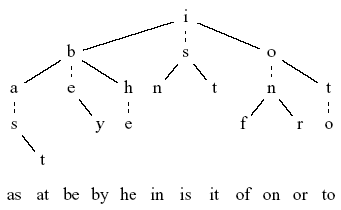
It would be nice if you added a few sentences explaining HOW the ternary search tree works, so we don't have to download and decipher the code. For example, you could say how one of the words in your tree diagram would be looked up.
|
|
|
|
 |
|
 |
I was unable to get Partial Matching to work. The following code snippet does not find any matches. I'm I missing something?
dict = new TstDictionary();
dict.Add("customers",null);
dict.Add("cust",null);
dict.Add("my customers are here",null);
dict.Add("this is just a long customer list",null);
foreach ( DictionaryEntry de in m_dict.PartialMatch("*cust*"))
Console.WriteLine("key = " + de.Key);
|
|
|
|
 |
|
 |
I've been looking into this myself, the partial match feature actually behaves more like a '?' in standard queries - it matches any character at that point but not anything after and not if there are no entries.
So for example, to match 'customers' you'd need 'cust*****' as the partial match string. however adding an additional * ('*cust*****') would cause the match to return 0 results.
If accidentally read induce vomiting
|
|
|
|
 |
