Introduction
Often times, it becomes necessary in an application to display ongoing and detailed status messages to the user. Capturing System.Diagnostics.Trace output by subclassing the TraceListener and redirecting the Trace output to someplace in the UI is a very simple way to accomplish that. This article presents a mechanism to capture Trace output and display it in a WPF user interface.
Background
I've had a WinForms version of this forever that has been quite handy. Replicating that in WPF took a little more doing than I thought it would, but that's mostly due to the steep WPF learning curve. In the end, the WPF FlowDocument made it a breeze to apply formatting to Trace output, especially compared to the old Win32 RichTextBox.
Using the Code
The attached code includes two mechanisms for redirecting Trace output to the UI.
TraceTextBoxControl
This is a simple UserControl that can be placed in the UI like any other control. When it is loaded in the visual tree, it creates a TraceListener and will immediately begin displaying Trace output in simple black and white text.
<local:TraceTextBoxControl>
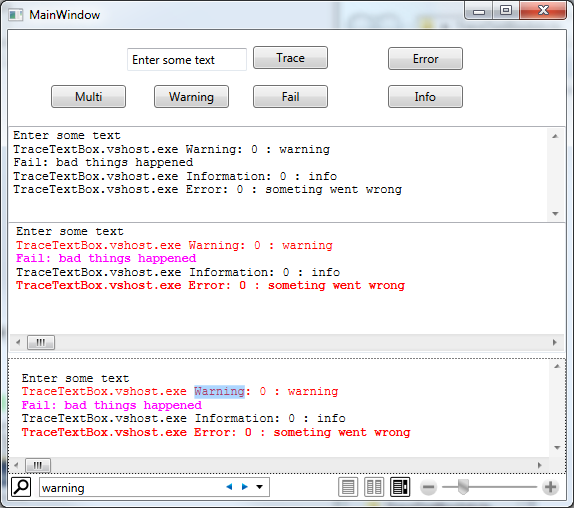
This is the topmost textbox in the screenshot above.
TraceDocument
If you want formatting above black and white, there is the TraceDocument. This class inherits from FlowDocument and can be used anywhere that a FlowDocument can be displayed.
In a RichTextBox (the middle window):
<RichTextBox IsReadOnly="True" AllowDrop="False"
      IsUndoEnabled="False"> <local:TraceDocument/>
</RichTextBox>
Or in a FlowDocumentReader (the bottom window):
<FlowDocumentReader ViewingMode="Scroll">
  <local:TraceDocument/>
</FlowDocumentReader>
The FlowDocumentReader includes built-in search and zoom.
The nice thing about using a FlowDocument is that different types of trace messages can be styled in the XAML and the TraceDocument will bind TraceEventTypes to similarly named styles.
public enum TraceEventType
{
    Critical = 1,
    Error = 2,
    Warning = 4,
    Information = 8,
    Verbose = 16,
    Start = 256,
    Stop = 512,
    Suspend = 1024,
    Resume = 2048,
    Transfer = 4096,
}
<FlowDocument  x:Class="TraceTextBox.TraceDocument"
               xmlns:x="http://schemas.microsoft.com/winfx/2006/xaml"
               xmlns="http://schemas.microsoft.com/winfx/2006/xaml/presentation"
               FontSize="12" FontFamily="Courier New" PageWidth="10000"  >
    <FlowDocument.Resources>
        <Style TargetType="{x:Type Paragraph}" x:Key="Information">
            <Setter Property="Margin" Value="0"/>
            <Setter Property="KeepTogether" Value="True"/>
        </Style>
        <Style TargetType="{x:Type Paragraph}" x:Key="Error">
            <Setter Property="Margin" Value="0"/>
            <Setter Property="Foreground" Value="Red"/>
            <Setter Property="FontWeight" Value="Bold"/>
            <Setter Property="KeepTogether" Value="True"/>
        </Style>
        <Style TargetType="{x:Type Paragraph}" x:Key="Warning">
            <Setter Property="Margin" Value="0"/>
            <Setter Property="Foreground" Value="Red"/>
            <Setter Property="KeepTogether" Value="True"/>
        </Style>
        <Style TargetType="{x:Type Paragraph}" x:Key="Fail">
            <Setter Property="Margin" Value="0"/>
            <Setter Property="Foreground" Value="Fuchsia"/>
            <Setter Property="FontWeight" Value="Bold"/>
            <Setter Property="KeepTogether" Value="True"/>
        </Style>
    </FlowDocument.Resources>
</FlowDocument>
Understanding the Code
TraceTextSource is the TraceListener derived class that captures Trace output and proxies it to an ITraceTextSink.
interface ITraceTextSink
{
    void Fail(string msg);
    void Event(string msg, TraceEventType eventType);
}
class TraceTextSource : TraceListener
{
    public ITraceTextSink Sink { get; private set; }
    private bool _fail;
    private TraceEventType _eventType = TraceEventType.Information;

    public TraceTextSource(ITraceTextSink sink)
    {
        Debug.Assert(sink != null);
        Sink = sink;
    }

    public override void Fail(string message)
    {
        _fail = true;
        base.Fail(message);
    }

    public override void TraceEvent(TraceEventCache eventCache, string source, TraceEventType eventType, int id, string message)
    {
        _eventType = eventType;
        base.TraceEvent(eventCache, source, eventType, id, message);
    }

    public override void Write(string message)
    {
        if (IndentLevel > 0)
            message = message.PadLeft(IndentLevel + message.Length, '\t');

        if (_fail)
            Sink.Fail(message);

        else
            Sink.Event(message, _eventType);

        _fail = false;
        _eventType = TraceEventType.Information;
    }

    public override void WriteLine(string message)
    {
        Write(message + "\n");
    }
}
TraceTextSource also wires to the UI (using a TraceDocument, for instance):
TraceListener listener = new TraceTextSource(new TraceDocument());
Trace.Listeners.Add(listener);
And it's up to the implementer of ITraceTextSink to display the Trace output stream appropriately in the UI.
public partial class TraceDocument : FlowDocument, ITraceTextSink
{
    private delegate void AppendTextDelegate(string msg, string style);

    private TraceListener _listener;

    public TraceDocument()
    {
        AutoAttach = true;
        InitializeComponent();
    }

    public bool AutoAttach { get; set; }

    public void Event(string msg, TraceEventType eventType)
    {
        Append(msg, eventType.ToString());
    }

    public void Fail(string msg)
    {
        Append(msg, "Fail");
    }

    private void Append(string msg, string style)
    {
        if (Dispatcher.CheckAccess())
        {
            Debug.Assert(Blocks.LastBlock != null);
            Debug.Assert(Blocks.LastBlock is Paragraph);
            var run = new Run(msg);

            run.Style = (Style)(Resources[style]);
            if (run.Style == null)
                run.Style = (Style)(Resources["Information"]);

            ((Paragraph)Blocks.LastBlock).Inlines.Add(run);

            ScrollParent(this);
        }
        else
        {
            Dispatcher.Invoke(new AppendTextDelegate(Append), msg, style);
        }
    }

    private static void ScrollParent(FrameworkContentElement element)
    {
        if (element != null)
        {
            if (element.Parent is TextBoxBase)
                ((TextBoxBase)element.Parent).ScrollToEnd();

            else if (element.Parent is ScrollViewer)
                ((ScrollViewer)element.Parent).ScrollToEnd();

            else
                ScrollParent(element.Parent as FrameworkContentElement);
        }
    }

    private void Document_Loaded(object sender, RoutedEventArgs e)
    {
        if (AutoAttach && _listener == null)
        {
            _listener = new TraceTextSource(this);
            Trace.Listeners.Add(_listener);
        }
    }

    private void Document_Unloaded(object sender, RoutedEventArgs e)
    {
        if (_listener != null)
        {
            Trace.Listeners.Remove(_listener);
            _listener.Dispose();
            _listener = null;
        }
    }
}
History
- 2/14/2010 - Initial upload.
- 8/25/2012 - support multithreading



 General
  News
News  Suggestion
  Question
  Bug
Bug  Answer
  Joke
Joke  Praise
  Rant
Rant  Admin
Admin 


 Submit an article or tip


