Click here to Skip to main content

Panorama 360 iPod Touch & iPhone

By , 11 May 2010
 

Introduction

PanoramaGL library is the first open source library in the world to see panoramic views on the iPod Touch 1G, 2G, 3G and iPhone EDGE, 3G and 3GS.

SVN and source code in http://code.google.com/p/panoramagl/

Created by Javier Baez - Visit Ecuador Team 
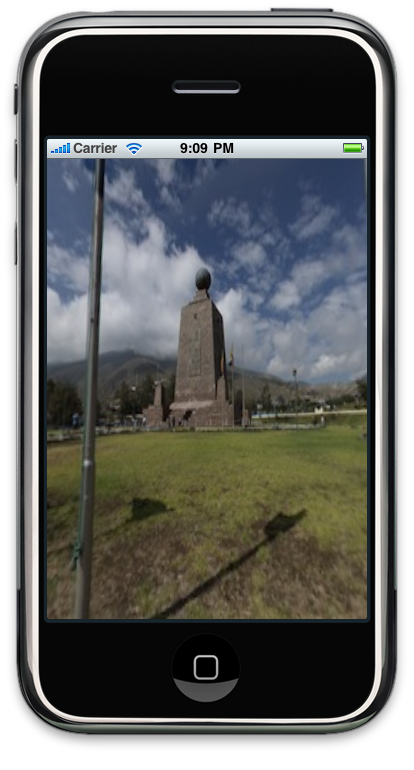
HelloPanorama image   

Important Note: Please add the credits in their projects when using the library.  

Background     

The supported features in version 0.1 Beta are:   

  • Supports OpenGLES 1.1
  • Tested with SDK 3.0 to 3.2
  • Supports cubic, spherical and cylindrical panoramic images
  • Allows scrolling and continuous scrolling
  • Supports scrolling left to right and from top to bottom using the accelerometer
  • Allows to use the inertia to stop scrolling
  • Supports zoom in and zoom out (moving two fingers on the screen)
  • Supports reset (placing three fingers on the screen)
  • Allows you to control the range of rotation in the x, y and z axis
  • Supports Portrait, Portrait Upside Down, Landscape Left and Landscape Right orientation using the accelerometer
  • Supports for events on view

Using the Code

To create a simple panoramic image viewer for the iPhone with PanoramaGL library, you must perform the following steps:

1. Creating a project for iPhone (iPhone view based).

  • Open XCode
  • Go to "File -> New Project -> iPhone OS -> Application -> View-based Application"
Create project
  • Click on "Choose" button and Save the project as "HelloPanorama"

2. Import PanoramaGL library.   

  • Download "PanoramaGL" library (Parent project folder) 
  • Decompress "PanoramaGL" library (double click on zip file) 
  • Go to menu "Project -> Edit Active Target 'HelloPanorama'" 
  • Go to "General" Tab 
Create project
  • Click on "+" button in the "Linked Library Section"  

  • Click on "Add Other" button and find "PanoramaGL" project 

  • Select "PanoramaGL" folder, select "PanoramaGL.xcodeproj" file and click on "Add" button returning to "General" Tab"  

  • Go to "Direct Dependencies" section and click on "+" button 

  • Select "PanoramaGL" and click on "Add Target" button returning to "General" Tab
  • Now go to "Build" Tab 

  • Find option "Header Search Paths" and double click on it.  

  • Click on "+" button and create a new setting string 
  • Select "Recursive" check, write a relative path of "PanoramaGL" folder (in this case "../PanoramaGL" and click on "OK" button 
  • Close "Project Active Target" window  
  • Go to "Group & Files" panel, find and select "PanoramaGL.xcodeproj"
  • Check target option of "libPanoramaGL.a" on top-right panel as shown below: 

3. In the controller class HelloPanoramaViewController must be implemented the code shown below:

#import <UIKit/UIKit.h>
#import "PLView.h"

@interface HelloPanoramaViewController : UIViewController {
	IBOutlet PLView * plView;
}

@property (nonatomic, retain) IBOutlet PLView *plView;

@end
4. The view created must inherit from PLView, instead of UIView, so it must be modified in the resource file HelloPanoramaViewController.xib.

5. In the controller class HelloPanoramaViewController must implement code in order to configure the view as shown below:
#import "HelloPanoramaViewController.h"

@implementation HelloPanoramaViewController

@synthesize plView;

// Implement viewDidLoad to do additional setup after loading the view, typically from a nib.
- (void)viewDidLoad 
{
    [super viewDidLoad];
    //Example with Spherical type
    plView.isDeviceOrientationEnabled = YES;
    plView.isAccelerometerEnabled = YES;
    plView.isScrollingEnabled = YES;
    plView.isInertiaEnabled = YES;
    plView.type = PLViewTypeSpherical;
    [plView addTextureAndRelease:[PLTexture textureWithPath:[[NSBundle mainBundle] pathForResource:@"pano" ofType:@"jpg"]]];
}

- (void)dealloc 
{
    [plView release];
    [super dealloc];
}

@end
		

6. plView variable pointing to the view in the resource file "MainWindow.xib"

7. Add a resource image as "pano.jpg" this image must be Spherical for this example.

Classes Documentation

Then proceed to explain briefly the operation of the classes used:

PLView class, this class is a view (inherits from UIView) allowing a simple set of features for power display panoramic images. The properties and methods of this class are:

  • BOOL isDeviceOrientationEnabled; //If the view allows you to enable orientation of the device supports (manually, typical of the Library)
  • UIDeviceOrientation deviceOrientation; //lets see what orientation has this view, or set in that we want the view orientation appears. Eg. plView.deviceOrientation=UIDeviceOrientationLandscapeLeft;
  • PLOrientationSupported deviceOrientationSupported;  //This property allows you to tell the view that positions of orientation is enabled and running. Eg. PlView.deviceOrientationSupported = (PLOrientationSupportedPortrait | PLOrientationSupportedLandscapeLeft) <- in this case only allows for Portrait orientation and LandscapeLeft
  • BOOL isAccelerometerEnabled; //This property enables the operation of the accelerometer
  • BOOL isAccelerometerLeftRightEnabled; // This property activates the accelerometer operation only in the x-axis and depends on this active property isAccelerometerEnabled
  • BOOL isAccelerometerUpDownEnabled; // This property activates the accelerometer operation only in the y-axis and depends on this active property isAccelerometerEnabled
  • float accelerometerSensitivity; // Set the sensitivity with which to operate the accelerometer (motion sensing)
  • NSTimeInterval accelerometerInterva;l // Sets the refresh time in seconds of accelerometer
  • CGPoint startPoint; // This property tells us which position he made the first touch when the event occurs (Touch Begin event)
  • CGPoint endPoint; // This property will be cooling while moving the finger on the screen (Touch Move event)
  • BOOL isScrollingEnabled; // This property tells us if you could make a scrolling at the hearing, if not active, only move when the fingers moving on the screen
  • NSUInteger minDistanceToEnableScrolling; // Minimum distance that must be traveled with the fingers to activate the scrolling
  • BOOL isInertiaEnabled; / / Check the inertia that means that when someone performs a scroll inertia is activated to slow the scroll to stop the movement
  • NSTimeInterval inertiaInterval; // Duration of inertia in seconds
  • BOOL isResetEnabled; // Property that can be enabled to reset the view to its original position when placing three fingers on the screen
  • PLViewType type; // Type of view to be used can be (PLViewTypeSpherical, PLViewTypeCubeFaces, PLViewTypeCylindrical)
  • PLCamera * camera; / / Property allows us to change or take the parameters of the camera  
  • - (void) addTexture: (PLTexture *) texture; // Add a texture to be used, in the case of spherical and cylindrical single view to invoke this method once, in the case of cubic view use this method six times (one texture per face)
  • - (void) removeTexture: (PLTexture *) texture; // Removes an object of type texture of the view
  • - (void) removeTextureAtIndex: (NSUInteger) index; // Removes an object of type texture by index of the view
  • - (void) removeAllTextures; // Removes all the textures that the view can use


PLTexture class allows us to load a texture that will be used by the view, its properties and methods are:  

  • GLuint textureId; // read-only property giving the identifier of an OpenGL texture
  • int width, height; // read-only properties for the width and height of a texture loaded
  • BOOL isValid; // Property to know if the texture failed to load
  • - (id) init; // Default Constructor
  • - (id) initWithImage: (UIImage *) image; // Constructor that receives an object of type UIImage where an image must be loaded
  • - (id) initWithImage: (UIImage *) image rotate (int) angle; // Same as the previous method but can rotate the image 90, 180, 270 degrees
  • - (id) initWithPath: (NSString *) path; // Constructor that receives the  image path (jpeg, png)
  • - (id) initWithPath: (NSString *) path rotate (int) angle; // Same as the previous method but can rotate the image 90, 180, 270 degrees

// Constructors static type that operate with the same parameters that the init equivalent  functions  

  • + (id) textureWithImage: (UIImage *) image;  
  • + (id) textureWithPath: (NSString *) path;
  • + (id) textureWithImage: (UIImage *) image rotate (int) angle;
  • + (id) textureWithPath: (NSString *) path rotate (int) angle;
  • - (BOOL) loadTextureWithImage: (UIImage *) image; // Load a texture from an image object
  • - (BOOL) loadTextureWithImage: (UIImage *) image rotate (int) angle; / / Same as the previous method but can rotate the image 90, 180, 270 degrees
  • - (BOOL) loadTextureWithPath: (NSString *) path,  // Load a texture from image path (jpeg, png)
  • - (BOOL) loadTextureWithPath: (NSString *) path rotate (int) angle; / / Same as the previous method but can rotate the image 90, 180, 270 degrees
Eg. PLTexture * texture = 
[PLTexture textureWithPath:[[NSBundle mainBundle] pathForResource:@"pano" ofType:@"jpg"]]; 
[plView addTexture:[PLTexture textureWithPath:texture]];

PLCamera class allows us to change the display settings of the hearing, their properties are:

  • BOOL  IsFovEnabled; // Enable zoom in or zoom out eg. plView.camera.isFovEnabled  = NO;
  • float fov; // zoom level for the Hearing eg. plView.camera.fov = 10;
  • float fovSensitivity; // sensitivity for the zoom when you place two fingers on the screen eg. plView.camera.fovSensitivity = 70;
  • PLRange fovRange; // Range in values that will allow for the default zoom from -180 to 180 eg. plView.camera.fovRange = PLRangeMake (-10.10);
  • PLRange fovFactorRange; // Range in which the zoom will work internaly (This range is for internal use with fovFactor property)
  • BOOL isXAxisEnabled, isYAxisEnabled, isZAxisEnabled;  // This properties enabled if the camera can move in the x, y, z eg. plView.camera.isXAxisEnabled = NO;
  • PLPosition position;  // property to place the camera in a position. PLPosition has the property x, y, z eg. plView.camera.x = 6;
  • PLRange xRange, yRange, zRange; // Define the range in which it can move in the x, y, z eg. plView.camera.xRange = PLRangeMake (-100, 100);
  • BOOL isPitchEnabled, isYawEnabled, isRollEnabled; // These properties enable that axes can rotate the camera x, y, z eg.  plView.camera.isPitchEnabled = NO;
  • BOOL  IsReverseRotation; // Enable the rotation of the camera displacement is inversely related to the user to do with the touch or accelerometer.  Eg. plView.camera.isReverseRotation = YES;
  • PLRotation rotation; // angles of rotation (in degrees) of the camera x, y, z eg. plView.camera.rotation.pitch = 80;
  • PLRange pitchRange, yawRange, rollRange; // Range in which the camera can rotate in x, y, z eg. plView.camera.pitchRange = PLRangeMake (-90, 90); <- on the x axis can only rotate the angle - 90 to 90
  • float rotateSensitivity;  // value of sensitivity in which the camera will rotate when the user moves the view eg . plView.camera.rotateSensitivity = 40;  
  • - (void) reset; / / Lets reset the camera settings back to the original position of the camera  eg. [plView.camera reset];
Eg. plView.camera.yawRange = PLRangeMake(-70, 70);

Many of the properties and methods named in the previous section have not been implemented in the example but it serves as reference documentation for those wishing to download the PanoramaGL library and begin using in their projects.

This weekend or next week maximum official library documentation will be published.

Points of Interest 

  • Panoramic images (Spherical, Cylindrical, Cubic)
  • Panoramic viewer

History

  • 22 February, 2009: Initial post

License

This article, along with any associated source code and files, is licensed under The GNU Lesser General Public License (LGPLv3)

About the Author

Javier Baez

Ecuador Ecuador
No Biography provided

Sign Up to vote   Poor Excellent
Add a reason or comment to your vote: x
Votes of 3 or less require a comment

Comments and Discussions

 
You must Sign In to use this message board.
Search this forum  
    Spacing  Noise  Layout  Per page   
Questionvideomembermarcoatmac14-Feb-13 23:07 
Hi, can works with video too (not images)?
thanks
M
QuestionProblem with the aspect ratiomemberTheReal2320-Feb-12 23:12 
The problem ist that when it is in portrait mode everything looks too slim and in the landscape mode everything looks too fat.
So is it possible to change the aspect ratio of the portrait and landscape mode?
QuestionPlease Help me to do this project in xcode4 with sdk ios4.3memberShirish_Shinde0426-Nov-11 7:03 
Hi,
 
can you please help me with this Project.
I am not able to do the 6 step told in this project.
I am using Xcode4 for doing this can you do this for me in xcode.
I want to include a gallery from where i can select a pic from for panorama view.
 
Thanks & Regards
Shirish Shinde
friends.shirish@gmail.com
Questionhow to Connect plView to view of viewConroller?membersaurabh.patil@hotmail.com2-Aug-11 19:26 
How to do this?
 
4. The view created must inherit from PLView, instead of UIView, so it must be modified in the resource file HelloPanoramaViewController.xib.
 
Also i call init of PlView I got a linking error.
QuestionPlay 360 VideomemberSREELAL HAMSAVAHANAN1-Aug-11 22:52 
Thanks for the great library.Is it possible to use this library to show 360 degree videos .How can i modify the existing code to do that.
AnswerRe: Play 360 Videomembermarcoatmac21-Dec-12 23:47 
I wish to use a video, are you fix it?
thanks
Questionhow to switch view of cubic faces from Outside of Cube to InsidememberMember 811051529-Jul-11 21:01 
First of all thanks a lot for this great library. It really is 1st of it's kind thing available to we people. I'm running this HelloPanorama on my iPhone4 n iPad2 and the bottom line is that it is built-up successfully.
 
But the issue is that it is showing me cubic faces layout from outside of the box, and when i switch to cylindrical or spherical layouts it just shows black screen (which i think is also because the view is from outside and the face of sphere/cylinder is drawn outward of the screen along positive z-axis).
 
When i change the value of z-axis of camera position from 0 to 1, it takes me to that middle position of cube but i can't see front side of cubic face, it shows black screen there because that goes outward of the screen.
 
I just want to know how can i switch this view from Outside to Inside??? Please help me or guide me to some place where I can find my solution. Because for my life I have tried searching for it around each and every corner of World Wide Web, but in vain.
 
Hoping to hear soon from you, Thanks in advance!
GeneralHow to run panoramaGLmemberP.Anandhakumar29-Apr-11 21:51 
Hi i download all the items for panorama and what are the steps here wrote down i followed for executing the code in my simulator but i cant to do it. please help me how can i run these in my iphone simulator.
 
I am using Xcode 4.2, iOS Version 4.2 (235).
 
These are error showing in my xcode
 
"error: PLView.h: No such file or directory"
 
Thanks in Advance,
 
Anand.
QuestionPanormagl filesmembermariela gutierrez20-Dec-10 11:28 
Where is PLControl .h/.m, because i found the next answer
 
It's an autorelease problem. The button to change (hide) is already released.
Go to PLControl.h/m and make the member button a property with retain attribute and change the line:
 
button = [UIButton buttonWithType:UIButtonTypeCustom];
to
self.button = [UIButton buttonWithType:UIButtonTypeCustom];
 
That should fix the problem.
 
but where is it? Help D'Oh! | :doh:
GeneralExample to play withmemberclearbrian116-Nov-10 6:57 
http://bg360.net/en/
best ones are rectangular panoramas but ones where you can look up or down too
360 degree ones not quiet right
 
open any of the rectangular panoramas
opens in flash
bottom left is tiny button to get the jpg
download and rezize in preview to width no greater than 1024 (height should scale automatically)
add to project
 
Change filename in HelloPanoramaViewController.m
 
     //[plView addTexture:[PLTexture textureWithPath:[[NSBundle mainBundle] pathForResource:@"pano" ofType:@"jpg"]]];
     //[plView addTexture:[PLTexture textureWithPath:[[NSBundle mainBundle] pathForResource:@"Chicago_Downtown_Panorama" ofType:@"jpg"]]];
     [plView addTexture:[PLTexture textureWithPath:[[NSBundle mainBundle] pathForResource:@"hali" ofType:@"jpg"]]];
    
     code below this lets you create box panoramas but not tried it
GeneralProblem with HelloPanoramamemberStefanBleicker29-Sep-10 9:33 
Hi,
 
i tried to build the hellopanorama app. but i receive an error:
ld: library not found for -lPanoramaGL
 
what to to running this example?
 
thanks
 
stefan
GeneralRe: Problem with HelloPanoramamemberSven123423451235423530-Sep-10 21:52 
check the path for PanoramaGL and check the box in the executable
 
The example will run if you check all the settings in "Using the Code" here at codeproject
Questionhow should I user this api if i want to create rotating globememberkonovkov15-Sep-10 4:49 
how should I user this api if i want to create rotating globe?
the solution i see is to set viewport outside from the sphere and arrange lights and textures.
unfortunately I'm new to opengl and hardly can find a solution.
can anybody help me?
NewsRe: how should I user this api if i want to create rotating globe [modified]memberkonovkov16-Sep-10 4:49 
After a hard working day i've managed sphere to look like globe (with appropriate textures). It's zoomable and rotateable.
 
BUT
 
It behaves weirdly. It seems like some areas on sphere surface are transparent, so I can see the sphere from the inside. These areas covers up to half of the sphere surface.
I think this happens because when we use it like panorama we are like standing inside the sphere so the elements behind our back don't need to be displayed.
How can I change the way of sphere surface behavior?


-- Modified Friday, September 17, 2010 5:57 AM
AnswerRe: how should I user this api if i want to create rotating globememberkonovkov17-Sep-10 0:26 
and, finally, after 2 days of struggling
it is solved Poke tongue | ;-P
 

glEnable(GL_CULL_FACE); should be added after glClear(GL_DEPTH_BUFFER_BIT | GL_COLOR_BUFFER_BIT); in PLSceneElement.h or in internalRender of PLSphere.h
GeneralRe: how should I user this api if i want to create rotating globememberSven123423451235423517-Sep-10 4:53 
Thanks for sharing this
 
have you tried that on iPhone or iPad?
GeneralRe: how should I user this api if i want to create rotating globememberkonovkov17-Sep-10 4:57 
Yes, it works. I've tested it on iPhone 3G (3.1.2)
Generalshow u problem can fix !!memberboardban17-Aug-10 21:35 
i add libPanoramaGL.a in framework , u can find in folder tutorial
(if u see a 2 file u not use a libPanoramaGL.a in folder simulator)
and i follow capital 2 of this tutorial.
 
this's easy to fix my problem,
GeneralHot spotsmemberisaacueca17-Aug-10 10:24 
Hi guys I'm trying to implement hotspots in the panorama? Has anyone tried to do that?
 
Thanks
GeneralDoes anybody know how to properly scale to ipad size? [modified]membershawhu200012-Aug-10 20:38 
Hi all
 
I've now running this on ipad. it looks like it just scale the whole view larger on ipad. but the texture looks fuzzy. I guess I had sth missing here. how do I set the viewport resolution?
 
how do I actually match ipad view size? is there any settings that I can work with?

modified on Friday, August 13, 2010 2:56 AM

GeneralThanks Javier Baez, who make this possible in the first placemembershawhu20007-Aug-10 3:29 
for the last 3 weeks I'm been trying desperately puting a panorama view on ipad. I did it.
 
I may have emailed Javier a couple more time. but i'm desperate. My apology for my constantly annoy email asking a little this alittle that.
 
I've made a small donation and I will make a much bigger one after I collect the money of my little project. as my gratitude to Javier.
 
Thank you Javier, you're the man!
GeneralRe: Thanks Javier Baez, who make this possible in the first placememberMember 784196418-Apr-11 11:03 
Shawn do you have this working in XCode 4 with iOS 4.3?
Questioncan use this library in device iphone3g (farmware 4.0.1) and ipad(farmware 3.2)?memberboardban6-Aug-10 0:39 
can use this library in device iphone3g (farmware 4.0.1) and ipad(farmware 3.2)?
 
today i can't run on iphone 4.0.1 and ipad3.2
 
no error !
 
thank Javier Baez for library Smile | :)
AnswerRe: can use this library in device iphone3g (farmware 4.0.1) and ipad(farmware 3.2)?membershawhu20007-Aug-10 3:22 
ok, I've been trying to email the author and he said it could be a ipad version in the future. he said sometimes earlier in Auguest.
 
Also after 2 weeks trying, now I've successfully compiled the whole thing and successfully made it run it on ipad. althought it's quite memory thirsty for ipad. ipad has the same memeory size as 3gs but a much larger screen resolution. so for ipad it need to use a much larger jpg file. which takes a LOT more memory.
 
but anyway
 
2 tips for people who desperately trying to run this on ipad just like me
 
1. modify the glu.h file, put #include "glues.h"
2. modify the panoramaGL project to include 2 other .h file in PL classes. include those 2 in the project. They already in the folder, just not included by default. I dont know if excluding them was on purpose but after I included them, everything is fine now.
GeneralRe: can use this library in device iphone3g (farmware 4.0.1) and ipad(farmware 3.2)?memberxinsoft@gmail.com22-Feb-11 0:23 
Thanks for your great help! Now I still have a compiling error as below, does anyone meet the same issue:
 

ld: duplicate symbol ___gl_pqHeapNewPriorityQ in /Users/yapingxin/Dev/PublicLibrary/Panorama/HelloPanorama/HelloPanorama/build/HelloPanorama.build/Debug-iphonesimulator/HelloPanorama.build/Objects-normal/i386/priorityq.o and /Users/yapingxin/Dev/PublicLibrary/Panorama/HelloPanorama/HelloPanorama/build/HelloPanorama.build/Debug-iphonesimulator/HelloPanorama.build/Objects-normal/i386/priorityq-heap.o
 
Thanks in advance,
Yaping
AnswerRe: can use this library in device iphone3g (farmware 4.0.1) and ipad(farmware 3.2)?memberboardban8-Aug-10 22:05 
wow!! today i can run 4.0.1 on iphone and 3.2 on ipad .
code is complete.
GeneralRe: can use this library in device iphone3g (farmware 4.0.1) and ipad(farmware 3.2)?memberSven123423451235423511-Aug-10 10:40 
is it stable on iPad?
I get many Memory Warnings on Console.. :(
GeneralRe: can use this library in device iphone3g (farmware 4.0.1) and ipad(farmware 3.2)?membershawhu200011-Aug-10 14:53 
no, it's not stable. I got lots of problems including freezing the entire system and I have to hard reset. normal project like uikit stuff, it just get kicked by super, but opengl stuff, if not do it with extreme care, you can freeze the entire system I guess?
 
But as far as I concern, it's the only project that I can work on, so...no other choice.
 
If you know any other better choice, even need to pay, I would like to hear
GeneralRe: can use this library in device iphone3g (farmware 4.0.1) and ipad(farmware 3.2)? [modified]memberSven123423451235423511-Aug-10 23:53 
On iPhone it works perfect, it´s a iPad issue..I think. On iPhone I turned 1h around and switched the Pano´s dynamically.. No problems...
 
When you compile with "NSZombies" Flag or enable Guard Malloc you will see why it crashes on iPad.
 
Yes, my system freezed too if you don´t make any action for receivedmemorywarning..
 
In my case I release plView and the iPad don´t freezes

modified on Thursday, August 12, 2010 7:00 AM

Generalto day i can build program in simulator3.1.2 , but i can't build in device3.1.2memberboardban12-Jul-10 21:31 
Ld build/Debug-iphoneos/HelloPanorama.app/HelloPanorama normal armv6
cd "/Users/boardban/Desktop/myProject copy/HelloPanorama"
setenv IPHONEOS_DEPLOYMENT_TARGET 3.1.2
setenv PATH "/Developer/Platforms/iPhoneOS.platform/Developer/usr/bin:/Developer/usr/bin:/usr/bin:/bin:/usr/sbin:/sbin"
/Developer/Platforms/iPhoneOS.platform/Developer/usr/bin/gcc-4.2 -arch armv6 -isysroot /Developer/Platforms/iPhoneOS.platform/Developer/SDKs/iPhoneOS3.1.2.sdk "-L/Users/boardban/Desktop/myProject copy/HelloPanorama/build/Debug-iphoneos" "-L/Users/boardban/Desktop/myProject copy/HelloPanorama/../PanoramaGL/build/Debug-iphonesimulator" "-L/Users/boardban/Desktop/myProject copy/HelloPanorama" "-L/Users/boardban/Desktop/myProject copy/HelloPanorama/../PanoramaGL/build/Debug-iphoneos" "-L/Users/boardban/Desktop/myProject copy/HelloPanorama/../../myProject/PanoramaGL/build/Debug-iphoneos" "-L/Users/boardban/Desktop/myProject copy/HelloPanorama/../../myProject/PanoramaGL/build/Debug-iphonesimulator" "-L/Users/boardban/Desktop/myProject copy/HelloPanorama/../../../Documents/PanoramaGL/build/Debug-iphonesimulator" "-L/Users/boardban/Desktop/myProject copy/HelloPanorama/../../__Production/iPhone/Panorama_beta2/PanoramaGL/build/Debug-iphonesimulator" "-F/Users/boardban/Desktop/myProject copy/HelloPanorama/build/Debug-iphoneos" -F/Developer/Platforms/iPhoneSimulator.platform/Developer/SDKs/iPhoneSimulator3.1.2.sdk/System/Library/Frameworks -filelist "/Users/boardban/Desktop/myProject copy/HelloPanorama/build/HelloPanorama.build/Debug-iphoneos/HelloPanorama.build/Objects-normal/armv6/HelloPanorama.LinkFileList" -dead_strip -ObjC -miphoneos-version-min=3.1.2 -framework Foundation -framework UIKit -framework CoreGraphics -framework OpenGLES -framework QuartzCore -framework IOKit -lPanoramaGL -o "/Users/boardban/Desktop/myProject copy/HelloPanorama/build/Debug-iphoneos/HelloPanorama.app/HelloPanorama"
 
ld: warning: in /Developer/Platforms/iPhoneSimulator.platform/Developer/SDKs/iPhoneSimulator3.1.2.sdk/System/Library/Frameworks/Foundation.framework/Foundation, file is not of required architecture
ld: warning: in /Developer/Platforms/iPhoneSimulator.platform/Developer/SDKs/iPhoneSimulator3.1.2.sdk/System/Library/Frameworks/UIKit.framework/UIKit, file is not of required architecture
ld: warning: in /Developer/Platforms/iPhoneSimulator.platform/Developer/SDKs/iPhoneSimulator3.1.2.sdk/System/Library/Frameworks/CoreGraphics.framework/CoreGraphics, file is not of required architecture
ld: warning: in /Developer/Platforms/iPhoneSimulator.platform/Developer/SDKs/iPhoneSimulator3.1.2.sdk/System/Library/Frameworks/OpenGLES.framework/OpenGLES, file is not of required architecture
ld: warning: in /Developer/Platforms/iPhoneSimulator.platform/Developer/SDKs/iPhoneSimulator3.1.2.sdk/System/Library/Frameworks/QuartzCore.framework/QuartzCore, file is not of required architecture
ld: warning: in /Developer/Platforms/iPhoneSimulator.platform/Developer/SDKs/iPhoneSimulator3.1.2.sdk/System/Library/Frameworks/IOKit.framework/IOKit, missing required architecture arm in file
ld: warning: in /Users/boardban/Desktop/myProject copy/PanoramaGL/build/Debug-iphonesimulator/libPanoramaGL.a, file is not of required architecture
Undefined symbols:
"__objc_empty_vtable", referenced from:
_OBJC_METACLASS_$_HelloPanoramaAppDelegate in HelloPanoramaAppDelegate.o
_OBJC_CLASS_$_HelloPanoramaAppDelegate in HelloPanoramaAppDelegate.o
_OBJC_METACLASS_$_HelloPanoramaViewController in HelloPanoramaViewController.o
_OBJC_CLASS_$_HelloPanoramaViewController in HelloPanoramaViewController.o
"___CFConstantStringClassReference", referenced from:
cfstring=pano in HelloPanoramaViewController.o
cfstring=jpg in HelloPanoramaViewController.o
"_OBJC_CLASS_$_PLTexture", referenced from:
__objc_classrefs__DATA@0 in HelloPanoramaViewController.o
"_OBJC_CLASS_$_NSBundle", referenced from:
__objc_classrefs__DATA@0 in HelloPanoramaViewController.o
"_objc_setProperty", referenced from:
-[HelloPanoramaAppDelegate setViewController:] in HelloPanoramaAppDelegate.o
-[HelloPanoramaAppDelegate setWindow:] in HelloPanoramaAppDelegate.o
-[HelloPanoramaViewController setPlView:] in HelloPanoramaViewController.o
"_UIApplicationMain", referenced from:
_main in main.o
"__objc_empty_cache", referenced from:
_OBJC_METACLASS_$_HelloPanoramaAppDelegate in HelloPanoramaAppDelegate.o
_OBJC_CLASS_$_HelloPanoramaAppDelegate in HelloPanoramaAppDelegate.o
_OBJC_METACLASS_$_HelloPanoramaViewController in HelloPanoramaViewController.o
_OBJC_CLASS_$_HelloPanoramaViewController in HelloPanoramaViewController.o
"_OBJC_CLASS_$_UIViewController", referenced from:
_OBJC_CLASS_$_HelloPanoramaViewController in HelloPanoramaViewController.o
"_objc_msgSend", referenced from:
_main in main.o
_main in main.o
_main in main.o
-[HelloPanoramaAppDelegate applicationDidFinishLaunching:] in HelloPanoramaAppDelegate.o
-[HelloPanoramaAppDelegate dealloc] in HelloPanoramaAppDelegate.o
-[HelloPanoramaViewController viewDidLoad] in HelloPanoramaViewController.o
-[HelloPanoramaViewController dealloc] in HelloPanoramaViewController.o
"_objc_msgSendSuper2", referenced from:
-[HelloPanoramaAppDelegate dealloc] in HelloPanoramaAppDelegate.o
-[HelloPanoramaViewController viewDidLoad] in HelloPanoramaViewController.o
-[HelloPanoramaViewController didReceiveMemoryWarning] in HelloPanoramaViewController.o
-[HelloPanoramaViewController dealloc] in HelloPanoramaViewController.o
"_OBJC_CLASS_$_NSAutoreleasePool", referenced from:
__objc_classrefs__DATA@0 in main.o
"_OBJC_CLASS_$_NSObject", referenced from:
_OBJC_CLASS_$_HelloPanoramaAppDelegate in HelloPanoramaAppDelegate.o
"_OBJC_METACLASS_$_NSObject", referenced from:
_OBJC_METACLASS_$_HelloPanoramaAppDelegate in HelloPanoramaAppDelegate.o
_OBJC_METACLASS_$_HelloPanoramaViewController in HelloPanoramaViewController.o
"_OBJC_METACLASS_$_UIViewController", referenced from:
_OBJC_METACLASS_$_HelloPanoramaViewController in HelloPanoramaViewController.o
ld: symbol(s) not found
collect2: ld returned 1 exit status
 

help me!
GeneralRe: to day i can build program in simulator3.1.2 , but i can't build in device3.1.2memberJavier Baez16-Jul-10 6:24 
Hi
 
This version is tested with SDK 3.1.2, you need download last version of http://code.google.com/p/panoramagl/. Please download HelloPanorama example and follow capital 2 of this tutorial.
 
Best regards
 
Javier
Generalerror 1 !!! ".objc_class_name_PLTexture", referenced from:memberboardban9-Jul-10 0:35 
".objc_class_name_PLTexture", referenced from:
literal-pointer@__OBJC@__cls_refs@PLTexture in HelloPanoramaViewController.o
ld: symbol(s) not found
collect2: ld returned 1 exit status
 
what 's a problem , help me please !!
GeneralRe: error 1 !!! ".objc_class_name_PLTexture", referenced from:memberSven123423451235423530-Jul-10 21:24 
Same problem here, with the latest SDK and iPhone SDK 3.2.
 
i can compile panoramaGL when I change the glue.h (import "glues.h"), but then I get this error.
 
Frown | :(
 
Somebody an idea?
 
Thanks for sharing this lib!
 
S
GeneralRe: error 1 !!! ".objc_class_name_PLTexture", referenced from: [modified]memberSven123423451235423531-Jul-10 9:28 
fixed the problem...
 
I had to copy PLResources.h and .m in my Classesfolder

modified on Friday, August 13, 2010 6:26 AM

GeneralRe: error 1 !!! ".objc_class_name_PLTexture", referenced from:memberkermitjoemama1-Oct-10 15:00 
Sven, Where did you get PLResources.h and m from?
GeneralRe: error 1 !!! ".objc_class_name_PLTexture", referenced from:memberboardban6-Aug-10 0:34 
i can fix a problem ,i forgot a check target
 
follow this
 
Check target option of "libPanoramaGL.a" on top-right panel as shown below:
GeneralRe: error 1 !!! ".objc_class_name_PLTexture", referenced from:membernwenimo29-Sep-10 0:05 
"_OBJC_CLASS_$_PLTexture", referenced from:
 
how can i fix this problem?
GeneralRe: error 1 !!! ".objc_class_name_PLTexture", referenced from:membermariela gutierrez20-Dec-10 8:07 
I have the same problem, a error in HelloPanoramaViewController like this:
 
objc-class-ref-to-PLTexture in HelloPanoramaViewController.o
 
and i can´t run the example, and i don´t understand your answer can you be more specific whit that about targets?
thank you!!! D'Oh! | :doh:
GeneralExcellent library!memberEd Bast7-Jul-10 4:25 
Thanks so much for this Javier, don't know how I would be able to accomplish my programming goals without it!
GeneralRe: Excellent library!memberJavier Baez16-Jul-10 6:26 
Hi Ed
 
Tanks Ed for you interest in this project.
 
Any question please write me to my email javbaezga@gmail.com
 
Best Regards
 
Javier
 
P.D: I hope will release new version at first days of August,
GeneralMy vote of 5memberEd Bast7-Jul-10 4:23 
Tutorial was great, and the Library is a huge addition.
GeneralConverting to iPad applicationmemberEd Bast1-Jun-10 10:29 
I've been trying to migrate this app to the iPad, so far so good - however right now I'm trying to alter the area where the finger can interact with the screen. Unfortunately, the height/width seem to be limited to the 320x480 iPhone screen. How can I increase that to the 1024x798 (approx. off the top of my head) that the ipad screen offers? I've been digging around the PanoramaGL files, but no luck.
 
Any help would be appreciated!
GeneralRe: Converting to iPad applicationmemberJavier Baez22-Jun-10 3:57 
Hi Ed
 
This weekend I will release a revision of the library to correct some errors.
 
Regards
 
Javier
GeneralRe: Converting to iPad applicationmemberstylecrate29-Jun-10 18:57 
Has this been updated yet?
 
Where can I find the latest version?
 
The last update in google code seems to be the 25th of April.
 
By the way. Awesome project. Just What I needed
GeneralRe: Converting to iPad applicationmemberJavier Baez1-Jul-10 9:50 
Hi Ed
 
The last weekend can not release the update of the project, I had some problems. This weekend I'm going to do.
 
Regards
 
Javier
GeneralRe: Converting to iPad applicationmemberSven12342345123542354-Aug-10 2:17 
do you have a solution for that problem?
GeneralRe: Converting to iPad applicationmemberSven12342345123542357-Aug-10 22:09 
I think the problem is not plView, it´s the xib. If you start in IB "Simulate as iPad Application" you will see why..
GeneralRe: Converting to iPad applicationmemberSven12342345123542357-Aug-10 23:43 
I found the solution:
 
Upgrade your project to Universal
 
select MainWindow.xib in IB and klick on Create iPad Version using Automask save the MainWindow.xib as MainWindow-iPad and overwrite the old one.
 
Now you can interact overall!
GeneralIssues with PLView.h file [modified]memberEd Bast27-May-10 5:25 
Most notably: I can't find it. I've only been at the iPhone/Objective C for a couple of months, so please pardon me if the answer is actually staring me in the face, but I can't, for the life of me, find the PLView.h file.
 
I've tried downloading all the examples and scoping those out, and none of them contain the file - so I can't even test to see if this is exactly what I want for my app.
 
Any help would be greatly appreciated!
 
Joe
 
EDIT: I got it to work, I had to re-import the project to my repository and during the whole process the Header Search field value of '../PanoramaGL' wasn't set. put that in and the app launches

modified on Thursday, May 27, 2010 11:42 AM

GeneralRe: Issues with PLView.h filememberEd Bast27-May-10 9:57 
I guess this is still an issue, but I'm trying to do this myself using your instructions, and I'm stuck trying to build & run the app and getting this error:
 
Unknown class PLView in Interface Builder file.
 
I know the class exists, but how come my Interface Builder doesn't see it???

General General    News News    Suggestion Suggestion    Question Question    Bug Bug    Answer Answer    Joke Joke    Rant Rant    Admin Admin   

Permalink | Advertise | Privacy | Mobile
Web03 | 2.6.130617.1 | Last Updated 11 May 2010
Article Copyright 2010 by Javier Baez
Everything else Copyright © CodeProject, 1999-2013
Terms of Use
Layout: fixed | fluid
