Click here to Skip to main content
Licence 
First Posted 12 Feb 2004
Views 84,835
Bookmarked 39 times

Using DataLinks to get or edit a connection string

By | 9 Mar 2004 | Article
Accessing DataLinks from a .NET program to get or edit a connection string.

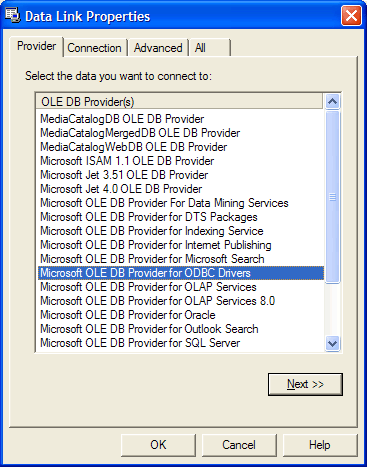
Sample Image - DataLinks.gif

Introduction

A similar article was written on this subject but this article deals with accessing DataLinks from a .NET program to get or edit a connection string. Your project must reference DataLinks and ADODB, then execute the PromptNew or PromptEdit methods.

Step by step procedure

  1. Reference ADODB in your project. This is required to read the COM object passed back from DataLinks. This file is located here: c:\Program Files\Microsoft.NET\Primary Interop Assemblies\adodb.dll
  2. Reference DataLinks in your project. DataLinks used to be MSDASC.dll, but has changed to OLEDB32.DLL (see KB). This file is located here: C:\Program Files\Common Files\System\Ole DB\OLEDB32.DLL
  3. Create a text box and a button on a Windows Form. In the button's click event, use this code:
private void ButtonGetConnectionString_Click(object sender, 
  System.EventArgs e)
{
   /* 
        Reference DataLinks
        NOTE: Reference 
              C:\Program Files\Common Files\System\Ole DB\OLEDB32.DLL
              (Was MSDASC.dll) 
        SEE:
           http://support.microsoft.com:80/support/kb/articles/Q225/1/32.asp
   */
      MSDASC.DataLinks dataLinks = new MSDASC.DataLinksClass();
      //note that a reference to: 
      //  c:\Program Files\Microsoft.NET\Primary Interop Assemblies\adodb.dll
      //is also required to read the ADODB._Connection result
      ADODB._Connection connection;                         
      //are we editing an existing connect string or getting a new one?
      if(this.txtConnectionString.Text==String.Empty)
      {     
            // get a new connection string
            try   
            {           
               //Prompt user for new connect string
               connection = (ADODB._Connection)dataLinks.PromptNew();
               //read result
               this.txtConnectionString.Text=
                    connection.ConnectionString.ToString();
            }
            catch(Exception ex)     
            {
                  MessageBox.Show(ex.ToString());     
            }
      }
      else
      {     
            // edit connection string
            connection=new ADODB.ConnectionClass();
            connection.ConnectionString=this.txtConnectionString.Text;
            //set local COM compatible data type
            object oConnection=connection;
            try   
            {     
                  //prompt user to edit the given connect string
                  if((bool)dataLinks.PromptEdit(ref oConnection))
                  {
                        this.txtConnectionString.Text=
                             connection.ConnectionString;
                  }
            }
            catch(Exception ex)
            {
                  MessageBox.Show(ex.ToString());     
            }
      }
}

License

This article has no explicit license attached to it but may contain usage terms in the article text or the download files themselves. If in doubt please contact the author via the discussion board below.

A list of licenses authors might use can be found here

About the Author

DanMayer

Web Developer

United States United States

Member


Sign Up to vote   Poor Excellent
Add a reason or comment to your vote: x
Votes of 3 or less require a comment

Comments and Discussions

 
You must Sign In to use this message board. (secure sign-in)
 
Search this forum  
 FAQ
    Noise  Layout  Per page   
  Refresh
GeneralProblem with the waitcursor PinmemberPrimozPayton2:44 25 Aug '08  
GeneralSqlClient Issue with Provider Property PinmemberBrady Kelly23:07 28 Jul '07  
GeneralNo need for interop PinmemberSergey Prokhorenko23:38 24 Jun '07  
GeneralRe: No need for interop PinmemberSergey Prokhorenko23:42 24 Jun '07  
Sorry, I didn't read the article carefully enough Wink | ;-)
We can use reflection and avoid interop assemblies:
 
Type type = Type.GetTypeFromProgID("DataLinks");
object links = Activator.CreateInstance(type);
object str = type.InvokeMember("PromptNew", BindingFlags.InvokeMethod, null, links, null);
object s = str.GetType().InvokeMember("ConnectionString", BindingFlags.GetProperty, null, str, new object[0]);
 
There's user interaction anyway - reflection won't add significant slowdown here.
GeneralRe: No need for interop PinmemberBrady Kelly22:58 28 Jul '07  
GeneralSpeed Pinmemberakorolev100:24 3 Oct '04  
GeneralGreat! Give me exact what I am looking for Pinmemberzhoulhh7:39 1 Jul '04  
GeneralPromptEdit(ref connectionString) PinmemberUnderEducated10:33 10 Mar '04  
GeneralRe: PromptEdit(ref connectionString) PinmemberDanMayer10:55 10 Mar '04  
GeneralRe: PromptEdit(ref connectionString) PinmemberUnderEducated12:03 10 Mar '04  
GeneralRe: PromptEdit(ref connectionString) [modified] Pinmembermlgray23:06 3 Jul '06  
GeneralRe: PromptEdit(ref connectionString) Pinmemberyetty20006:10 26 Oct '07  
GeneralRe: Very Slow... PinmemberVHsu19:41 13 Feb '04  
GeneralRe: Very Slow... PinmemberDanMayer6:45 14 Feb '04  
GeneralRe: Very Slow... Pinsussmgarins4:20 19 Feb '04  
GeneralRe: Very Slow... PinmemberRicardo Casquete23:55 17 Feb '06  

General General    News News    Suggestion Suggestion    Question Question    Bug Bug    Answer Answer    Joke Joke    Rant Rant    Admin Admin   

Use Ctrl+Left/Right to switch messages, Ctrl+Up/Down to switch threads, Ctrl+Shift+Left/Right to switch pages.

Permalink | Advertise | Privacy | Mobile
Web02 | 2.5.120529.1 | Last Updated 10 Mar 2004
Article Copyright 2004 by DanMayer
Everything else Copyright © CodeProject, 1999-2012
Terms of Use
Layout: fixed | fluid
