Introduction
This is the first time I make a Toolbar control for Internet-Explore-based web applications. This toolbar acts as a menu for the visitor to navigate to the right page, by a user-friendly way.
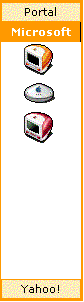
The features are as follows:
- Two-level navigation toolbar.
- Customizable title, image and onclick script.
- Style sheet is used to define presentation.
- Supports multiple controls on the same page.
Usage
To use the control, simply include webToolbar.js and webToolbar.css in your HTML file. Then, inside the element (body tag, div tag, etc.), place a script tag and build the control via an array. E.g.:
document.all["placeHolder"].innerHTML =
   new ToolbarControl(myTools, 400, 100, 80, 300);
A demo of how to do this is inside the included zip file.
Implementation issues
- a
ToolbarControlHandler is used to maintain multiple controls.
- the tag IDs are coded with
ControlID (see makeTabID and makeToolsID)
This member has not yet provided a Biography. Assume it's interesting and varied, and probably something to do with programming.



 General
  News
News  Suggestion
  Question
  Bug
Bug  Answer
  Joke
Joke  Praise
  Rant
Rant  Admin
Admin 


 Submit an article or tip


