Click here to Skip to main content
Licence 
First Posted 15 Feb 2004
Views 177,384
Bookmarked 89 times

Multipurpose Digital Clock Control using .NET

By | 20 Feb 2004 | Article
A digital clock user control which can be used as a regular clock, stop watch or count down timer. Options include changing display color, freezing the clock and setting multiple alarms.

Introduction

The Digital Clock Control is a versatile user control with options for:

  • Digital clock
  • Stop watch
  • Count down timer
  • Setting multiple alarms
  • Freezing the clock
  • Multiple color display
  • Resizable display

The digits can be displayed in three different colors - Red, Blue and Green.
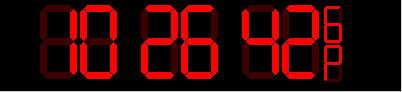
The control adjusts the digits size with the size of the rectangle of the control. A ratio of 1:2 is maintained between the height and the width of the large digits and half the size for smaller ones. The clock control also supports 2 types of formats - 12 hour and 24 hour.

Using the Digital Clock control

Place the SriClocks.dll and Digital.bmp files in a single directory. At design time, right click in the ToolBox of Visual Studio, browse for and select SriClocks.dll file. The following image shows the control selected:

On pressing OK, the control is added to the ToolBox as shown below:

Now, drag and drop the control on to a form to create the Digital Clock control as any other user control.

Demo project - TestClock.exe

The demo project included shows all the capabilities and usage of the Clock control. Here is a screenshot.

Code to use the DigitalClockCtrl

To display a normal watch, which is also the default, just set the clock type to DigitalClock as shown below. Optionally, you may set the 24 hour or 12 hour format using ClockDisplayFormat of DigitalClockCtrl. The 12 hour format will display 'A' for AM and 'P' for PM. The default is the 12 hour format.

// set the clock type to DigitalClock
digitalClockCtrl.SetClockType = SriClocks.ClockType.DigitalClock;
// setting display to 24 hour format
digitalClockCtrl.ClockDisplayFormat = SriClocks.ClockFormat.TwelveHourFormat;

To use the countdown timer, create and add delegates to the clock control's CountDownDone event. Then set the clock type to CountDown. When the countdown is over, the clock control will fire the CountDownDone event.

// declare a callback method which implements the countdown 
// delegate declared in DigitalClockCtrl and add it to CountDownDone events
private void OnCountDownDone()
{
}
.....
.....
// Add the delegate method to CountDownDone events
// Whenever a countdown is over the clock control calls this delegate
digitalClockCtrl.CountDownDone += new DigitalClockCtrl.CountDown(OnCountDownDone);
......
// set the countdown time
digitalClockCtrl.CountDownTime = ms; // ms - milliseconds
digitalClockCtrl.SetClockType = SriClocks.ClockType.CountDown;

To start the stop watch, set the clock type to ClockType.StopWatch.

// Start the stop watch
digitalClockCtrl.SetClockType = SriClocks.ClockType.StopWatch;

To freeze the clock display, set the clock type to ClockType.Freeze. This will freeze the clock till the clock type is reset to DigitalClock, CountDown or StopWatch. The functionality is particularly useful when using the stopwatch.

// to freeze the clock display
digitalClockCtrl.SetClockType = SriClocks.ClockType.Freeze;

To change the display color, set the SetDigitalColor property of the control to one of the DigitalColor enumerations.

// setting the digits color to GreenColor
digitalClockCtrl1.SetDigitalColor = SriClocks.DigitalColor.GreenColor;

To set alarms, create delegates and add them to RaiseAlarm event of the clock control. When an alarm is raised by the control, it fires the RaiseAlarm events.

// Create the Alarm delegates
public void OnRaiseAlarm()
{
}
....
....
// add the delegate to the RaiseAlarm event
digitalClockCtrl.RaiseAlarm += new DigitalClockCtrl.Alarm(OnRaiseAlarm);
....
// set the alarm which accepts values as System.DateTime structure.
// DateTime.Parse is used here to parse the input text from user
// When the alarm is raised by the control
// the OnRaiseAlarm method declared above is called
digitalClockCtrl.AlarmTime = DateTime.Parse(Alarmtime.Text);

License

This article has no explicit license attached to it but may contain usage terms in the article text or the download files themselves. If in doubt please contact the author via the discussion board below.

A list of licenses authors might use can be found here

About the Author

Sriram Chitturu

Architect

United States United States

Member


Sign Up to vote   Poor Excellent
Add a reason or comment to your vote: x
Votes of 3 or less require a comment

Comments and Discussions

 
You must Sign In to use this message board. (secure sign-in)
 
Search this forum  
 FAQ
    Noise  Layout  Per page   
  Refresh
QuestionClock for VB.NET - aspx? PinmemberTmuld8:13 15 Mar '07  
AnswerRe: Clock for VB.NET - aspx? PinmemberSriram Chitturi9:55 17 May '07  
QuestionNewbie Trouble importing DigitalClock Control to VS 2005 Pinmemberstabarinde11:09 17 Jan '07  
Questionmultiple clocks Pinmemberlnae2:14 26 Sep '06  
AnswerRe: multiple clocks Pinmemberskst5:44 31 Oct '06  
GeneralRe: multiple clocks PinmemberChristopherZ117:46 2 Jun '10  
GeneralClock disabled Pinmemberjackieflan2:07 12 May '06  
Hi there. I'm not sure if its something I'm doing incorrectly but the clock doesn't seem to work correctly on my web project. If I create and add it to a windows application it works correctly, but as soon as I try to add it to a project that is located on a server, not on my machine, the control becomes disabled. Is there any way that I can get around this?
 
Jackie
GeneralSetting the time Pinmemberbighoss12:12 18 Apr '06  
QuestionIf i want to get the time shown on the your Control , what should i do? PinmemberYour details have been updated18:34 6 Sep '05  
GeneralGMT PinmemberLee Becham9:54 8 Jul '05  
GeneralUsing two clocks at the same time Pinmembercarlotino12:50 3 Jun '05  
GeneralRe: Using two clocks at the same time Pinmemberlnae21:38 14 Oct '06  
GeneralProblem with Digital.bmp Pinmembercarlotino11:07 13 May '05  
GeneralRe: Problem with Digital.bmp PinmemberSriram Chitturi2:19 14 May '05  
GeneralRe: Problem with Digital.bmp PinmemberVinceHolmes5:49 28 Nov '05  
GeneralRe: Problem with Digital.bmp Pinmemberpinturic23:17 5 Dec '05  
GeneralRe: Problem with Digital.bmp Pinmemberpinturic23:27 5 Dec '05  
JokeRe: Problem with Digital.bmp PinmemberLillebrorDE1:33 23 Jan '06  
GeneralRe: Problem with Digital.bmp PinmemberJuba4:23 27 Dec '06  
GeneralPartially strange behavior Pinmemberloizzi5:13 22 Apr '05  
QuestionCountDownDone...How to set Clocktime to 00:00:00? Pinmemberanarcho11:50 30 Nov '04  
GeneralSaved me some time PinmemberTony D. Abel9:51 4 Nov '04  
GeneralSolid Functional Building Block PinmemberFlashMerlot4:05 22 Oct '04  
GeneralNot revolutionary... PinmemberRobert Rohde23:09 15 Feb '04  
GeneralRe: Not revolutionary... PinmemberSriram Chitturi2:54 16 Feb '04  

General General    News News    Suggestion Suggestion    Question Question    Bug Bug    Answer Answer    Joke Joke    Rant Rant    Admin Admin   

Use Ctrl+Left/Right to switch messages, Ctrl+Up/Down to switch threads, Ctrl+Shift+Left/Right to switch pages.

Permalink | Advertise | Privacy | Mobile
Web02 | 2.5.120529.1 | Last Updated 21 Feb 2004
Article Copyright 2004 by Sriram Chitturu
Everything else Copyright © CodeProject, 1999-2012
Terms of Use
Layout: fixed | fluid
