Introduction
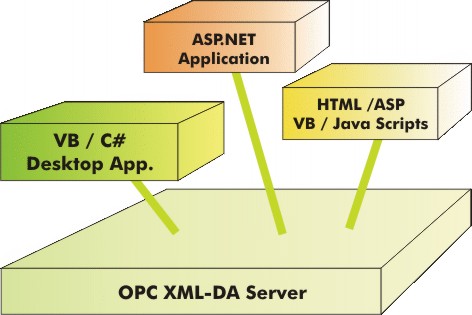
The OPC XML-DA standard and the currently widely used OPC DA V2 standard address the same tasks but the server interface is quite different, due to their different base, web services respectively DCOM. Developers of OPC client applications have to be aware of these differences. The sample client applications show how the Read and Subscribe/Poll functions are used from different kinds of applications. The VB.NET and C# samples use the .NET web services support, the HTML/ASP scripts use the MSSOAP toolkit.
Background
Read the XMLDA.NET White Paper for a description of how web services differ from DCOM and how this influences the design of client applications. Evaluation versions of .NET based OPC XML DA servers a clients can be downloaded.
Using the Code
VB and C# applications typically use the .NET features to access web services. Desktop and ASP.NET applications can access OPC XML-DA servers in the same way. XML-DA has a stateless design that fits well into ASP.NET applications. The code snippet shown below uses the Read function to periodically read the value of two items from the server. The XML-DA Read function is self contained and not dependent on any previous calls.
Dim Srv As localhost.OpcXmlDA = New localhost.OpcXmlDA
Srv.Url = "http://advosol.us/XMLDADemo/ts_sim/OpcDaGateway.asmx"
Dim ReqOptions As localhost.RequestOptions = New localhost.RequestOptions
ReqOptions.ClientRequestHandle = "test"
ReqOptions.ReturnErrorText = True
ReqOptions.ReturnItemName = True
Dim ReadReqList As localhost.ReadRequestItemList = New ReadRequestItemList
ReDim ReadReqList.Items(1)
ReadReqList.Items(0) = New localhost.ReadRequestItem
ReadReqList.Items(0).ItemName = "Test/Integer"
ReadReqList.Items(1) = New localhost.ReadRequestItem
ReadReqList.Items(1).ItemName = "Test/Float"
Dim reply As localhost.ReplyBase
Dim ReadReplyList As localhost.ReplyItemList
Dim Errors() As localhost.OPCError
While 1 = 1
Try
reply = Srv.Read(ReqOptions, ReadReqList, ReadReplyList, Errors)
Console.WriteLine()
Dim i As Int32
For i = 0 To ReadReplyList.Items.Length - 1
If ReadReplyList.Items(i).ResultID Is Nothing Then
Console.WriteLine(ReadReplyList.Items(i).ItemName + " = " + _
Convert.ToString(ReadReplyList.Items(i).Value))
Else
Console.WriteLine(ReadReplyList.Items(i).ItemName + " = " + _
ReadReplyList.Items(i).ResultID.Name)
End If
Next
Catch ex As Exception
Console.WriteLine("Error: " + ex.Message)
End Try
Threading.Thread.Sleep(2000)
End While
Optional parameters are a source for common mistakes. The .NET web services interface has an 'enable' parameter with each optional value type parameter. If this parameter is not set to 'true', then setting the optional parameter has no effect.
subscription.EnableBuffering = True
subscription.EnableBufferingSpecified = True
The usage of the XML-DA functions is quite simple but initializing the request lists with the required definitions for hundreds of items need quite a bit of code. In applications with many items, it is better to define the request lists in an XML file and in the application only call a helper method that initializes the request list object from the XML file. Advosol's XML-DA Client Component offers such support. The code snippet below shows how a read call is done using the SDK helper classes. Download the XML-DA Client SDK evaluation version to explore this further.
Private Sub btnRead_Click_1(ByVal sender As System.Object, _
ByVal e As System.EventArgs) Handles btnRead.Click
Dim srv As XmlServer = New XmlServer(cbURL.Text)
Dim readItemList As ReadRequestItemList
readItemList = embeddedList.GetReadItemList("OCSTKSimulatedData")
Dim reply As ReplyBase
Dim options As RequestOptions = New RequestOptions
options.ReturnErrorText = True
options.ReturnItemName = True
Dim rslt As ReplyItemList
Dim err As OPCError()
Try
reply = srv.Read(options, readItemList, rslt, err)
If rslt Is Nothing Then
MessageBox.Show(err(0).Text, "Error at Read")
Else
Dim txt As String = ""
Dim iv As ItemValue
For Each iv In rslt.Items
txt += iv.ItemName
If iv.ResultID Is Nothing Then
txt += " = " + iv.Value.ToString() + Environment.NewLine
Else
txt += " : Error: " + iv.ResultID.Name + Environment.NewLine
End If
Next
tbItems.Text = txt
End If
Catch ex As Exception
MessageBox.Show(ex.Message, "Exception in Read")
Close()
End Try
End Sub
HTML and ASP applications need to make the OPC XML-DA server access from client-side respectively server-side scripts. The source code download contains samples with JavaScripts and VB scripts. They show how to use the Read and the more complex but also more efficient Subscribe/Poll functions. The XML-DA web service call is made by building the SOAP request message using the MSSOAP toolkit. The code snippet shows how a Read request message is created.
function CreateXMLDAReadRequest(ServerURL)
{
NSxmlda = "http://opcfoundation.org/webservices/XMLDA/1.0/";
var mobjWS = new ActiveXObject("MSSOAP.SoapClient30");
ErrText = "";
if( ! mobjWS )
ErrText = "SoapClient NOT created";
mobjWS.ClientProperty("ServerHTTPRequest") = "true";
mobjWS.MSSoapInit( ServerURL + "?wsdl", "OpcXmlDaSrv", "OpcXmlDaSrvSoap" );
var oTempXml;
var strXML;
DocXml = new ActiveXObject("msxml2.domdocument.4.0");
if( ! DocXml )
ErrText = "DomDocument NOT created" ;
strXML = "";
DocXml.loadXML( strXML );
oTempXml = DocXml.createElement("Read");
oTempXml.setAttribute( "xmlns", NSxmlda );
DocXml.documentElement.childNodes(0).appendChild( oTempXml );
oTempXml = DocXml.createNode(1, "Options", NSxmlda );
oTempXml.setAttribute( "ReturnErrorText", "true" );
oTempXml.setAttribute( "ReturnItemTime", "true" );
oTempXml.setAttribute( "ReturnItemName", "true" );
oTempXml.setAttribute( "LocaleID", "en" );
DocXml.selectSingleNode("//Read").appendChild(oTempXml);
ItemListNode= DocXml.createNode(1, "ItemList", NSxmlda);
DocXml.selectSingleNode("//Read").appendChild( ItemListNode );
DocXml.setProperty("SelectionNamespaces", "xmlns:xda='" + NSxmlda + "'");
return DocXml ;
}
License
This article has no explicit license attached to it, but may contain usage terms in the article text or the download files themselves. If in doubt, please contact the author via the discussion board below.
A list of licenses authors might use can be found here.
This member has not yet provided a Biography. Assume it's interesting and varied, and probably something to do with programming.



 General
  News
News  Suggestion
  Question
  Bug
Bug  Answer
  Joke
Joke  Praise
  Rant
Rant  Admin
Admin 


 Submit an article or tip


