Introduction
A common webform should be able to display the content in:
- Edit mode (to change data)
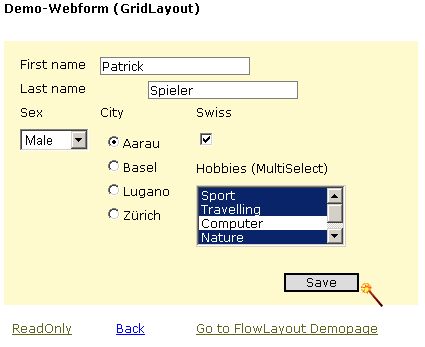
- Read only mode (to display data)

Let's say, you have to program a webform with several controls (textboxes, dropdowns, checkboxes....) to add, edit and display detail information (e. g. customers details).
Wouldn't it be nice, if you could just switch between edit mode (with all different input controls) and display mode (labels instead of the input controls) by calling a method?
Code
To implement this behavior, I wrote a method in a base class (derived from System.Web.UI.Page), which is accessible from any webform deriving from this base class.
First of all, I collect all (self defined) input-controls in a DataTable (the DataTable has three columns: the ControlCollection [in which the controls reside], the control and index of the control):
private void CollectControls(ControlCollection cc) {
foreach(Control c in cc) {
if (c is TextBox ||
c is ListBox ||
c is DropDownList ||
c is RadioButton ||
c is RadioButtonList ||
c is CheckBox ||
c is CheckBoxList ||
c is BaseValidator ||
c is Button)
_ControlContainer.Rows.Add(new object[]{cc, c, cc.IndexOf(c)});
if (c.HasControls())
CollectControls(c.Controls);
}
}
Second, I replace the input-controls with Labels...
private void ReplaceControls() {
DataRow[] drs = _ControlContainer.Select("", "Index desc");
foreach(DataRow dr in drs) {
ControlCollection cc = (ControlCollection)dr["ControlCollection"];
Control c = (Control)dr["Control"];
int index = cc.IndexOf(c);
cc.RemoveAt(index);
Label l = new Label();
l.CssClass = "lbl";
if (c is WebControl)
{
l.Style.Add("LEFT", ((WebControl)c).Style["LEFT"]);
l.Style.Add("TOP", ((WebControl)c).Style["TOP"]);
l.Style.Add("POSITION", ((WebControl)c).Style["POSITION"]);
l.Style.Add("Z-INDEX", ((WebControl)c).Style["Z-INDEX"]);
}
else if (c is HtmlControl)
{
l.Style.Add("LEFT", ((HtmlControl)c).Style["LEFT"]);
l.Style.Add("TOP", ((HtmlControl)c).Style["TOP"]);
l.Style.Add("POSITION", ((HtmlControl)c).Style["POSITION"]);
l.Style.Add("Z-INDEX", ((HtmlControl)c).Style["Z-INDEX"]);
}
if (c is TextBox) {
l.Text = ((TextBox)c).Text;
}
else if (c is DropDownList || c is RadioButtonList) {
if (((ListControl)c).SelectedValue != string.Empty)
l.Text =
((ListControl)c).Items.FindByValue(((ListControl)c).SelectedValue).Text;
}
else if (c is CheckBoxList || c is ListBox) {
if (((ListBox)c).SelectionMode == ListSelectionMode.Multiple) {
foreach(ListItem li in ((ListBox)c).Items) {
if (li.Selected) l.Text += li.Text + _MultiDelimiter;
}
if (l.Text.Length > 0)
l.Text =
l.Text.Substring(0, l.Text.LastIndexOf(_MultiDelimiter));
}
else {
l.Text = ((ListBox)c).SelectedValue;
}
}
else if (c is RadioButton || c is CheckBox) {
l.Text = ((CheckBox)c).Checked.ToString();
}
else {
if (!(c is BaseValidator) && !(c is Button))
{
throw new
ArgumentOutOfRangeException("Controltype not " +
"supported at the moment", c.ToString());
}
}
cc.AddAt(index, l);
}
}
Demo
The base class does support GridLayout and FlowLayout (for both, examples are included).
This code should give you an idea of how to implement the intention and could be enhanced and optimized.
Feel free to add comments.
|°atric|<



 General
  News
News  Suggestion
  Question
  Bug
Bug  Answer
  Joke
Joke  Praise
  Rant
Rant  Admin
Admin 


 Submit an article or tip


 ;);)
;);) . This come from the fact the original control has not save there viewstate since they have been deleted. Any idea how we can quickly fix this?
