Click here to Skip to main content

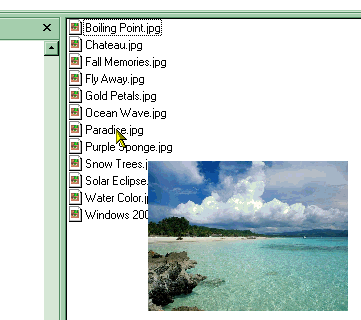
Image Tip - A popup thumbnail shell extension

By , 8 Mar 2004
 

Introduction

During my day job, I write software that makes ultrasonic scans of aircraft parts. (If you are an part aircraft manufacturer, buy our kit!). These scans are essentially large 8 bit bitmaps, with some job specific extra information. In order to quickly tell these files apart, I wanted an InfoTip shell extension that could either display description text stored in these files, or a preview image (also stored in the files).

Writing the text popup was trivial. But search as I might, I didn't find any graphical equivalent. So I got my hands dirty and wrote it!

Once I'd done that, I thought this might be quite and handy utility for image files too. Theoretically, you could adapt this to play the first 5s of a music file for mp3s etc. That is an exercise for the reader...

How it works... aka The light bulb moment.

I tried for ages to hook into the info tip creation cycle, seeing if I could integrate myself a little earlier. Eventually I gave up. At two am, I woke up with a dead simple idea. Return a blank tooltip, and use than moment to generate my own tooltipesque picture window. After having proved my idea, I went back to bed. Most of my best work is done when I'm asleep. At least, that's what I tell my colleagues when the wake me up at my desk!

The shell extension...

The shell extension itself was premade by a shell extension wizard. (See bibliography). I only really had to change the GetInfoTip function.

HRESULT CImage_Tip::GetInfoTip ( DWORD   dwFlags, LPWSTR* ppwszTip )
{
  static std::wstring  m_FileNameLast;

  // We're going to create our own tooltipesque window, 
  // but with a the CPreviewBitmap in it...
//  wchar_t  buf [512];
//  wcscpy (buf, L"CImage_Tip::GetInfoTip (). m_Filename = '");
//  wcscat (buf, m_FileName.c_str ());
//  wcscat (buf, L"' m_FileNameLast = '");
//  wcscat (buf, m_FileNameLast.c_str ());
//  wcscat (buf, L"'\n");
//  OutputDebugStringW (buf);

  // Return a blank tooltip.
  IMalloc *pMalloc;
  if ( FAILED( SHGetMalloc ( &pMalloc )))
    return E_FAIL;
  *ppwszTip = (LPWSTR) pMalloc->Alloc ( (1) * sizeof(wchar_t) );
  if ( NULL == *ppwszTip )
  {
    pMalloc->Release();
    return E_OUTOFMEMORY;
  }
  (*ppwszTip) [0] = 0;
  pMalloc->Release();

  // Make sure we haven't recently shown this item, 
  // otherwise Explorer will keep on trying...
  if (m_FileName.compare (m_FileNameLast))
    CGraphicTip::ShowTip (m_FileName);  // This is all that's needed here!
  m_FileNameLast.erase ();
  m_FileNameLast.append (m_FileName);
  
  return S_OK;
}

I had to make sure that explorer wasn't making repeat requests for the same tip, otherwise the screen ended up getting very busy. Once that was in place, I simply created a new CGraphicTip object, which made its own window, message loop, and tidying up bit.

The graphic popup window...

This is pretty much a mini app in its own right. Created with a filename as a parameter, it loads the image using IPicture, and creates a window scaled down to a maximum of 200 x 200, and shows it a little way from the cursor.

The object contains its own message loop, and window procedure. I used classic Win32, as MFC seemed like major overkill, and I've yet to play with WTL. Using Win32 windowing code felt like a bit of a nostalgia trip. Beside, all MFC / WTL would do is the same job, but more hidden.

Please forgive the lack of comments, but there are only a few routines, and I try to use very obvious function / variable names...

class CGraphicTip
{
public:
  static BOOL  ShowTip (std::wstring FileName);

protected:
  CGraphicTip ();
  ~CGraphicTip ();

  static  DWORD WINAPI TipThread ( LPVOID lpParameter );
  static  LRESULT CALLBACK TipProc ( HWND hwnd, UINT uMsg, 
    WPARAM wParam, LPARAM lParam );
  static  SIZE  GetCorrectedOutputSize (const SIZE szIn, 
    const SIZE sizeBounding);

  LRESULT  OnPaint ();

  HANDLE  m_hThreadHandle;
  DWORD  m_dwThreadID;
  
  std::wstring  m_FileName;
  IPicture      *m_Picture;
  SIZE          m_szHiMetric;
  HWND          m_hWnd;
};

Installing the extension...

If you haven't compiled it yourself, you'll need to put the dll in an obvious location, fire up a command prompt, go to the dll's directory, and type:

regsvr32 ImageTip.dll"
to install, and
regsvr32 /u ImageTip.dll"
to uninstall.

Things to do...

  • An installation program.
  • A way of changing maximum tip size, and duration at runtime.
  • A way of changing which file types are "tipped" at runtime.
  • Make the tip appear above / to the left when necessary.
  • An uninstallation program!
  • Bibliography

    The following codeproject articles made my life veeeeery easy:

    Context Menu Shell Extension AppWizard by Maxime Labelle.

    which seemed heavily based on...

    The Complete Idiot's Guide to Writing Shell Extensions - Part III by Michael Dunn. I cannot recommend his shell extension series highly enough.

    History

    v1.0

    Uploaded to Code Project. The software is perfect already. Honest. Would these eyes lie?

    License

    This article has no explicit license attached to it but may contain usage terms in the article text or the download files themselves. If in doubt please contact the author via the discussion board below.

    A list of licenses authors might use can be found here

    About the Author

    Iain Clarke, Warrior Programmer
    Software Developer (Senior)
    Sweden Sweden
    Member
    I have now moved to Sweden for love, and recently married a lovely Swede.
     

    -----------------
    I started programming on BBC micros (6502) when I was six and never quite stopped even while I was supposed to be studying physics and uni.
     
    I've been working for ~13 years writing software for machine control and data analysis. I now work on financial transaction transformation software, for a Software company in Gamlastan, Stockholm.
    Look at my articles to see my excellent coding skills. I'm modest too!

    Sign Up to vote   Poor Excellent
    Add a reason or comment to your vote: x
    Votes of 3 or less require a comment

    Comments and Discussions

     
    Hint: For improved responsiveness ensure Javascript is enabled and choose 'Normal' from the Layout dropdown and hit 'Update'.
    You must Sign In to use this message board.
    Search this forum  
        Spacing  Noise  Layout  Per page   
    QuestionFeature requestmembergauravkale30 Apr '13 - 2:19 
    I know this is an old obsolete project but to my surprise this still works on Windows 7/Windows 8. I could also compile a 64-bit version. The only problem is that when the mouse moves away from the image file, the preview does not disappear. Could you fix this issue so the tooltip preview...
    GeneralXP crashing problem solvedmemberPhil.Benson16 Feb '05 - 22:04 
    After lokking through the source, and doing a bit of debugging, I have found the problem that leads to windows XP crashing when this tool is installed. The problem is that the call to DllCanUnloadNow() returns S_OK, even though the Tip has yet to be shown (and theoretically the lock count should...
    GeneralRotating an ImagememberAlex Evans4 Jan '05 - 9:25 
    Any idea, how can I ROTATE 90, 180 etc using an IPicture object, once it is loaded and showing on screen...   Thanks Alex
    GeneralRe: Rotating an ImagememberIain Clarke4 Jan '05 - 21:38 

    Not specifically.
     
    For 180o, you can simply use the Render method and change the X/Y/W/H values around.
    For 90o, you can extract the HBITMAP, HDC etc from the IPicture. From that you could
    get the underlying data using GetDIBits.
     
    The other option is to use GDI+ and the Image class. That has a constructor that take
    a filename. It also has a RotateFlip method.
     
    Iain.

    GeneralRe: Rotating an ImagememberAlex Evans5 Jan '05 - 9:44 
    Hello Iain   Re - 180, I tried... I tried playing with the X/Y/W/H of te "Target" rectangle before calling Render, but it seems I am not managing to get it right, so any suggestions will be appreciated.   For the 90 option, this HDC / HBITMAP... I have no idea of how to go about...
    GeneralRe: Rotating an ImagememberIain Clarke5 Jan '05 - 21:39 
    OK, here is a choice of functions to draw an IPicture into a rectangle. I've done four calls to Render, with it mirrored in all four combinations. Mirrored twice becomes 180o rotate. Mirrored once is *not* 90o rotate.   OK. First the fluff code. if (m_iPic) { CSize pxSz, hmSz,...
    GeneralRe: Rotating an ImagememberAlex Evans6 Jan '05 - 9:21 
    Hello again,   NIce of you to go to the trouble, I have in the meantime resolved it, seems in a much simpler way - but I can sure learn something from your code eg: AtlHiMetricToPixel() and Interpolate.   Here is what I did:   //These are the dimensions of the TARGET drawing are...
    QuestionHow can I hook the listview?memberK7magi20 Nov '04 - 14:59 
    Hi,   I want to hook the list view under the cursor and then traces the mouse on the listview. When the mouse leaves the current selection then the graphictip window closes itself.   I think that's better than waiting 10 seconds.. but how should I implement it?   --dave
    Generaldoesn't work in xpmembereversor22 Aug '04 - 3:45 
    As somebody on neowin discovered this app: http://www.contextmagic.com/instant-viewer/   i thought there must be an alternative out there and so i found this little prject here after a little search.   But sadly your project doesn't work on xp (i tried adding the idl file you...
    GeneralXP & Missing IDL file.memberIain Clarke11 Mar '04 - 5:08 
    While downloading the source to work on the "crashing sometimes under XP" bug, I noticed that I'd left out the ImageTip.idl file. For those curious, I've pasted it below.   As I'm not going to have debugging access to an XP machine for a week, the bug is going to have to remain...
    GeneralRe: XP & Missing IDL file.member.dan.g.11 Mar '04 - 15:46 
    you might like to try out projectzip[^] as a means of not missing files   rgds   .dan.g.   AbstractSpoon (subscribe)
    GeneralShock! Horror! I'm not perfect.... *sniff*.memberIain Clarke10 Mar '04 - 5:44 
    OK. I've found a bug.   In Graphic_Tip.cpp, in CGraphicTip::ShowTip I forgot to close the file handle. I neatly released the IStream, and neglected the file handle. All together now, .   Modify the routine as follows...   .... ::OleLoadPicture(iStream, 0,...
    Generalbad crash....memberKandjar10 Mar '04 - 4:55 
    Crash my explorer.... (using XP pro)
    GeneralRe: bad crash....memberIain Clarke10 Mar '04 - 5:48 
    I did find one bug (see my announcement message), but it wouldn't crash explorer.   Were you doing anything specific at the time?   I'll have another look see when I get time tonight to have a go on my XP machine. (I develop under 2000, and only use Window Pretty OS / XP to play...
    GeneralRe: bad crash....memberKandjar10 Mar '04 - 22:23 
    In fact, I don't have a lot of pictures here with me, so I tried your program on a big picture (my wallpaper), it's maybe that which made the program crash with the explorer...
    GeneralBBC Microsmember.dan.g.9 Mar '04 - 20:16 
    me too, back in 1983.   fond memories   rgds   .dan.g.   AbstractSpoon (subscribe)
    GeneralRe: BBC MicrosmemberIain Clarke9 Mar '04 - 22:41 
    Oooo, the famous author of ToDoList pays attention to li'l ol' me! Fame at last!   I just reread my profile, and implies I'm *still* programming BBCs... Hopefully, people will realise my extension is not for BBC Explorer!   Still, those were the days. 64K, programming EPROMS...

    General General    News News    Suggestion Suggestion    Question Question    Bug Bug    Answer Answer    Joke Joke    Rant Rant    Admin Admin   

    Permalink | Advertise | Privacy | Mobile
    Web01 | 2.6.130516.1 | Last Updated 9 Mar 2004
    Article Copyright 2004 by Iain Clarke, Warrior Programmer
    Everything else Copyright © CodeProject, 1999-2013
    Terms of Use
    Layout: fixed | fluid
