Click here to Skip to main content

.NET - Diving into System Programming - Part 2

By , 9 Mar 2004
 

Introduction

In Part 1, I have demonstrated how to enumerate device classes. Now let us see how to enumerate devices of the class.

Device enumeration

First of all, let us look again at the picture with Device Manager information. It is easy - Device Manager enumerate devices when we expand the tree for device class.
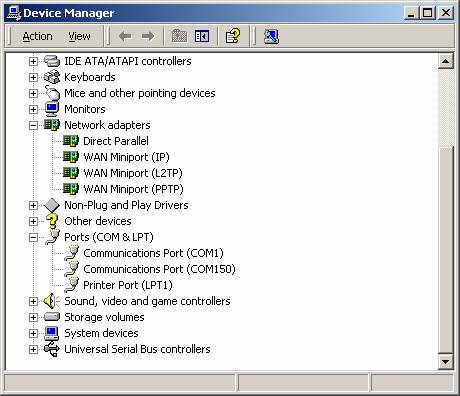
The idea of device enumeration is not difficult for understanding:

  • Get class Guid using device class name (SetupDiClassGuidsFromNameA function)
  • Get device info set for device class (SetupDiGetClassDevsA function)
  • Get device info data for every device (SetupDiGetClassDevsA function, second parameters for this function is sequential device index in the device class, so call this function in circle with device index = 0, 1, etc.).
  • Get device name from Registry via SetupDiGetDeviceRegistryPropertyA function.

Below you see code in C# that will enumerate devices for selected device class for PC.

using System;
using System.Text;
using System.Runtime.InteropServices;

namespace DevInfo
{

    class DeviceInfo
    {

        public const int DIGCF_PRESENT    = (0x00000002);
        public const int MAX_DEV_LEN = 1000;
        public const int SPDRP_FRIENDLYNAME = (0x0000000C);  
          // FriendlyName (R/W)
        public const int SPDRP_DEVICEDESC = (0x00000000);    
          // DeviceDesc (R/W)

        [StructLayout(LayoutKind.Sequential)]
            public class SP_DEVINFO_DATA
                {
                 public int cbSize;
                 public Guid  ClassGuid;
                 public int DevInst;    // DEVINST handle
                 public ulong Reserved;
                };

        [DllImport("setupapi.dll")]//
        public static extern Boolean
          SetupDiClassGuidsFromNameA(string ClassN, ref Guid guids, 
            UInt32 ClassNameSize, ref UInt32 ReqSize);

        [DllImport("setupapi.dll")]
        public static extern IntPtr                //result HDEVINFO
          SetupDiGetClassDevsA(ref Guid ClassGuid, UInt32 Enumerator,
            IntPtr     hwndParent,  UInt32 Flags);

        [DllImport("setupapi.dll")]
        public static extern Boolean
          SetupDiEnumDeviceInfo(IntPtr DeviceInfoSet, UInt32 MemberIndex,
            SP_DEVINFO_DATA     DeviceInfoData);

        [DllImport("setupapi.dll")]
        public static extern Boolean
          SetupDiDestroyDeviceInfoList(IntPtr DeviceInfoSet);

        [DllImport("setupapi.dll")]
        public static extern Boolean
          SetupDiGetDeviceRegistryPropertyA(IntPtr DeviceInfoSet,
          SP_DEVINFO_DATA     DeviceInfoData, UInt32 Property,
          UInt32   PropertyRegDataType, StringBuilder  PropertyBuffer,
          UInt32 PropertyBufferSize, IntPtr RequiredSize);


        public static int EnumerateDevices(UInt32 DeviceIndex, 
                string ClassName,
                StringBuilder DeviceName)
        {
         UInt32 RequiredSize = 0;
         Guid guid=Guid.Empty;
         Guid[] guids=new Guid[1];
         IntPtr NewDeviceInfoSet;
         SP_DEVINFO_DATA DeviceInfoData= new SP_DEVINFO_DATA();


         bool res=SetupDiClassGuidsFromNameA(ClassName,
                    ref guids[0],RequiredSize,
                    ref RequiredSize);

         if(RequiredSize==0)
               {
                //incorrect class name:
                DeviceName=new StringBuilder("");
                return -2;
               }

         if(!res)
          {
           guids=new Guid[RequiredSize];
           res=SetupDiClassGuidsFromNameA(ClassName,ref guids[0],RequiredSize,
                ref RequiredSize);

           if(!res || RequiredSize==0)
               {
           //incorrect class name:
                DeviceName=new StringBuilder("");
                return -2;
               }
          }

         //get device info set for our device class
         NewDeviceInfoSet=SetupDiGetClassDevsA(ref guids[0],0,IntPtr.Zero,
                     DIGCF_PRESENT);
         if( NewDeviceInfoSet.ToInt32() == -1 )
         if(!res)
               {
          //device information is unavailable:
                DeviceName=new StringBuilder("");
                return -3;
               }

            DeviceInfoData.cbSize = 28;
            //is devices exist for class
            DeviceInfoData.DevInst=0;
            DeviceInfoData.ClassGuid=System.Guid.Empty;
            DeviceInfoData.Reserved=0;

            res=SetupDiEnumDeviceInfo(NewDeviceInfoSet,
                   DeviceIndex,DeviceInfoData);
            if(!res) {
         //no such device:
                SetupDiDestroyDeviceInfoList(NewDeviceInfoSet);
                DeviceName=new StringBuilder("");
                return -1;
            }


        DeviceName.Capacity=MAX_DEV_LEN;
        if(!SetupDiGetDeviceRegistryPropertyA(NewDeviceInfoSet,
          DeviceInfoData,
        SPDRP_FRIENDLYNAME,0,DeviceName,MAX_DEV_LEN,IntPtr.Zero) )
        {
         res = SetupDiGetDeviceRegistryPropertyA(NewDeviceInfoSet,
          DeviceInfoData,SPDRP_DEVICEDESC,0,DeviceName,MAX_DEV_LEN, 
            IntPtr.Zero);
         if(!res){
         //incorrect device name:
                SetupDiDestroyDeviceInfoList(NewDeviceInfoSet);
                DeviceName=new StringBuilder("");
                return -4;
            }
        }
         return 0;
        }

        [STAThread]
        static void Main(string[] args)
        {
         StringBuilder devices=new StringBuilder("");
         UInt32 Index=0;
         int result=0;

         if(args.Length != 1)
          {
            Console.WriteLine("command line format:");
            Console.WriteLine("DevInfo <CLASSNAME>");
            return;
          }

         while(true)
          {
            result=EnumerateDevices(Index, args[0], devices);
            Index++;
            if(result == -2)
                    {
                     Console.WriteLine("Incorrect name of Class = {0}",
                       args[0]);
                     break;
                    }
            if(result == -1)break;
            if(result == 0)Console.WriteLine("Device{0} is {1}", 
              Index, devices);
        }

        }
    }
}

The command line for this console application - DevInfo classname

classname - the name of device class. You can use application from previous article to find correct device class name. After running application you can see devices for any device class on your PC.

Summary

Now we can join code from the first article and this article, add information about devices (for example, resources like IRQs, ports, etc) and put it in the Windows Forms application. But it is a subject for Part 3.

License

This article, along with any associated source code and files, is licensed under The Code Project Open License (CPOL)

About the Author

Vladimir Afanasyev
Web Developer
Ukraine Ukraine
Member
I am C++ Builder developer.
I am interesting in WMI, Shell, some deep
COM interface. Beside these I am Brainbench
Win32 API Master.
Now I very like Microsoft .NET and C#. I made some firsts OPOS drivers for Ukrainian fiscal printers.


Sign Up to vote   Poor Excellent
Add a reason or comment to your vote: x
Votes of 3 or less require a comment

Comments and Discussions

 
You must Sign In to use this message board.
Search this forum  
    Spacing  Noise  Layout  Per page   
AnswerRe: device statememberVladimir Afanasyev9 Mar '06 - 20:59 
Hi.
 
Frankly I am not ready to give answer just now.
I hope to do it on the next week.
 
Best Regards.
Vladimir.
QuestionListing device driver files with WMImembermohcin26 Jan '06 - 2:17 
I need some script using WMI that shows me the files for the device drivers
installed on my PC. Does anybody know hou could I do that?

AnswerRe: Listing device driver files with WMImemberVladimir Afanasyev26 Jan '06 - 3:30 
Follow ref. should help you (for XP and Windows Server 2003):
List Plug and Play Signed Drivers
http://www.microsoft.com/technet/scriptcenter/scripts/hardware/devices/hwdevbo4.mspx
Vladimir.
General'{' missing (possibly '}' too)memberhobyrne5 Dec '05 - 4:12 
After the line
if( NewDeviceInfoSet.ToInt32() == -1 )
there is no '{'.
 
I haven't looked to see if the '{'s and '}'s balance, so there may be a '}' missing too.
 
If you choose to use a single statement as the body of the 'if' without enclosing it in {} (condemned by coding standards), the indenting needs care.
 
While I'm looking at that line, what does -1 stand for? Not even the MSDN page on SetupDiGetClassDevs says anything about -1 in the Return Values section of the page. Magic numbers bad!

GeneralRe: '{' missing (possibly '}' too)memberVladimir Afanasyev5 Dec '05 - 6:27 
hobyrne wrote:
If you choose to use a single statement as the body of the 'if' without enclosing it in {} (condemned by coding standards), the indenting needs care.

 
Yes of course - no need to use { and } in this case.
 
hobyrne wrote:
While I'm looking at that line, what does -1 stand for? Not even the MSDN page on SetupDiGetClassDevs says anything about -1 in the Return Values section of the page. Magic numbers bad!

 
-1 means INVALID_HANDLE_VALUE.
 
Vladimir.
GeneralRe: '{' missing (possibly '}' too)memberVladimir Afanasyev5 Dec '05 - 6:32 
But may be
 
if( NewDeviceInfoSet.ToInt32() == -1 )
if(!res)
{
//device information is unavailable:
DeviceName=new StringBuilder("");
return -3;
}
 
is error.
 
May follow will better:
 
if( NewDeviceInfoSet.ToInt32() == -1 )
{
//device information is unavailable:
DeviceName=new StringBuilder("");
return -3;
}
GeneralIssues with WIN32 callsmemberRLyon9 May '04 - 23:43 
Is there any reason for not using the Unicode Win32 APIs?
 
Isn't it a good idea to use GCHandle when using WIN32 APIs which have pointers as parameters? The existing code works, but it makes implicit assumptions about the managed memory layout.
 
Apart from these issues your code has been really helpful!

 
Richard Lyon
GeneralRe: Issues with WIN32 callsmemberVladimir Afanasyev10 May '04 - 22:29 
RLyon wrote:
Is there any reason for not using the Unicode Win32 APIs?
 
Frankly, firstly I did this code for C++ (I prefer Borland C++ Builder) and not for Microsoft .Net. I wanted that code works for various OS begining Win98. This was reason why
I don't used Unicode. The source I put in Borland codecentral. And now I only transfer this code from C++ to C#.
RLyon wrote:
Isn't it a good idea to use GCHandle when using WIN32 APIs which have pointers as parameters? The existing code works, but it makes implicit assumptions about the managed memory layout.
May be you are right - I don't think about this matter.
RLyon wrote:
Apart from these issues your code has been really helpful!
Oh! Many thanks.
QuestionWhat about WMI?memberzucchini11 Mar '04 - 4:26 
Have you looked at or considered what effort is involved in using the WMI objects in WBEM to enumerate these things, instead of using direct Win32 API calls?
 
Just curious...
 
Regardless, thanks for a very good article.

AnswerRe: What about WMI?memberVladimir Afanasyev11 Mar '04 - 6:00 
Thank you.
WMI is really a good thing.
But exist some problems with WMI.
I mean that I had problems...
I write about it in Part 3.
Best Regards.

General General    News News    Suggestion Suggestion    Question Question    Bug Bug    Answer Answer    Joke Joke    Rant Rant    Admin Admin   

Permalink | Advertise | Privacy | Mobile
Web03 | 2.6.130523.1 | Last Updated 10 Mar 2004
Article Copyright 2004 by Vladimir Afanasyev
Everything else Copyright © CodeProject, 1999-2013
Terms of Use
Layout: fixed | fluid