Click here to Skip to main content

VS File Finder

By , 8 May 2005
 

Sample Image - VSFileFinderScreenShot.gif

Introduction

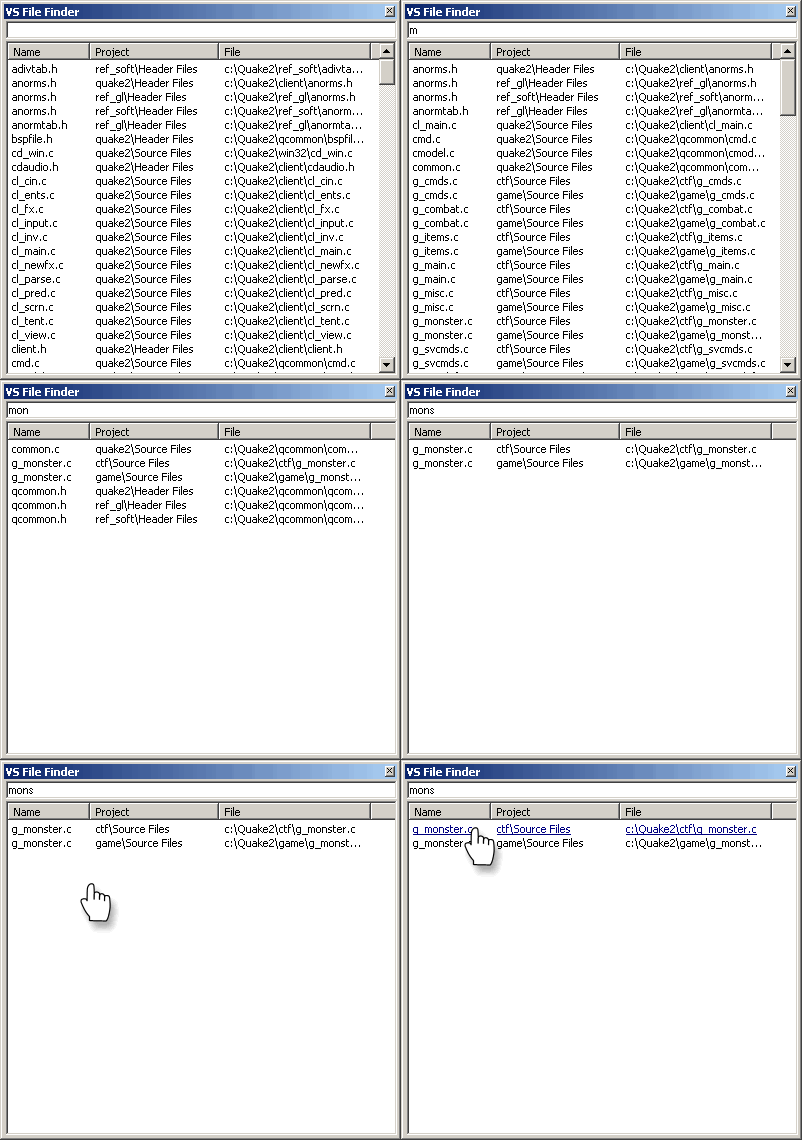
VS File Finder is a Visual Studio .NET 2003 Add-In that helps you find files quickly in large projects. It is written in C++ and can list files from all the project types that Visual Studio supports.

After installing, you will see a new window in the IDE listing all the files in your current solution. By typing a few letters from any part of a filename, you can quickly narrow down the list to just a few files and then open the file you are interested in.

This is more useful than the Solution Explorer or the file open dialog in large projects as files can be spread over many folders and you might only remember part of a file name.

There are options to highlight or exclude files based on the file name so you can quickly get to the files you want.

Requirements

The add-in should work well with projects written in any of the languages Visual Studio .NET supports. I have tested the add-in with C++, C# and VB.NET projects.

The add-in works with Visual Studio .NET 2003 (version 7.1). It does not work with Visual Studio .NET 2002, Visual Studio .NET 2005 beta or any previous version of Visual Studio. Adding support for VS2002 or VS2005 may be as simple as changing the registration code to list the add-in as working with those versions or it may require some code changes (I don't have access to either of these versions to find out).

Background

The add-in uses the Visual Studio .NET automation interface to find the files in the project and to display its window.

It took a long time to find a method of building the file list that was both quick and reliable. I started with a version that built a list of files and then tried to use the solution events to update the list whenever the project changed. This method didn't work that well as some actions (like loading a solution) can cause a lot of events to be triggered and some actions don't generate events or send events that are too generic to work out their effect on the list of files. I tried adding more and more event handlers but this method seemed doomed to failure.

The method that I now use is to rebuild the list of files on each event. To keep things working quickly, I delay the actual building of the list by a few hundred milliseconds so multiple events will get batched up into one rebuild. The add-in also uses a virtual list control to reduce the amount of flicker when the list changes.

This method seems to work well even with large solutions (I typically use it on a project with two or three thousand files with no problems at all).

Using the code

There are a few bits of code from this project that might be useful for other projects. SolutionExplorer.cpp/.h provides the base class for classes that need to iterate over the files in a solution in a visitor style and hides a lot of the tedious details.

The code also has some useful helper classes for handling Visual Studio events and has some code for displaying and sorting a virtual list control.

Points of Interest

The solution is actually built using two projects, a Visual Studio Add-in and an ActiveX control. There seems to be an odd problem with hosting ActiveX controls in Visual Studio when the controls are built using MFC. The control gains an extra border which should not be there. This also happens with simple AppWizard created code as well, so I am wondering if this is an MFC bug. The only solution I could find is to call DestroyTracker in CVSFileFinderCtrl::OnActivateInPlace. This fixes the problem but I would be interested to find out why this is needed.

History

  • 12 March 2004 - Version 1.0 released
  • 5 April 2004 - Version 2.0 released
    • Fixed issues with C# and VB projects
    • Added options and about dialogs
    • Added exclude filter
    • Added highlight filter
    • Added code to store column widths on exit

License

This article has no explicit license attached to it but may contain usage terms in the article text or the download files themselves. If in doubt please contact the author via the discussion board below.

A list of licenses authors might use can be found here

About the Author

J W Payne
Web Developer
United Kingdom United Kingdom
Member
No Biography provided

Sign Up to vote   Poor Excellent
Add a reason or comment to your vote: x
Votes of 3 or less require a comment

Comments and Discussions

 
You must Sign In to use this message board.
Search this forum  
    Spacing  Noise  Layout  Per page   
GeneralVery Good onememberVijay Chandra Sekhar Parepalli1 Feb '05 - 19:56 
I liked this very much.Can any one point me to any resources by which I can get this converted to C#. I am not proficient in C++ and hence unable to extend the functionality offered here. This is a very nice tool.
 
Sekhar
GeneralRe: Very Good onememberJ W Payne7 Feb '05 - 7:47 
Thanks for the complement.
 
I am not sure how you would convert the project to C#. I think creating tool windows in C# might require a special shim control, see this page. It might be easier to just extend the current version - I am sure you can pick up the C++ easily enough or alternatively you could suggest your ideas here and see if some one else could be tempted to implement it!
 
Jonathan
GeneralRe: Very Good onememberVijay Chandra Sekhar Parepalli7 Feb '05 - 8:51 
Thanks Jonathan, my small-changesSmile | :) are
1) To save the auto-hide status , which is not yet there now for this addin.
2) Text and Regex based search across solution..just as you said.
3) To make the behavior configurable : as soon as I click the any link in the search results, again the search field value vanishes resetting back everything again.
 

Smile | :)
 
Sekhar
GeneralRe: Very Good onememberJ W Payne8 Feb '05 - 1:39 
I think the version on my web site fixes 3 and maybe 1. I thought 2 would be a useful feature but I have never actually wanted to use it in day-to-day work - is it something you think you would actually use?
 

Jonathan
GeneralRe: Very Good onememberVijay Chandra Sekhar Parepalli8 Feb '05 - 19:07 
OK. I downloaded the latest one from your site. seems fine. regarding 2: In situations where there are multiple proj files in a solution, it helps in finding out all the occurences of a particular string or a pattern. Very few advantages on top of my mind with this are to find out:
1) how many times a particular function is called and from where.
2) how many and what are functions declared or used and at/from where.
 
Thanks,
 
SekharSmile | :)
GeneralRe: Very Good onememberJ W Payne10 Jun '06 - 10:16 
Although this is over a year late, I have just finished a new version of the addin written entirely in C#. Please see http://www.zero-one-zero.com/vs.
GeneralSuggestionsitebuilderUwe Keim19 Jan '05 - 1:32 
One suggestion: It would be cool to have the result list view with multiple selection enabled to open multiple files at once.
 
--
Affordable Windows-based CMS: www.zeta-producer.com
 

GeneralSolution on unmodeled projectsmemberAd016 Dec '04 - 12:29 
I solved that problem by generating the tree into my own tree class, wrapping the objects in a safe manner.
 
I went the UIHieracy way, and where elements is not projects, not solution items project, but are one level above solution, are unmodeled projects.
 
IDispFileVwDataProject = doesn't work, but shows up in VS.NET in properties when you select DB project.
 
IDispFileVwNode = Works for files in unmodeled projects (DB Project)
 
IDispFileVwFolder = does not work.
 
UIHieracyItem-based traversing is the best universal way to get items and their information.
 
By having child and parent, you also can generate a path (like with mine find control).
 
Then you QueryInterface ('is' them in C#) to check if they are unmodeled or not.
I think you also can check kind on Constants::vsProjectKindUnmodeled
 
---
 
I actually stumbled across this page after writing my VS file finder-kind of control.
 
Knowledge is power!
GeneralProblem with Auto-HidememberUrs Eichman8 Nov '04 - 21:06 
I use V3.1 and want to have the VS File Finder window in auto-hide state (sticking to the right border). This does work, but this state is not saved. The next time I open VS, it is not auto-hidden, and I have to press the Pin button again. Other tools' windows are being saved correctly, so it is not a problem with my VS installation.
 
This problem has nothing to do with the "unofficial" V3.1, it was already there with V2.0.
 
It would be nice if someone could fix this bug, as I currently don't have time to do it. Thanks!
GeneralVersion 3.1memberJ W Payne12 Jun '04 - 11:13 
I have updated VSFileFinder to version 3.1. This version fixes a bug with opening files using the keyboard. You can now open files using the up and down arrow keys to select a file and pressing enter to open it (previously, the enter key opened the first file in the list which wasn't so useful).
 
I have put the updated version on my shiny new web site at http://www.zero-one-zero.com/vs/index.html.
 
There is also another work in progress add-in there! Wink | ;)
 
Jonathan

General General    News News    Suggestion Suggestion    Question Question    Bug Bug    Answer Answer    Joke Joke    Rant Rant    Admin Admin   

Permalink | Advertise | Privacy | Mobile
Web03 | 2.6.130523.1 | Last Updated 8 May 2005
Article Copyright 2004 by J W Payne
Everything else Copyright © CodeProject, 1999-2013
Terms of Use
Layout: fixed | fluid
