Introduction
This article is the consequence of
this other. Here, I'll go adding other features to the NLib.
The Approach
I'll follow a "modular" approach: avoiding to "frameworkize" the library, and
using a "component model" (not necessarily COM or .NET: I'll stay with native
language features) allowing us to use that component as needed, without any
need to include them or use them when what we do doesn't require them.
As in the previous article, I'll do nothing new that has not yet been done
before: you can find as many articles you like to do the same with MFC, or WTL.
I just want to test a different coding approach. Am I reinventing wheels ?!
YES: I AM !
But if MFC is best for rain, and WTL for sand ... may be these ones feel better
on snow!
The starting point
It is the W2 project of the previous
article: a "Hello world" unfeatured window, but already with
message maps and command delivery. I created a W3 Win32 empty project, put a
copy of W2 sources, and did some settings (adding "NLib" to the solution, set
RTTI on, set "use precompiled headers" and "create precomp. header" for stdafx.cpp.
Also set the dependency of W3 from NLib).
Some NLIB Modification
During the deployment of this second article, I found it convenient to modify
certain parts of the NLIB, for both bug fixing and also improvement.
Message crackers
The message cracker map macros have been modified to carry functions having as
last parameter a bool& bHandled. This value is set to true by
the macro before calling the passed function, but this arrangement allows you
to set it back to false. By setting to false, the chained action is not broken
by the handler call, and can continue with other EWnd eventually
attached to the same HWND. To avoid confusion, I renamed those
macros ONMSG_xxx rather than GETMSG_xxx.
This is particularly comfortable when you want to "spy" a message, without
interfering with its dispatching.
Wrappers redesign
While extending the wrappers to create more features, I discovered some "flaws"
that - if not better redesigned - put some limitations in usage. And since the
cost of this "redesign" is very few, I found convenient to adequate the
existing code:
In particular:
-
New types have been introduced:
CRH and COH: normally
they are as CH and RH, but are intended to be
returned by "const" functions. The old type are instead
intended to be returned by non-const functions.
-
New functions had been introduced in the
traits_wrp_xxx classes:
CAccess
and CDereference: they return COH and
CRH from a IH<CODE>.
-
In
WrpBase, operator TT::OH() is no more const,
and calls Access. Instead an operator TT::COH() const
had been introduced, calling CAccess.
-
In
Wrp, operator->() and operator*() had
been rewritten in both the const and non-const versions, calling the
corresponding traits functions.
Although the supplied implementation of the traits does the same things, this
different interface gives us the capability, where is the case, to
differentiate between the use of a wrapper to access a data for reading, and
the use to modify the hold data.
Strings
Many Windows APIs are defined in terms of TCHAR. Although it is
relatively easy to have a string class holding TCHARs by defining
a std::basic_string<TCHAR>, the implementation of std::strings
provided by PJ Plauger (essentially a specialization of vectors) is not very
efficient: strings are considered "values" and are always copied.
In contrast, MFC and ATL CString makes use of shared vectors that
are "cloned" only when a string value needs to be modified. To implement a
similar scheme, I tested a "WrpBase and traits"
override that allows to maintain shared data between wrappers, and do the clone
when non-const access is attempted.
Although it worked, there is an overhead due to the internal calls between Wrp,
WrpBase and traits. So I preferred a dedicated
implementation, more efficient for this specific purpose (also if less
flexible).
A new wrapper type (NWrp::SShare<T, nullval>) has been
introduced to auto generate, auto clone and share buffers of Ts.
NWin::SString is then derived by
NWrp::SShare<TCHAR,
                _T('\0')>
, adding
Left,
Mid,
Right,
constructors and operators.
Note that SString is not itself a full OOP class (none of the
classes defined here is): it is only a "memory manager". To manipulate strings,
I still refer to the Windows API or to the string function taken from tchar.h.
SString converts implicitly to and from LPCTSTR. To
modify the buffer, use - instead GetBuffer(int wantedsize),
passing the required size, or -1 to let the actual size unchanged. GetBuffer
performs a buffer "clone" if the actual buffer is shared, then resizes it
accordingly and returns its address.
Working with Menu, commands and IDs
To add an icon or a menu to a window, we don't need a wrapper: the icon ID can
be specified during window class registration, and a menu can be loaded while
creating the window. Until the HMENU remains associated to a
window, it's Windows that provides its destruction.
Thus, here is the modified winmain.
int APIENTRY _tWinMain(
HINSTANCE hInstance,
HINSTANCE hPrevInstance,
LPTSTR lpCmdLine, int nCmdShow)
{
NWin::SMsgLoop loop(true);
NUtil::SResID resWapp(IDR_WApp);
LPCTSTR wcname = _T("W1MainWnd");
NWin::SWndClassExReg wc(true, hInstance, wcname, resWapp);
CMainWnd wnd;
wnd.CreateWnd(hInstance, wcname, NULL, WS_VISIBLE|WS_OVERLAPPEDWINDOW,
NWin::SRect(NWin::SPoint(CW_USEDEFAULT,CW_USEDEFAULT),
NWin::SSize(600,400)), NULL,
LoadMenu(hInstance, resWapp), NULL);
loop.Loop();
return 0;
}
Things become a bit more complicated when we want to manage command user
interface updates (for example: to disable unused commands).
Two common approaches are the following:
-
WTL approach: a command has an associated "state" that the application
manages. GUI elements have the functionality to represent that state when
displayed. Menus typically do during
WM_INITMENUPOPUP,
toolbars during the idle time processing.
-
MFC approach: a GUI element (menus during
WM_INITENUPOPUP,
toolbars during idle processing) queries the application about its state. The
application responds by setting its interface status.
I think the two approaches are "dual": no "best" exists, but one can be favorite
than the other depending on cases: if the command state depends on a variety of
factors dispersed in many places, probably the MFC approach is simpler to code,
while - if the state is a well defined condition, WTL approach is probably
simpler.
I find MFC approach more general, so I implemented a similar one.
Command state
We need an object that abstracts the behavior of a GUI element (a menu item or a
toolbar button or whatever) that can receive a number of states:
Enabled/Disabled, Grayed, Checked, Radiochecked, Indeterminate, Having Text,
Having Image.
This is done through an interface: ICmdState, that provides a set
of abstract functions.
Those functions can be implemented in various classes managing a specific UI
component. For Windows standard menu, this is done by SCmdMnu.
To manage command update, I used two private messages GE_QUERYCOMMANDHANLER
and GE_UPDATECOMMANDUI.
In particular, to update menus:
-
During
WM_INITMENUPOPUP, a GE_QUERYCOMMANDHANLER message
is sent. The LPARAM is a SCmdMnu*, and WPARAM
is a command ID.
-
GE_QUERYCOMMANDHANLER is handled by the COMMAND_xxxx_U
macros (should be used in place of COMMAND_xxxx, the same that
handles WM_COMMANDs) by calling SetHandled.
When a GUI require it is appropriate, (WM_INITMEMUPOPUP, idle
handler, or whatever), it must post a GE_UPDATECOMMANDUI message
(same parameter as the previous). The application can handle this message by
calling ICmdState member functions. Their implementation operates
setting the state of the GUI.
For menus, this stuff can easily be handled by a EWnd derived class
that can be attached, for example, to the main window. This class is EMenuUpdator:
it handles
WM_INITMENUPOPUP as indicated.
To use it, we simply create it and attach it to the main window.
int APIENTRY _tWinMain(
HINSTANCE hInstance,
HINSTANCE hPrevInstance,
LPTSTR lpCmdLine, int nCmdShow)
{
NWin::SMsgLoop loop(true);
NUtil::SResID resWapp(IDR_WApp);
LPCTSTR wcname = _T("W1MainWnd");
NWin::SWndClassExReg wc(true, hInstance, wcname, resWapp);
CMainWnd wnd;
wnd.CreateWnd(hInstance, wcname, NULL, WS_VISIBLE|WS_OVERLAPPEDWINDOW,
NWin::SRect(NWin::SPoint(CW_USEDEFAULT,CW_USEDEFAULT),
NWin::SSize(600,400)), NULL,
LoadMenu(hInstance, resWapp), NULL);
NWin::EMenuUpdator mnuupdt;
mnuupdt.Attach(wnd);
loop.Loop();
return 0;
}
That's it.
To process GE_UPDATECOMMANDUI, I provided the macros ONMSG_GE_UPDATECOMMANDUI,
ONMSG_GE_UPDATECOMMANDUI_RANGE, and ONMSG_GE_UPDATECOMMANDUI_RANGE_CODE
(they are in CmdUpdt_macros.h) that can be used in message maps.
They all call a function prototype as:
LRESULT function(
UINT nID,
WORD nCode,
ICmdState* pCmdState,
bool& bHandled
);
Pseudo-Bugs fixed
Some pseudo-bugs have been fixed from the previous article. I say "pseudo"
because they are not themselves "bugs" (programming mistakes) but "design
flaws": they reveal lack of functionalities when needed.
Wrapper types
The function WrpBase::Value, originally returns OH,
but -in fact- it should be the return type of the function Access,
inherited from the traits, making the Value function a not useful
clone. In fact, Value should return the "value" as it is stored,
for read-only access, without any conversion. Thus, its return type has been
changed into const SH&.
This has no influence on normal wrappers (SH is H and
OH
is
const HANDLE&, so that's the same) or
pointers (
SH is
H*, and
OH is
H*
again, but this means "copy on return", so
const SH& becomes
const H*&
, that assigns to an
H* in the same way),
but can be substantial in more complex cases, where the returned types are not
the same as the wrapper stored values.
And here is the real case.
Reading custom resources
To read a custom resource, the windows API require the following steps:
-
Call
FindResource passing a HMODLULE and an ID,
to get a HRSRC.
-
Call
LoadResource passing the HRSRC to get a pseudo
HGLOBAL
.
-
Call
LockResource to get a LPVOID
to cast appropriately.
-
use the data, then ...
-
Call
UnlockResource passing the HGLOBAL
and then ...
-
Call
FreeResource again with the HGLOBAL.
While step 1 does not involve memory allocation, steps 5 & 6 are the inverse
of 3 & 2 respectively.
Thus, a comfortable wrapper can attach to HRSRC loading the "data",
let them available using dereference, and free the data on detach. If more
wrappers are around the same HRSRC, loading must be done by the
first and freeing must be done by the last. The "data" ... should be a template
parameter.
So, a resource wrapper for a toolbar resource can be (namespaces apart) a
Wrp<SResourceData<XToolBarData>
                >
. If
wrpTbrRes is a variable of that type,
operator->
will return an
XToolbarData*.
SResourcedata, then, derives from WrpBase, closing the
inheritance (passing itself as the "W" parameter) and having
specific traits and reference counters holder.
Because to load a resource we need not only a HRSRC, but also a HMODULE,
we have to store the HMODULE as "initial parameter" into SResourceData,
providing an initialization function (void SetHModule(HMODULE hMod)).
Then, we need to store the HGLOBAL and the Data pointer.
Because these values must survive until there are wrappers around a given
resource, the more comfortable place to store is the shared reference counters
holder.
Thus:
For example, to read a RT_TOOLBAR resource into a XToolBarData,
we can use the following code:
struct XToolBarData
{
WORD wVersion;
WORD wWidth;
WORD wHeight;
WORD wItemCount;
WORD* items()
{ return (WORD*)(this+1); }
};
typedef NWrp::Wrp<NWrp::SResourceData<XToolBarData> > TTbrData;
TTbrData TbrData;
TbrData.SetHModule((HMODULE)hInst);
TbrData.Attach(FindResource(hInst, lpszResourceName, RT_TOOLBAR));
XToolBarData* pData = &*TbrData;
ASSERT(pData && pData->wVersion == 1);
Adding images to menu
A simple way to bind commands to images is to use the Visual Studio toolbar
editor, to create a bitmap and a "toolbar" resource.
During menu initialization, we can convert all the items into "owner draw" (a
task that can be accomplished by an EWnd derived, called EMenuImager),
but ... where do we store the data ?
For commands, we can think to a global map, indexed by command IDs: after all
... command IDs are global. The "value" of the map will be a SCmdDraw::XCmdChara
holding the resource ID the image is from, and the relative image index.
Then, we can convert to owner-draw all the menu items during WM_INITMENUPOPUP
and convert them back to normal during WM_UNINITMENUPOPUP. May be
not so efficient, but it is safe in terms of memory management (we don't keep
all strings having no ID, for example in submenus, from a menu).
It is important that those message are processed after eventual menu
state modification induced by other wrappers. To be sure of this, I let the
message handler to mark the messages as "handled" (no further processing), but
I called Default() at the beginning of the handler.
So:
-
If you wrap first (for example) with
EMenuUpdator and then with EMenuImager,
the subclass window procedure will call EMenuImager that calls Default,
causing EMenuUpdator
to process first.
-
If you wrap first with
EMenuImager and then with EMenuUpdator,
the subclass procedure will call EMenuUpdator first and (because
it left the messages as "unhandled") then EMenuImager.
In both cases, the sequence is first update the items, then, adapt them to be
drawn.
Items drawing
Because there are various ways to draw menu items (in terms of effects and state
rendering: think of Win2K or WinXP or VS-IDE), we can think of different
implementation strategies to handle WM_DRAWITEM.
-
Templetize
EMenuImager and provide a parametric "traits" class
that provides the OnDrawItem
function: it has the drawback that the code is "static": the user cannot switch
between different "traits": we have to provide different template
instantiation, but this also means a multiple static or global data structure
instantiation.
-
Declare
OnDrawItem
as abstract, and implement it in different derived classes.
-
Don't respond to
WM_DRAWITEM, and do it in a separate EWnd
derived, letting to the Windows kernel to do the polymorphism.
-
Derive
EMenuManager, give it a new message map that chains with
the base's one (WTL style).
While A is not suitable for implementations like this, B introduces some
constraints about the use of the functions.
C means declare a EMenuImager_xxx, to attach to the same HWND
wrapped by EMenuImager, where xxx is the aspect we
want to provide. It is probably the most flexible solution, but it's prone to
generate strongly entangled classes: you define a Exxx that seems
a HWND wrapper, but it is not functional by itself and relies on
data generated (and defined) by another independent class.
D is the most traditional, but in this case seems optimum. The implementation
provided is NGDI::EMenuImagerIDE.
Displaying Accelerators
A common practice in programs using accelerators, is to display the shortcut
keys for commands on the right of the menu text.
Writing the shortcut names in the MENU resource it is not - however
- a good practice: Message translation is based on HACCEL that is
loaded from an "accelerator table" that is not itself the menu. You change the
shortcuts by editing the accelerator table, but you must also change the menu
text. And if a same command appear in many different menus ... may be it is not
so easy to track.
An alternative can be to avoid to place the text in the MENU resource, but
provide a way to alter the menu text before displaying it. This can be easily
done in EMenuUpdator. By making this class aware of an accelerator
table and by providing it the textual descriptions for all the keyboard keys,
we can - just before displaying a command - browse the given accelerator table,
find the accelerator for a given command, retrieve its text and then add it to
the right of the menu.
And because this means "to associate an accelerator table to a window", we can
hook to the SMsgFiltrerEvent singleton when becoming active (and
unhook when becoming inactive), and call the TranslateAccelerator API.
Because this event is generated by the message loop just before dispatching a
message, this will - in fact - make the accelerators associated to the window,
working.
All this is implemented in EMenuUpdator.
In particular, to create the text to be used to describe the shortcuts, I used a
RC_DATA
resource that is a sequence of a pair, composed by a
WORD
followed by a C-string. The
WORD is a
VK_xxx constant
representing a keyboard functional key, and the C-string is its description.
The last three record of the resource must have 0 as ID, and report "Shift+",
"Ctrl+" and "Alt+" (or whatever description they have in a given localization)
respectively.
In EMenuUpdator, the XKeyNames structure is a helper
to read this resource: I used it wrapped into a SResourceData<>,
attached to the HRSRC given by FindResource. The XKeyTexts
structure is instead where the description are stored, indexed by the VK_xxx
ID. (See its Load function implementation.)
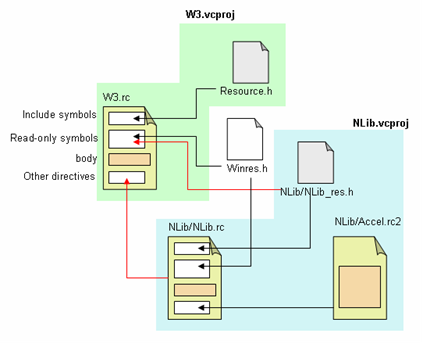
To stay within the functionality of the IDE, I provided to the NLIB project the NLib.rc
resource file, and the Accels.rc2 file. And also a NLib_res.h file
containing the manifest constant definitions.
NLib.rc is configured to include NLib_res.h as its own header and
the Accels.rc2 as an included resource file. Because Nlib is a library, NLib.rc
must not be itself compiled. It must instead be included in the "exe" project
resource file: in our case, the "W3" project has a resource file (W3.rc)
that includes the traditional resouce.h and also the Nlib_res.h,
and also includes in its body the NLib.rc file.
The test project
I generated some projects to test and as samples of usage.
The executable is a pure Win32 project making use of NLib as static library.
The stdafx.h file includes the NLib/StdAfx.h, and - for non debug
versions - defines the GE_FORCEINLINE symbol: this results in the
NLib CPP files to be included at the end of their respective .h files,
with all functions declared as "inline".
Because the solution contains two projects and because W3 depends on NLib, there
is the need, even when the all code is inlined, to still have a Nlib.lib
to link. This is obtained by providing a emptylib.cpp source just
defining a local hidden symbol (no meaning, just to have something to compile,
or no library is generated), and by differentiating the Debug configuration
(where all files but emptylib.cpp are included in the generation
process) and the release version (where the generation rule is inverted). emptylib.cpp
is also configured to not use the precompiled headers.
The WinMain function is very simple:
int APIENTRY _tWinMain(
HINSTANCE hInstance,
HINSTANCE hPrevInstance,
LPTSTR lpCmdLine,
int nCmdShow)
{
NUtil::STrace::_Filter() = 2;
NUtil::SWinMain winmainparams(hInstance);
NWin::SMsgLoop loop(true);
CMainWnd wnd;
wnd.Create(hInstance);
loop.Loop();
return 0;
}
Essentially a CMainWnd is created and a message loop executed.
CMainWnd is declared as follows:
class CMainWnd: public NWin::EWnd
{
protected:
    NWin::EMenuUpdator _mnuupdt;
    NWin::EMenuImagerIDE _mnuimg;
public:
    CMainWnd() {}
    bool Create(HINSTANCE hInstance);
protected:
    LRESULT OnFileExit(WORD wNotifyCode,
           WORD wID, HWND hWndCtl, bool& bHandled);
    LRESULT OnExecSomeCommand(WORD wNotifyCode,
           WORD wID, HWND hWndCtl, bool& bHandled);
    LRESULT OnCreate(LPCREATESTRUCT lpcs, bool& bHandled);
    LRESULT CMainWnd::OnPaint(bool& bHandled);

    BEGIN_MSG_MAP(CMainWnd)
        ONMSG_WM_CREATE(OnCreate)
        ONMSG_WM_PAINT(OnPaint)
        COMMAND_ID_HANDLER_U(ID_FILE_EXIT, OnFileExit)
        COMMAND_ID_HANDLER_U(ID_HELP_ABOUT, OnExecSomeCommand)
        COMMAND_ID_HANDLER_U(ID_FILE_NEW, OnExecSomeCommand)
        COMMAND_ID_HANDLER_U(ID_FILE_OPEN, OnExecSomeCommand)
        COMMAND_ID_HANDLER_U(ID_FILE_SAVE, OnExecSomeCommand)
    END_MSG_MAP()
};
Note the COMMAND_ID_HANDLER_U macros in the message map, and note
that some commands had been implemented through the same "placeholder" function
OnExecSomeCommand
. The
Create function is a shortcut to
handle
WNDCLASSEX registration and the real window creation, via
EWnd::CreateWnd(...)
.
The OnCreate function (handler for WM_CREATE)
initializes the other member wrappers and attach them to the same CWnd.
Of course, there's no need for those wrappers to be members, but enclosing them
into a same class makes the data structure more ordered.
Here are the two bodies:
bool CMainWnd::Create(HINSTANCE hInstance)
{
LPCTSTR wcname = _T("W3MainWnd");
NUtil::SResID resWapp(IDR_WApp);
static NWin::SWndClassExReg clsrg(true, hInstance, wcname, resWapp);
if(!CreateWnd(hInstance, wcname, _T("W3 test"),
WS_VISIBLE|WS_OVERLAPPEDWINDOW|WS_CLIPCHILDREN,
NWin::SRect(NWin::SPoint(CW_USEDEFAULT,CW_USEDEFAULT),
NWin::SSize(600,400)), NULL,
LoadMenu(hInstance, resWapp), NULL))
return false;
return true;
}
LRESULT CMainWnd::OnCreate(LPCREATESTRUCT lpcs, bool& bHandled)
{
Default();
NUtil::SResID resWapp(IDR_WApp);
_mnuupdt.LoadAccelerators(HInstance(), resWapp);
_mnuupdt.Attach(*this);
_mnuimg.GetCmdImgs().LoadCmdImages(HInstance(), resWapp);
_mnuimg.Attach(*this);
return 0;
}
Note that at the moment of attaching the additional wrapper, the window already
exists. In fact, at the end of OnCreate, the window appears to
have three referring wrappers. Note also that non "chain" is done in the
message map: this is automatically done by the EWnd::Attach-ing
and Detach-ing processes.
The menu commands File/New, File/Open, File/Save and Help/About have been
implemented through a dummy function.
The commands Menu/AutoUpdate and Menu/Images are toggles. They are checked if
the _mnuupdt and _mnuimg are respectively attached.
The commands are implemented by Attaching / Detaching the inner wrappers
alternatively.
Note that, when detaching _mnuupdt, menus stop to update their own
state. If the detachment is done immediately after the application startup,
without displaying other menus, menus will appear as "all enabled", and without
shortcut descriptions. If it is done later, menus will retain the "last set
state".
Debug "verbosity"
You can see at the very beginning of WinMain, the line "
NUtil::STrace::_Filter()
                = 2;
". This has been done to reduce the debug output as generated by
STrace
and
STRACE.
In the code, I set all message retrieving as having "levl 0" and message
dispatching / memory allocation to have "level 1". If you like to have a more
verbose debug output, you can set the value to 1 or even to 0. The
inconvenience is that menu navigation becomes "slow" because of the wrapping /
unwrapping activity of GDI objects and all the messages that activity
generates.
Conclusion
May be I'm still reinventing wheels, but - strange - I really enjoyed while
enhancing these features even more while writing code with WTL.
I don't pretend all this to become a new library for "real good apps". The only
thing I hope is someone learns something with this.
And since it was a nice experiment, I will continue: docking toolbars, docking
windows, serializations ... many arguments to treat in future articles.
History
- 2004/3/29 - some text revision.
- 2004/4/26 - code bug fixed
Born and living in Milan (Italy), I'm an engineer in electronics actually working in the ICT department of an important oil/gas & energy company as responsible for planning and engineering of ICT infrastructures.
Interested in programming since the '70s, today I still define architectures for the ICT, deploying dedicated specific client application for engineering purposes, working with C++, MFC, STL, and recently also C# and D.



 General
  News
News  Suggestion
  Question
  Bug
Bug  Answer
  Joke
Joke  Praise
  Rant
Rant  Admin
Admin 


 Submit an article or tip


