Click here to Skip to main content

CResizableSheet and CResizablePage

By , 27 Oct 2001
 

CResizableSheet(Ex) and CResizablePage(Ex)

These four classes handle resizable property sheets, wizards and the wizard 97 style dialogs, and are now fully based on my ResizableLib class library (see article).

The user will have the ability to resize the dialog, with consequent rearrangement of child windows. You can control the minimum and maximum size allowed, as well as the maximized size and position of the dialog. The size grip is displayed by default, but you may turn it off. Automatic Save/Restore the dialog's size and position, along with the active page, is also supported.

Conversion of a previously existant property sheet or wizard should be very simple.

I will talk about non-Ex classes for the rest of the article, but the same concepts applies for Wizard 97 dialogs.

The Sample Applications

This is a view of the sample dialog at minimum size as a property sheet and in wizard mode:
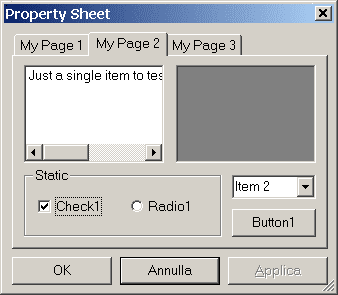
Property sheet with smaller size and proportional resizing Wizard mode with help button and minimal size

Note that the minimum width is not the default. You may see how to do this in the next section.

This is a screenshot of the resizable version of Wizard97 sample project coming with Visual C++.

A resizable Wizard 97 dialog

Usage - Step by Step

Add the ResizableLib to your project's workspace, as explained in the relative article.

Create a property sheet or wizard dialog and do the relative associations with MFC classes, for example using the Property Sheet component, or take one you have already made which you want to be resizable. You don't need to change any window style to have the dialog resizing.

Include 'ResizableSheet.h' in the property sheet associated header file.

Search and replace all CPropertySheet occurences with CResizableSheet in both your .cpp and .h files, just as if your property sheet class was derived from CResizableSheet instead of CPropertySheet.

Include 'ResizablePage.h' in the property pages associated header file.

Search and replace all CPropertyPage occurences with CResizablePage in both your .cpp and .h files, just as if your property page classes were derived from CResizablePage instead of CPropertyPage.

The same applies for wizard dialogs, of course.

Your property sheet header file should appear like this:

// MyPropertySheet.h : header file
//

#include "MyPropertyPages.h"

/////////////////////////////////////////////////////////////////////////////
// CMyPropertySheet

#include "ResizableSheet.h"

class CMyPropertySheet : public CResizableSheet
{
    DECLARE_DYNAMIC(CMyPropertySheet)

// Construction
public:
    CMyPropertySheet(CWnd* pWndParent = NULL);

// ( other stuff )
// ...
}

In your OnInitDialog override you may change the initial settings of your property sheet, such as the minimum size and automatic save/restore, that can optionally set also the active page.

BOOL CMyPropertySheet::OnInitDialog() 
{
    CResizableSheet::OnInitDialog();
    
    // set minimal size
    CRect rc;
    GetWindowRect(&rc);

    SetMinTrackSize(CSize(GetMinWidth(), rc.Height()));

    // enable save/restore, with active page
    EnableSaveRestore(_T("Properties"), TRUE, TRUE);

    return TRUE;
}

Your property pages header file should appear like this:

// MyPropertyPages.h : header file
//

/////////////////////////////////////////////////////////////////////////////
// CMyPropertyPage1 dialog

#include "ResizablePage.h"

class CMyPropertyPage1 : public CResizablePage
{
    DECLARE_DYNCREATE(CMyPropertyPage1)
// ...
}

// and so on for the other pages ...

In each page's OnInitDialog override you only have to set a layout for your controls. You specify where to attach the top-left and bottom-right corners by horizontal/vertical percentage or using predefined constants.

BOOL CMyPropertyPage2::OnInitDialog() 
{
    CResizablePage::OnInitDialog();
    
    // preset layout
    AddAnchor(IDC_LIST1, TOP_LEFT, CSize(50,70));
    AddAnchor(IDC_PICTURE1, CSize(50,0), CSize(100,70));
    AddAnchor(IDC_GROUP1, CSize(0,70), BOTTOM_RIGHT);
    AddAnchor(IDC_CHECK1, CSize(0,85));
    AddAnchor(IDC_RADIO1, CSize(100,85));
    AddAnchor(IDC_COMBO1, CSize(100,70));
    AddAnchor(IDC_BUTTON1, BOTTOM_RIGHT);

    m_ctlEdit1.AddString(_T("Just a single item to test the "
        "listbox behavior with very long lines..."));
    m_ctlEdit1.SetHorizontalExtent(300);

    return TRUE;
}

You are ready to rebuild your project and you will have a resizable property sheet or a wizard dialog just as you wanted.

For further details, see the next section.

Class Reference

The property sheet class inherits from CResizableLayout, CResizableGrip, CResizableMinMax, CResizableState and obviously from CPropertySheet.

The property page class inherits from CResizableLayout and obviously from CPropertyPage. The other classes are not needed.

CResizableSheet::CResizableSheet

CResizableSheet()
CResizableSheet(UINT nIDTemplate, CWnd* pParentWnd = NULL)
CResizableSheet(LPCTSTR lpszTemplateName, CWnd* pParentWnd = NULL)

CResizablePage::CResizablePage

CResizablePage()
CResizablePage(UINT nIDTemplate, CWnd* pParentWnd = NULL)
CResizablePAge(LPCTSTR lpszTemplateName, CWnd* pParentWnd = NULL)

The first form is the default constructor.

The second and the third forms are needed to reproduce the construction scheme of a CPropertySheet/Page derived class. Since the dialog resource template is needed by the CPropertySheet/Page constructor, you have to call one of these forms of the CResizableSheet/Page constructor. This is the reason why replacing one class with the other will work.

CResizableSheet::EnableSaveRestore

void EnableSaveRestore(LPCTSTR pszSection, BOOL bRectOnly, BOOL bWithPage = FALSE)

Enables automatic save/restore on dialog's open/close operations. The first argument is the same as in CWinApp::WriteProfileString. If bRectOnly is TRUE, the minimized/maximized state is not saved/restored. The last argument is a flag for restoring the active page (active page is always saved). Should be called after all the layout settings.

If you want details on how these settings are stored, look at CWinApp::SetRegistryKey, CWinApp::m_pszProfileName, CWinApp::m_pszRegistryKey on MFC documentation.

CResizable???::???

Implemented in the various base classes, see ResizableLib article.

Member functions to set/reset maximized size and position may seem rather useless, since you don't have a maximize box in the window's caption. I left them because I think it should be possible to enable caption buttons, playing a little with window's styles.

Conclusion

I hope these classes can make some programmers' life a little easier. I also want to thank Jerzy Kaczorowski for his unique support during the port of CResizableDialog code to property sheets.

Integration with ResizableLib is now complete. This required a partial rewriting, but I hope it will benefit of all the improvements made to the library (and the bugs too).

The CVS tree is now on Source Forge.

Updates

28 Jul 2000

Initial public release.

27 Oct 2000

Fixed bug with stacked tabs.
Controls that need refresh now display correctly.
Replaced internal structure with a CArray.

13 Mar 2001

Fixed a bug with radio buttons and group boxes (thanks to Matt Philmon)
Changed copyright note

11 Jun 2001

New implementation and integration with ResizableLib

15 Jul 2001

Updated to new ResizableLib release
Complete integration with the library, now using new callback anchors
Added support for 'Wizard 97' style dialogs

28 Oct 2001

Version 1.1 (CVS Tag: SF_1_1)
Fixed a bug with CTRL+Tab while navigating Wizard dialogs
Added static build configurations to all projects

License

This article, along with any associated source code and files, is licensed under The Code Project Open License (CPOL)

About the Author

Paolo Messina
Software Developer RoboTech srl
Italy Italy
Member
Paolo began programming at the age of 9 with a glorious 8086 and GW-BASIC, then he played a bit with C, ASM and Pascal. He tought himself MFC and Windows programming, to exploit his studies of C++. Always attracted by low-level programming and Assembly, he's beginning to appreciate the joys of templates and STL. At work he changed his mind about Java, discovered Eclipse IDE, and now think it's cool.
 
He lives in Follonica, Italy.
 
He has been abroad in the U.S. to work on his final thesis before graduating. For seven months he was playing with airplanes and automatic control at the Unversity of Illinois at Urbana-Champaign.
 
He graduated in Computer Science Engineering at the University of Pisa, Italy, in December 2003.
 
Currently working for an edutainment robotics company (www.robotechsrl.com).

Sign Up to vote   Poor Excellent
Add a reason or comment to your vote: x
Votes of 3 or less require a comment

Comments and Discussions

 
You must Sign In to use this message board.
Search this forum  
    Spacing  Noise  Layout  Per page   
QuestionTabbing through controlsmemberYanezDeGomeyra21 Jul '11 - 5:21 
Hi there,
 
great article, thanks. It helped me a lot in propagating resizing messages across the pages in the sheet I was working on. But I have another problem, which I'm not sure is completely relevant with this thread, but I'll try anyway: my sheet is created as a child window inside a dialog (I thought I'd use the sheet's capability to swap pages with SetActive to change the contents of the dialog). I now have a problem with the keyboard navigation, which seems to be be having rather erratically. Note that the sheet is 'invisible' in that I've made it with no border, the ok/cancle/apply buttons and the tab control are also hidden.
 
The host dialog contains other controls so I'd like the keyboard navigation to be seamless going through the outer controls, then into the sheet's active page and then out again to the remaining controls in the dialog. At the moment, depending on what window has the focus, tabbing seems to go through a sub-group of controls, both inside and outside the sheet. Additionally, pressing the 'enter' key should do the default action of the control with the focus, for example the clicking of a button. Sometimes it doesn't.
 
Any idea how I could go about getting a tighter control over the tabbing and more in general, keyboard management?
 
Many thanks in advance,
Alberto
AnswerRe: Tabbing through controlsmemberPaolo Messina21 Jul '11 - 5:40 
Hi Alberto,
 
To have correct keyboard navigation in child dialogs (or any windows with child controls) you have to assign them the WS_EX_CONTROLPARENT style.
 
Please have a look at these pages:
http://blogs.msdn.com/b/oldnewthing/archive/2004/07/30/201988.aspx[^]
http://msdn.microsoft.com/en-us/library/ms644995%28VS.85%29.aspx[^]
 
Also refer to official documentation.
 
Kind regards,
Paolo
------
Why spend 2 minutes doing it by hand when you can spend all night plus most of the following day writing a system to do it for you? - (Chris Maunder)

GeneralRe: Tabbing through controlsmemberYanezDeGomeyra21 Jul '11 - 6:03 
Hi Paolo.
 
My windows do have that extended style and indeed I can tab into the child windows (when I programmatically call SetActiveWindow the focus is moved to the first control of the child). But when the tabbing goes around the loop I'd like to intercept the exit point and send the focus to a different window to the one the tabbing came in through.
 
Any idea on how I could go about that?
 
Cheers,
Alberto
GeneralRe: Tabbing through controlsmemberPaolo Messina21 Jul '11 - 6:46 
I don't know. You could try to add WS_EX_CONTROLPARENT to the parent window (parent of the sheet) and add WS_TABSTOP to the other children you want to extend the "tab loop" to.
 
Or take a whole different approach and intercept keyboard navigation keys with PreTranslateMessage(), but that may be more work to do.
 
Paolo
------
Why spend 2 minutes doing it by hand when you can spend all night plus most of the following day writing a system to do it for you? - (Chris Maunder)

GeneralRe: Tabbing through controlsmemberYanezDeGomeyra21 Jul '11 - 6:56 
Yep, done that too. Argh!
I feared you might say that... Sounds like I do need to go the 'PreTranslateMessage' way around it. Thanks for all your help anyway and have a good evening!
 
Ciao,
Alberto
GeneralModeless PropertySheet [modified]memberFariborz_576 Mar '08 - 4:45 
In my application the propertysheets are modeless. The first time the sheet and its pages are brought up, the sizes are correct. However next time that the sheet and its pages are brought up, size of the sheet and placement of the p[ages has changed, does anyone know whether it is possible at all to use this library for modeless property sheets and pages?
 
modified on Monday, January 4, 2010 4:38 PM

GeneralTab control was drawn incorrectly if the property sheet was themed under XPmemberDandy Cheung15 Feb '08 - 5:01 
Frown | :( you can use a manifest file simply to verify this problem. i tried to solve it and failed, but i think this is a fault from microsoft now.
 
Look ahead, all is dark.

GeneralRe: Tab control was drawn incorrectly if the property sheet was themed under XPmemberDandy Cheung15 Feb '08 - 14:07 
i got it! new code:
 
BOOL CResizableSheet::OnEraseBkgnd(CDC* pDC)
{
ClipChildren(pDC);
BOOL bRet = CPropertySheet::OnEraseBkgnd(pDC);
pDC->SelectClipRgn(NULL);
 
return bRet;
}

 
Look ahead, all is dark.

GeneralRe: Tab control was drawn incorrectly if the property sheet was themed under XPmemberanowsober25 May '09 - 21:14 
so cool !
thank you very much !
 
china fox also

GeneralProblem in reusing CResizableSheet derived instancememberdobbs@riskeng.com23 Jan '08 - 4:38 
I have a settings editor that is derived from CResizableSheet. Previously my instance was a local variable, and I called DoModal only a single time for a particular instance and everything resized properly. Now, my instance is a member variable of my document. The first time I display the settings for a particular page, everything resizes properly. But if I reopen the editor by calling DoModal another time, any page that was displayed previously does not resize. The size of the sheet is retained, but the pages do not fill up the available space.
 
Does anyone know a workaround to force the resizing?
 
I haven't updated my copy of Resizable Libary for a while. Any Chance this issue has been addressed in an update?
 
Any help will be greatly appreciated.
 
Best regards,
 
Rich Dobbs

General General    News News    Suggestion Suggestion    Question Question    Bug Bug    Answer Answer    Joke Joke    Rant Rant    Admin Admin   

Permalink | Advertise | Privacy | Mobile
Web01 | 2.6.130523.1 | Last Updated 27 Oct 2001
Article Copyright 2000 by Paolo Messina
Everything else Copyright © CodeProject, 1999-2013
Terms of Use
Layout: fixed | fluid
