Click here to Skip to main content

WTL - Button Menu

By , 13 Aug 2000
 

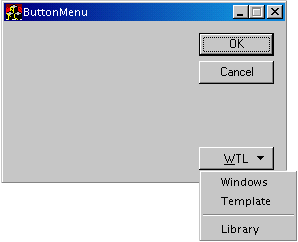
Sample Image - ButtonMenu.gif

DevStudio's Tools|Customize menu displays a dialog box that contains a button control with an arrow on it. When pressed, the button will display a drop-down menu. I needed this feature in my ATL applications, but didn't want the overhead of MFC or the headache of Win32. So I borrowed from Norm Almond's excellent example of Cool Push Menu Button and ported it to WTL, simplifying it's functionality along the way. I'm not implying anything was wrong with what Norm developed...the control just did more than I needed it to. I will eventually port his entire control to WTL, when time allows.

Caveats

CButtonMenu is derived from CButtonMenuImpl. To draw the arrow on the button, CButtonMenuImpl needs to have the BS_OWNERDRAW style set. However, this will send the WM_DRAWITEM msg to the parent of the CButtonMenuImpl, and not the CButtonMenuImpl itself. By subclassing the parent HWND, the CButtonMenuImpl can hijack the msg and handle it alone. To do this, the CButtonMenuImpl has a private member CContainedWindow variable that subclasses the parent. Then, using the ALT_MSG_MAP() macro, we can catch the msg:

class CButtonMenuImpl : ...
{
CContainedWindow m_Parent;
public:
    CButtonMenuImpl():
      m_Parent(this,1){}

    {other code}
protected:
    typedef CWindowImpl<T, TBase, TWinTraits> baseClass;
    BEGIN_MSG_MAP(CButtonMenuImpl)
        other msgs
    ALT_MSG_MAP(1)
        MESSAGE_HANDLER(WM_DRAWITEM, OnDrawItem)
    END_MSG_MAP()
        {other code}

};
Finally, to make simple use of this control, CButtonMenu provides an operator overload:
class CButtonMenu : public CButtonMenuImpl<CButtonMenu>
{
public:
    DECLARE_WND_SUPERCLASS(_T("WTL_CButtonMenu"), GetWndClassName())
//ZZZZZZZZZZZZZZZZZZZZZZZZZZZZZZZZZZZZZZZZZZZZZZZZZZZZZZZZZZZZZZZZZZZZZZZZZZZ
    CButtonMenu& operator=(HWND hWnd)
    {
        if ( m_hWnd )
            DestroyWindow();
        if ( ::IsWindow(hWnd) )
            SubclassWindow(hWnd);
        return *this;
    }
};
Here's an example of how to initialize a CButtonMenu with a button already on a dialog:
    // Member variable of dialog
    CButtonMenu btnMenu;        

    // Somewhere in WM_INITDIALOG handler
    btnMenu = GetDlgItem(IDC_BTN_ABOUT);
    btnMenu.AddMenuItem(IDC_MNU_ONE,"Windows");
    btnMenu.AddMenuItem(IDC_MNU_TWO,"Template");
    btnMenu.AddMenuItem(IDC_MNU_THREE,"",MF_SEPARATOR);
    btnMenu.AddMenuItem(IDC_MNU_FOUR,"Library");
When the user selects a menu item, a msg will be sent to the dialog.

Deficiencies

  • Doesn't provide a Create method that will initialize the control properly (yet)
  • Doesn't respond to the BS_DEFPUSHBUTTON flag

    History

    August 14, 2000 - Fixed the OnDraw method to use the DRAWITEMSTRUCT's HWND instead of the Button's HWND when calling GetWindowText(). This fixed a bug that resulted in two different CButtonMenu's on the same dialog always painting the same caption.
  • License

    This article has no explicit license attached to it but may contain usage terms in the article text or the download files themselves. If in doubt please contact the author via the discussion board below.

    A list of licenses authors might use can be found here

    About the Author

    David Peterson
    United States United States
    Member
    No Biography provided

    Sign Up to vote   Poor Excellent
    Add a reason or comment to your vote: x
    Votes of 3 or less require a comment

    Comments and Discussions

     
    You must Sign In to use this message board.
    Search this forum  
        Spacing  Noise  Layout  Per page   
    GeneralNo Button title appearing on Win98sussd.khan5 Jun '03 - 23:36 
    Works fine on Win200 but there is button title on Windows 98. All other functions seem to work fine.
    GeneralRe: No Button title appearing on Win98memberRCube-14 Nov '03 - 15:56 
    The problem is in OnDrawItem. It uses CComBSTR to store the string. Which doesn't show up in win98. So I just changed it to _TCHAR and made a few different function calls. Tested on Win98, WinNT4 and WinXP.
     
    -----------------------------------
    add this to the class:
    enum { MAX_CAPTION_SIZE = 255 };
    -----------------------------------
    change:
    CComBSTR bstrCaption;
    GetWindowText(bstrCaption.m_str);
    to:
    _TCHAR tmpCaption[MAX_CAPTION_SIZE];
    GetWindowText(tmpCaption, MAX_CAPTION_SIZE);
    -----------------------------------
    change all the:
    ::DrawTextW(DC,bstrCaption,lstrlenW(bstrCaption),rectText,DT_SINGLELINE|DT_CENTER|DT_VCENTER);
    to
    ::DrawText(DC, tmpCaption, lstrlen(tmpCaption), rectText, DT_SINGLELINE|DT_CENTER|DT_VCENTER);

    Generaltext bugmemberljhhome14 Jan '03 - 19:47 
    I used two button menu object,but their windowtext became same,why?
    GeneralRe: text bugmemberRCube-16 Nov '03 - 12:02 
    Download the source file. It has an updated version of the ButtonMenu.h file with the fix.
     
    I have a simlare problem. It is drawing in other owner drawn controls. So I made it catch the OCM_DRAWITEM message(reflected form of WM_DRAWITEM). You will need to add REFLECT_NOTIFICATIONS() macro in button menu's parent window message map for this to work. If you apply my fix. It will fix the text problem too.
     
    ButtonMenuImpl message map change:
    BEGIN_MSG_MAP(CButtonMenuImpl)
    MESSAGE_HANDLER(WM_LBUTTONDOWN, OnLButtonDown)
    MESSAGE_HANDLER(OCM_DRAWITEM, OnDrawItem)
    ALT_MSG_MAP(1)
    //MESSAGE_HANDLER(WM_DRAWITEM, OnDrawItem)
    END_MSG_MAP()
     

    Now remember to add REFLECT_NOTIFICATIONS() in parent window message map.


    GeneralMenu off by one pixelmemberBryan Ressler13 Dec '01 - 9:38 
    The menu is positioned too far right by one pixel Poke tongue | ;-P . This is easily remedied by chaning this line in OnLButtonDown():
     
    m_menu.TrackPopupMenu(Flags | TPM_LEFTBUTTON, pt.x, pt.y, m_Parent);
     

    to
     
    m_menu.TrackPopupMenu(Flags | TPM_LEFTBUTTON, pt.x - 1, pt.y, m_Parent);
     
    -Bryan
    GeneralCaptionmemberSteffen11 Jul '01 - 1:47 
    Hi,
    how can i set the caption of a CButtonMenu?
     
    I tried "SetWindowText", but it did not work.
    Generaldebug assertion failed.memberAndla28 Mar '01 - 5:54 
    Did the simplest ATL/WTL project.
    In the about popup dialogbox OK button.
     

    LRESULT OnInitDialog(UINT /*uMsg*/, WPARAM /*wParam*/, LPARAM /*lParam*/, BOOL& /*bHandled*/)
    {
    CenterWindow(GetParent());
     

    CButtonMenu btnMenu;
    btnMenu = GetDlgItem(IDOK);
    btnMenu.AddMenuItem(IDR_MAINFRAME,"Windows");
    //btnMenu.AddMenuItem(IDC_MNU_TWO,"Template");
    //btnMenu.AddMenuItem(IDC_MNU_THREE,"",MF_SEPARATOR);
    //btnMenu.AddMenuItem(IDC_MNU_FOUR,"Library");
     
    return TRUE;
    }
     
    What am i missing ?
    GeneralRe: debug assertion failed.memberAnonymous28 Mar '01 - 7:05 
    Don't declare your CButtonMenu object in the routine's scope. Declare it in the dialog's class scope.
     
    -David Peterson
    GeneralMissing atlutils.hsussShilp1 Nov '00 - 7:53 
    It seems the sample is missing a file atlutils.h.
    Hence the project cannot be compiled
    GeneralRe: Missing atlutils.hmemberSAWilde30 Nov '00 - 6:06 
    that is okay because it is not actually required just comment it out - i did and it was fine Smile | :)
     

    General General    News News    Suggestion Suggestion    Question Question    Bug Bug    Answer Answer    Joke Joke    Rant Rant    Admin Admin   

    Permalink | Advertise | Privacy | Mobile
    Web03 | 2.6.130523.1 | Last Updated 14 Aug 2000
    Article Copyright 2000 by David Peterson
    Everything else Copyright © CodeProject, 1999-2013
    Terms of Use
    Layout: fixed | fluid
