Introduction
The PropertyGrid Component that ships with Visual Studio is a great way to add configurability to an application with very little effort. An object's properties are displayed when the object is assigned to the grid's SelectedObject property. The properties are displayed in either alphabetic order, or in categorized alphabetic order. Unfortunately, there is no built-in functionality to specify any other order. This article presents some simple code which allows the order of properties to be specified via a custom attribute in the same form as the grid's other attributes.
Using the code
Properties in code can be decorated with attributes to group them in categories when shown in the Property Grid. Descriptions can be applied in a similar way. The attributes are extracted via reflection when the object is assigned to the grid.
For example, using the following code -
[DefaultProperty("Name")]
public class Person
{
    protected const string PERSONAL_CAT = "Personal Details";

    private string _name = "Bob";
    private DateTime _birthday = new DateTime(1975,1,1);

    [Category(PERSONAL_CAT)]
    public string Name
    {
        get {return _name;}
        set {_name = value;}
    }

    [Category(PERSONAL_CAT)]
    public DateTime Birthday
    {
        get {return _birthday;}
        set {_birthday = value;}
    }

    [Category(PERSONAL_CAT)]
    public int Age
    {
        get
        {
            TimeSpan age = DateTime.Now - _birthday;
            return (int)age.TotalDays / 365;
        }
    }
}
an instantiated object assigned to the PropertyGrid will look like this -

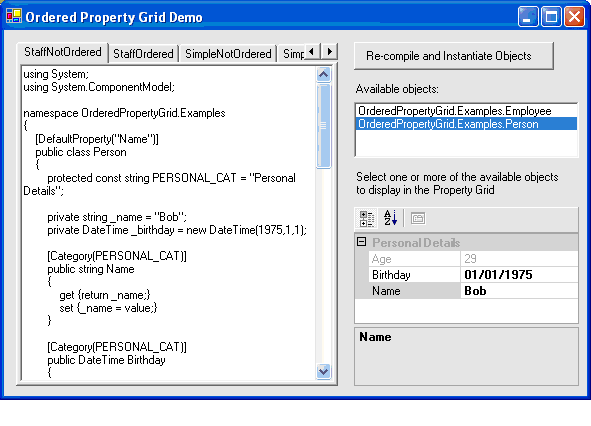
The name, birthday and age are shown in the "Personal Details" category as expected. The name and birthday are editable as they have gets & sets. The age is read-only. The name is highlighted as the default property. This is fine in development, but a client is unlikely to want the key piece of information, i.e. the name, coming last due to the alphabetic order. The alphabetic ordering will also be applied to the combined properties in objects derived from the Person class. Ideally, we want the ordering to be- 'name', then 'birthday', then 'age'. Any additional properties added in derived classes should follow from these, or be placed in another category.
Enter the Property Sorter. With some additional attributes, and the inclusion of the PropertySorter.cs file in the project, the ordering can be defined. The Person class is modified to look like this -
[TypeConverter(typeof(PropertySorter))]
[DefaultProperty("Name")]
public class Person
{
    protected const string PERSONAL_CAT = "Personal Details";

    private string _name = "Bob";
    private DateTime _birthday = new DateTime(1975,1,1);

    [Category(PERSONAL_CAT), PropertyOrder(10)]
    public string Name
    {
        get {return _name;}
        set {_name = value;}
    }

    [Category(PERSONAL_CAT), PropertyOrder(11)]
    public DateTime Birthday
    {
        get {return _birthday;}
        set {_birthday = value;}
    }

    [Category(PERSONAL_CAT), PropertyOrder(12)]
    public int Age
    {
        get
        {
            TimeSpan age = DateTime.Now - _birthday;
            return (int)age.TotalDays / 365;
        }
    }
}
The only changes are the addition of the TypeConverter attribute at the top, and the PropertyOrder attributes on each property. When the class is instantiated and assigned to the PropertyGrid, it looks like this -
Furthermore, any derived classes can have PropertyOrder attributes assigned and they will be honored. The order value passed in the attribute signifies the rank of the property in a sparse array (i.e. non-contiguous). Categories can be added on 'hundreds' boundaries (100, 200, 300 etc.) to allow subsequent categories to be added without breaking previous code. (Doesn't that remind you of line numbers in Basic?)
Points of Interest
The code to do the ordering is very simple, and not really worth describing. Have a look at PropertySorter.cs to see how it works. I did like the use of dynamic code compilation in the demo project to dynamically compile the examples, and allow you to change and test them immediately (go on try it!). Maybe, this will result in another CP project for a CP demo harness?
Conclusion
This is some very simple code to fix a hole in PropertyGrid's armory. Being able to specify the order of properties using attributes makes your data look better. The demo application provides some code samples that are dynamically compiled, so you can change the code and see the effects immediately. I hope someone finds this useful!
History
First CP project.
Working with code since 1994. Mostly c#, with history in VC++, Embedded C++, Delphi, and Modular 2. Working in the finanical sector.



 General
  News
News  Suggestion
  Question
  Bug
Bug  Answer
  Joke
Joke  Praise
  Rant
Rant  Admin
Admin 


 Submit an article or tip


