Introduction
The RTF-control is a very useful beast, but it takes a nerve-grating amount of code to accomplish even the most basic formatting tasks. Adding the capabilities to easily edit formatted text is often a boon to an application, but taking this amount of work? Why not some commands to get and set the RTF directly? Save and load to a file? Built-in editing buttons?
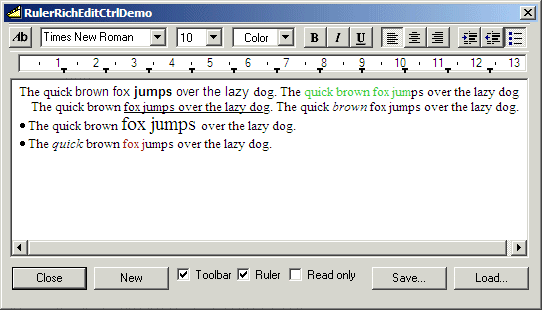
CRulerRichEditCtrl is just such a control (OK, combo of controls, actually). It can be added to a dialog box or a form view (it can, of course also be added to a CView, but then one might want to consider basing the application on WordPad instead...). It contains a mini-toolbar with formatting combos and buttons, a ruler that displays either inches or centimeters as well as the tabulator settings (which can be dragged around) and an embedded RTF-control. The complete control can be compiled for Unicode and uses Riched20.dll.
The package
CRulerRichEditCtrl consists of four main classes:
CRulerRichEditCtrl - the control itself, derived from CWnd. This is the class you manipulate in your application. This class also contains the ruler.
CRulerRichEdit - a CRichEditCtrl wrapper for an embedded RTF-control. The package uses its own class, as it needs to handle scrollbar messages, among other things.
CRRECRuler - a CWnd-derived class for the editor ruler.
CRRECToolbar - a CToolBarCtrl-derived class for the editor toolbar.
some helper classes:
CTextFile - for loading and saving the contents of the control (see this article for this class).
CStdGrfx - a series of static functions to draw in the system colors. This helper is taken from this article.
CFontComboBox - a font combo, displaying the installed fonts.
CSizeComboBox - a simple combo with predefined font sizes.
and a toolbar resource (bitmap and rc-file) for the built-in toolbar.
The toolbar
The toolbar controls and buttons are, from the left to the right:
- Font name (a combobox where the user can set the font name of the selected text).
- Font size (a combo where the user can set the size of the selected text).
- Font (set the font for the selected text. The common font dialog is displayed.).
- Color picker (set the color of the text. A color picker is displayed.).
- Bold (make the selected text bold).
- Italic (make the selected text italic).
- Underline (underline the selected text).
- Left-align (left align selected text or paragraph).
- Center (center selected text or paragraph).
- Right-align (right align selected text or paragraph).
- Indent (indent the selected text or paragraph to the next tab-position).
- Outdent (outdent the selected text or paragraph to the previous tab-position).
- Bullets (make the selected text or paragraph bulleted).
The button handlers are located in the parent, but the toolbar class handles selection changes for the comboboxes as well as functions to update them as the text selection changes.
The toolbar can be hidden/displayed with a call to ShowToolbar. IsToolbarVisible will return the visibility state of the toolbar.
The ruler
The ruler displays a scale in either inches or centimeters. Tabulator markers are placed at the tab positions (there are 32 of them). The tabs can be changed by clicking and dragging the small markers on the ruler (yes, I know they are small and hard to hit). Tabs can't be moved before or after other tabs, or the start or end of the ruler.
Mouse messages (WM_LBUTTONDOWN, WM_MOUSEMOUSE, WM_LBUTTONUP) are handled by the ruler control. They are passed on with SendMessage to the parent using a registered window message, urm_RULERACTION. The parent handles dragging and setting the tabs.
The display mode of the ruler, inches or centimeters, can be changed with a call to SetMode, and gotten with GetMode.
The ruler can be hidden/displayed with a call to ShowRuler. IsRulerVisible will return the visibility state of the ruler.
The RTF stuff
From code, you can save or load the contents of the RTF-control with Save or Load. They will even display a CFileDialog automatically, if you don't submit a filename.
You can get or set the RTF contents directly with GetRTF or SetRTF.
You can set text, unformatted, to the control by calling SetWindowText. GetWindowText returns the text, GetWindowTextLength the number of characters in the control.
The RTF-control itself can be accessed directly by a call to GetRichEditCtrl.
Using the code
CRulerRichEditCtrl derives from CWnd, and can be used as such. It contains resources, so a little setup is necessary:
- Add the cpp- and h-files to your project.
- Include RulerRichEditCtrl.rc in the rc2-file of your project (you'll find it in the res-directory).
- Declare a
CRulerRichEditCtrl-member in the parent class and call CRulerRichEditCtrl::Create to create it.
Points of interest
This project is actually a complete fiasco. I intended to further investigate the implications of the edit rectangle for multi line edit boxes and RTF-controls (see this article and this).
"How about a complete mini-editor, with a ruler for graphical manipulation of the tab-settings, and perhaps even some common formatting buttons - ready to plunk down into an app with minimum effort", I thought (although not in English...). I started with not a small amount of enthusiasm, implementing the ruler and the communication/synchronization between it and the RTF-control. Imagine my annoyance when I realized that the vertical scrollbar would extend from the top of the control, not the top of the edit rectangle, and the initial idea was completely useless! I had, however, written so much code that I felt it to be an almost criminal waste not to do something with the code, and thus the solution to pack sub-controls in a parent CWnd. And it will still save development time, albeit with a somewhat more conventional solution - as well as demonstrate things like dragging and drawing, registered messages, control synchronization, simple RTF-streaming and such things.
First, I had the control style ES_AUTOHSCROLL for the embedded RTF-control. This revealed a bug in the control - evident in WordPad as well. Scroll messages are not sent when the max. horizontal position is reached. This means that the text scrolls on, but the ruler will not be synchronized. Sigh. Anyhow, I've left the style as an option for those who need it - if the last parameter in CRulerRichEditCtrl::Create is TRUE, the RTF-control will have the AutoHScroll style set.
Drawing should normally only be done in an OnPaint or OnDraw handler for a window. Otherwise, the drawing will be destroyed if the user switches to another application and back again, or the window is covered and uncovered for some other reason. Tracking is the one exception I can come to think of, and here I do it. Not only that, I draw over two child windows from a parent, but the alternative - creating a special "dragger"-window with the ruler line - is definitely overkill in this situation, in my opinion.
History
- 23/4 2004 Initial version.
- 16/5 2005 A complete re-write, with Unicode-support and a redesigned toolbar.
Credits
First of all, this is hardly my control any longer. The Unicode-adaptation was made by Iain Clarke, who also changed the toolbar to a proper one. Furthermore, he proposed the design changes for the toolbar, and is really far more than a co-author of this version. The credits for everything that is better goes to him, and blame for substandard implementation to me.
I've also used code from other articles here on CodeProject:
At the bottom of the text-file handling class CTextFile now lies CStdioFileEx by David Pritchard. I've taken the liberty of removing a few compile warnings, other than that, this excellent class worked straight away as a plug-in replacement for CStdioFile. Recommended, get it here [^]!
For the toolbar, I've added Chris Maunder's color picker (or perhaps rather colour picker). I would've liked to be able to add some stuff to this control and send the enhancements back to Chris, but to my dismay, the control was already as complete as could be wished. You'll find the picker here[^].
45 years old, married, three kids.
Started with computers more than 20 years ago on a CBM-64.
Read Theoretical Philosophy at the University of Lund.
Working as a C++ consultant developer.
Science-fiction freak. Enjoy vintage punkrock.



 General
  News
News  Suggestion
  Question
  Bug
Bug  Answer
  Joke
Joke  Praise
  Rant
Rant  Admin
Admin 


 Submit an article or tip


